Apple continues to prepare iOS 26.6, even though iOS 27 has already become the main hero of the summer. The other day, the company released the fifth beta of iOS 26.6 for developers, followed shortly by a fresh public build. Testing has been underway since the end of May, so the final release is just around the corner. Many are eagerly awaiting this update: the current version iOS 26.5.2 drains the battery and overheats the iPhone, and people are tired of putting up with it.
The fresh branch is already available
New Features and Fixes in iOS 26.6
Let me say the main thing right away: there are no major new features here. Apple has saved all the goodies for iOS 27, and the sixth update of the iOS 26 branch turned out to be more of a technical one. But a couple of curious details were still found in the beta, and both deserve attention.
First — working with contact blocking. Now the system shows a warning when you try to block too many numbers. Previously, the limit existed, but almost nobody knew about it. If you actively clean your phone from spammers, pushy advertisers, and automated bank calls, you could hit an invisible ceiling suddenly and without any explanation. Now at least it’s clear what’s happening and why the next number won’t block.
There aren’t many changes, the focus here is on stability and performance
The second change is far more important, though invisible at first glance. iOS 26.6 is preparing the Spotlight search index, which the smart assistant will later rely on. It sounds like a boring technical detail, but the meaning is simple: the system is organizing your notes, messages, emails, and files in advance. All of this is needed so that you can later use Siri AI without delays and misses. The idea is that the smart assistant will be able to search across all phone content: ask it to find a photo from your last vacation or an email from a colleague, and Siri will deliver the result instantly. Simply put, Apple is quietly laying the groundwork for a future update so that the new feature works fast from day one.
iPhone Theft Protection and Quick Screen Access
Now this is truly interesting. In the iOS 26.6 code, traces of new theft protection were found. This concerns the unpleasant scenario when a smartphone is snatched right out of your hands on the street or in the subway. Apple is working on a mechanism that in such a moment automatically locks the device, preventing the thief from using the unlocked screen.

New theft protection is coming soon
The idea isn’t entirely new, but it’s important. Apple already has Stolen Device Protection, which appeared back in iOS 17.3 and requires Face ID for important actions away from home. The new function works proactively: it catches the very moment of the snatch and instantly locks access. For large cities, where grabbing a phone on the go is a common occurrence, this is a truly needed feature. After all, most often the thief counts on those few seconds while the screen is still active.
For now, the feature is raw and hidden deep within the system, so it’s too early to draw final conclusions. But if Apple polishes it up, a stolen smartphone will turn into a useless brick before the thief even rounds the corner.
When Will the Final Version of iOS 26.6 Be Released
The fifth beta is a good sign. Usually at this stage, the release is just around the corner. According to predictions, the final iOS 26.6 will reach users by the end of July. First, Apple will most likely release a release candidate with a description of changes, and about a week later will distribute the public version for everyone.
Interestingly, this year Apple is slightly ahead of schedule. Last season, a similar intermediate beta came out noticeably later relative to the start of testing the new system. So we may get the final build a bit earlier than usual — a nice bonus for those waiting for stability and bug fixes.
Meanwhile, the next major system has already entered testing. If you don’t want to wait until fall, the first public beta of iOS 27 is already available, and anyone can install it. Just remember the golden rule: a beta is a beta, and it’s better to be careful with it on your main device so you don’t end up without a working phone.
iOS 26.6 or iOS 27: Which Update to Install
No matter how you look at it, iOS 26.6 is an intermediate stop. The real celebration awaits us in the fall with iOS 27. That’s where Apple has poured all its efforts: an updated Siri with artificial intelligence, expanded Apple Intelligence, the fresh Liquid Glass design, redesigned CarPlay, and an updated camera.
Speaking of shooting — there are indeed many changes here, and we’ve already broken down in detail what the iPhone camera in iOS 27 has in store and how to use it. In short — Apple has done a pretty good job, and the upgrade is noticeable even on not-the-newest models, not just on the latest flagships.
The official release of iOS 27 will take place in September, and before that, a whole summer of beta versions awaits us. According to rumors, the next test build for developers will come out as early as next week, so testing is in full swing. For those who don’t want to risk dealing with developer builds, patience will be needed: iOS 26.5 is currently the latest, and iOS 26.6 will be the version that carries most users through to the September premiere. So don’t rush to chase betas — sometimes stability is more important than new features.
And if you want to try out iOS 26.6 right now, installing the beta is easy — here’s a quick guide:
- Go to developer.apple.com with your Apple ID and accept the program terms.
- On your device, open “Settings” — “General” — “Software Update.”
- In the “Beta Updates” section, select iOS 26 Public Beta or iOS 26 Developer Beta.
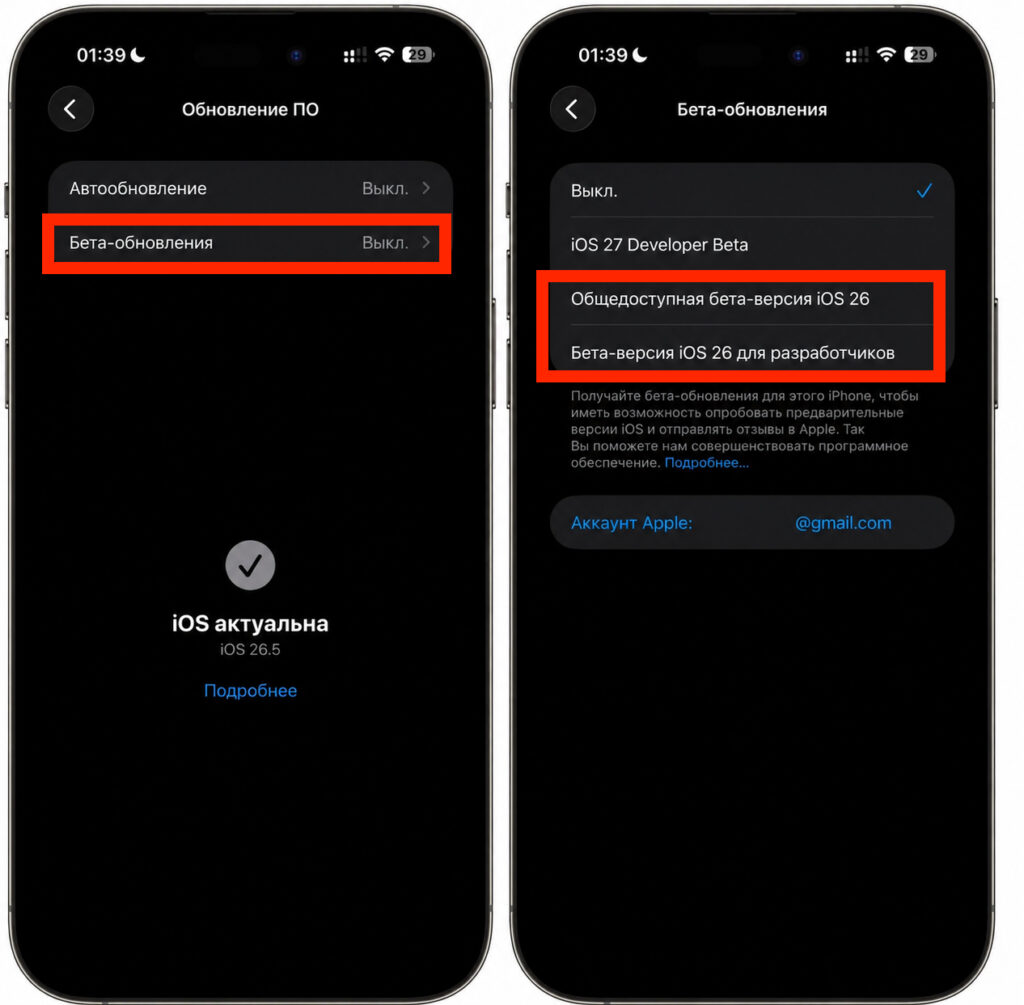
Switch to any of these beta versions
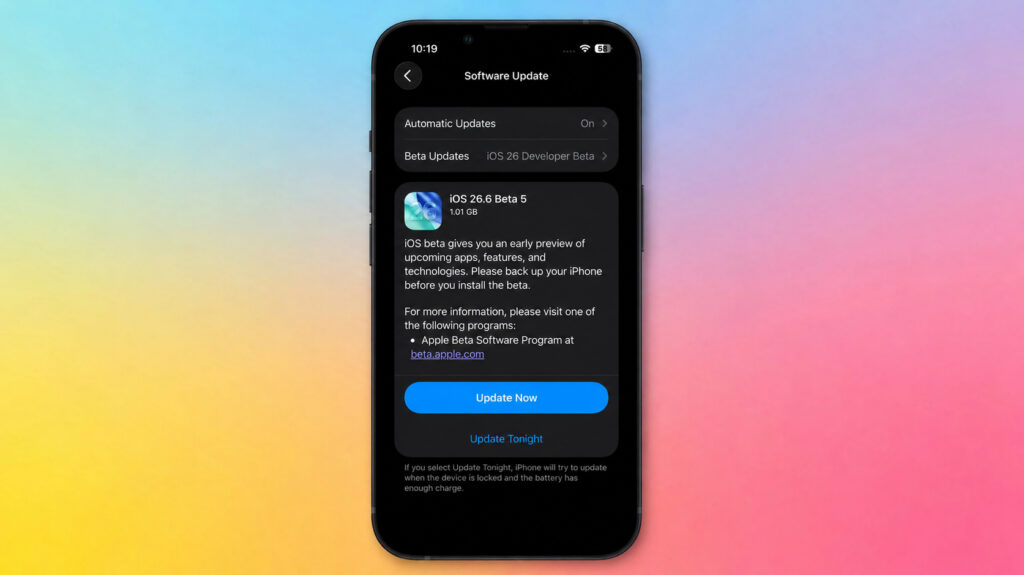
Install the beta like a regular update


