Apple is updating the default Mail app in iOS 27: the main change is a redesigned search and built-in artificial intelligence features powered by Siri. The first public beta of iOS 27 is already available to everyone, so you can try out the new Mail features right now. Some changes work on any compatible iPhone, but the most notable ones are tied to Apple Intelligence and aren’t available everywhere.
New features were added even to Mail
New Email Search in the Mail App
Previously, the app showed emails by keywords and recency — it simply displayed everything containing the needed word, starting with the most recent messages. Now results are ranked by meaning, not just word matching.
An example from Apple’s description: you search for a store to find a recent order — and the app first shows the email with that order, and only then promotional mailings from the same seller. Less scrolling, and the needed email is found faster.
Search improvements work on all iPhones without any AI dependency. This is probably the most useful change for most users.
What Siri Can Do in the Mail App
Mail now has a built-in “Ask Siri” feature. A long press on an email opens a list of actions: you can briefly summarize an email, find a specific item in it, track a package, extract a flight number, or save a photo from an attachment.
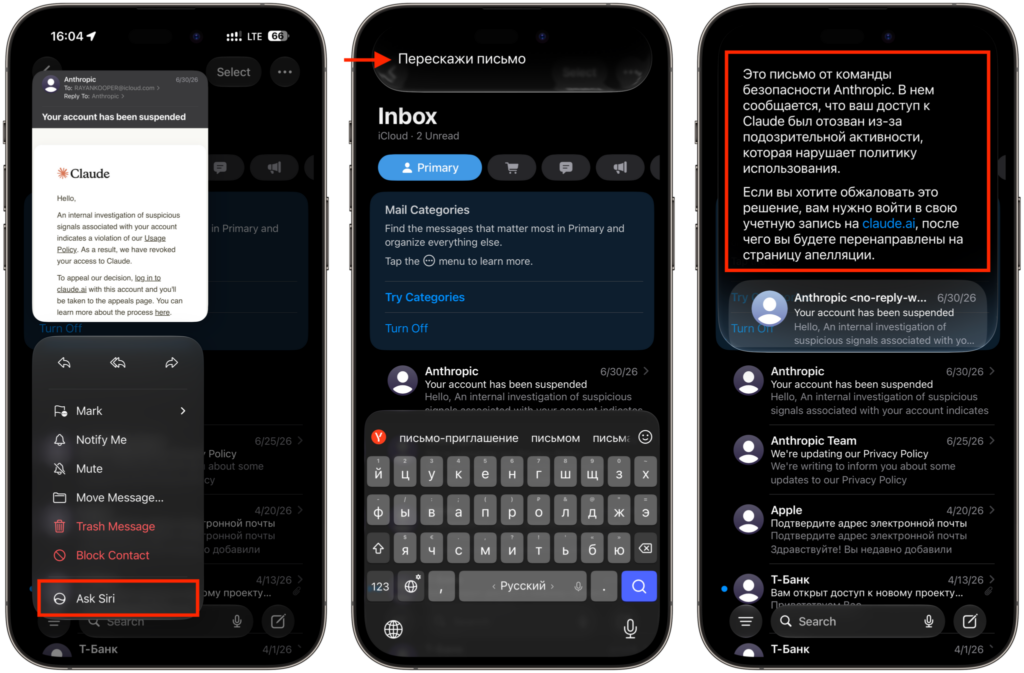
Ask a question in Russian and get an answer in Russian too
After receiving an answer, simply swipe down to enter the Siri interface and ask follow-up questions. All such conversations are saved in a separate Siri app.
Siri can also perform actions within Mail itself — for example, delete all emails from a sender or add information from an email to a reminders list. Convenient for quick mailbox cleanup without manually sorting through messages.
Good news for those in Russia: suggestions and additions can work in Russian too.
Writing and Editing Emails with Siri
Above the keyboard in Mail, there’s now a “Write with Siri” panel. By tapping it, the assistant can compose a draft, check what you’ve already written, rephrase text, change its style, or suggest a better wording.
According to Apple, the feature adapts to your writing style, punctuation, and tone so that emails sound like yours rather than machine-generated. You can see how well this works in Russian in the screenshot below. In my opinion, it’s excellent.
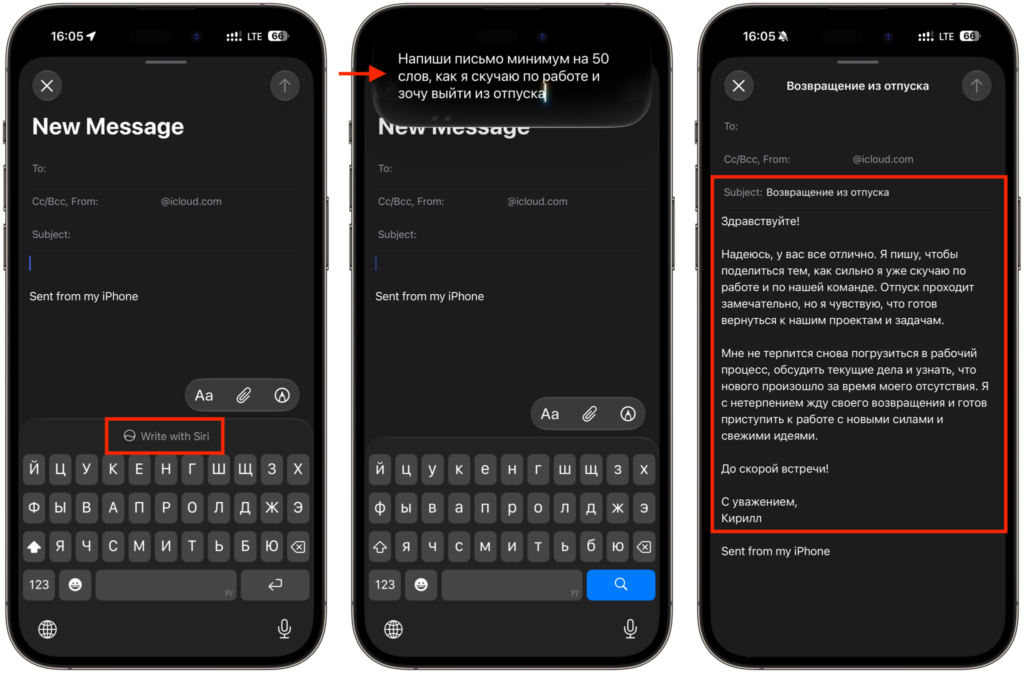
Text is composed even in Russian
Additionally, iPhone now highlights not only typos but also grammatical errors right while typing. Quick one-tap reply options also adapt to your writing style — so suggestions sound closer to what you would write yourself.
How iPhone Recognizes Data in Emails
Mail has become significantly smarter, there’s no arguing with that
Suggestions at the top of an email have received an updated design and are now available to third-party apps, not just Apple services. Here’s how it works:
- an email with a flight time or restaurant reservation will offer to add the event to Calendar with one tap
- an email with a route will let you open it in Maps
- an email with a package tracking number can be tracked through Wallet
No need to manually copy data from an email to another app — routine steps are reduced.

Contextual suggestions offer to open email data in other apps
A separate new feature is Call Context, which links Mail and the Phone app. When you call a company where you have a relevant email, the Phone app will show data from that email: a flight reservation number or order number. Important for privacy: Call Context works on the device itself and only looks at who you’re calling — the call audio is not analyzed. In addition to new features, Apple claims overall performance improvements for the app:
- emails open faster
- search indexing has become more reliable
- unread email counters sync more accurately between iOS and macOS
List formatting in emails has also been updated. A small thing, but noticeable in daily use.
Which iPhones Support the New Mail Features
Now about limitations. Improved search is available on all iPhones with iOS 27. However, AI-based features — Siri integration, “Write with Siri,” Call Context, and contextual suggestions — require an iPhone with Apple Intelligence support. Additionally: