If you, like me, use a Mac with Apple Silicon, you’re already used to system warnings. But it’s one thing to see updates, and quite another when macOS tells you outright that your favorite app will soon stop working. I sat down at my computer after the weekend, wanting to check photos from the countryside in Yandex Disk that I’d taken on my iPhone. I opened the app — and there was a notification in the corner of the screen. It said that support for Intel processor apps would soon end, and that this version of Yandex Disk contains a component that won’t work in future versions of macOS. It was clear for a long time that Intel Macs would be left without support. But the fact that familiar apps would start breaking was an unpleasant surprise.
Apple is starting to warn that old apps on Mac will soon stop working
macOS Says the App Will Soon Stop Working
Starting with macOS Tahoe 26.4, the system began showing notifications when launching apps that run through Rosetta 2. It appears as a pop-up banner with text saying that the program contains an Intel-based component that won’t work in future versions of macOS.
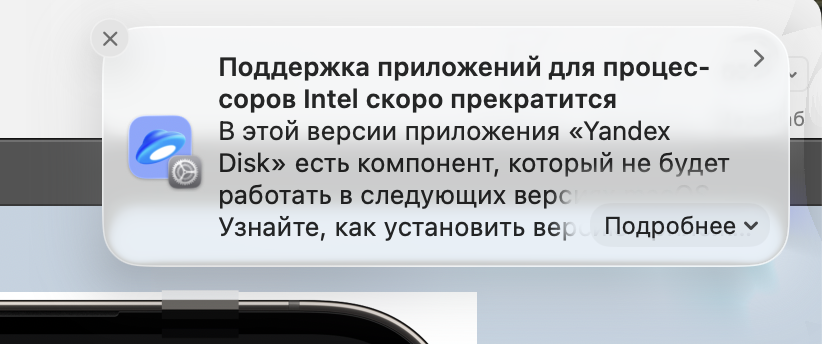
This is the notification I received today and I was a bit shocked
Rosetta 2 is a translator technology. Apple released it in 2020 along with the first Macs with M1 processors. It allows running old programs written for Intel on new computers with Apple Silicon. It works invisibly in the background — you don’t even notice that the app is actually being “translated” on the fly. But there’s a price for this convenience: increased RAM usage and faster MacBook battery drain.
The notification is not an error or a glitch. Apple specifically added it in macOS 26.4 so that users and developers have time to prepare. If you see such a banner — it means one of your apps still hasn’t been adapted for Apple Silicon. And with the release of macOS 27 with an updated design, the gap between old and new software will become even more noticeable.
Which Version of macOS Will Stop Running Intel Apps
Apple has outlined a clear timeline for phasing out Rosetta 2. The technology will continue to work in macOS 27, but support will be largely discontinued. Only a stripped-down version will remain — exclusively for old games that no one updates or supports anymore.
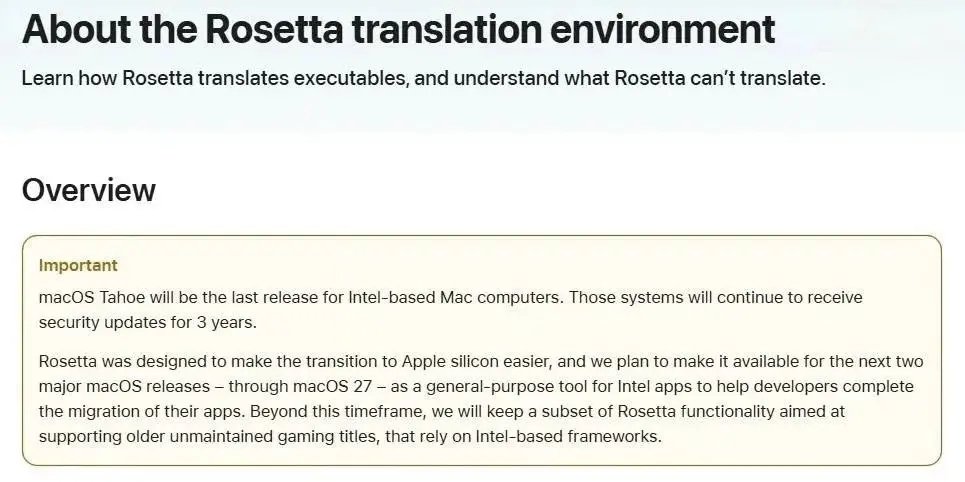
Developers were notified about the end of support late last year
So developers still have a little time to adapt their programs for Apple Silicon. Those who don’t make it in time risk losing all their Mac users. And those users, mind you, number in the tens of millions worldwide.
It’s worth reminding that macOS 27 will only be available for Macs with Apple Silicon. Owners of Intel-based computers will stay on macOS Tahoe. Apple promised them three more years of security updates, but they won’t see any new features.
Yandex Disk on Mac: Will the App Work in macOS 27
Perhaps the most telling example from Russian software is Yandex Disk. It’s been six years since Apple Silicon launched, yet the desktop client for Mac still hasn’t received a native version. The app runs through Rosetta 2, consumes more RAM, and drains MacBook batteries faster compared to native alternatives.

Surprisingly, Yandex still hasn’t made a dedicated app for Apple chips
Meanwhile, Google Drive, Telegram, and many other services switched to native code long ago. Yandex, it seems, is in no hurry. And the situation is even more interesting: starting June 3, 2026, the desktop version of Yandex Disk becomes paid. Without a Yandex 360 subscription, only local files will remain accessible in the app — no cloud sync. Paying for a program that isn’t even optimized for your computer — you’ll agree, that’s a questionable pleasure.
If Yandex doesn’t release a native version before macOS 27 launches, the app will simply stop launching on all modern Macs. And this isn’t an empty threat — Apple has clearly outlined the timeline.
Intel or Apple Silicon App: How to Check
You can find out which of your programs depend on Rosetta 2 in just a couple of minutes. Select an app in Finder, press Command + I (or right-click — “Get Info”). In the window that opens, find the “Kind” line. There will be one of three options.
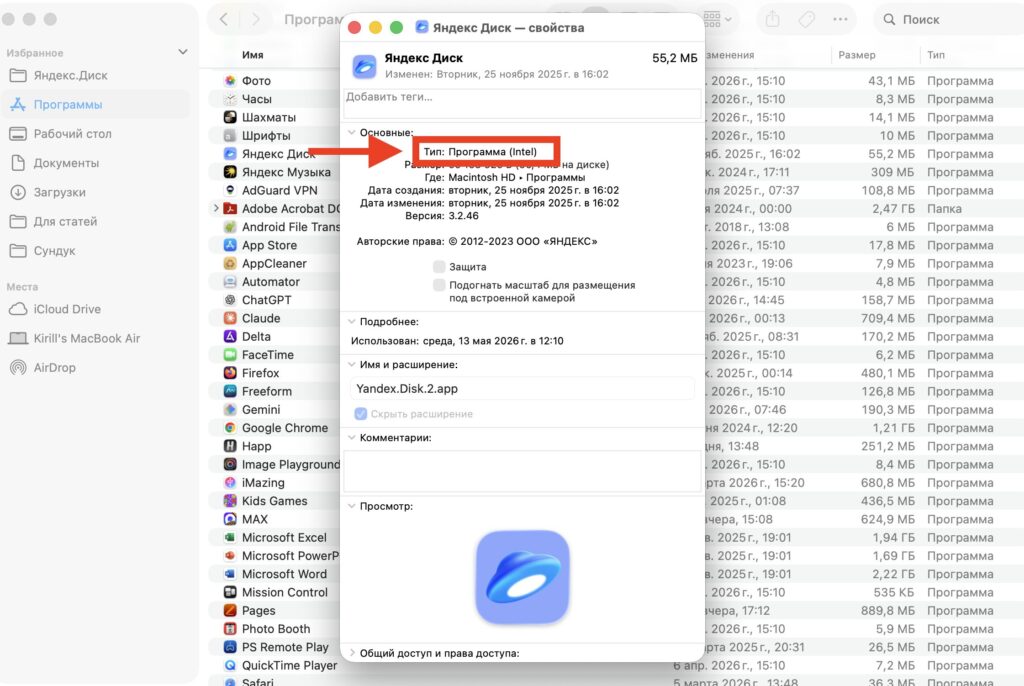
Apple shows app status in Finder
- Intel — the app is written for the old architecture and runs through Rosetta 2. This is the one that will stop launching after macOS 27.
- Universal — the app supports both Intel and Apple Silicon. Everything is fine with it, no updates needed.
- Apple Silicon — the app is written exclusively for Apple Silicon. No issues, runs natively.
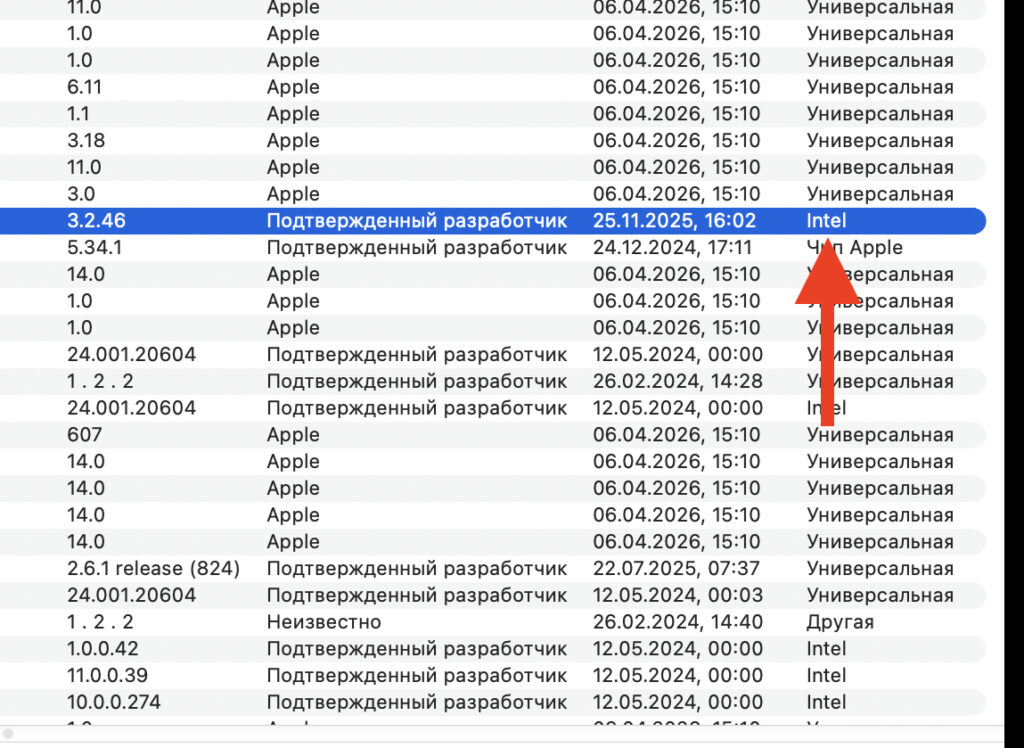
Or you can find it in the system report
There’s another way to get the full picture. Open “About This Mac” — “More Info” — “System Report” — “Applications.” There you’ll see a complete list of installed software with architecture details. I recommend checking all your work tools in advance — so there are no unpleasant surprises when updating.
How to Update a Mac App to the Apple Silicon Version
There are several options, and they depend on where you got the program. If you downloaded it from the App Store — open the store and check for updates. It’s possible that the developer has already released a native version and you simply haven’t updated.
If the program was downloaded from the developer’s website — visit their site and look for a fresh version labeled Universal or Apple Silicon. Many developers released updated builds long ago, but users continue using the old ones.
Sometimes the developer is silent and there are no updates. In that case, look for an alternative.


