Old disguised versions of the T-Bank app for iPhone have stopped opening — they simply crash on launch. As a result, Apple smartphone owners can’t access their money or make payments and transfers. Given that T-Bank no longer works with VPN either, this is yet another problem that needs to be resolved quickly.
T-Bank crashes on some iPhones. Image: rbc.ru
Why T-Bank Crashes on iPhone
iOS users began massively complaining about the glitch: T-Bank apps known as Craft Angle and GlossFlow crash immediately upon trying to open them. The banking client simply won’t launch — the screen flickers and closes. One might think it was a large-scale internet outage like the one a couple of weeks earlier, but for other users the app opens just fine.
There are no such problems with newer versions of the app. Judging by the comments, the issue affects specifically the early guerrilla builds that T-Bank had placed in the App Store under third-party names in early 2026. Some users report that the YellowT version — another disguised name for the T-Bank client — also won’t open.
Which Versions of the T-Bank App Stopped Working
Both versions are disguised T-Bank apps that the bank released in the App Store to circumvent sanctions. Craft Angle appeared in early January 2026, GlossFlow — in early February. Due to sanctions, Apple moderators eventually remove such programs, and the bank cannot update them through the App Store.

Not all bank clients were able to activate this version
As a result, these versions are frozen in their original state from when they were initially released. If something changed on the bank’s side — certificates, server infrastructure, connection protocols — the old version simply stops working. That is apparently exactly what happened.
How to Download T-Bank on iPhone in 2026
If your version is crashing, there are several working ways to regain access to the bank right from your iPhone:
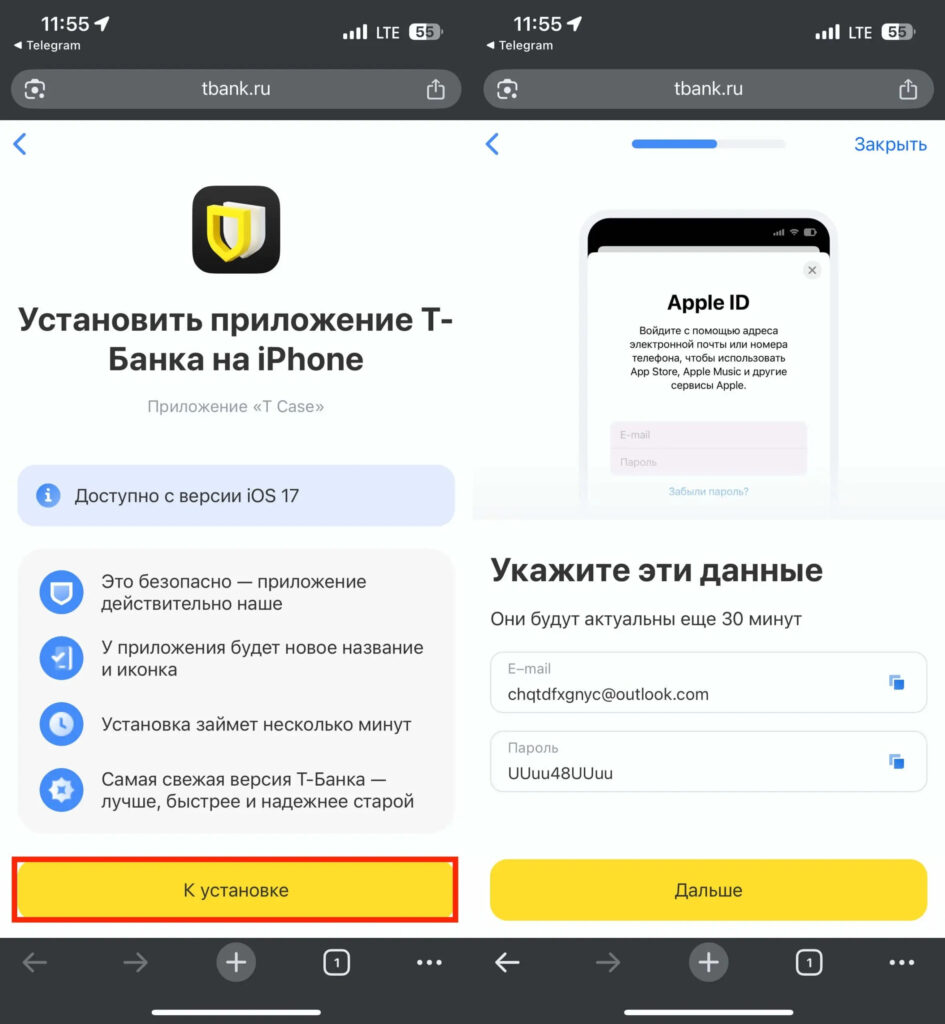
Use any convenient method to get a temporary Apple ID from T-Bank and install the new app
- T-Bank web version. Open Safari, go to tbank.ru, and log into your personal account. You can add a shortcut to your home screen — it will work almost like a regular app. Transfers, payments, account management, and even push notifications are supported.
- Installing the latest version through your personal account. Go to the mobile version of tbank.ru, navigate to “More” — “Install T-Bank app on iPhone” and follow the instructions. This method works on iOS 17 and above.
- Installation via T-Mazing. A free program from T-Bank for your computer. It allows you to transfer the current version of the app to your iPhone via cable — even if there’s nothing in the App Store.
- Contacting support. Write in the chat on the T-Bank website the phrase “Install the bank app on iPhone.” The bot will send you a temporary Apple ID and a link to download the latest version.
What Not to Do If T-Bank Crashes
At times like these, scammers become active, posting fake apps with similar names and logos. Downloading T-Bank apps from unverified sources is dangerous — they can steal card data and passwords.
A few rules:
- Only install the app via a link from the official tbank.ru website or from the bank’s support chat.
- Never enter the temporary Apple ID from T-Bank in your iCloud settings — only in the App Store. Otherwise, you could lose access to your iPhone.
- Disable automatic offloading of unused apps: Settings — App Store — turn off “Offload Unused Apps.” Otherwise, iPhone may delete the banking client, and you won’t be able to get it back from the App Store.
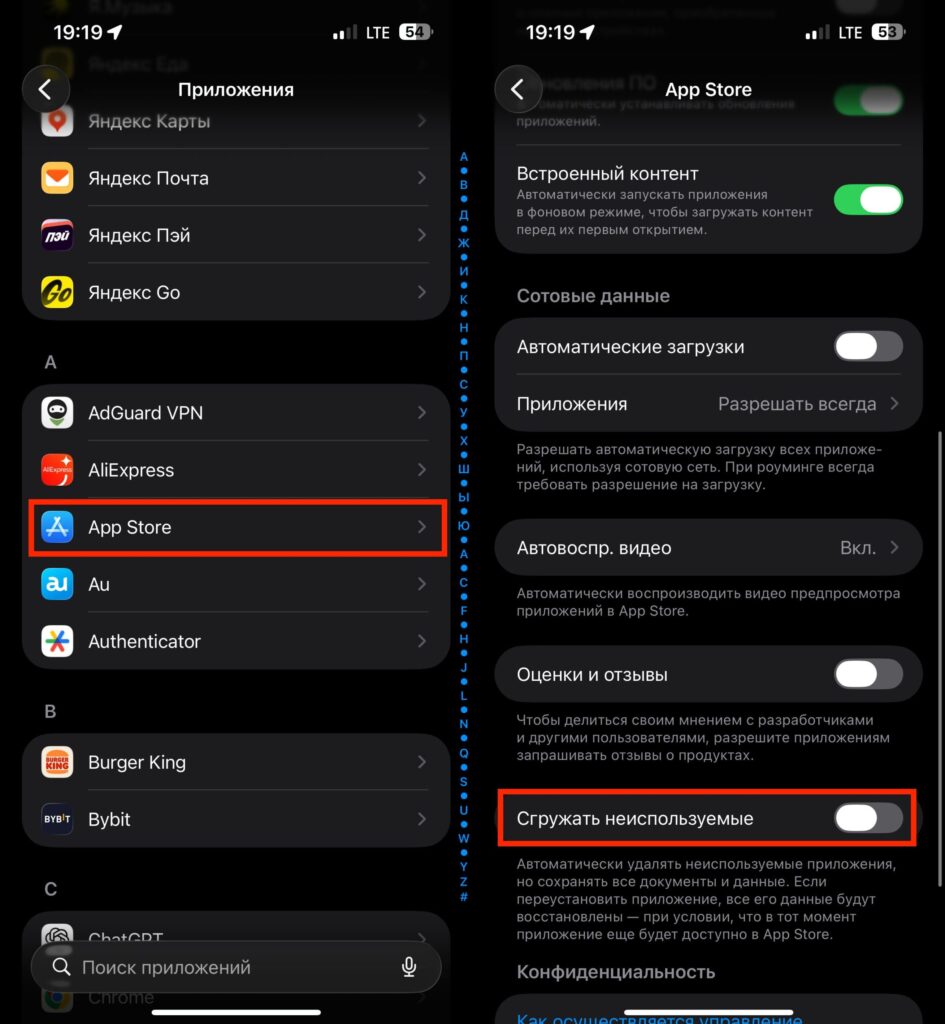
Don’t let iPhone offload apps so it doesn’t accidentally delete T-Bank
If you installed the T-Bank app through the personal account on the website or via T-Mazing in recent months and have the latest version of the client — the glitch won’t affect you. The problem only concerns those who were using early App Store versions (Craft Angle, GlossFlow, and possibly YellowT) that the bank can no longer update.
If the app has stopped opening — don’t wait for it to fix itself. Switch to the current version using any of the methods described above or temporarily use the web version. In terms of functionality, it’s nearly as good as the full client: transfers, payments, card management, and even cashback — everything is there.