I’ve been buying on AliExpress since 2016. Over this time, I’ve experienced it all: great finds, disappointments, and one unpleasant episode when I got scammed on a smartphone (I told that story in detail). However, everything worked out in the end, and I continue to use the platform because, with the right approach, it’s one of the best tools for ordering goods from China. I’ve gathered everything I know and am sharing with you how to properly buy on AliExpress right from your Android smartphone.
Learning how to properly buy on AliExpress
Is AliExpress Safe in 2026
AliExpress in 2026 is the largest international marketplace with millions of products and hundreds of millions of buyers worldwide. The platform itself belongs to Alibaba Group and has been operating since 2010. It hasn’t gone anywhere, hasn’t shut down, and doesn’t scam people as an organization.
But it’s important to understand: AliExpress is not a store. It’s a platform where independent sellers trade. Among them, there are reliable ones, mediocre ones, and outright garbage ones. The responsibility for a specific product lies with the specific seller, not AliExpress. The platform takes on the role of an arbitrator in disputed situations and protects buyers through a refund system. Buying on AliExpress completely without risk is impossible, just like on any other marketplace. But the risk can be minimized if you know the rules. That’s exactly what this guide is about.
Official AliExpress Website and Android App
First and most importantly: only use official resources. There are plenty of fake websites and counterfeit apps imitating the marketplace. The official AliExpress website: aliexpress.ru (Russian version). No hyphens, extra words, or suspicious domains.
To download AliExpress on Android, use only these sources:
- Google Play: search for “AliExpress” and install the first result from Alibaba Mobile;
- RuStore: the official AliExpress app for Android is available there too.
Don’t download APKs from third-party sites, even if they look convincing. Fake software can intercept card data or login credentials. The AliExpress app from official sources weighs about 100-120 MB. If the file is significantly smaller, that’s a reason to be cautious.
Should You Enter Passport Data on AliExpress
When placing certain orders, AliExpress asks you to enter passport data. Many people get scared and don’t understand why this is needed. Let me explain: this is a requirement of Russian customs, not AliExpress itself. The Federal Customs Service requires specifying the recipient’s data to control the import of goods from abroad. The data is needed for customs declaration processing and is transmitted to the Russian Federal Customs Service.
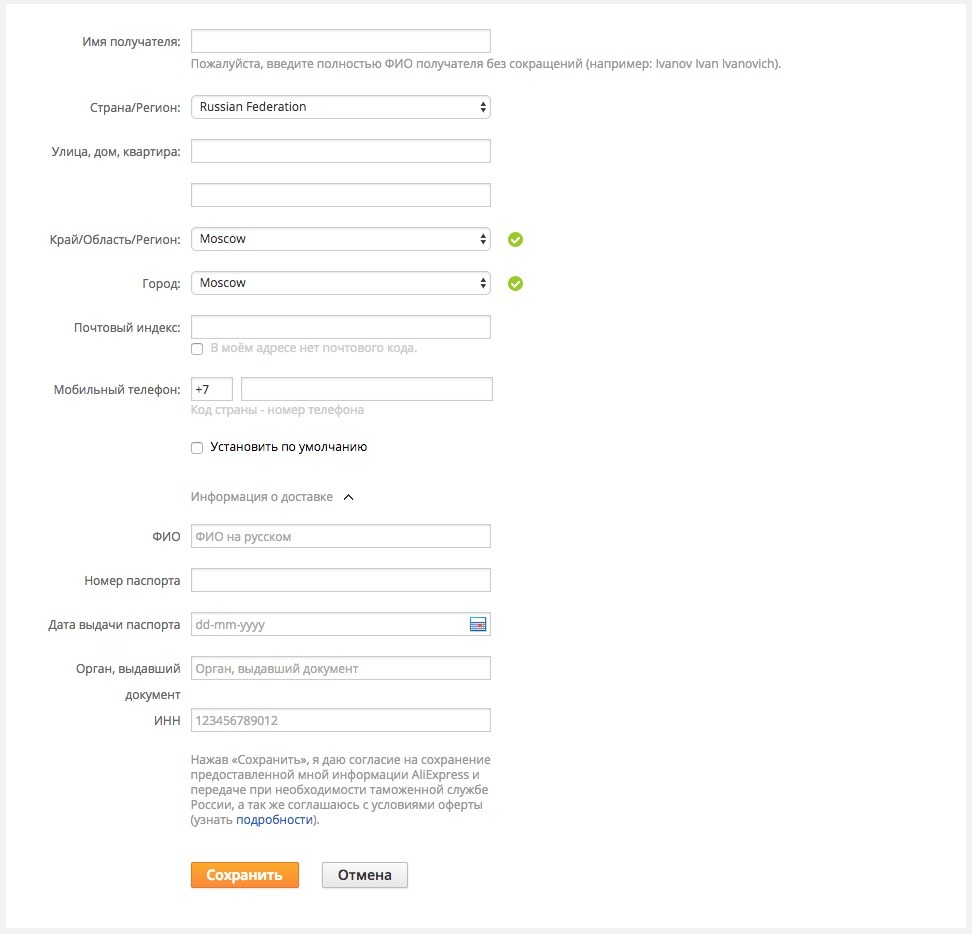
Data that AliExpress requests
Entering passport data on AliExpress is safe under one condition: you are on the official website or in the official app. Check the address bar — it should be aliexpress.ru with a secure connection icon. If you have doubts, don’t enter the data and double-check that you have the correct site open. Passport on AliExpress is not always requested — only for goods crossing customs, and only once. Items from AliExpress’s Russian warehouses don’t require this data.
Reliable Sellers on AliExpress
Choosing a seller is the key moment. Official stores on AliExpress are marked with a special badge and offer the greatest guarantees, but prices there are usually higher. For other sellers, you need to look at several parameters.
What to pay attention to:
- AliExpress seller rating. Viewed in the store’s profile. A good indicator is above 95% positive reviews with several thousand ratings;
- Store’s operating time. The older the store, the better. A store opened a month ago with hundreds of reviews is a reason to be cautious;
- Number of sales. Thousands of sales of a specific product is a good sign. Dozens of sales with a high rating is normal for niche products;
- Seller’s responses to questions. Go to the Q&A section. If the seller responds quickly and to the point — that’s a good sign.
How to check the seller’s rating:
- Open the product page.
- Tap on the store name below the product title.
- On the store page, you’ll see the rating, number of followers, and sales history.
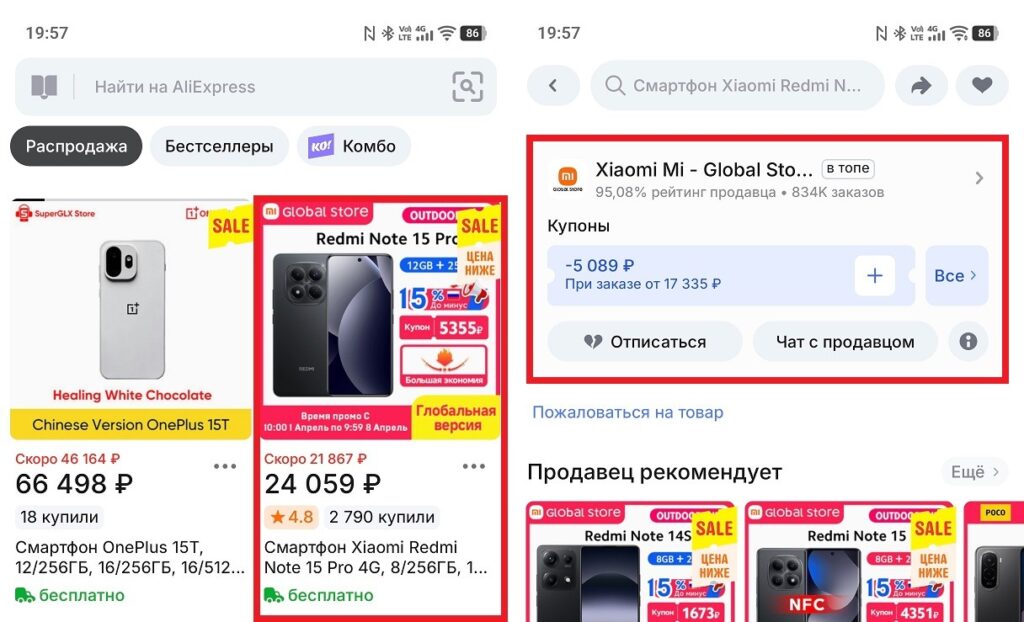
Here you can check the seller’s rating
It’s also worth paying attention to stores marked “Top Brand” or “Choice” — AliExpress highlights them with a special badge. This isn’t a guarantee of perfect quality, but it’s an additional reliability filter. I personally avoid new stores with no sales history, even if the price is very attractive.
AliExpress Buyer Reviews
AliExpress buyer reviews are an important tool, but they’re easily manipulated. Here’s how to tell real reviews from fake ones:
- reviews with photos on AliExpress;
- negative reviews are present and the seller responds to them — this is a good sign;
- reviews are written at different times, not in batches during one period;
- reviews mention specific product details rather than generic phrases like “everything is great.”
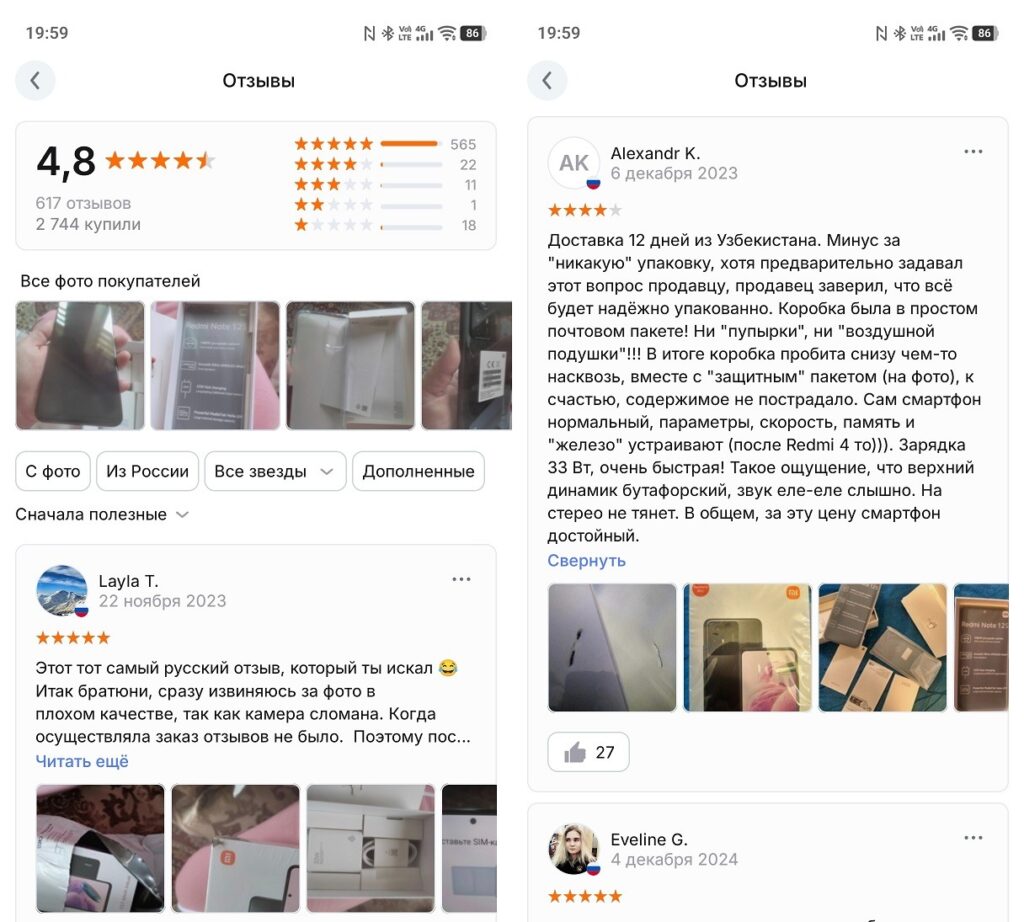
This is what real AliExpress reviews look like
Signs of inflated ratings:
- hundreds of identical short reviews without details;
- all reviews are five stars without a single complaint;
- reviews appeared in a short period after the store opened;
- photos in reviews match photos in the product description (they were simply copied).
New products are a separate story. If it’s a new smartphone model or a just-released gadget — the AliExpress product rating may be zero simply because no one has had time to buy it yet. In that case, focus on the seller’s overall rating rather than the specific product’s rating.
Payment on AliExpress — Methods and Security
Prices on AliExpress are attractive, but it’s important not to ruin the shopping experience with payment problems. Available methods for Russia in 2026:
- Russian bank cards (MIR, SBP cards);
- electronic wallets (YooMoney);
- AliExpress bonus coins (partial payment with accumulated points).
A few tips on payment security: