When I realized I wanted to activate a free month of the Gemini Pro subscription, I ran into an obvious problem: to activate the trial period, you need a card that Google will accept. Russian cards? Do they even work? I think you know the answer, so I started looking for a proper solution. And I found one! I’ve been using it for several years now, and in 2026 the method works just as reliably, allowing you to pay on Google Play from Russia at any time. Here’s how.
I know a very convenient way to pay for Google services
Does Google Payment Work in Russia
Since 2022, Google has been progressively disabling the ability to pay on Google Play from Russia. First, they removed the option to link Russian cards, then they closed payment profiles with the Russian region. In effect, Google payment in Russia via domestic cards became impossible.
But that doesn’t mean you can’t pay at all. Google in Russia continues to work. Apps download, services open. It’s just that to pay for a Google account, you need a card that the system recognizes as non-Russian. And this is where virtual cards from various fintech services come to the rescue. They are issued online, topped up via SBP (Russia’s fast payment system), and are accepted by Google without any issues.
What Is a Virtual Card for Payments
A virtual card is a fully functional bank card without a physical plastic version. Just a number, expiration date, and CVV code. For payment through Google, that’s enough: the service sees a foreign card and accepts the payment.
You don’t need a foreign bank account, a trip to another country, or a friend with a foreign card. Everything is set up online in a few minutes. I use the service Wanttopay — a fintech platform that issues virtual cards for Google payments and other international services. I found it a few years ago, tried it — it works, and I’ve stayed. You can top up the card via SBP from any Russian bank. This is important: no cryptocurrencies, no workarounds. Just a regular transfer through the fast payment system.
Which Virtual Card to Choose
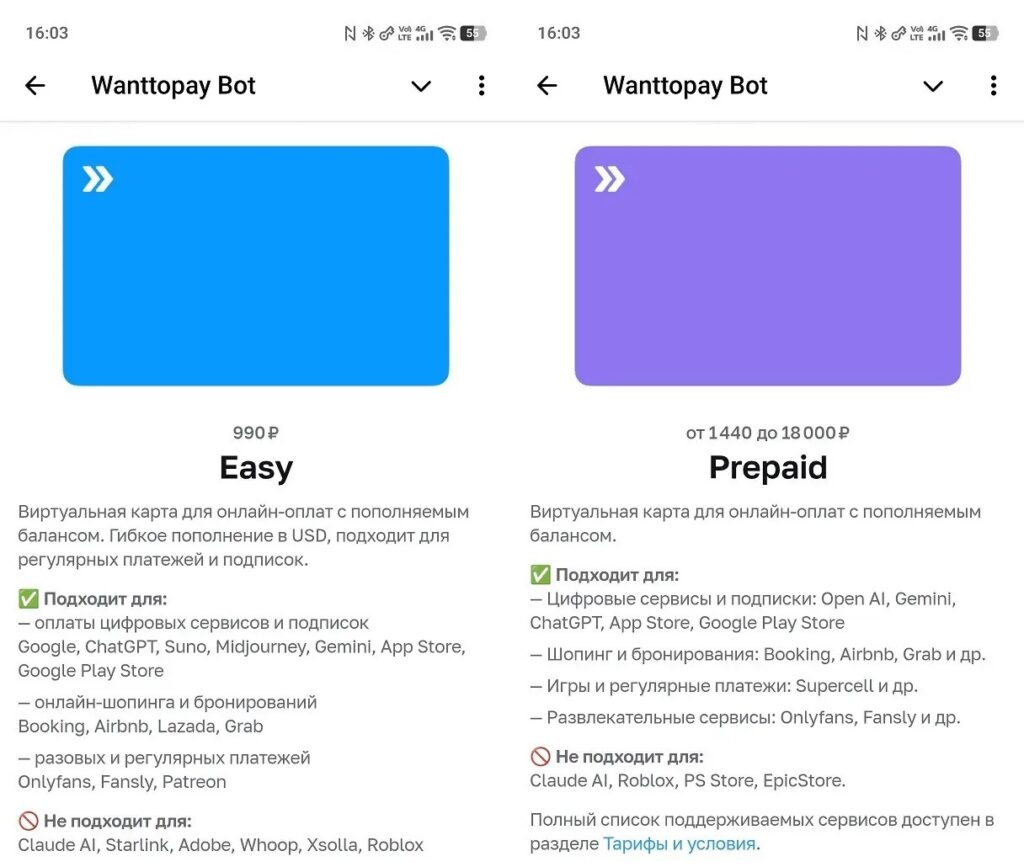
There are several card plans available
The Wanttopay service offers four plans. Here’s what they look like:
| Conditions | Prepaid | Easy | Smart | Pro |
|---|---|---|---|---|
| Card issuance | $14.00 | $10.00 | $15.00 | $35.00 |
| Maintenance | Free | $6.00/mo | $6.00/mo | $6.00/mo |
| Purchase limit | $1,000/mo | $4,000/mo | $50,000/mo | $50,000/mo |
| Transaction fee | 0.5% | $0.25 | $0 | $0.5 |
| Contactless payment | No | No | Apple Pay / Google Pay | Apple Pay / Google Pay / Samsung Pay |
| Validity period | 12 months | 12 months | 36 months | 24 months |
If you only need a virtual card for Google payments (subscriptions, storage, Play Store purchases), Easy or Prepaid is enough. I use Easy: a small transaction fee, a reasonable limit, nothing extra. Smart and Pro make sense if you plan to use the card abroad. They support Google Pay and Apple Pay for contactless payments. Convenient for trips, overkill for home subscriptions.
A separate note about Wanttopay reviews: the service has been operating for several years, cards are consistently accepted by Google, top-ups via SBP are commission-free — I have no complaints about that. The method worked in 2022, and it still works now.
How to Create a Wanttopay Virtual Card
You can create a Wanttopay card through the website wanttopay.net or through the Telegram bot @WantToPayBot. I chose the bot: it’s more convenient, everything opens inside Telegram without a separate app.
First, you need to pass KYC verification — this is a standard identity check:
- Open the @WantToPayBot bot and press “Start.”
- Select Russian language and open the Mini App.
- Press “Pass verification.”
- Enter your phone number and confirm it with a code.
- Choose passport verification, upload a photo of your document, and scan your face using the camera.
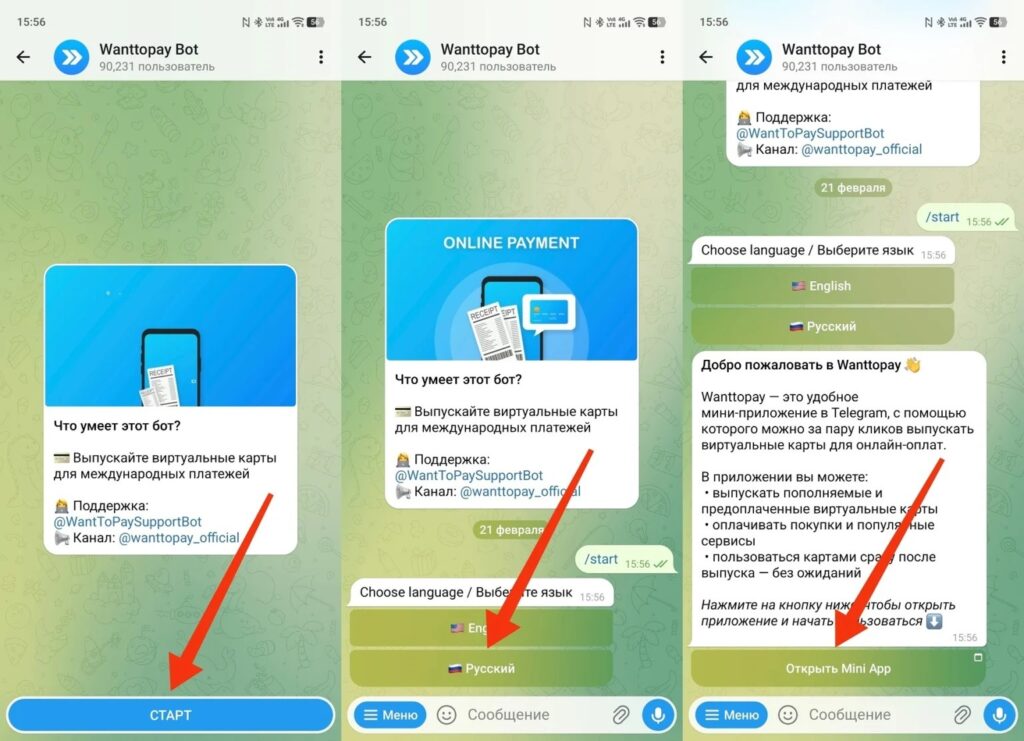
First, launch the bot
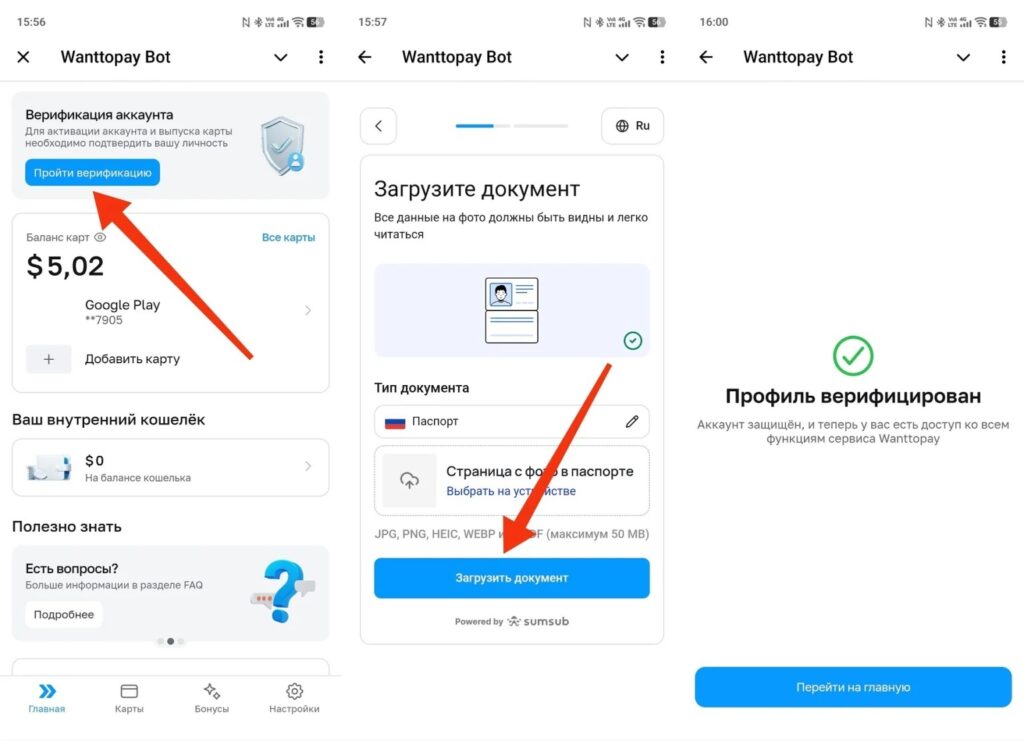
And pass the Wanttopay verification
Verification takes about two minutes. After that, you can create a virtual card:
- In the Mini App, press “Add card.”
- Select the desired plan and press “Issue card.”
- Pay via SBP from any Russian bank.
- The card appears in the app instantly (number, expiration date, CVV).
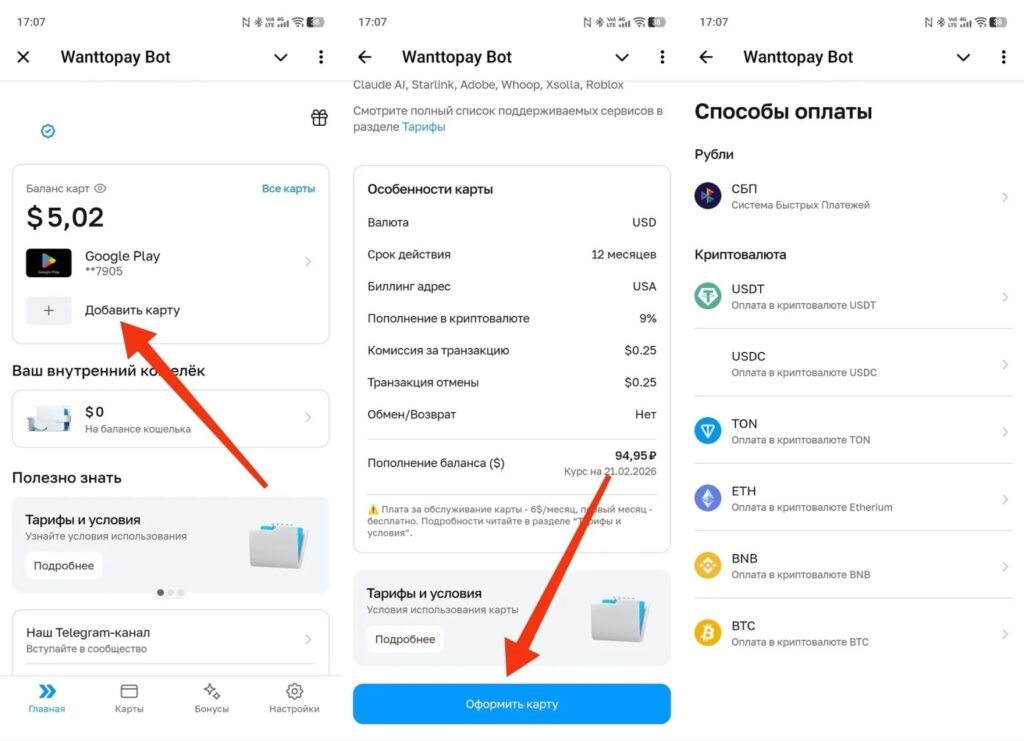
Next, choose a card and top it up using any convenient method
That’s it! Creating a Wanttopay virtual card from start to finish takes five to ten minutes on the first setup. Subsequent ones are faster since you don’t need to go through verification again.
How to Add a Card to Google Play
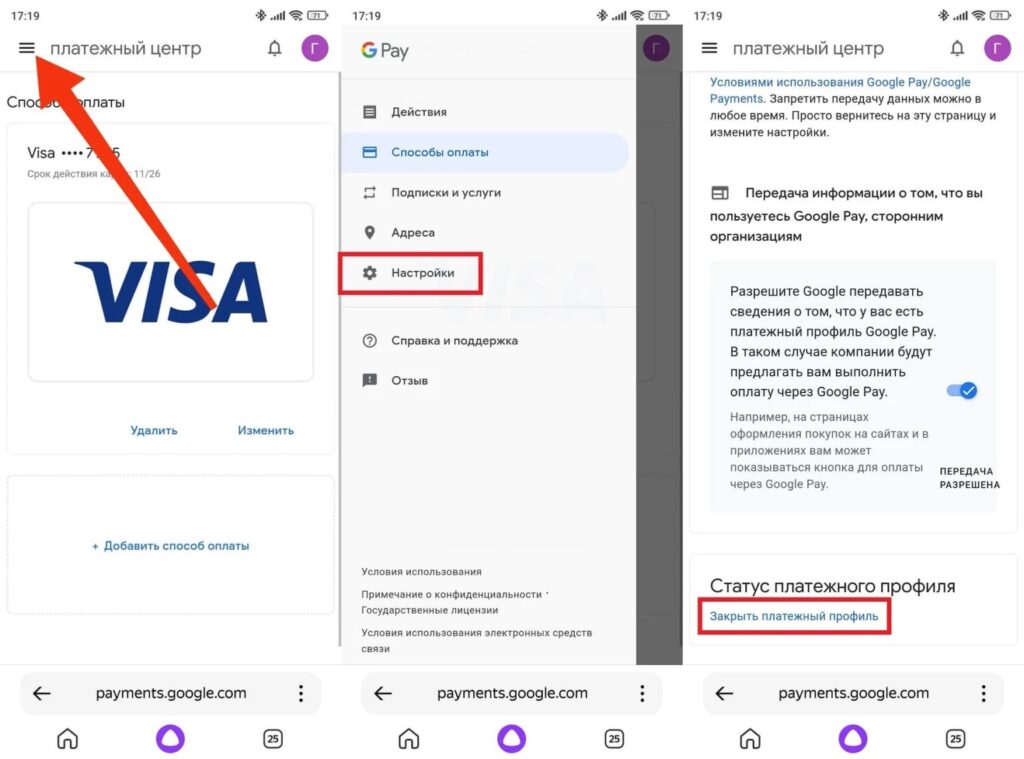
Before adding a card, an important note: if you previously had a Russian payment profile linked, you need to close it first, otherwise the new card may not work:
- Open Google Play and go to “Payment settings” through the profile icon.
- Press “Other payment settings” — a browser will open.
- Press the three lines in the top left corner, select “Settings.”
- Find “Close payment profile” and confirm the action.