Scammers regularly hijack messenger accounts. But the threats don’t stop there: a virus on your phone can appear unnoticed and operate for months before you find out. In 2026, the situation has become more serious: trojans powered by artificial intelligence and malware that comes pre-installed on smartphones straight from the factory have emerged. Let me explain everything in order: what it is, how it gets in, and what to do.
Detecting and removing viruses on Android
Do Viruses Exist on Android?
Strictly speaking, classic viruses (self-replicating programs) are almost nonexistent on Android. What is commonly called an Android virus is more accurately referred to as malware. But for simplicity, I’ll use both terms interchangeably in this article, since that’s how most people understand the word.
Android malware is divided into several types, each of which does something different:
- Trojans: disguise themselves as regular apps, intercept SMS, steal bank card data and passwords;
- Adware: shows ads even on a locked screen, generates fake ad clicks in the background;
- Spyware: tracks geolocation, reads messages, records conversations through the microphone;
- Miners: use processor resources to mine cryptocurrency, causing the phone to lag and overheat;
- Ransomware: locks the screen with a banner and demands money to unlock it.
According to analysts at F6, about 1.5% of Android devices in Russia are infected with various malware. With a sample of 100 million devices, that’s nearly one and a half million smartphones.
Every 67th Android smartphone in Russia is infected with malware.
How Does a Virus Get on Your Phone?
Downloading a virus on Android is easier than it seems. The main infection routes:
- APK files from third-party sources (the most common method). A virus on Android via APK gets in when a user downloads an app not from an official store: from unfamiliar websites, through Telegram, or through links in SMS;
- Phishing links in messengers and SMS (a message with an “important” file or link from a stranger or even an acquaintance whose device is infected);
- Fake apps on Google Play (rare, but it happens). Such programs are removed quickly, but hundreds of thousands manage to download them;
- Infected Wi-Fi (connecting to someone else’s unsecured network can give an attacker access to your traffic);
- Infected firmware (more on this in the next section).
It’s worth separately mentioning apps with viruses on Android in public chats. Scammers actively distribute infected files in neighborhood chats, interest groups, and even work conversations disguised as photo archives, videos, or “important documents.”
The main source of infection is APK files from third-party sources and links in messengers.
What New Android Viruses Appeared in 2026
The Mamont virus is actively operating in Russia
2026 has brought several truly unpleasant discoveries. New Android viruses steal data, and this is no longer an abstract threat but specific documented cases:
- Keenadu — the most unusual threat of early 2026. Kaspersky Lab discovered it on more than 13,000 new Android smartphones, with nearly 9,000 of them in Russia. The key feature: the virus gets onto the device before it’s even purchased, embedding itself in the firmware during manufacturing or reflashing. It disguises itself as system components. Its main goal is ad fraud: the infected phone generates fake ad clicks in the background. More dangerous versions steal photos, messages, banking data, and geolocation.
- Mamont — a remote access trojan responsible for 47% of all infections among Russian banking customers. It spreads through messengers disguised as photo archives and fake antivirus apps. After installation, it requests permission to handle SMS by default and begins intercepting bank confirmation codes.
- PromptSpy — a fundamentally new class of threats, identified by ESET in February 2026. The first-ever new Android virus to use the Google Gemini neural network. It disguises itself as a banking app. The problem is that PromptSpy asks the AI how exactly to entrench itself on a specific device. This makes it universal and difficult to remove.
- MiningDropper — discovered in April 2026. It initially disguised itself as a cryptocurrency miner but evolved into a platform for delivering any malicious components. Its modular architecture allows changing functionality without rewriting code.
In 2026, viruses with artificial intelligence and malware built into smartphones right at the factory have appeared.
How to Tell If Your Phone Has a Virus
How do they even get in there?
There are no direct signs without checking, because an Android phone virus deliberately disguises itself. But there are indirect signals that should raise concern:
- The phone lags and overheats without any visible load (possibly a miner or adware running);
- The battery drains noticeably faster than usual;
- Mobile data usage increases even though you’re not downloading anything (background processes are sending data);
- Unfamiliar apps appear in your app list that you didn’t install;
- Ads appear where they shouldn’t be: in the notification shade, on the home screen, over other apps;
- Contacts complain they’re receiving strange messages from you (a trojan is sending the virus to your contacts);
- The screen gets locked with a banner demanding payment.
If you notice two or three signs simultaneously, that’s already a serious reason to check your phone. Android wiretapping and surveillance show no outward signs at all. They can only be detected by checking permissions and traffic.
How to Check Your Phone for Viruses
The first tool is built into Android. Google Play Protect scans installed apps automatically. To run it manually:
- Open Google Play.
- Tap your profile icon in the upper right corner.
- Select “Play Protect” and tap “Scan.”
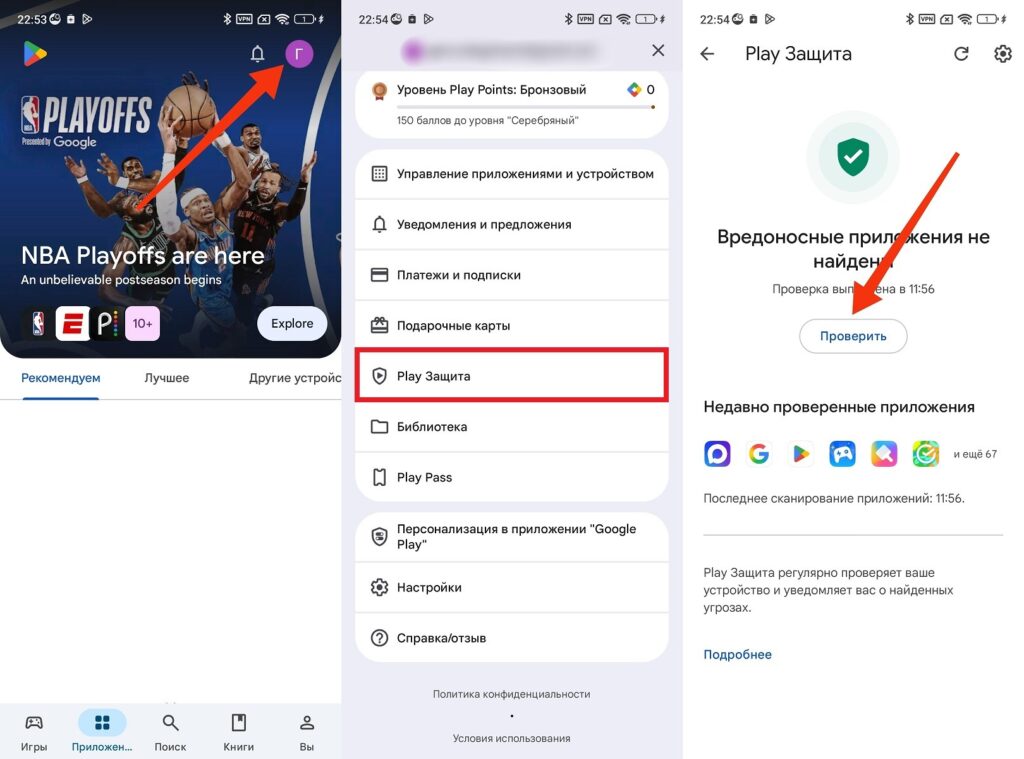
Google protection is the baseline
Checking Android for viruses with a third-party antivirus gives more detailed results. Among the trusted options in Russia — Kaspersky for Android, Dr.Web Light, ESET Mobile Security. All are available on Google Play and RuStore for free in their basic versions. In short: with careful usage, Google Play Protect is sufficient, but if you occasionally install APKs from third-party sources, an additional antivirus won’t hurt.
Additional check: go to “Settings — Apps” and review the entire list. Unknown apps that you didn’t install should be investigated.


