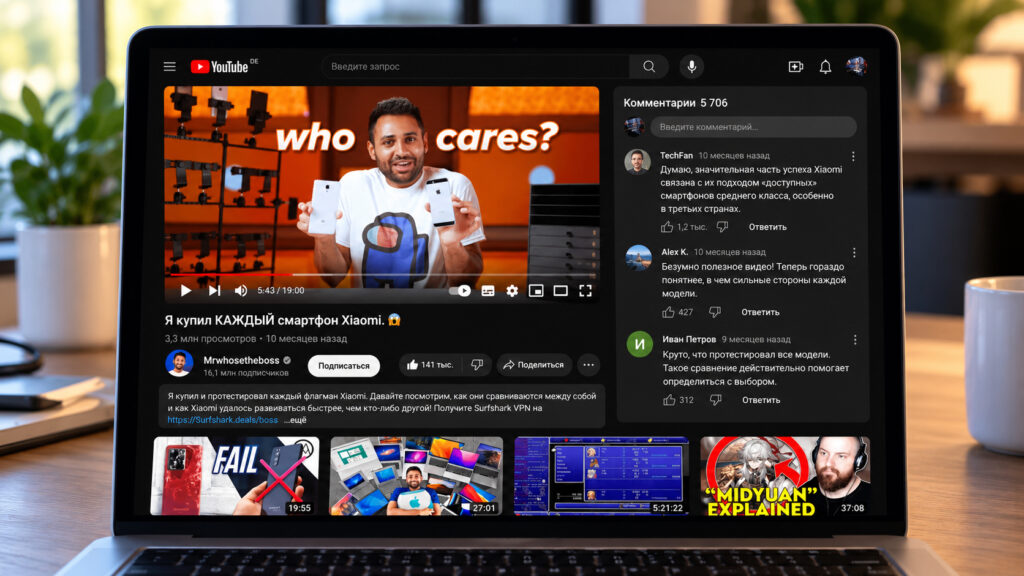
YouTube watch page on a MacBook, with comments to the right of the player and recommendations below the video
YouTube is again testing a desktop watch page that moves comments into a column beside the player and pushes recommendations below the video. There is no setting to switch it off. The source describes several workarounds that may bring back the familiar layout:
- Checking whether you are in the test.
- Clearing YouTube’s site data.
- Installing the YouTube Redux extension in Chrome or Firefox.
- Adding custom filters to uBlock Origin Lite in Safari or Chrome.
None of these methods is guaranteed to keep working, because YouTube can change the experiment at any time.
What you need to know
- In the test layout, comments and the description sit in a column to the right of the player. Recommendations appear as a large grid of thumbnails beneath the video.
- YouTube tried a nearly identical design in spring 2024 and dropped it within weeks after a backlash. It has not commented officially on the new test.
- YouTube Redux redraws the page in the classic layout. A filter list for uBlock Origin Lite instead disables the experiment’s flags so YouTube treats you as outside the test.
- According to the source, the filters may need updating every few weeks if YouTube renames its experiment flags.
What YouTube changed on the watch page
In the new variant, comments and the video description move into a column to the right of the player. Recommendations, which sat in the sidebar for years, now appear under the video as a large grid of thumbnails.
Not everyone sees the change. YouTube is rolling it out to a portion of desktop users, and on October 7 the outlet Ubergizmo reported that the test appears to have been expanded significantly. YouTube has not commented on the experiment officially.
The source author reports that the new design never appeared on their own account, which still shows the familiar page with recommendations on the right. This suggests the test is currently limited to some users.
According to user complaints on Reddit cited by the source, the main problem is simple: the video window has become noticeably smaller. The source notes that this is especially obvious on a 13-inch MacBook.
The second complaint concerns spoilers. Previously, you had to scroll down to reach the comments. Now they stay in view for the entire video, which is awkward for TV series reviews and game walkthroughs.
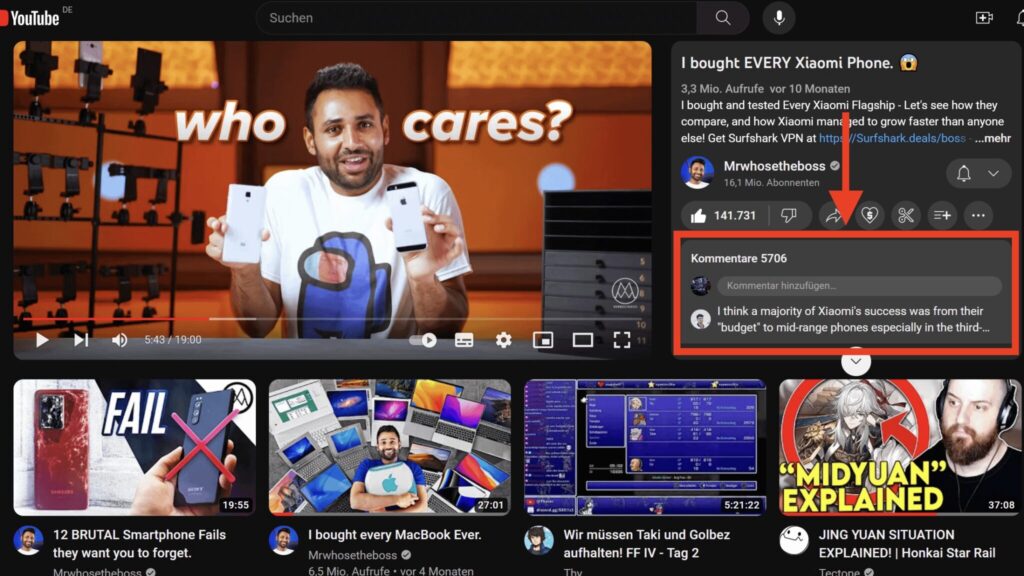
The new YouTube design: comments on the right, recommendations below
This has happened before
In spring 2024, YouTube tested an almost identical page, received a wave of negative feedback and ended the experiment within a few weeks. According to the source, the design later returned briefly but never reached all users. How this third attempt will end is not yet clear.
First, check whether you are really in the test
Before installing extensions, the source recommends confirming that the new layout is tied to you rather than to a misconfigured browser. Open any video in a private Safari window (Cmd + Shift + N) or in another browser where you are not signed in to your Google account. If the page looks the old way there, the experiment is linked to your profile or to cookies.
Sometimes clearing the site’s data helps. YouTube may then reassign you to test groups and serve the old version. In Safari, go to Settings > Privacy > Manage Website Data, search for youtube and remove the results. There is no guarantee, and the test may return a day later. Still, the method costs nothing and takes about a minute.
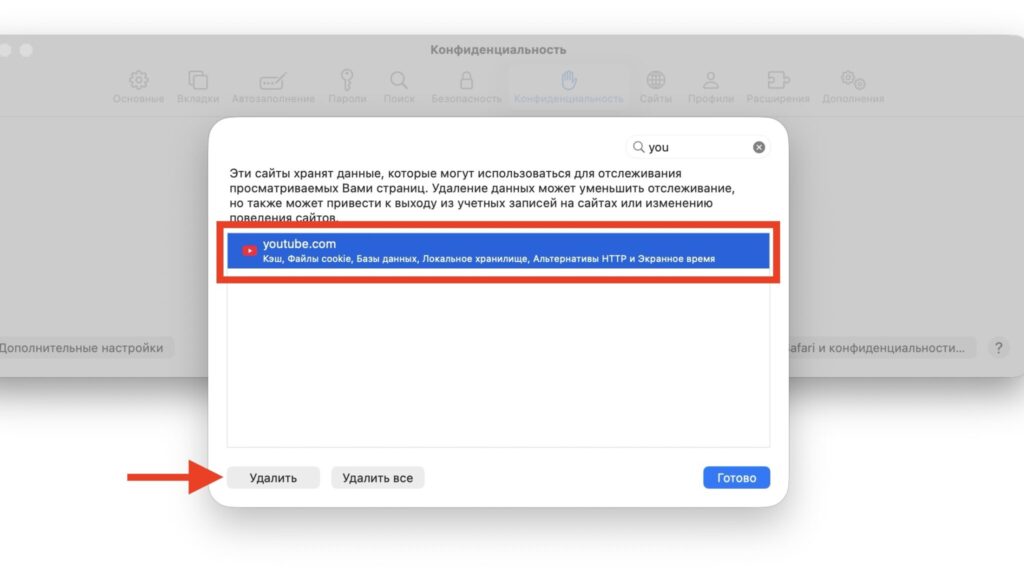
Removing YouTube data from Safari
In 2024, Premium subscribers had an official way out: the youtube.com/new page offered a toggle for the new watch layout. According to the source, that option is no longer there, so users have to rely on third-party tools.
Extensions that restore the old YouTube layout
For people who do not want to deal with code, the source names the YouTube Redux extension as the most straightforward option. It can:
- Switch the watch page back to the classic layout.
- Shrink the player to its familiar size.
- Change the density of thumbnails on the home page.
- Restore the old logo.
It is free:
- YouTube Redux for Chrome. The source says it also works in other Chromium-based browsers such as Edge and Arc.
- YouTube Redux for Firefox.
After installation, click the extension icon to the right of the address bar to open a panel of toggles. The source author reports installing Redux and finding that the old design returned.
There is one caveat. The extension does not roll the site back but redraws it on top, and its most recent update was released in May 2026. If YouTube restructures the page code again, parts of the layout may break until Redux is updated.
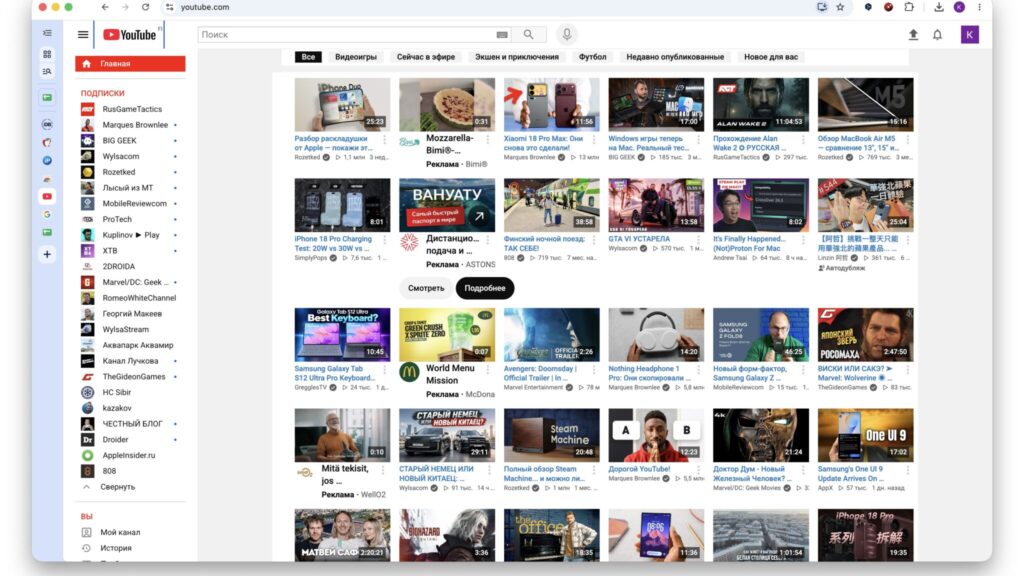
The YouTube Redux extension restoring the old YouTube design
Firefox users also have CustomTube, which renders YouTube in the style of various years from 2008 to 2021. However, it has not been updated since February 2024, so the source describes it as more of a nostalgia toy.
The source author says they could not find a comparable extension for Safari. For Mac users who stick with Safari, the ad-blocker method below is the suggested route.
How to restore the old YouTube in Safari with uBlock Origin Lite
This method, which the source credits to Reddit users, works differently from an extension like Redux. Instead of redrawing the page, the filter disables the experiment flags themselves, which YouTube turns on in the site’s code. As a result, the service treats you as if you were not part of the test.
For Safari, you need uBlock Origin Lite from the App Store, a lightweight version of the well-known blocker from the same developer. According to the source, the extension is free, runs on Macs with macOS 15 or later and accepts custom filters, which is what this method requires. Menu labels below are translated from the source and may differ slightly depending on your system language and app version.
The steps are as follows:
- Install uBlock Origin Lite from the App Store.
- Open Safari and go to Safari > Settings > Extensions. Tick the checkbox next to uBlock Origin Lite.
- In the same place, click “Edit Websites” and choose “Allow” for youtube.com. Without access to the site, the filters will not be applied.
- Open youtube.com, click the uBlock Origin Lite icon to the left of the address bar and choose the gear icon, “Open dashboard”.
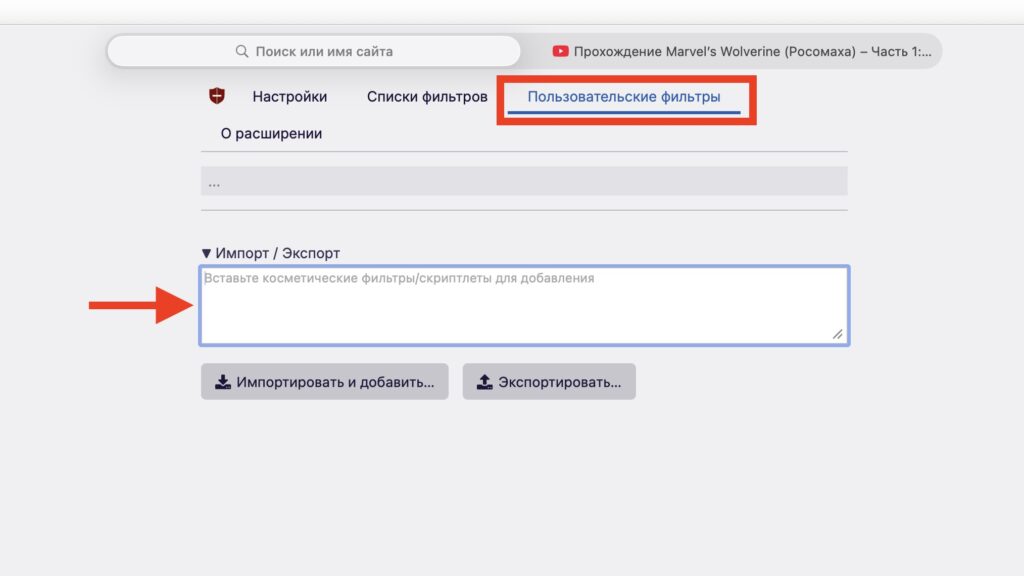
The Custom filters tab in uBlock Origin Lite
- In the dashboard, go to the “Custom filters” tab.
- Click “Import / Export” and paste the entire block of code below into the field that appears.
- Confirm that you want to add the filters, return to YouTube and reload the page.
The filter code:
youtube.com##+js(set, yt.config_.EXPERIMENT_FLAGS.web_watch_eligible_to_switch_to_grid, false)
youtube.com##+js(set, yt.config_.EXPERIMENT_FLAGS.web_watch_enable_single_column_grid_view, false)
youtube.com##+js(set, yt.config_.EXPERIMENT_FLAGS.web_fixed_panel_watch_next_grid_swap, false)
youtube.com##+js(set, yt.config_.EXPERIMENT_FLAGS.web_watch_fixed_default_panels, false)
youtube.com##+js(set, yt.config_.EXPERIMENT_FLAGS.web_engagement_panel_show_description, false)
youtube.com##+js(set, yt.config_.EXPERIMENT_FLAGS.web_watch_move_summary_to_sd, false)
youtube.com##+js(set, yt.config_.EXPERIMENT_FLAGS.web_watch_hero_list, false)
youtube.com##+js(set, yt.config_.EXPERIMENT_FLAGS.web_watch_split_scroll, false)
youtube.com##+js(set, yt.config_.EXPERIMENT_FLAGS.web_side_rail_dismissible_panels, false)
youtube.com##+js(set, yt.config_.EXPERIMENT_FLAGS.kevlar_watch_hide_comments_while_panel_open, false)
youtube.com##+js(set, yt.config_.EXPERIMENT_FLAGS.disable_theater_mode, false)
youtube.com##.ytSideRailViewModelHost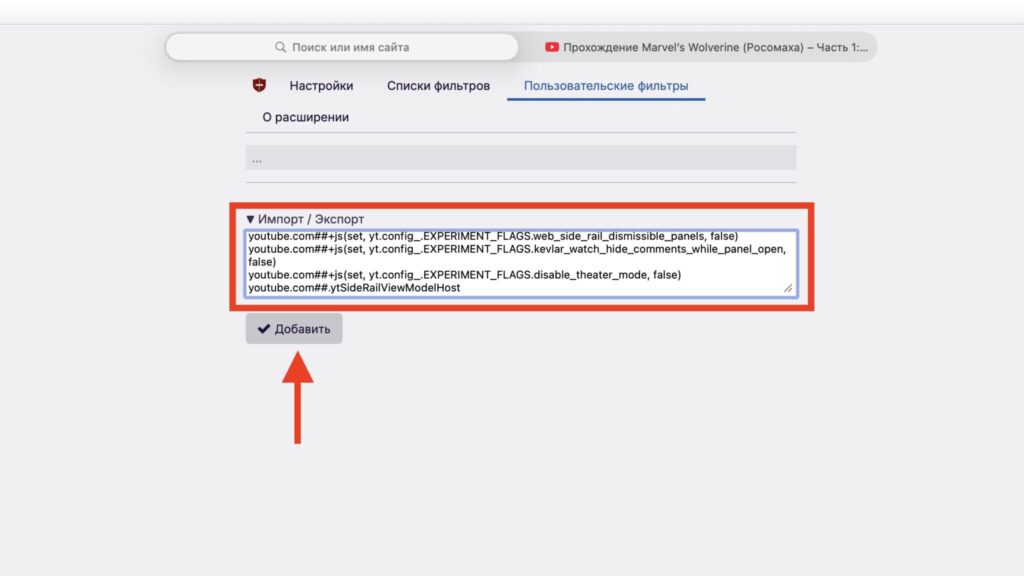
Adding custom filters in uBlock Origin Lite
What the filters do
According to the source, the first eleven lines switch off individual parts of the new design, such as the recommendations grid under the video, the description column and split scrolling. The last line hides the side panel if YouTube renders it anyway.
If uBlock Origin Lite highlights some lines as errors after you paste them, that version of the extension does not support them. In that case, only the panel-hiding rule will take effect.
Using the same filters in Chrome
The source says uBlock Origin Lite for Chrome accepts the same filters. Before pasting them:
- Open chrome://extensions.
- Click “Details” under uBlock Origin Lite.
- Turn on the “Allow user scripts” toggle.
Without this setting, the lines containing +js will not work.
If the filter does not work
The source’s first suggestion is to quit Safari completely with Cmd + Q and reopen it. YouTube remembers some page settings, and a simple reload is sometimes not enough.
Next, check two settings:
- The filtering mode for youtube.com in the uBlock Origin Lite popup is not set to “no filtering”.
- The extension has access to the site under Safari > Settings > Extensions.
If that still does not help, YouTube has most likely renamed the flags in its code. The source notes that this is common with such experiments and that the filters may need to be updated every few weeks.
Removing the filters is simple: open the “Custom filters” tab again and delete the lines with the trash icon. The page will then return to whatever layout YouTube assigns you.
Which method to choose
Judging by user complaints, the test affects only the desktop version of YouTube. The source says the iPhone and iPad apps have not received it. On a computer, the right choice depends on your browser:
- Chrome or another Chromium browser, or Firefox: install YouTube Redux and experiment with its toggles.
- Safari, or if you prefer not to install a dedicated layout extension: add the filters to uBlock Origin Lite. According to the source, they disable the experiment itself, and the extension also blocks ads.
- If nothing works: the source suggests clearing the site’s data and waiting for YouTube to change course. Based on what happened in 2024, the source considers a reversal reasonably likely, though that remains speculation.


