Yandex Disk users whose files won’t download are not necessarily dealing with a phone problem. According to the source, since October 11 many users have found that folders, photo previews and storage totals look normal, but downloads hang indefinitely or end in an error. Yandex has confirmed it deliberately limited some Disk functions, and some files are also not responding from the servers. Below is what is happening, how Android users can retrieve files now, and why the app’s “Free up space” button is best left alone for the time being.
What you need to know
- Yandex confirmed it “deliberately restricted some Yandex 360 functions, including Disk” to reduce load on its remaining servers. The source links this to drone attacks on data centers in Sasovo, Kaluga and Vladimir.
- Bulk downloads are disabled, including whole folders, multiple files at once, albums and the “Download all” button on public-link pages. Single files can still be downloaded.
- A visible preview in the app does not guarantee the original file can be retrieved. Some downloads fail with errors such as “504 Gateway Time-out” or “file IO failure: no more reliable hosts.”
- Yandex has not said when full functionality will return.
The Yandex Disk app against the backdrop of a data center fire
Files appear to be there, but they will not download
The source reports that problems began before the largest outage. On October 8, after news of a fire at a data center in Sasovo, one Habr user decided to back up his 1.9 TB Disk as a precaution. By the night of October 10, about 21 GB, or roughly 1% of his files, would not download. On the morning of October 11, when the data center in Vladimir went down, he said roughly half of his files had become inaccessible.
The failures vary. For some files, the preview is visible but the original will not download. For others, both the preview and the file are gone. In these cases, the server stays silent for a long time and then returns an error such as “504 Gateway Time-out” or “file IO failure: no more reliable hosts.”
Key takeaway: a preview in the app does not mean the file itself can be retrieved.
What Yandex has disabled on purpose
According to the source, the company confirmed: “We have deliberately restricted some Yandex 360 functions, including Disk.” The source says Yandex is doing this to reduce the load on its remaining servers, of which there are now noticeably fewer after drone attacks on data centers in Sasovo, Kaluga and Vladimir.

Outage affecting Yandex and other Russian services
The source says these Disk functions are currently disabled:
- downloading one or more entire folders;
- downloading several files at once;
- downloading albums;
- the “Download all” button on a public-link page.
Individual files can still be downloaded. According to Yandex, the Disk desktop program can also download folders if the files inside them are available.

This means users may be facing two different problems. Either a feature has been switched off, or the file itself is temporarily not responding. The first can be worked around. With the second, users may have to wait. Yandex has not given a timeline for restoring full service.
How to download files one at a time on Android
Because bulk downloading is disabled, files have to be retrieved one by one. The source describes this as slow but workable. In the Yandex Disk app:
- Open the Yandex Disk app.
- Find the file you need, then press and hold it to select it.
- Tap the three vertical dots icon.
- Choose “Download.”
- Pick the folder on your phone where the file should be saved.
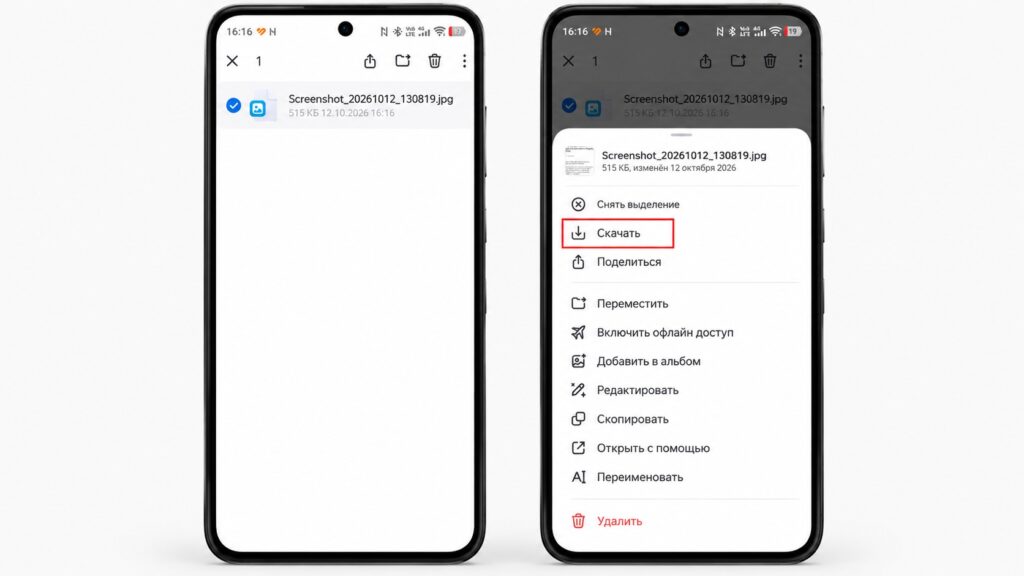
Downloading a file from Yandex Disk on Android
If a file will not download and the progress hangs, the source advises against repeatedly forcing it. The file is most likely stored on servers that are not currently responding, so the source suggests trying again a few hours later. The same Habr user was able to download some files on the evening of October 10: 8 of the 21 GB that had previously been unavailable.
The source recommends starting with the most valuable files, such as documents, photos of children and work files. Music and films can wait.
Offline access for the most important files
To avoid selecting every file individually, the app offers offline access. Selected files and folders are downloaded to the phone’s storage and can be opened even without an internet connection. According to the source, you can enable it like this:
- Open the Yandex Disk app.
- Select the files or folders you need.
- Tap the three dots icon.
- Choose “Enable offline access.”
- To find these files, open the “Files” section and select “Offline” at the top.
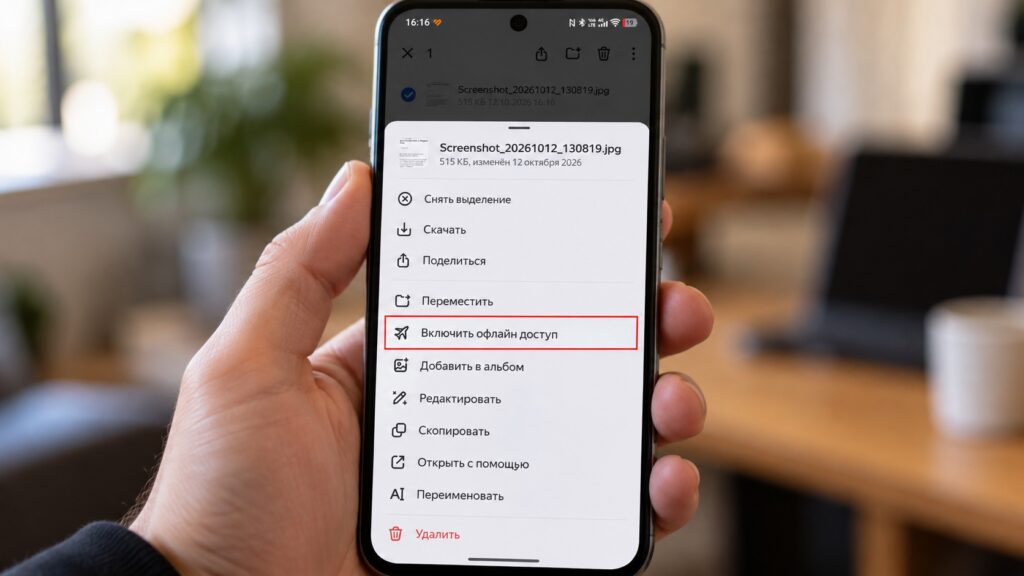
The offline access feature in the Yandex Disk app
Offline files are marked with a paper-airplane icon. The source flags two limitations:
- Offline copies open through the Disk app, not the phone’s gallery. They disappear from the phone if you clear the “Offline” section or uninstall the app.
- If offline downloads are set to Wi-Fi only, they will not run over mobile data. This can be changed in the app’s settings.
How to check whether your photos are still on your phone
The source notes that many people turn on auto-upload and never think about where their photos actually live: on the phone, in the cloud or in both places. It suggests a quick check:

- Turn on airplane mode to cut off the internet connection.
- Open the gallery on your smartphone.
- Scroll through photos from different years and open several of them full screen.
- If a photo opens sharp and can be zoomed in, it is stored on the phone.
- If you see a grey square or a blurry preview instead, the photo is not on the phone. The original exists only in the cloud.
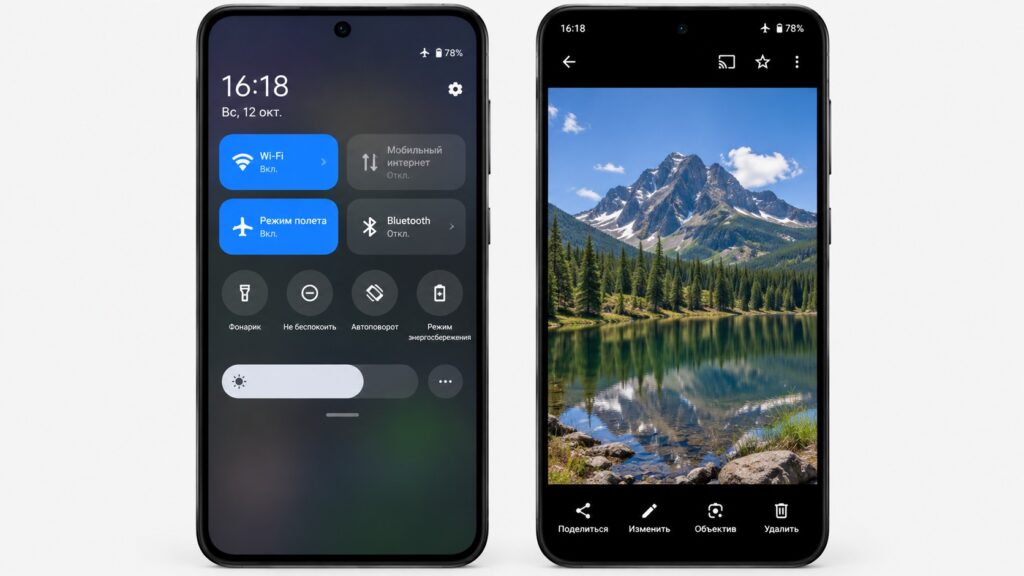
Turning on airplane mode and checking photos in the Gallery
Remember to turn airplane mode off afterward. According to the source, finding that older photos are not on the phone is not a catastrophe. They are on Disk, but they may be hard to retrieve right now. The bigger risk is deleting what is still on the phone, which the Disk app can do with a single button.
The button to avoid for now
The Yandex Disk app has a “Free up space” function. It sits in the menu that opens when you tap your avatar. It deletes photos and videos from the phone that have already been uploaded to Disk through auto-upload. Normally this is convenient because it frees storage while the pictures stay in the cloud. The app even suggests how many gigabytes you could reclaim.
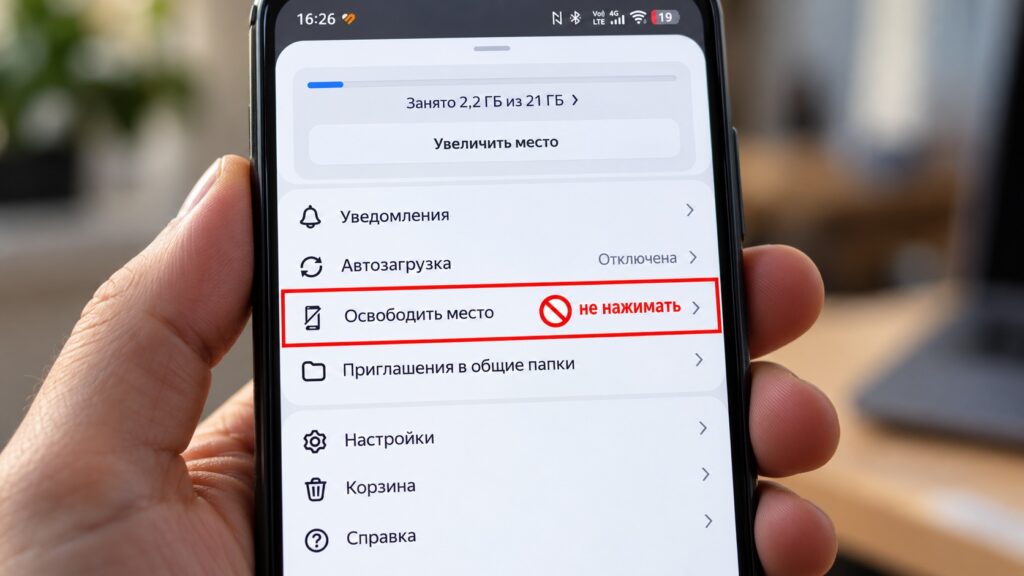
The Free up space function in Yandex Disk
Under current conditions, that logic breaks down. If you delete photos from the phone, the only copy remains on Disk, and Disk does not always return files right now. Until Yandex fully restores service, the source advises:
- do not tap “Free up space” in the Disk app;
- do not manually delete photos from the gallery, even if you are sure they are “already in the cloud”;
- do not uninstall the Disk app if it holds offline files.
The source author applies the same caution to similar functions in Google Photos and other cloud services. Until you are sure files can be downloaded back, the author suggests freeing space in other ways, such as removing unneeded apps, clearing cache or deleting old videos from messaging apps.
What the source author recommends next
The source author says it is too early to panic. Yandex has not said that files are lost. Some functions were disabled on purpose, while some files are temporarily unavailable because of damaged servers, and some of those have already started to come back. Still, the author argues the episode illustrates a simple point: a cloud service is not a backup if it is the only place your files are stored.
The author’s suggested plan:
- Download your most valuable files to the phone one at a time or through offline access.
- If possible, download them to a computer using the Disk desktop program, which can download folders.
- Then set up a second copy, whether on a computer, a USB flash drive or another cloud service.


