If the display on a new iPhone 18 Pro or 18 Pro Max looks washed out, slightly tinted, or unnaturally oversaturated, the cause may not be your eyes or your brightness settings. According to the source report, Apple sources the displays for this generation from two suppliers, Samsung and LG, and the panels differ more than buyers would like. The good news: the phone stores the panel’s identity internally, and you can read it in a few minutes using the built-in sysdiagnose diagnostic tool, no third-party apps required. Below is what buyers are complaining about, how the panel codes differ, and how to find out which one is in your phone.
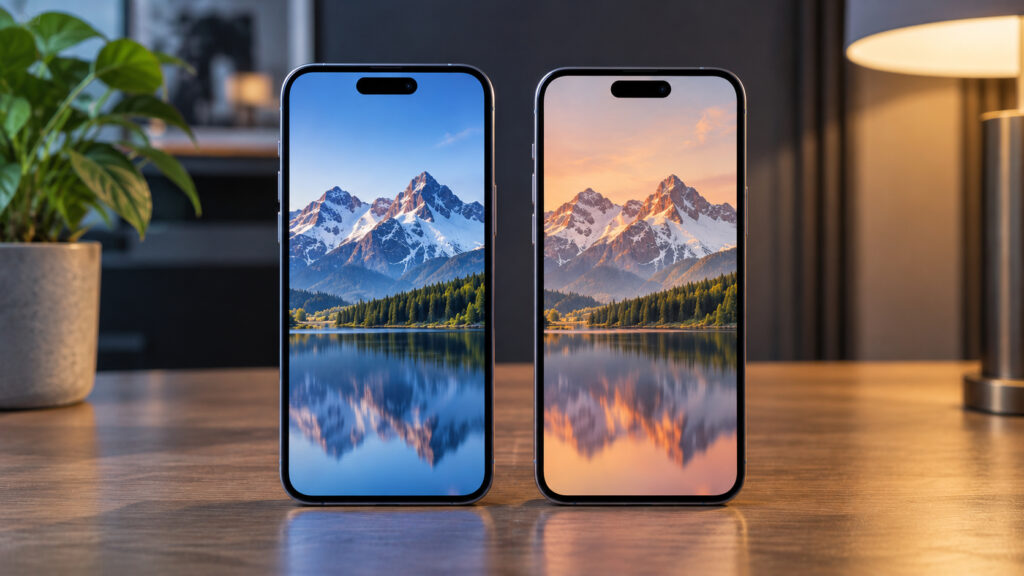
Identical iPhones with different screens
What you need to know
- The source says iPhone 18 Pro and 18 Pro Max displays come from two suppliers, Samsung and LG, with panel codes G9N, G9Q and G9P (Samsung) and GVC and GH3 (LG).
- Early buyers have reported off white balance, oversaturated colors, reduced brightness and slight blur; the same symptoms were reported on the iPhone 17 Pro a year earlier.
- By the source’s rough estimate, Samsung supplies about 55 percent of panels and LG about 45 percent, with roughly a 20 percent chance of receiving the lowest-tier LG GH3.
- The panel code can be read from a sysdiagnose file under Settings, in the IODeviceTree file next to the “raw-panel” entry. The method works on most modern iPhones, not only the 18 Pro.
What is wrong with iPhone screens again
The so-called display lottery is a recurring story for Apple, and this autumn’s models are no exception. The company has long bought the same components from several contractors at once, which makes supply more resilient. The difference between memory chips or batteries from different factories is almost impossible to notice, but displays are another matter: panels from different manufacturers can be told apart even without a side-by-side comparison, if you look closely.
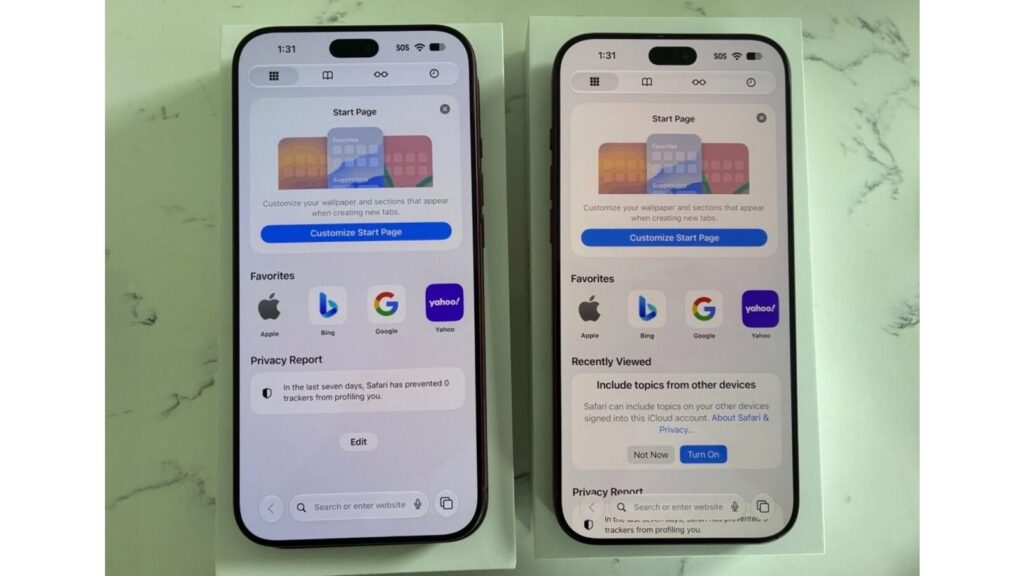
Two different screens in the iPhone 18 Pro
Early buyers of the iPhone 18 Pro and 18 Pro Max have begun complaining about odd color reproduction. For some, the white balance drifts warm or cool; for others, colors look oversaturated and cartoonish, and parts of the image appear slightly blurred. The source notes that exactly the same symptoms were reported on the 17 Pro a year ago, so the issue appears to carry over from generation to generation.
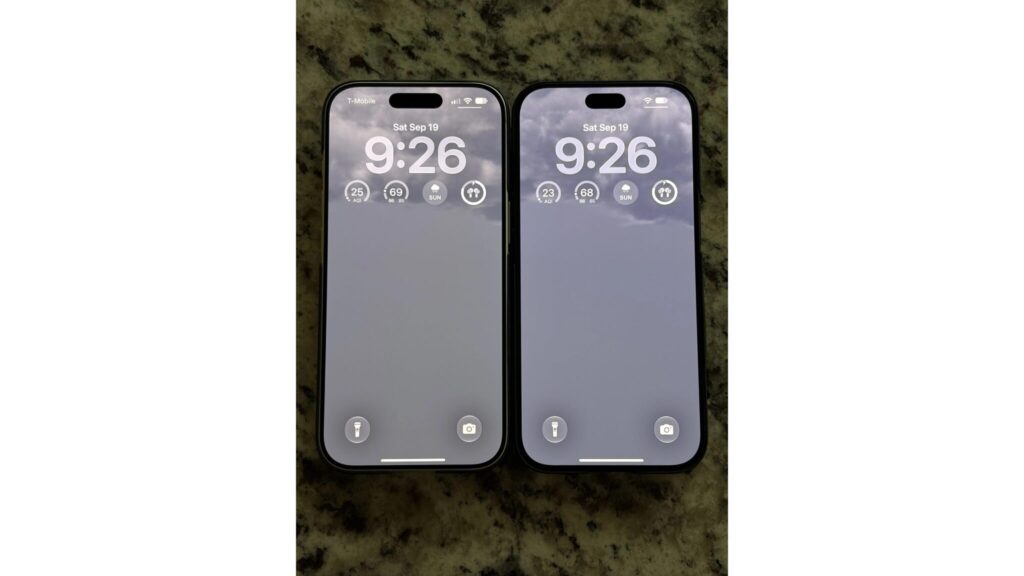
iPhone 17 Pro and iPhone 18 Pro screens
One owner cited in the source gave a simple example: an app logo that is always the same recognizable shade of blue, a color you roughly know by heart. On his new 18 Pro Max it turned into a washed-out neon blue, the kind that flashes by in a frame of The Simpsons. He also noted a greenish tint, lower brightness, and a general feeling that the screen was simply unpleasant to look at.
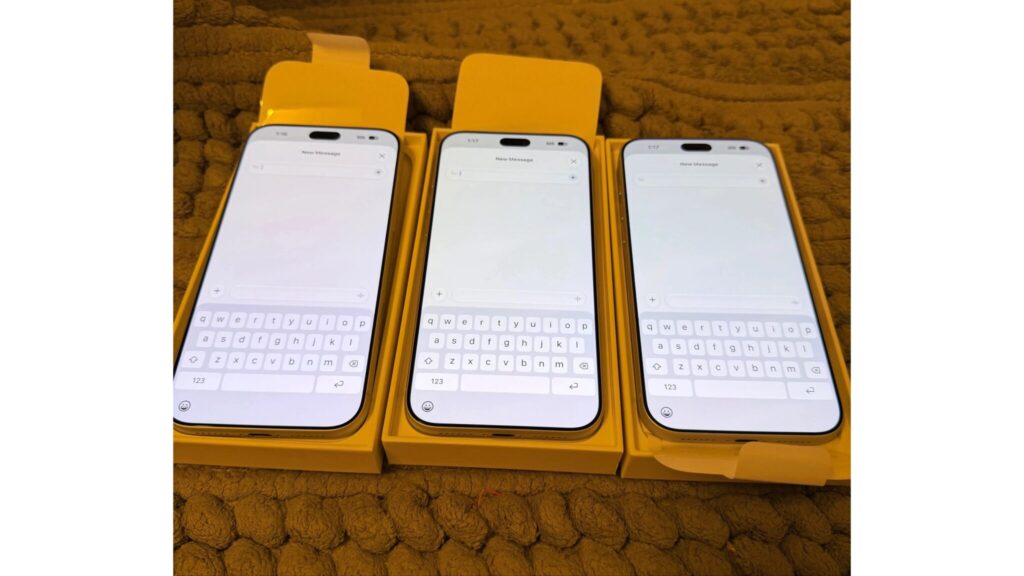
Three iPhone 18 Pro Max units with different displays
Which panels go into the iPhone and how they differ
For this generation, the source says, displays for the iPhone 18 Pro and Pro Max are produced by two factories: Samsung and LG. This is the root of the lottery: the same phone model can arrive with a noticeably different picture depending on which panel was fitted at assembly.
iPhone held in a hand
Samsung panels
Samsung panels are considered the better ones. Units marked G9N are described as the pick of the batch, with the sharpest text rendering, accurate color, and no distortion even at steep viewing angles. Next come G9Q and G9P: they did not pass the strictest selection, but fully meet Apple’s requirements and look excellent in everyday use.
LG panels
With LG the situation is more complicated. According to the source, the company does not produce any reference-grade panels at all. Its best option, GVC, is close in quality to a mid-tier Samsung panel, while the GH3 code marks the lower limit of what is acceptable. GH3 has the loosest manufacturing tolerances, and those are said to produce the washed-out look, the acidic colors, the slight pink, green or yellow cast, and sometimes a hue shift when the phone is tilted.
By the source’s rough estimate, Samsung’s share this year is about 55 percent and LG’s roughly 45 percent. In other words, the odds of getting a good panel are higher, but the chance of ending up with the weakest GH3 variant is not zero, around 20 percent. These figures are estimates rather than confirmed supply data, so before getting upset it is worth checking what you actually received.
How to find out which screen is in your iPhone
To identify the display manufacturer you do not need third-party software or a trip to a service center. The phone stores the data internally, and the built-in sysdiagnose diagnostic utility lets you extract it. The method is not limited to the 18 Pro; the source says the same check works on practically any modern iPhone. Here are the steps as described:
- Lock the phone and turn off the screen.
- Press and hold both volume buttons and the power button at the same time for about one second, until the phone vibrates. Do not hold them longer, or you will trigger the emergency call feature.
- Wait a couple of minutes so the system can finish collecting data.
- Open Settings, then Privacy & Security, then Analytics & Improvements, then Analytics Data.
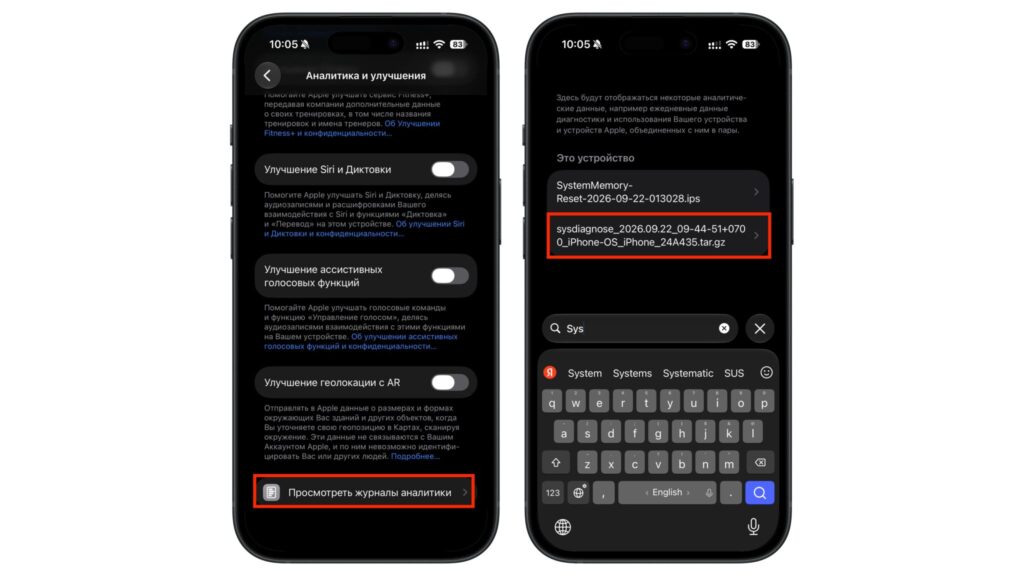
Finding the system diagnostic file
- Scroll down the list and find the file named sysdiagnose_XXXXXXXX.
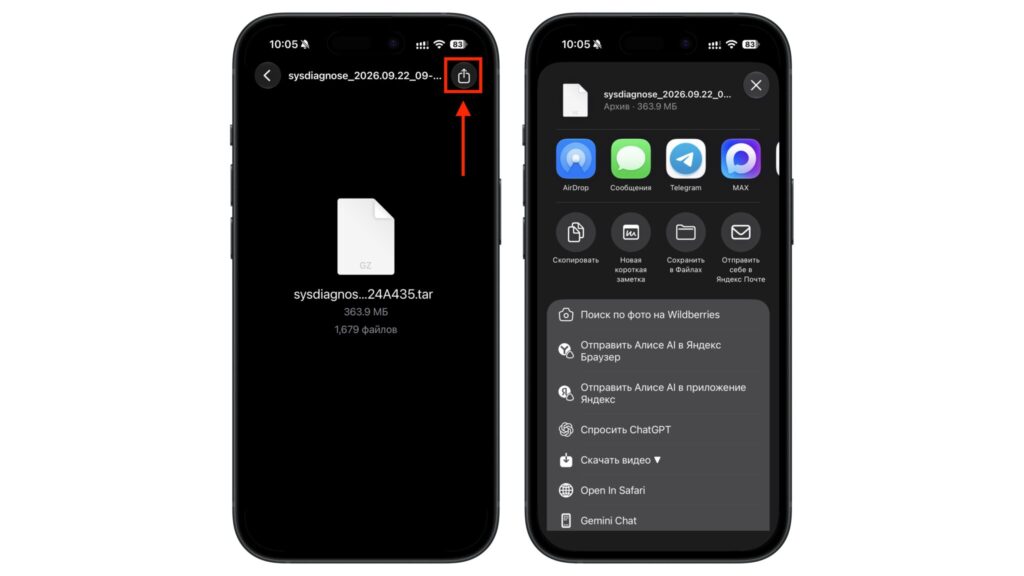
Sending the file to a Mac
- Send the file to a Mac via AirDrop, or save it to the Files app on the iPhone itself, then unpack the archive.
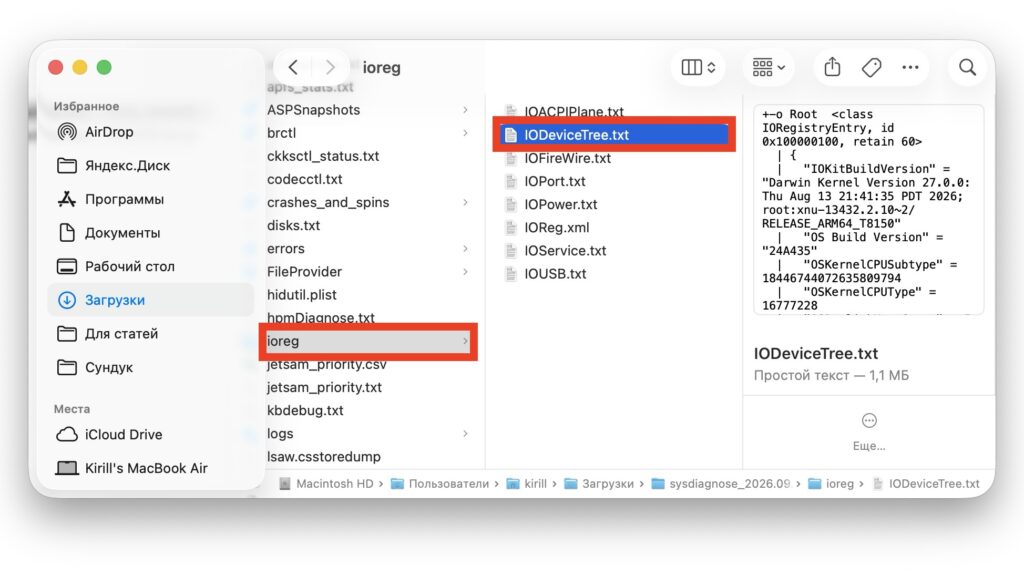
Locating the file that contains the display data
- Inside, open the ioreg folder, then the IODeviceTree file.
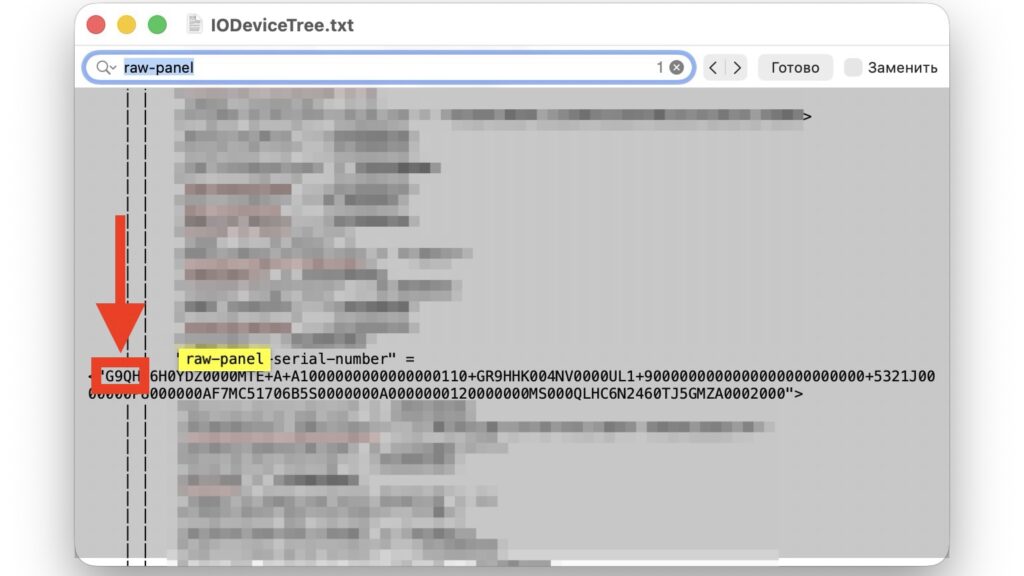
Display panel model shown in an iPhone diagnostic file
- Use search to find the string
raw-panel; the serial number of your panel appears next to it.
The first characters of that serial number are the panel code: G9N, G9Q, GVC, GH3 and so on. Compare it against the table below to see which panel you received.
| Code | Description |
|---|---|
| Samsung G9N | Best option. Top yield grade, the sharpest text rendering, accurate color reproduction, and no distortion even at steep viewing angles. |
| Samsung G9Q | Second tier. Did not pass the strictest G9N selection but fully meets Apple’s standards. In everyday use the difference is barely visible. |
| Samsung G9P | Third tier. Also a solid Samsung panel with slightly less strict quality control, but no obvious problems. |
| LG GVC | The best LG makes. A solid mid-range panel: slightly behind the top Samsung units in color uniformity and off-angle viewing, but good overall. |
| LG GH3 | Worst option. The loosest tolerances, resulting in a washed-out look, reduced brightness, acidic colors, and a slight pink, green or yellow cast. |
Note that these tier descriptions are the source article’s characterizations, not official Apple specifications, so treat them as informed assessments rather than confirmed grading data.
What to do if you are unhappy with the screen
If the check shows an LG GH3 and the picture genuinely bothers you, there are a few options. The most obvious is to return or exchange the phone, or at least try to, subject to the return policy where you bought it. The second is to keep it as is: many people never notice a difference until they compare two devices side by side or start reading forum threads on the topic.
It is also worth remembering that some complaints are a matter of inflated expectations. At this price you want a perfect screen, and any hint of a tint affects perception more strongly than it would on a budget model.
The bottom line is straightforward. The display lottery is neither a myth nor a mass defect; it is a consequence of Apple being physically unable to produce a hundred million perfectly identical screens in a single season. Most buyers will receive a good Samsung panel and never think about panel codes. But if you cannot shake the feeling that something is off with the picture, you now know how to check in a couple of minutes, and what your suspicion is actually based on.