How iOS 26.5 affects the battery. Is it really that bad?
iOS 26.5 is already out — Apple released the update on May 11, 2026, three weeks after the release of iOS 26.4.2. While the previous build was purely a security patch, 26.5 is a full-featured update with fresh wallpapers, improved Apple Intelligence, and a dozen minor improvements. The main thing iPhone owners are worried about after installation: how iOS 26.5 affected iPhone battery life and whether the battery started draining faster. A fresh battery life test is already available — let’s break it down.
What’s New in iOS 26.5
Unlike the modest iOS 26.4.2, the fresh update brought noticeable changes. Apple finally finished what it promised at WWDC 2025 and added a couple of nice extras that owners of newer models will definitely appreciate. Here are all the new features in iOS 26.5:
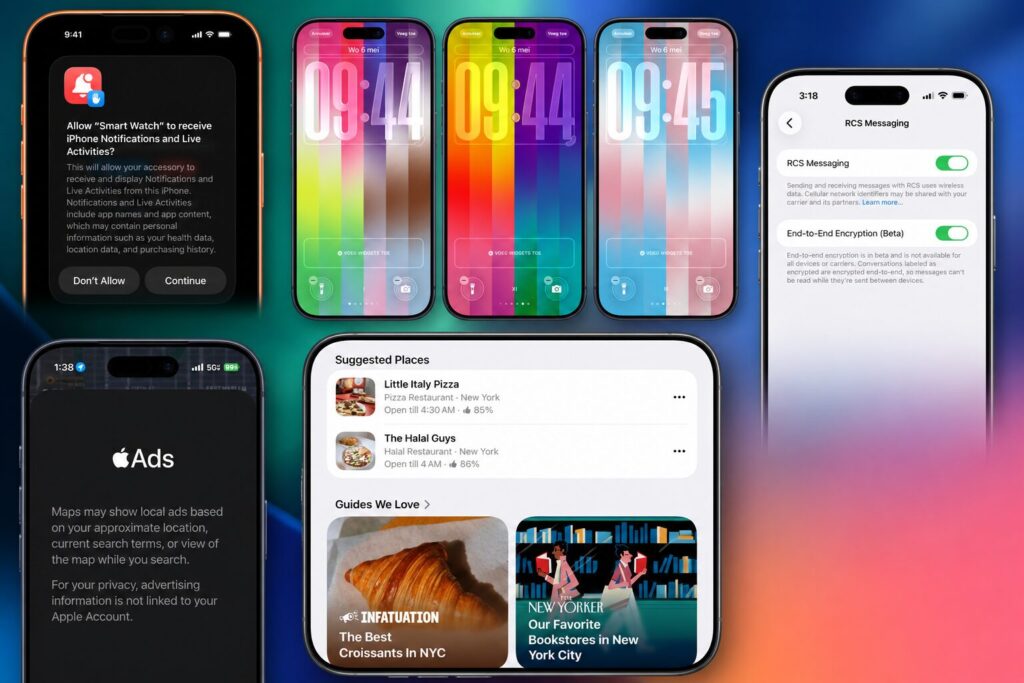
iOS 26.5 got new features
- A new set of wallpapers, including hidden regional variants.
- Apple Intelligence improvements, including faster Genmoji performance and improved notification summarization.
- A fix for the Camera freezing bug when switching to macro mode on iPhone 16 Pro.
- Stabilized CarPlay operation when connecting via USB-C.
- Several medium-severity vulnerabilities patched.
Personal impressions of the update were already described in a separate article by my colleague Kirill Pirozhenko — he updated his iPhone 16 Plus to iOS 26.5 and shared the pros and cons in practice. But subjective feelings are one thing, while synthetic benchmarks with their cold numbers are something entirely different. Especially since iPhone battery life after iOS 26.5 behaves completely differently across various models.
How iPhone Battery Life Changed on iOS 26.5
Blogger iAppleBytes was among the first to test the battery life of six iPhone models on the latest firmware: from iPhone SE 2020 to iPhone 16. The methodology was the same — identical screen brightness, identical set of tasks, though with different battery health on each device. The numbers turned out very surprising.
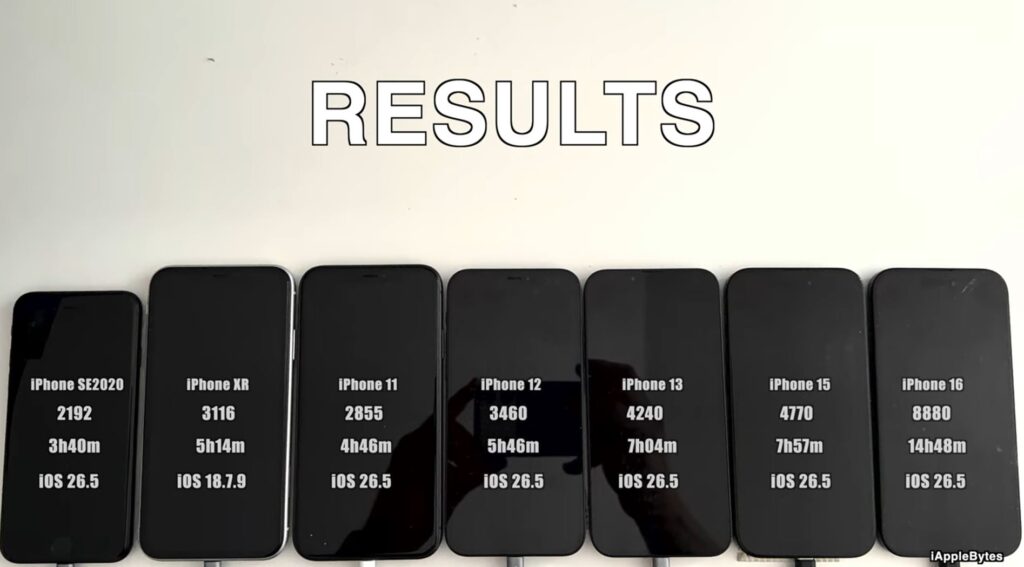
The blogger conducted the fresh study among the first. Photo: YouTube channel iAppleBytes
As usual, I compiled the results into a table and compared them with iOS 26.4.2, last year’s iOS 18.5, and the year-before-last iOS 17.5. The picture turned out paradoxical, with many interesting conclusions. Let’s take a look.
| Model | iOS 26.5 | iOS 26.4.2 | iOS 18.5 | iOS 17.5 |
|---|---|---|---|---|
| iPhone SE | 3 hours 40 minutes | 3 hours 41 minutes | 3 hours 19 minutes | 3 hours 22 minutes |
| iPhone 11 | 4 hours 46 minutes | 4 hours 49 minutes | 5 hours 25 minutes | 5 hours 29 minutes |
| iPhone 12 | 5 hours 46 minutes | 5 hours 48 minutes | 5 hours 49 minutes | 6 hours 1 minute |
| iPhone 13 | 7 hours 4 minutes | 6 hours 22 minutes | 6 hours 47 minutes | 5 hours 50 minutes |
| iPhone 15 | 7 hours 57 minutes | 9 hours 5 minutes | 9 hours 4 minutes | 10 hours 52 minutes |
| iPhone 16 | 14 hours 48 minutes | 13 hours 58 minutes | 14 hours 20 minutes | — |
And this is where it gets really interesting. iOS 26.5 split the iPhone lineup into two camps: some models hit all-time highs, while others lost more than an hour of battery life in a single build. We haven’t seen this kind of swing within a single update in a long time.
- iPhone SE — stable as a Swiss watch. Minus one minute compared to iOS 26.4.2, which is considered margin of error in any test. Compared to iOS 18.5, the model gained 21 minutes, and it’s already 18 minutes ahead of iOS 17.5. Apple has finally stopped torturing the old A13 Bionic device, and it shows in the graph of recent builds.
- iPhone 11 — no surprises, but no joy either. Minus 3 minutes compared to iOS 26.4.2 — again, margin of error, but the overall picture compared to iOS 18.5 and iOS 17.5 is disappointing. If your iPhone 11 isn’t in its prime anymore, the drain will be noticeable.
- iPhone 12 — the most predictable hero of the test. On iOS 26.5, it shows 5 hours 46 minutes, which almost exactly matches the results on iOS 26.4.2, iOS 18.5, and even iOS 17.5. The difference between all four builds is less than 15 minutes. If you own a 12, nothing will change.
- iPhone 13 — the sensation and record-breaker of the release. Battery life increased by 42 minutes compared to iOS 26.4.2, and now the model shows 7 hours 4 minutes — an all-time high across all iOS versions, including 17.5 and 18.5. Apple is clearly continuing to optimize the system for A15 Bionic, and iPhone 13 owners got a truly useful update.
And now for the sad part. iPhone 15 — the biggest loser in this test. The model lost 1 hour 8 minutes compared to iOS 26.4.2 and almost 3 hours compared to iOS 17.5. This is the worst result for the iPhone 15 in its entire history, and the downward trend in battery life from build to build has become critical. If you have an iPhone 15 — think about whether it’s worth updating right now, or wait for iOS 26.5.1 with potential fixes.
How iOS 26.5 Affected iPhone Battery Life — Conclusions
An important caveat: iPhone battery life tests are always synthetic, and your specific device’s results may differ. Real-world battery life is affected by battery health, installed apps, background activity, cellular signal quality, and a dozen other factors. But these tests accurately show the overall trend across the lineup: battery life with iOS 26.5 reached record highs in some cases and dropped critically in others.
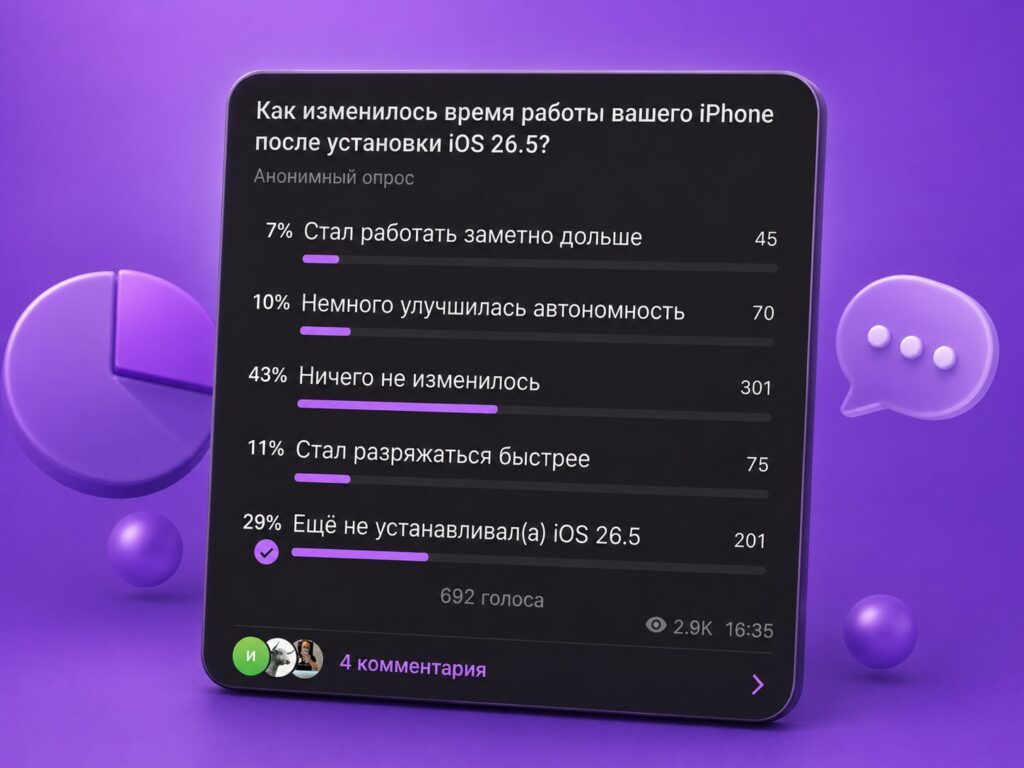
It’s important to listen to real-world feedback too
Interestingly, this time the overwhelming majority noted no changes in battery life with iOS 26.5, and those who noticed a downgrade aren’t that many. The camp of those who prefer not to update at all remains strong. So the general advice of “go ahead and update” doesn’t work here.


