Cyberpolice have discovered yet another app that disguises itself as a free VPN service. In reality, instead of protecting your connection, it installs a banking trojan on your smartphone that can steal card data, intercept SMS messages, and download additional malicious modules onto the device. The user doesn’t even know it’s happening — everything runs in the background.
Free VPNs can cause more problems than actual benefits
How a Malicious VPN Gets Access to SMS and Cards
The warning came from the Department for Combating Illegal Use of Information and Communication Technologies of the Russian Interior Ministry (UBK MVD). According to the agency, scammers are distributing a free service for Android with high speed, a Russian-language interface, and a 10 GB limit. However, 6 antivirus solutions have already flagged this file as malicious.
After the user downloads the APK file and installs it, the app requests a set of permissions — supposedly for the VPN connection to work. In reality, the trojan gains access to critically important data on the device.
Here’s what it can do:
- Read incoming SMS messages with confirmation codes from banks
- Intercept push notifications from banks
- Gain access to bank card data stored on the device
- Download additional malicious modules without the smartphone owner’s knowledge
Essentially, the attackers gain full control over the victim’s finances. Intercepted SMS codes allow them to confirm transfers and purchases, while access to banking apps enables them to withdraw money from accounts. The ability to download additional modules is particularly dangerous. Even if the initial trojan doesn’t contain all malicious functions, it can “pull” them later — from a remote server. This means the device remains at risk until the app is completely removed.
Why Apps Outside Google Play and App Store Are Dangerous
The scheme is nothing new. Scammers regularly exploit the topic of free services to lure users. A person wants to protect their connection on a public Wi-Fi network — and stumbles upon a slick website promising lightning-fast speed and anonymity.
The problem is that apps downloaded from third-party sites, bypassing official stores, undergo no verification. In the App Store, every update is reviewed by moderators, while files from unknown sources can contain anything. Moreover, it’s impossible to spot the threat visually — the app’s interface looks professional, and the malicious code operates covertly.
An important point: FlashVPN is distributed as an APK file, which is an Android app format. It’s physically impossible to install it on an iPhone — iOS simply can’t work with APK files. So this particular trojan poses no threat to Apple device owners.
Free VPNs, especially from unknown sources, can lead to data loss
That said, there’s no reason to let your guard down. Although iOS doesn’t allow installing apps from third-party sources in standard mode, fake apps that masquerade as popular services occasionally appear in the App Store. Threats to iPhone do exist — they just work differently and are significantly less common.
There’s also a separate trick that specifically targets iPhone owners. Sometimes in messaging channels or on dubious websites, they offer to install an app bypassing the App Store — via an enterprise developer certificate, configuration profile, or TestFlight. They tell you: “Just tap ‘Trust’ in settings, and everything will work.” You should absolutely never do this.
Such apps don’t undergo Apple’s review process, and the installed profile gives a third-party developer extended access to your device. Essentially, you’re disabling the protection with your own hands — the very protection that makes iPhone safer than Android.
How to Protect Your Smartphone from Dangerous VPN Services
Cyberpolice offer a simple but important piece of advice: download apps only from official stores. The agency notes that even this doesn’t guarantee 100% security. But at least apps in the App Store go through a minimum level of review.
You can protect yourself
Here are a few rules that will help iPhone owners reduce their risk:
- Never install apps bypassing the App Store — via configuration profiles, developer certificates, or direct links from messengers
- Check the app developer in the App Store — well-known companies have verified accounts
- Pay attention to requested permissions — if a calculator asks for access to contacts and location, that’s a red flag
- Regularly check Settings — General — VPN & Device Management for unfamiliar profiles
- Don’t trust apps with suspiciously high ratings but a small number of reviews
If you’ve already installed a suspicious app, delete it immediately. Then check your bank card statement for suspicious transactions. If you discover unauthorized charges, contact your bank and the police right away.
How to Find Suspicious Configuration Profiles in iOS
Even though FlashVPN specifically doesn’t threaten iPhone owners, it’s worth making sure your device doesn’t have any third-party configuration profiles. Go to Settings — General — VPN & Device Management. If there are unfamiliar profiles in this section that you didn’t install yourself — delete them.
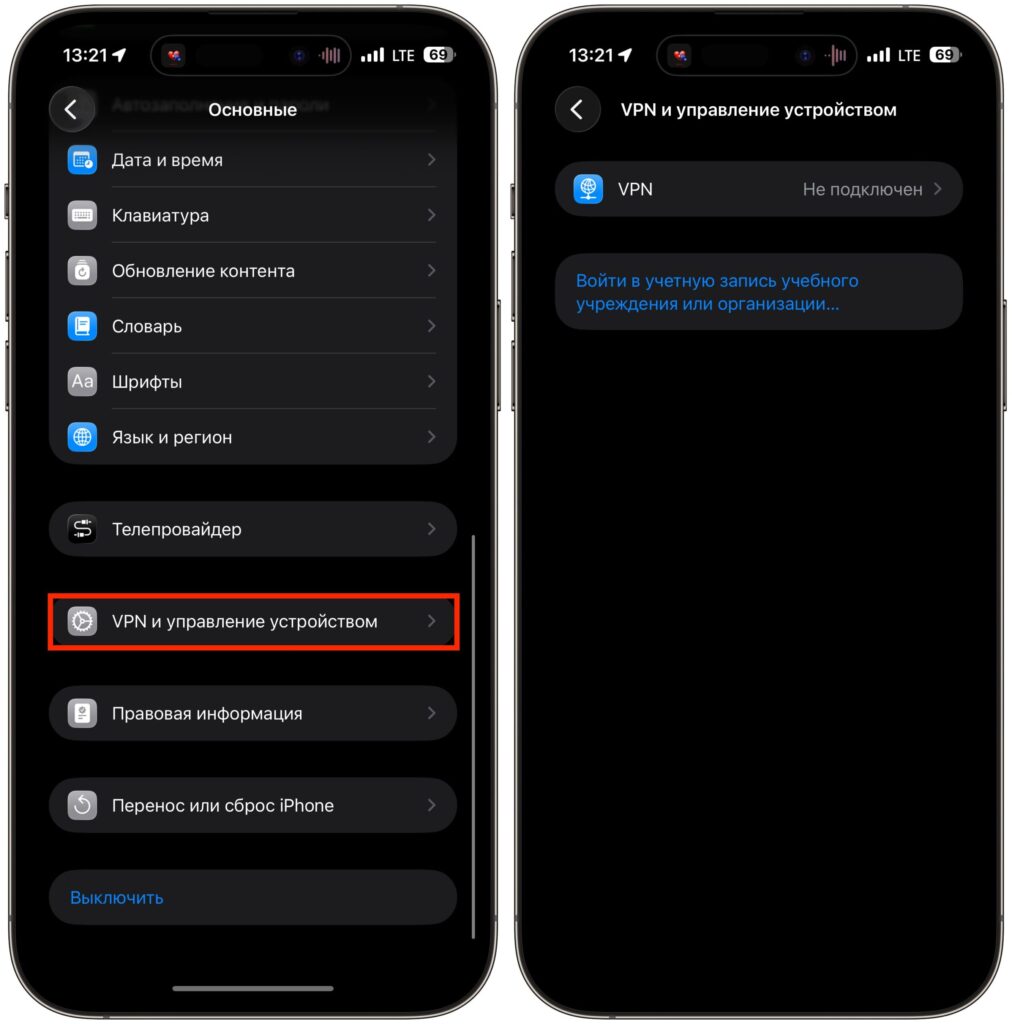
Make sure there are no certificates here that you don’t know about
Also check which apps have extended access. Open Settings — Privacy and go through the sections — contacts, microphone, camera, location. If an app has gained access that it clearly doesn’t need to function, revoke the permission or delete the app entirely.


