The idea of selling your old smartphone on the secondary market seems simple and logical: reset the settings, wipe down the case, hand it to the buyer, get your money. But a factory reset doesn’t guarantee complete data deletion, and some information may remain accessible to the new owner. Let’s break down exactly what risks leaking and how to prepare your phone for sale so you don’t hand over your passwords, messages, and photos along with it.

If you don’t properly delete data from your smartphone, it will end up in the hands of the new owner
What Remains on a Phone After a Factory Reset
The main misconception among sellers is that simply deleting data wipes it clean. In practice, a smartphone most often just marks old data as deleted and removes quick access to it, but the files themselves physically remain on the storage. This means that if the reset is done incorrectly, some photos, documents, and messages can be recovered.
A separate risk is related to accounts. If you don’t sign out of your Google account before resetting, the device may trigger an account lock, and the new owner will be stuck on the activation lock screen. This is already a problem for the buyer, but it’s also unpleasant for you: the phone will be returned or a refund will be demanded.
What Data You Should Never Leave on a Phone When Selling It
Before parting with your device, it’s worth understanding what exactly is valuable to a stranger and to scammers. The danger isn’t just in personal photos — the consequences of leaking access to services are far more serious.
Here’s what you should never leave on your phone before selling:
- saved passwords in the Chrome browser and in password managers
- active sessions in banking apps and wallets
- messages in messengers and email
- photos of documents, cards, and personal pictures
- linked Google accounts and other service accounts
- autofill form data and browser history
Especially sensitive are browser passwords — these are what people hunt for most often. Arguably, even the ability to track a smartphone via geolocation can’t compete with them in terms of value if the previous owner didn’t sign out of their account.
How Resetting Settings Differs from Restoring Factory Settings
Interestingly, modern Android smartphones offer several reset options that differ significantly from each other. Naturally, this confuses people, and they perform the reset incorrectly.
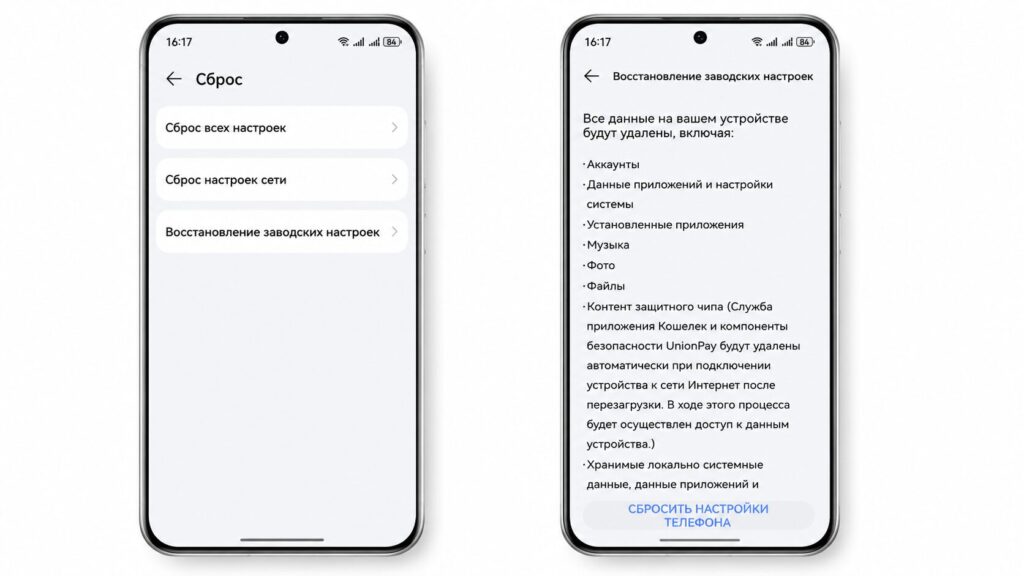
If you choose the wrong type of reset, all data will remain on the device
- Reset all settings involves returning to the original settings parameters, deleting fingerprint data, face image data, and lock screen password. Data on the smartphone is not deleted. But this is the method people most often choose.
- Network settings reset involves resetting all network settings, including Wi-Fi, mobile data, hotspot data, as well as Bluetooth and NearLink.
- Factory reset — this is what we need. In addition to rolling back to base parameters, this tool also involves complete data deletion from the device, including photos, videos, contacts, music, apps, etc.
However, you’ll still need to remove your account manually, otherwise the device will remain linked to the account you signed into:
- Open your smartphone settings.
- Go to the “Accounts and sync” section.
- Select the Google account.
- Tap the “More” button, then — “Remove account.”
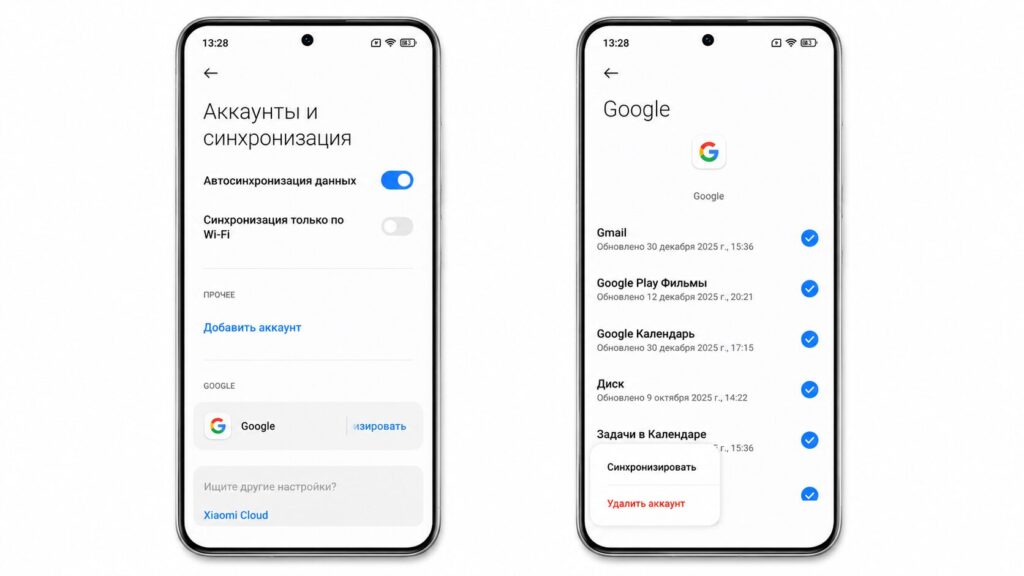
It’s also better to sign out of your account in advance
Can Deleted Photos Be Recovered from a Sold Phone
Short answer: with improper preparation — yes, some photos can be recovered. On older devices without encryption and on memory cards, deleted files often remain in memory until overwritten, and they can be extracted using data recovery software, and sometimes even through standard methods. On modern smartphones with encryption enabled, the task becomes much more difficult for an outsider, but you shouldn’t fully rely on this. That’s why you shouldn’t neglect a full factory reset.
Also remember the microSD memory card: people often forget to remove it, and it may contain photos and backups. If the card remains in the sold phone, recovering data from it is usually easier than from internal storage.
What to Check Before Selling Your Phone
The final check takes a couple of minutes but protects against the most common mistakes. Before handing over the device, go through this short list.
- Google account is unlinked and doesn’t lock the device
- SIM card and memory card are removed
- no saved passwords or history remain in the browser
- you’ve signed out of all messengers and banking apps
- a backup of important data has been made
The main takeaway: a factory reset is a necessary but not the only step. To prevent the buyer from learning too much about you, it’s important to unlink accounts in advance, remove browser passwords, take out the cards, and if possible, overwrite the memory. These simple actions separate a safe sale from a situation where, along with the phone, you hand a stranger access to your entire digital life.