iOS 27 and iPadOS 27 introduce a dedicated recovery mode, similar to the one available on Macs with Apple silicon. It boots the iPhone or iPad into a simplified interface without launching the full system, helping to fix some serious issues directly on the device — no cable or computer needed.
Now you can restore your iPhone without a computer
New iPhone Recovery Mode Without a Computer
The main new feature is a new recovery mode for iPhone and iPad that boots into a lightweight interface instead of the full system. Apple has now built a full standalone screen around this concept. Everything is set up almost exactly like on Macs with Apple silicon chips.
The logic will be familiar to anyone who has ever restored a modern Mac: the device boots not into normal mode but into a service environment from which you can launch repair tools. It’s initiated via the power button, not by connecting to a computer.
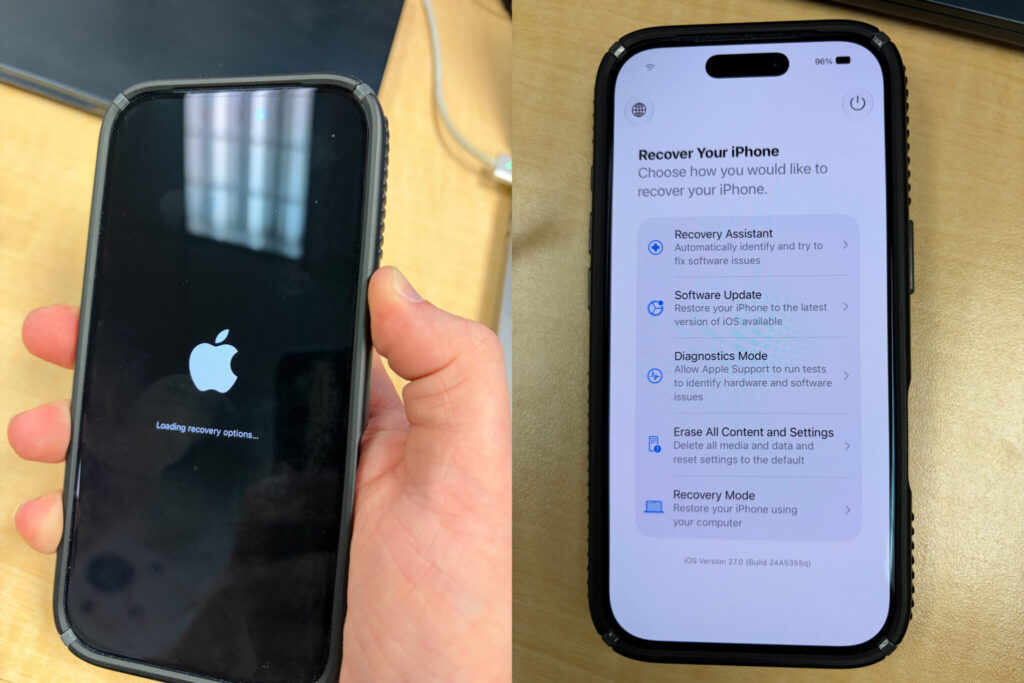
The iPhone will show a special boot screen and launch recovery mode
- Completely turn off your iPhone or iPad.
- Press and hold the side button to turn on the device.
- The Apple logo will appear on screen, just like during a normal boot.
- Keep holding the button — after a while, a progress bar will appear.
- After that, the device will boot not into iOS but into the new recovery mode.
This method mirrors the logic of Macs with Apple silicon, where recovery mode is triggered by holding the power button for an extended time. No third-party software or cables are needed to enter it.
iPhone Recovery Tools in iOS 27
On the new screen, the user is presented with five service options:
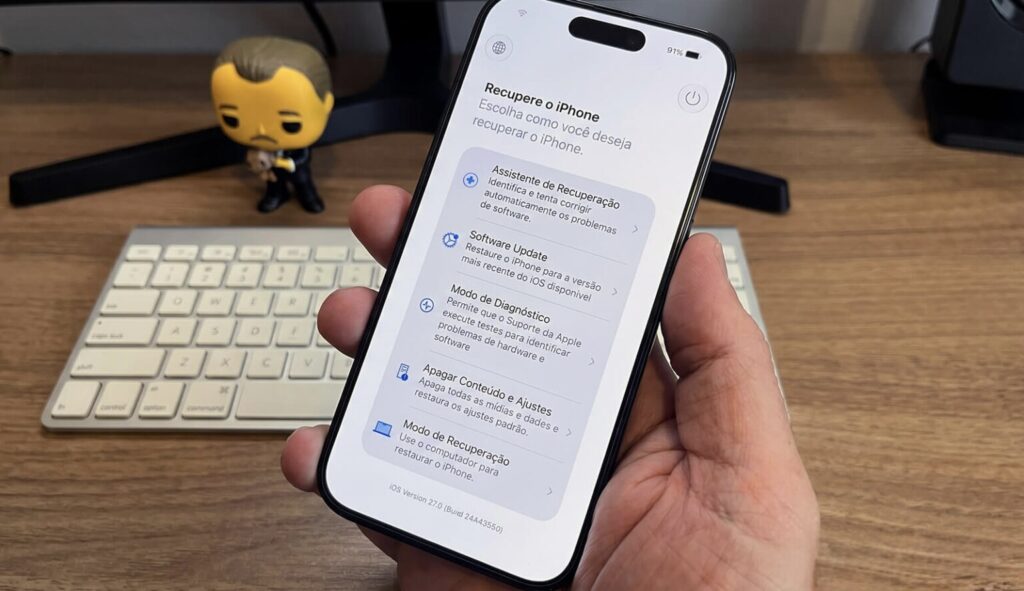
All recovery mode tools are right in front of you
- Recovery Assistant — an automatic helper for troubleshooting issues
- Software Update — reinstalling or installing the system
- Diagnostics Mode — a diagnostics mode
- Erase All Content and Settings — a full device reset
- Recovery Mode — the classic recovery mode
In addition to the menu items themselves, the battery level is displayed in the corner of the screen, and the device automatically connects to a known Wi-Fi network. The toolbar also includes a power button — you can use it to attempt a normal reboot if you don’t need to go through with a full recovery. I’d also note that Recovery Assistant handles some automatic fixes without any user involvement.
When the New Recovery Mode Can Help

Now some repair tasks can be handled without connecting to a computer
The purpose of the feature is simple: you no longer need a computer to revive your smartphone. Previously, restoring a frozen iPhone required connecting it to a Mac or PC, putting it into DFU mode, and reinstalling the system from scratch. Now many of those scenarios can be handled directly on the device.
A good example is an interrupted system update. If the device ran out of battery right during an update installation and stopped booting normally, you can use the “Software Update” option to reinstall the latest stable version. This is especially relevant for those who install betas: sometimes they send the device into an endless reboot loop, and previously only a computer could help.
Who Will Benefit from iOS 27 Recovery Mode
Let me be straightforward: most people will rarely need this mode. It’s a tool for serious failures, not an everyday feature. If your iPhone works fine and you don’t install betas, you’ll likely never even think about this screen.
However, the benefit is obvious for two categories. The first is people without a computer nearby, for whom any serious issue used to mean a trip to a service center. The second is those who test early builds and occasionally encounter freezes during installation.
iOS 27 Release Date for All Users

iOS 27 will become available to all users in September
Currently, iOS 27 and iPadOS 27 are being tested in the developer beta. The public beta is expected next month, and the official release is planned for the fall. Until then, the final feature set may still change, so it’s best to take the details with a grain of salt: this is what the early build shows for now.
In short: the new recovery mode isn’t the kind of feature everyone will notice, but it’s a useful safety net in case of a serious failure. There’s no need to update specifically for it, but when iOS 27 comes out this fall, this capability will bring peace of mind to everyone without a computer nearby — and especially to those who live on beta builds.