Last week Apple released iOS 26.4.1 — a small but very important update with build number 23E254. The description, as usual, only mentions “bug fixes.” But in practice, the update turned out to be much more interesting than the sparse release notes suggest. I installed it on my iPhone and spent several days with the new firmware. Here’s what changed and whether it’s worth updating.
iOS 26.4.1 works well on iPhone
What Changed in iOS 26.4.1
Although Apple didn’t elaborate on the details, enthusiasts quickly figured out the changes. The main fix addresses the iCloud sync bug that appeared in iOS 26.4. Because of it, apps using CloudKit stopped receiving change notifications. This affected Notes, Passwords, and many third-party apps. You could change something on iPhone, but the data simply wouldn’t update on Mac or iPad.
The firmware is mostly needed for bug fixes
The problem was so serious that developers began massively complaining on Apple forums. One of them described the situation like this: just two days before updating to iOS 26.4, sync worked perfectly, and after — it completely broke. Meanwhile, the bug didn’t manifest on Mac; it affected only iPhone and iPad.
The second change concerns enterprise devices: Stolen Device Protection now automatically activates on them when updating from iOS 26.4. Previously, it had to be manually enabled on each device. Now Apple has closed this gap as well.
Importantly, the update contains no security fixes. On the Apple Security Releases page for iOS 26.4.1, there isn’t a single CVE identifier. This is purely a bugfix release.
How iPhone Performs After Updating to iOS 26.4.1
After installing iOS 26.4.1, the smartphone runs fast and stable. I noticed no lags, slowdowns, or freezes. The interface responds instantly, apps open without delays, and animations are smooth. If anyone had performance issues on iOS 26.4, Apple has clearly improved optimization here.
Many users complained that after updating to iOS 26.4, they started experiencing Wi-Fi problems and battery drain. I’m not seeing anything like that — the battery holds up exactly the same as on previous system versions. No abnormal drain, overheating, or strange background behavior. Some report that in the first 24 hours after updating, the battery drained faster than usual, but then the situation stabilized. This is standard behavior — after installation, iOS re-indexes Spotlight and photo data, which temporarily puts extra load on the processor.
Wi-Fi also works without issues. The network connection is stable, speed hasn’t dropped, and there are no disconnections. Some people on MacRumors forums complained about Wi-Fi instability after the update, but I haven’t experienced anything like that.
Do Sberbank Online, RuTube, and Other Apps Removed from the App Store Work on iOS 26.4.1
One of the main questions for Russian users is the fate of apps removed from the App Store. I checked: RuTube, Sberbank Online, and other previously removed apps continue to work on iOS 26.4.1 without any issues. Apple has not blocked them or limited their functionality.

RuTube crashed on first launch but worked fine afterward
The only nuance: on the first launch of RuTube after the update, the app crashed. But it turned out to be a one-time glitch — after relaunching, everything worked normally, and there have been no issues since. Most likely, this was related to data re-indexing after the system update rather than any incompatibility.
So there’s no need to worry. If you have Russian bank apps and services on your iPhone that disappeared from the App Store long ago, they will continue to work after updating to iOS 26.4.1. Just don’t delete them, because you won’t be able to re-download them from the store.
Is iOS 26.4.1 Worth Installing
Definitely yes. iOS 26.4.1 is a high-quality and stable update that fixes real bugs from the previous version. The smartphone runs fast, battery life hasn’t declined, and Russian apps work properly. The update came out just two weeks after iOS 26.4 — this shows that Apple rushed to fix the critical iCloud sync bug, and they succeeded.
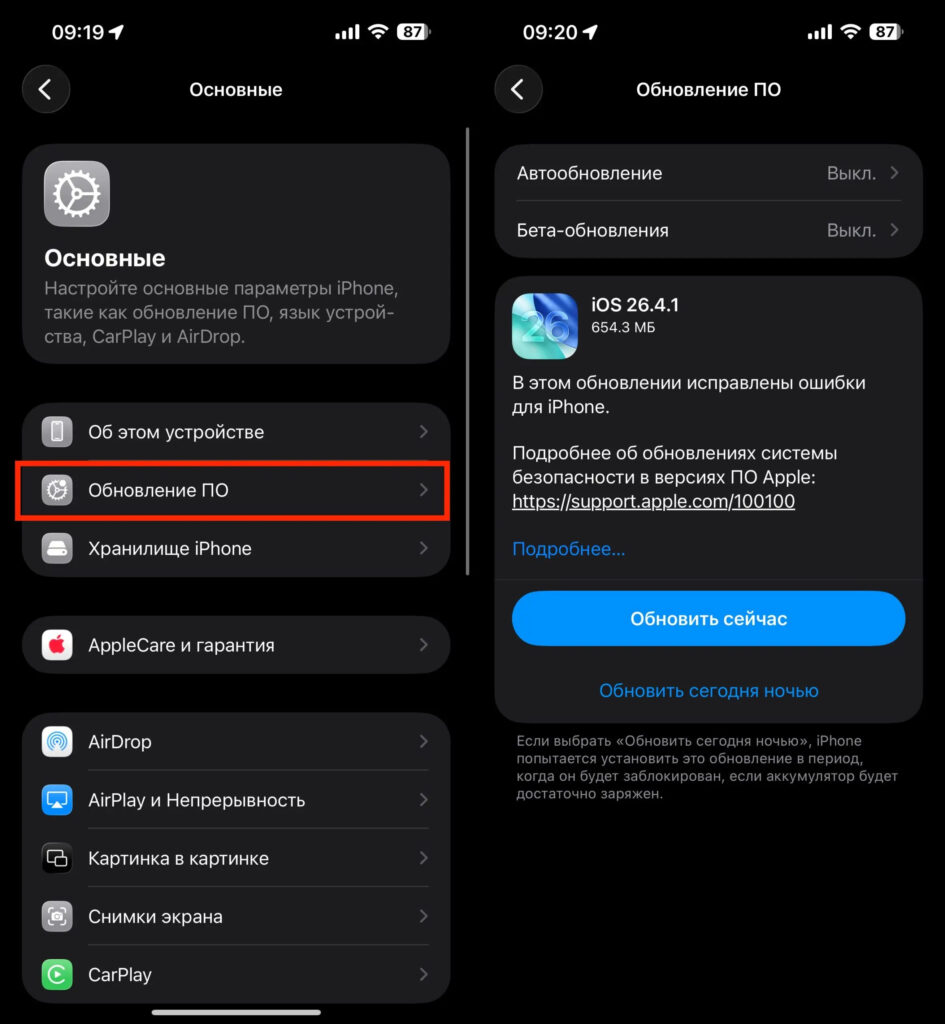
You can install iOS 26.4.1 from Settings as usual
Meanwhile, iOS 26.5 is already in beta testing and is expected to release in late April or May. But that will be a full-fledged update with new features, while iOS 26.4.1 is all about stability.
You can install the update the standard way: Settings — General — Software Update. The firmware is small, so downloading and installing will only take a few minutes.