Many users in Russia still believe that creating a second Apple ID with a foreign region is a universal solution to all Apple service payment problems. Supposedly, one account for iCloud, another for everything else, and you can carry on with your life. In reality, things work differently, and if you don’t figure it out in advance, you can easily waste money or lose access to the services you need.
Two Apple IDs on one iPhone have their own specifics
Here’s how two Apple IDs on one iPhone actually work, which services can be paid for with a foreign account and which cannot, and why you’ll need to make a separate decision for iCloud.
Why You Need a Second Apple ID on iPhone
A second Apple ID with a region set to, say, Turkey or the US, is needed for just one purpose — buying apps and subscriptions within the App Store. This means that through a foreign account you can pay for:
- Paid apps and games from the App Store of another region
- In-app purchases
- Subscriptions to Apple Music, Apple TV+, Apple Arcade
- Subscriptions to third-party services if they are sold through the App Store — Netflix, Spotify, YouTube Premium, ChatGPT Plus, and others
The main rule is simple. If a service can be paid for through the subscription mechanism within the App Store, a foreign Apple ID solves the problem. Top up the balance with a gift card, subscribe — and everything works.
Subscriptions You Can’t Pay for Through a Second Apple ID
This is where things get tricky — something few people warn about in advance. iCloud+ with expanded storage is tied to the primary Apple ID used to sign into iCloud on the device. This is not the same account you use to download apps.
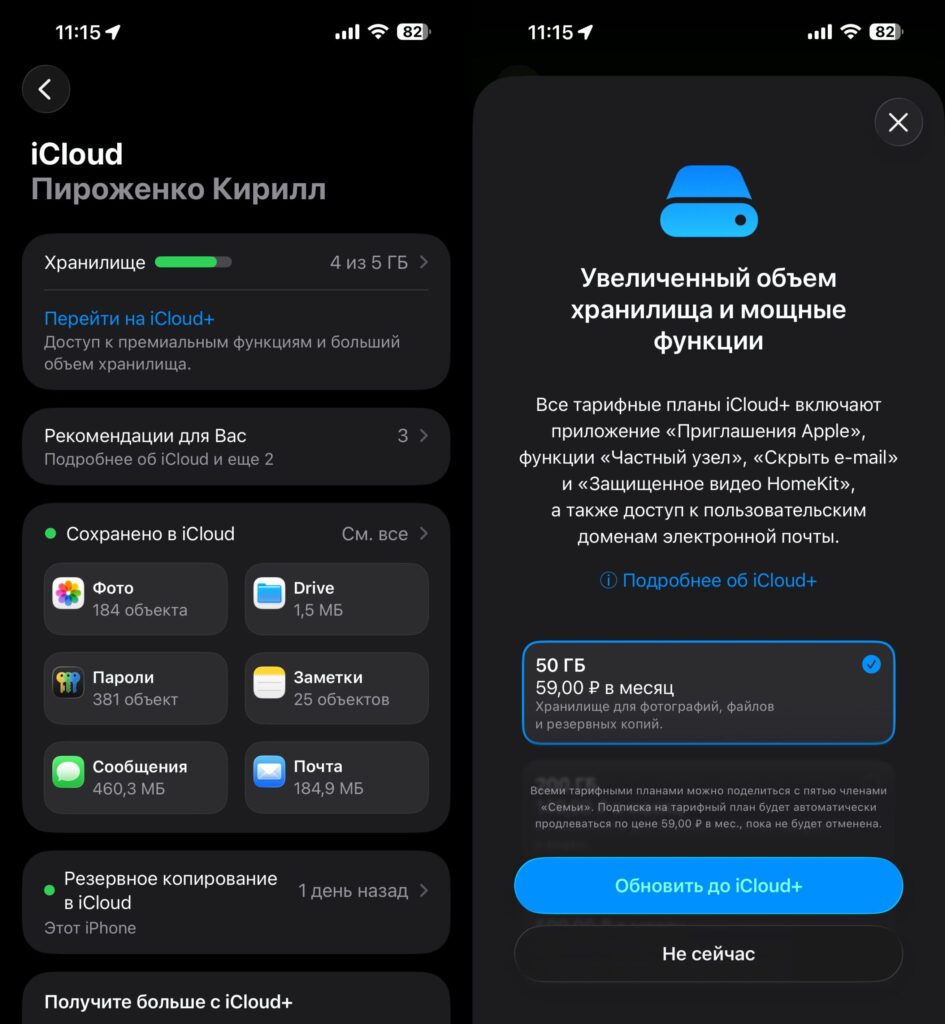
You can’t pay for iCloud with a second account since the process doesn’t go through the App Store
On iPhone, two parallel layers of authorization work simultaneously. One is for iCloud, backups, photos, notes, and Find My. The second is for the App Store and media purchases. You can set different Apple IDs for each, and the system allows this.
But the iCloud+ subscription is charged only from the account designated as the primary one for iCloud. The foreign Apple ID in the App Store has no effect on this payment. The same applies to additional charges for extended Apple One plans if the primary account is linked to iCloud.
Adding a Second Apple ID on iPhone
The procedure takes a couple of minutes but requires care. It’s important not to confuse where exactly you’re signing in, otherwise you risk resetting your iCloud sync.
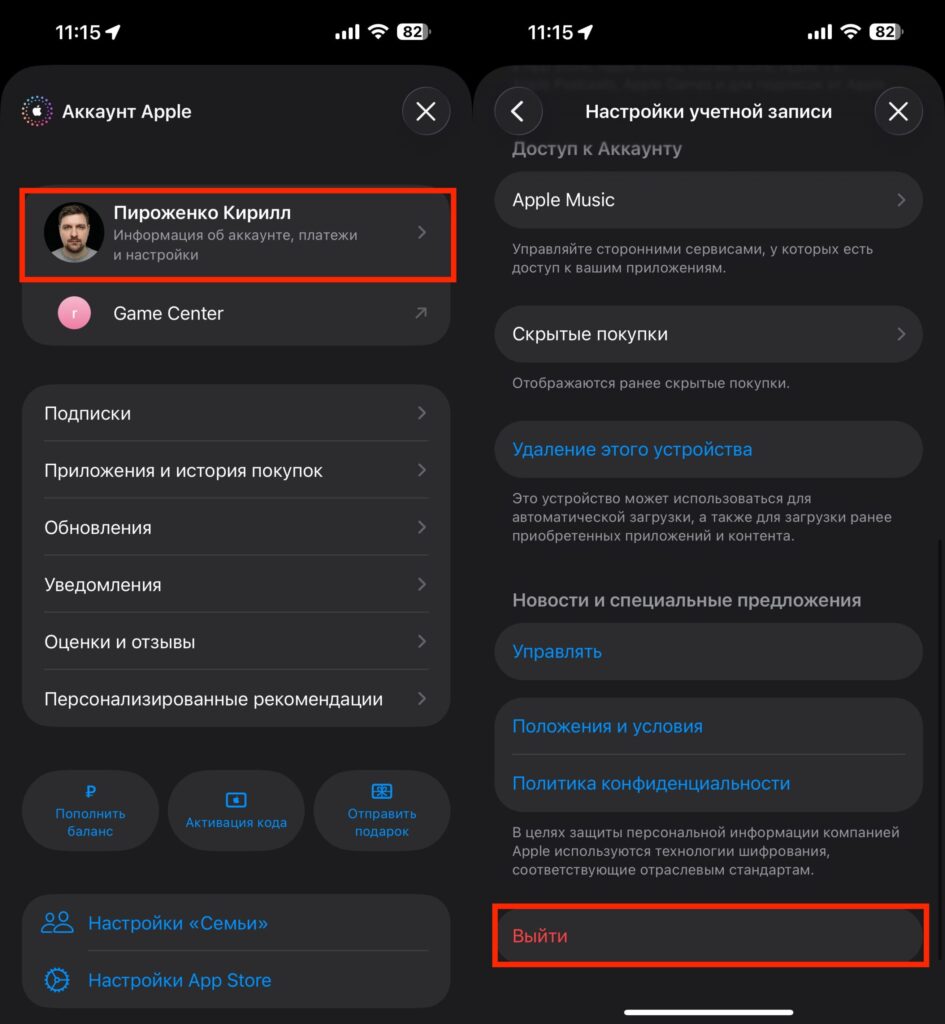
Sign out of the primary and sign in with the backup Apple ID
- Open the App Store and tap your avatar in the upper right corner
- Tap your name and at the very bottom of the page tap “Sign Out”
- Sign in with the second Apple ID set to the desired region
After this, the App Store will work with the foreign account, while all your photos, contacts, and backups will continue to be stored on your primary Russian Apple ID. No data will be lost.
Topping Up a Foreign Apple ID in 2026
It’s impossible to link a Russian bank card to a foreign account, just as it is to add a mobile phone number. The only working method is App Store gift cards for the required region.
You can buy them through intermediaries. The most popular options:
- Gift card resale services — the price is usually 10–20% above face value
- Marketplaces like Ozon and Wildberries, where sellers offer App Store codes for various regions
- Banks such as Sber, T-Bank, Ozon, and others
- Specialized Telegram bots
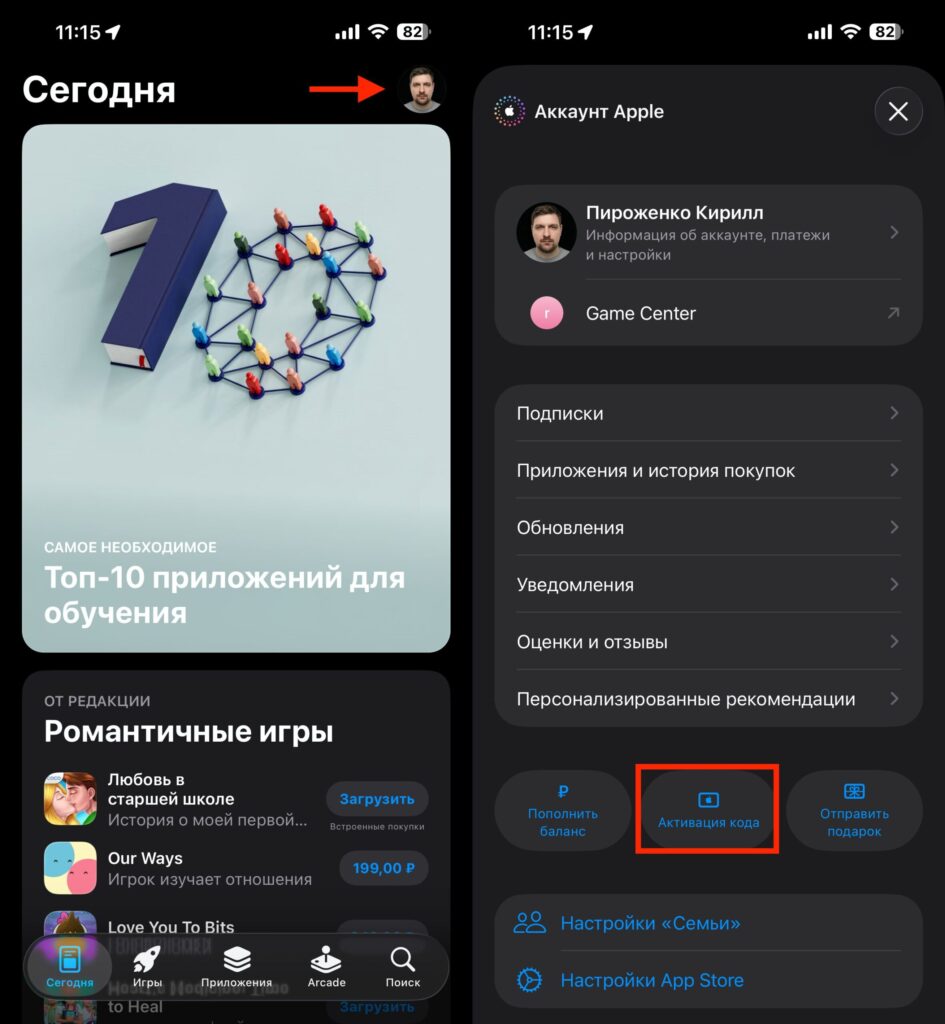
The purchased code is activated in this section
After purchase, the code is activated in the App Store through the “Redeem Gift Card” section. The money goes to the foreign Apple ID balance, and it can be used to pay for any apps and subscriptions in that region.
How to Pay for iCloud on iPhone in 2026
Here, the second account scheme won’t work. The only way is to change the region of your primary Apple ID to a foreign one and top it up the same way — through gift cards.
Before changing the Apple ID region, it’s important to prepare:
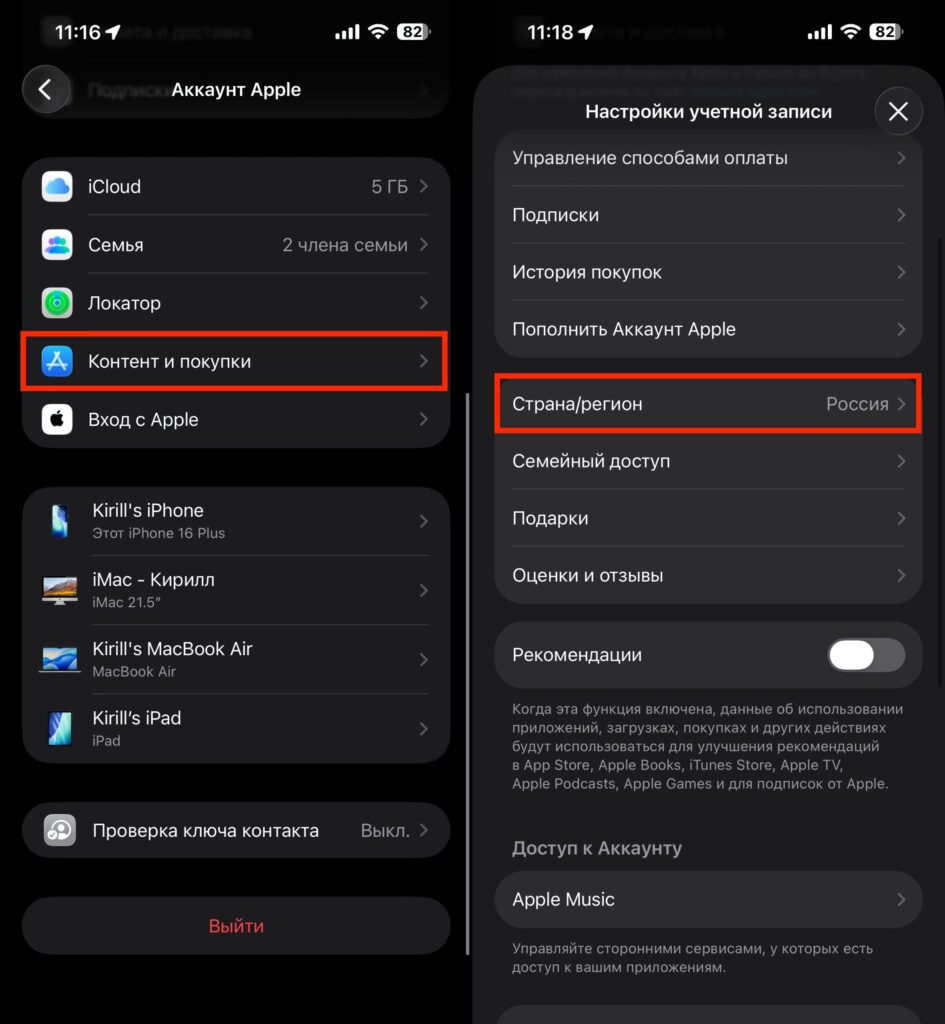
The Apple ID region can be changed in a couple of minutes
- Cancel all active subscriptions made in the Russian App Store
- Zero out the Apple ID balance
- Go to iPhone Settings and tap your name at the top of the screen
- Tap “Media & Purchases”
- In the “Country/Region” line, select the desired country for your Apple ID and follow the on-screen instructions
After this, iCloud+ will be paid from the primary Apple ID balance topped up with a gift card. But keep in mind — you can only switch back to the Russian region after resetting subscriptions and balance once again.
Two Apple IDs or Region Change: Which Is Better
The answer depends on what matters more to you. If you only need apps, games, and subscriptions to third-party services — create a second Apple ID with a foreign region and keep your primary Russian one for iCloud. This is a safe option where you don’t lose anything.
If keeping an iCloud+ subscription with a large storage volume is critical — you’ll have to change the region of your primary account and accept that the entire App Store will also become foreign. A second Apple ID is not needed in this situation.
The third option is a combined approach. Some users keep their primary account in the Russian region and pay for iCloud through Family Sharing, where the family organizer is in another country. But this scheme requires a trusted person abroad and isn’t suitable for everyone.


