How to pay for Apple subscriptions in Russia today is one of the most popular questions. Apple Music, iCloud+, Apple Arcade, Apple TV+, Apple One — these services have become an integral part of the ecosystem. But since April 1, 2026, the usual ways to pay for Apple subscriptions in Russia have stopped working. We’ve already covered in detail why you can no longer top up a Russian Apple ID from a mobile phone balance. In this article, we’ll break down how to pay for a subscription on an iPhone, which region has cheaper subscriptions, and how to subscribe to Apple for a year.
Paying for Apple subscriptions and more
What Subscriptions Does Apple Offer
Before discussing how to pay for Apple subscriptions in Russia, let’s list the main ecosystem services:
- Apple Music — music streaming (over 100 million tracks).
- Apple Arcade — a library of games without ads or in-app purchases.
- iCloud+ — expanded cloud storage (from 50 GB to 12 TB). This subscription is needed for backups and syncing.
- Apple TV+ — original movies and series.
- Apple Fitness+ — workouts (not available everywhere).
- Apple One — a bundled subscription (includes Music, TV+, Arcade, and iCloud+).
Separately, there are subscriptions in third-party apps — YouTube Premium, ChatGPT Plus, Telegram Premium, translators, fitness services, dating apps. All of them are paid through Apple’s billing, so they share the same fate as Apple subscriptions.
Any Apple subscription works through the App Store and is tied to your Apple ID region. This is exactly what’s causing the subscription payment problem in Russia right now.
You can top up a foreign Apple ID using gift cards, which are always available at the Paytool store.
How You Can Currently Pay for Apple Subscriptions
How to pay for an Apple subscription without changing your region? If your Russian Apple ID already has money on the balance, you can pay for subscriptions without changing the region — funds will be automatically deducted for Apple Music, iCloud+, App Store, and other services.
But if the balance is empty, the only working method for paying for Apple subscriptions in Russia is changing your account region to a country where alternative payment methods and foreign payment options are available.
Brief algorithm:
- Make sure there are no remaining funds on your Apple ID balance;
- Cancel all active subscriptions — they must be completed by the end of the paid period;
- In Apple ID settings, select “Country/Region” — “Change Country or Region”;
- Specify the new country, accept the terms, and enter payment information or tap “None.”
A detailed step-by-step guide on changing your Apple ID region has been published in a separate article — follow the link to learn about all the nuances.
How Changing Your Region Affects Apple Subscriptions
Changing your Apple ID region determines which apps and games are available in the App Store, what subscription prices will apply, and how you can pay for subscriptions on your iPhone. The region directly affects access to services and content for your device.
When changing your region:
- the currency and prices in the App Store change;
- some services appear or disappear (for example, Apple News+ is only in the US, Apple Fitness+ is also not available everywhere);
- all your data, purchases, and iCloud settings are preserved;
- you can use gift cards from the new region to top up your balance.
The most popular regions to choose from are Turkey, the US, and Kazakhstan. In brief:
Turkey — the country with the cheapest Apple subscriptions. Subscription prices are noticeably lower than in the US. However, due to local legislation, Apple Music Classical, Apple Fitness+, Apple News+, Apple One, as well as purchasing most books and movies are unavailable. Apple Podcasts only works with free podcasts.
USA — the most complete region in terms of content. All Apple services are available: Apple Fitness+, Apple News+, Apple One, purchasing books, movies, and TV shows. Prices are higher than in Turkey but lower than in Europe. Suitable for those who need maximum functionality.
Kazakhstan — a compromise option. Prices are higher than Turkey’s but lower than America’s. Pros include a partially Russian-language store interface, Apple Music Classical works (it’s not available in Turkey), and music and ringtone purchases are available. Cons — no Apple Fitness+, Apple News+, Apple One, and Apple TV only supports video syncing without movie purchases.
Below we’ll go into more detail about Apple subscription prices in popular regions, so you know exactly what you’ll be paying for and what savings you’ll get. If you’re specifically interested in music streaming, we have a separate breakdown on how to pay for Apple Music in Russia.
Subscription Prices in Different Regions
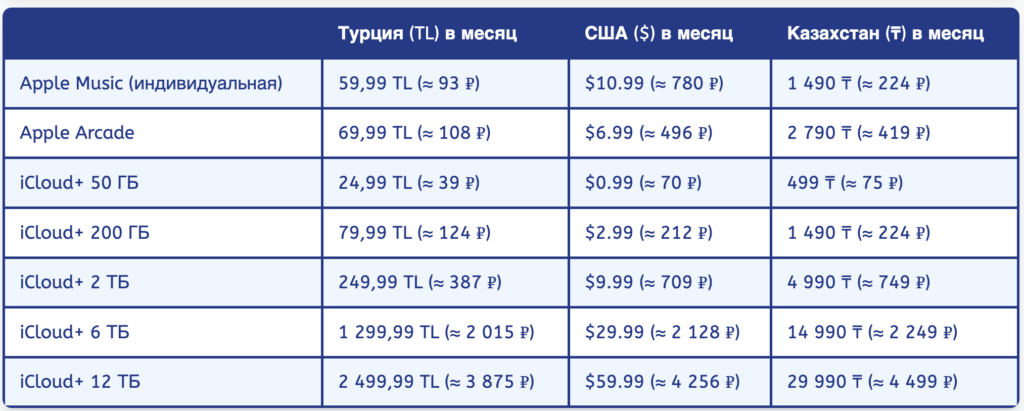
Prices differ across regions
Prices in rubles are shown at the exchange rate at the time of publication and may change.
Important: in some US states, tax is added to the subscription price in accordance with local legislation. When choosing an American account, it’s better to specify an address in a state without tax on digital goods (Oregon, Montana, New Hampshire).
Availability of Apple Services and Media Content by Country
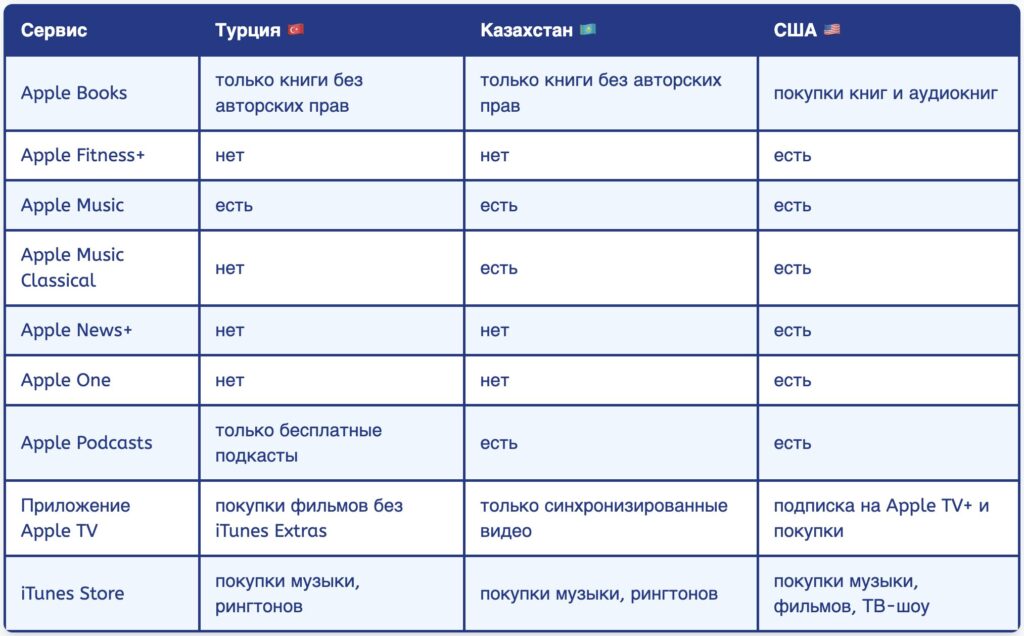
Keep in mind that not all services work everywhere. For example, Turkey doesn’t have Apple One
Beyond prices, the content of services also differs dramatically. If you’re thinking about how to pay for Apple subscriptions now, carefully study which features will be available to you:
How to Pay for Subscriptions After Changing Your Region
After the account region has been changed, subscription payment is made from the Apple ID balance, which can be topped up using gift cards from the corresponding region. You can buy a card for paying subscriptions through specialized services. Let’s look at an example of such a service:
- Go to the Paytool website;
- Choose the Apple ID region and the desired card denomination;
- Click “Go to cart”;
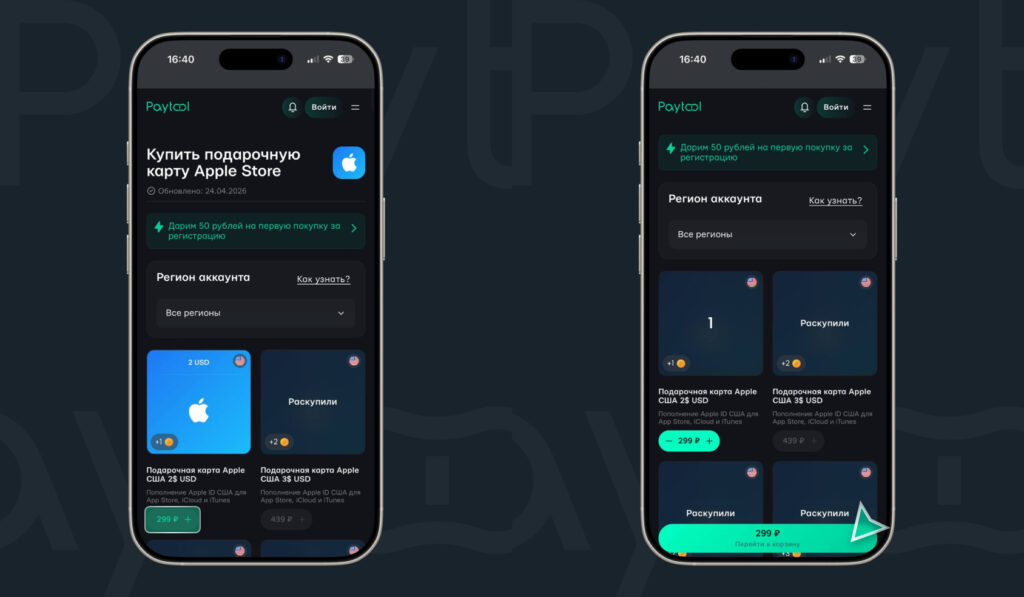
Choose the card denomination and add it to your cart
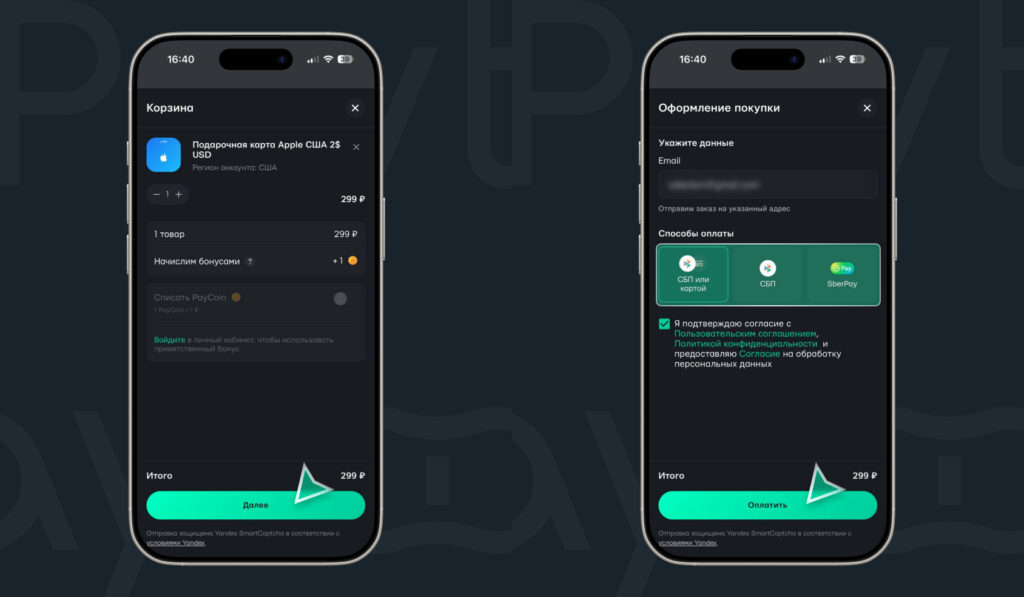
Pay for the selected card