Most of us use our smartphones manually: we turn on silent mode in the evening, turn it off in the morning, and then wonder about missed calls. All these small repetitive actions add up to irritation and wasted time. But Android already has built-in automation tools that do this for you, and you don’t need to pay for or install anything. Below are three features that genuinely change everyday phone use. They all live in standard Android settings.
Showing secret settings for Android automation
Bedtime and Wake-Up Mode on Android
The most useful scenario is automatic bedtime mode. It takes just a couple of minutes to set up in the “Digital Wellbeing” section in settings: you set your bedtime and wake-up time, choose the desired actions — and then the phone does it all by itself every evening.
What exactly happens in the evening? The screen switches to grayscale mode — this is a visual signal that it’s time to put the phone down. Then Do Not Disturb mode kicks in, suppressing notifications. If you want, you can also add dark theme and screen dimming. The result is a smooth end to the day, rather than an abrupt shutdown.
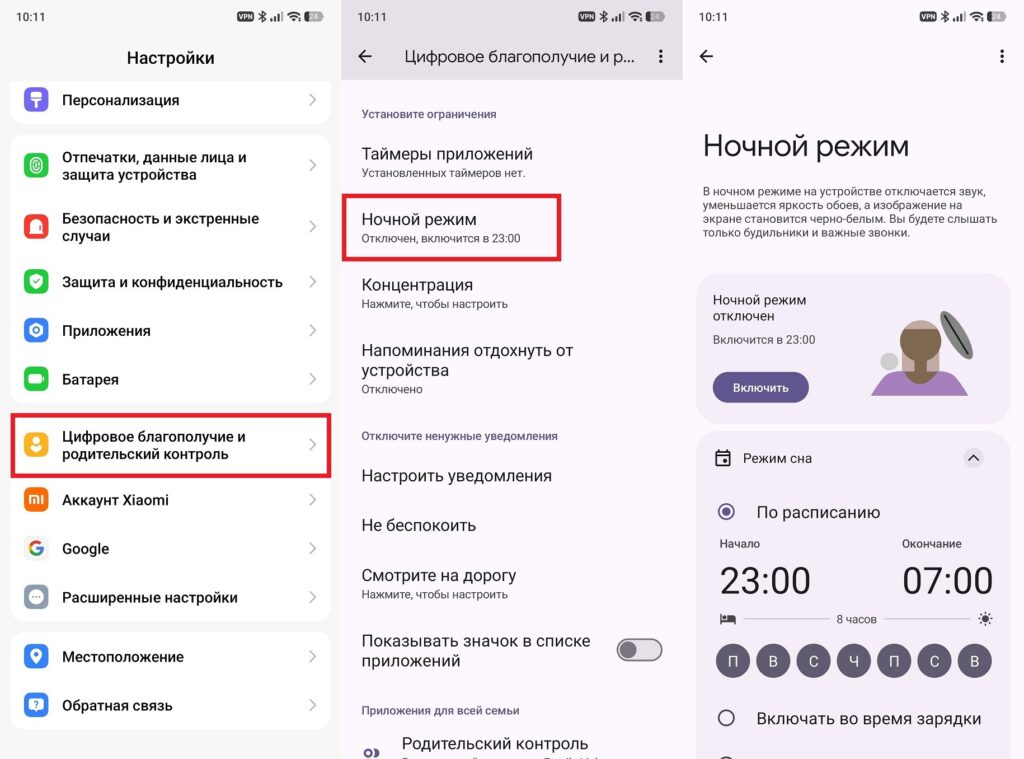
Set up a bedtime mode schedule
In the morning, everything reverses: at the set time, Do Not Disturb turns off, the screen returns to normal colors, and the phone is ready for work. If you often have long days, the charging-based trigger option is useful: plug your phone in to charge after 9 PM — and the automation kicks in on its own.
Focus Mode on Your Phone
If bedtime mode takes care of the evening, Focus Mode works during the day. The concept is simple: you pre-select a list of apps that get paused while the mode is active. You can’t open them, and notifications don’t come through either.
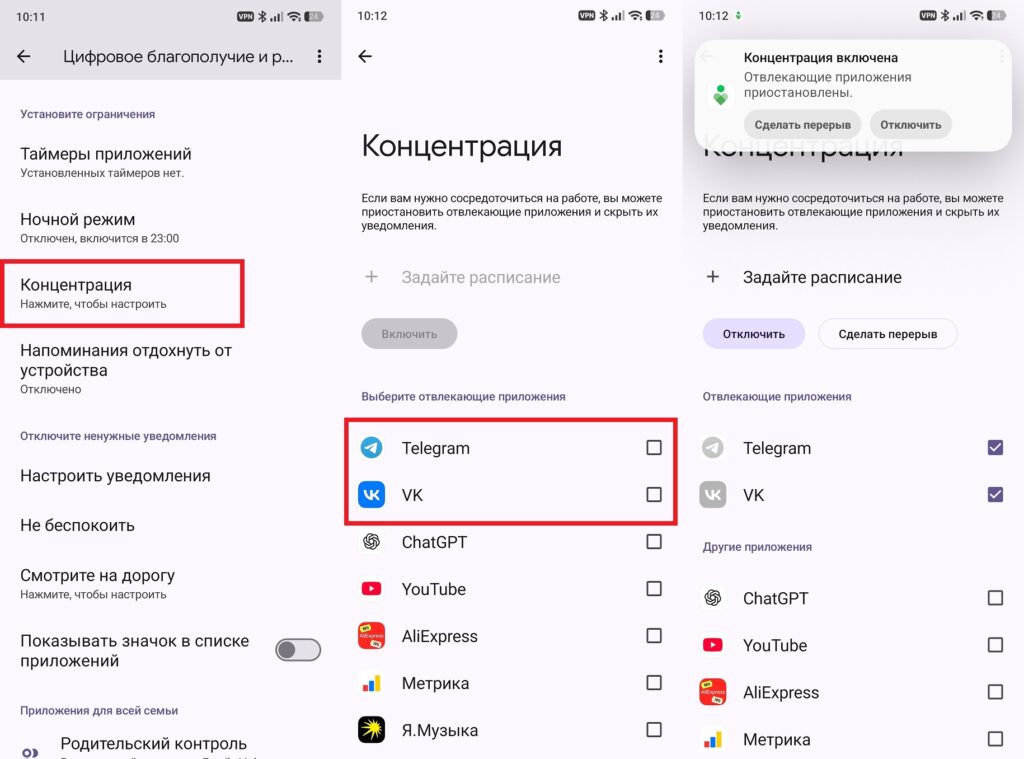
This way you’ll get distracted by apps less often
The main convenience is scheduling. I set it up so that the mode activates at the start of the workday: all the apps you open on autopilot get blocked before you even think about them. This solves the willpower problem — or rather, the lack of it. To keep it from becoming a strict prison, there’s a “Take a Break” button: you can unlock everything for 5, 10, or 15 minutes. It’s handy when you need to urgently check something rather than wait until the end of the workday.
App Timers on Android
A separate tool is app timers, also part of Digital Wellbeing. This is the most precise of the three settings: you set a maximum daily usage time for each app individually. For example, 30 minutes each for YouTube and the same for Instagram. After the limit is used up, the app icon grays out until the end of the day and resets at midnight. Additionally, the system shows how much time you’ve spent in each app — the picture is usually sobering.
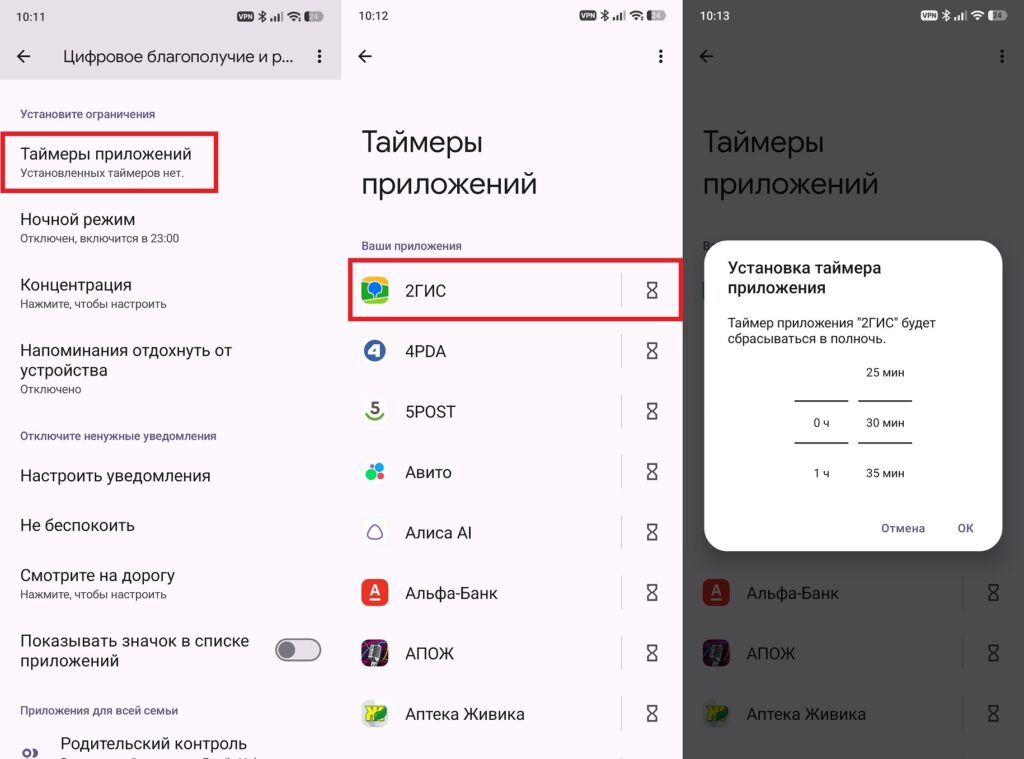
Apps will close automatically when the timer runs out
How is this different from Focus Mode? Focus Mode simply disables an app on a schedule, while a timer lets you use the app but limits the duration. YouTube, for example, is often needed for work but easily sucks you in — 30 minutes is enough to watch what you need without falling into an endless feed.
Who Needs These Hidden Android Settings
The main advantage of all three features is that you don’t need to download anything. They’re already built into Android and located in the standard settings — look for Bedtime Mode, Focus Mode, and App Timers in the “Digital Wellbeing” section. Setup takes a couple of minutes, and then the phone does everything on its own.
Who will find this useful: those who get glued to their phone, forget to turn off silent mode, or want to fall asleep properly without a glowing screen. If you already use your smartphone in a disciplined way, you don’t need to bother much.


