It’s 2026, and today AI has taught those who never could to write, and even those who never held a brush or pencil in their lives to draw. Creating a song with a neural network is also something anyone can do today — without a music education, a studio, or even the ability to sing. All you need is a browser and a few minutes. In this article, we’ll walk through the entire process step by step: from writing lyrics to a finished track with vocals. We’ll compare five of the best music generation services, show you how to properly compose prompts, and explain how to get a quality result for free and in Russian.
In 2026, anyone can create their own song. All you need is a little time and desire
How a Neural Network for Music Creation Works
Before moving on to practice, it’s worth briefly understanding how music generation by a neural network works — this will help you formulate requests more precisely and get better results.
How to create a song with a neural network — best services
Modern AI music models are trained on massive datasets of audio recordings, musical scores, and song lyrics. They have learned patterns: how verses and choruses are structured, how melody changes depending on genre and tempo, which chords are typical for a pop ballad, and which for punk rock. When you enter a text request (prompt), the algorithm analyzes it and generates an original composition based on learned patterns. This is not a search for a similar track in a database — the neural network actually creates new audio.
Different services specialize in different things. Some focus on vocal quality, others excel at instrumental arrangements, and still others allow fine control over the track’s structure. But the general principle is the same: the more precise and detailed your request, the more predictable and higher-quality the result.
How to Write Song Lyrics for a Neural Network
The first question when creating a song with a neural network: where do you get the lyrics? There are two paths — write them yourself or entrust it to a language model. Both work, and they can be combined.
If you want to generate lyrics automatically, any chatbot based on a large language model will do: ChatGPT, YandexGPT, GigaChat. Describe the topic, mood, and genre. Ask it to write a verse, chorus, and optionally a bridge (a short transitional section before the final chorus). The key thing is to specify that the words should fit well into a rhythm: lines of roughly equal length, without clusters of hard-to-pronounce consonants.
Here’s an example of a good prompt for a chatbot: “Write lyrics for a sad pop ballad in Russian about a breakup. Two verses and two choruses. Short, rhythmic lines that are easy to sing. No complex metaphors.”
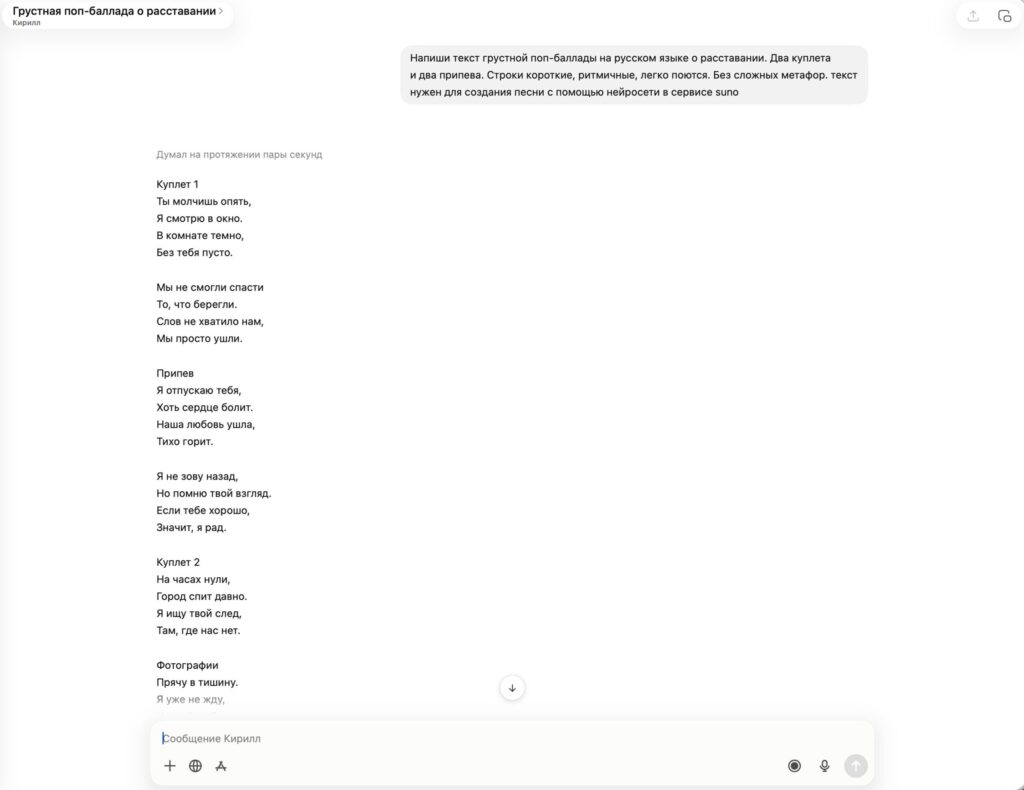
ChatGPT handles writing song lyrics excellently and even marks where the verse is and where the chorus is
If you’re writing yourself, keep a few rules in mind:
- Lines within one verse should be roughly the same length — this makes it easier for the neural network to fit them into a melody.
- Place stressed syllables on strong beats. Read the text aloud, clapping your hands on each stressed syllable — if the rhythm “jumps,” rephrase.
- Avoid long words with clusters of consonants: “predshestvovavskhikh,” “vsplesk” — all of this sounds unclear when sung.
- To start, two verses and two choruses are enough. That’s about 100-150 words of text.
Many AI music services, including Suno, can also generate lyrics themselves — right when creating a track. But the result will be better if you come with ready-made song lyrics or at least edit the suggested version.
A Song in Suno with Your Own Lyrics: Step-by-Step Guide
This is the key stage — this is where the neural network turns lyrics and style directions into a full-fledged track with instruments, rhythm, and voice. The entire process takes from 30 seconds to a couple of minutes. Let’s walk through it step by step using Suno as an example — the most popular service for song generation:
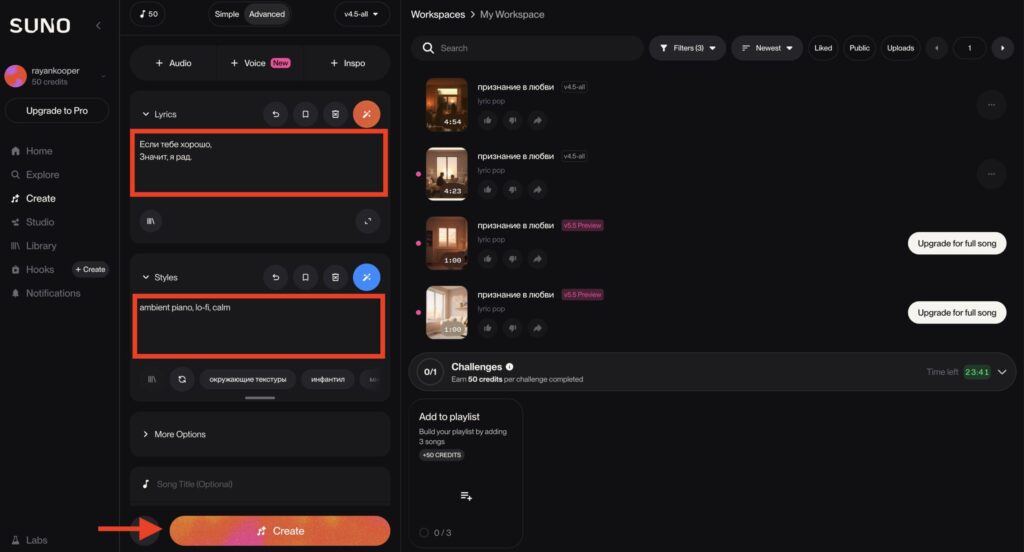
Add the lyrics, describe how you want the music to sound, and click “Create”
- Open suno.com and sign in with your Google, Apple, or Discord account.
- Click the Create button. By default, the service will offer automatic lyrics mode — switch to Custom if you want to paste your own.
- Paste your song lyrics into the Lyrics field. If you don’t have lyrics — leave the field empty, and Suno will generate the words itself based on the style description.
- In the Style of Music field, describe the genre, mood, tempo, and instruments — preferably in English, but Russian works too.
- Click Create. In 30-60 seconds, you’ll get two versions of the track — listen to both and choose the best one.
The quality of the result directly depends on how you described the style. Here’s a comparison of good and bad prompts:
| What you want | Bad prompt | Good prompt |
|---|---|---|
| Sad song | sad song | sad indie folk, melancholic, acoustic guitar, female vocal, slow, 72 BPM |
| Dance track | dance music | upbeat dance pop, female vocal, synth, energetic, 128 BPM |
| Rock | rock | alternative rock, distorted guitar, male vocal, aggressive, mid-tempo, 110 BPM |
| Calm background | something calm | ambient piano, lo-fi, calm, no vocals, 60 BPM |
| Retro sound | 80s style | 80s synth-pop, drum machine, reverb vocals, retro, upbeat, 118 BPM |
Note: prompts are better written in English. Most models are trained primarily on English-language style descriptions, and “sad indie folk with acoustic guitar” will give a noticeably more accurate result than the same phrase in Russian. However, song lyrics can be in Russian — Suno and Udio handle Russian-language vocals well.

The process of creating a track in Suno: paste the text, describe the style — and get a finished song
If you only need an instrumental track without vocals, enable Instrumental mode. This is convenient when you plan to overlay your own vocals or use the melody as background for a video.