The MAKS messenger (МАКС) lets anyone who has your phone number find your profile by default — including your name, photo, and online status. If your number has ever been shared in group chats, online listings, or leaked databases, strangers and spammers can look you up in seconds. Fortunately, MAKS includes a privacy setting that restricts phone-number search to your own contacts only, and it takes just a few taps to enable.
What you need to know
- By default, anyone can search for your MAKS profile using your phone number and see your name, avatar, and online status.
- Changing the “Find me by number” setting to “Contacts only” means only people already in your contact list can discover you via phone number search.
- The setting is found under Settings → Security → “Find me by number” in both the mobile app and the web version, and it syncs across devices automatically.
- The source author recommends enabling this restriction on children’s accounts as a priority, since school and class group chats can expose a child’s number to many strangers.
Disabling phone number search adds another layer of security
Why hiding your number matters
As long as phone-number search is set to “everyone,” any person can type in your number and immediately see your MAKS profile — your name, photo, and sometimes your “last seen” status. According to the source, it only takes one instance of your number appearing on a classifieds site, a store form, or someone else’s group chat for it to spread beyond your control.
The practical risks are straightforward: spammers and scammers run leaked number databases through messengers and message anyone who turns up. Unwanted contacts from the past can find you even if you never shared your details with them directly. And your profile can reveal more than you intend — your avatar, display name, and activity timestamps.

With this setting, only your contacts can find you
Once you switch the setting to “Contacts only,” only people who are already saved in your contact list can find you by phone number. For everyone else, your profile simply does not appear in search results — though your account continues to function normally.
How to change the setting in the MAKS app
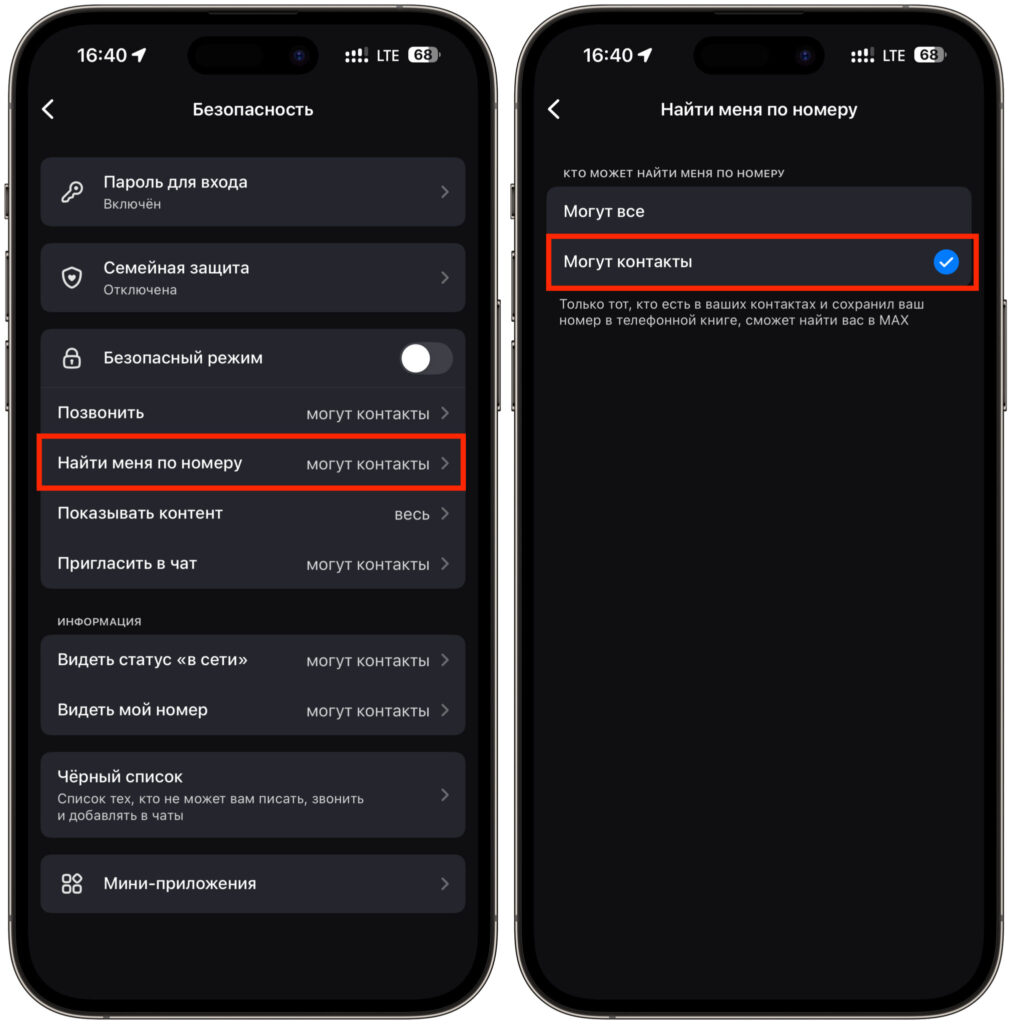
Changing the setting in the MAKS app
- Open the MAKS app and go to Settings (usually behind the profile icon or the menu button in the corner of the screen).
- Tap Security. All privacy-related options are collected here, not in the general account settings.
- Find the line labeled “Find me by number” and tap it.
- Select “Contacts only” instead of the default option that allows everyone to find you.
The change takes effect immediately — there is no separate save step. From this point on, a new person can only find you by phone number if they are already in your own contact list. Strangers will not see you in search results.
The source author also recommends checking neighboring options in the same Security section, such as settings for online status visibility, group invitations, and calls from unknown users.
Using the web version instead
If you do not have the MAKS app installed (for example, because it was removed from the App Store), the web version works in a browser and, according to the source, offers nearly the same functionality. The path to the privacy setting is identical:
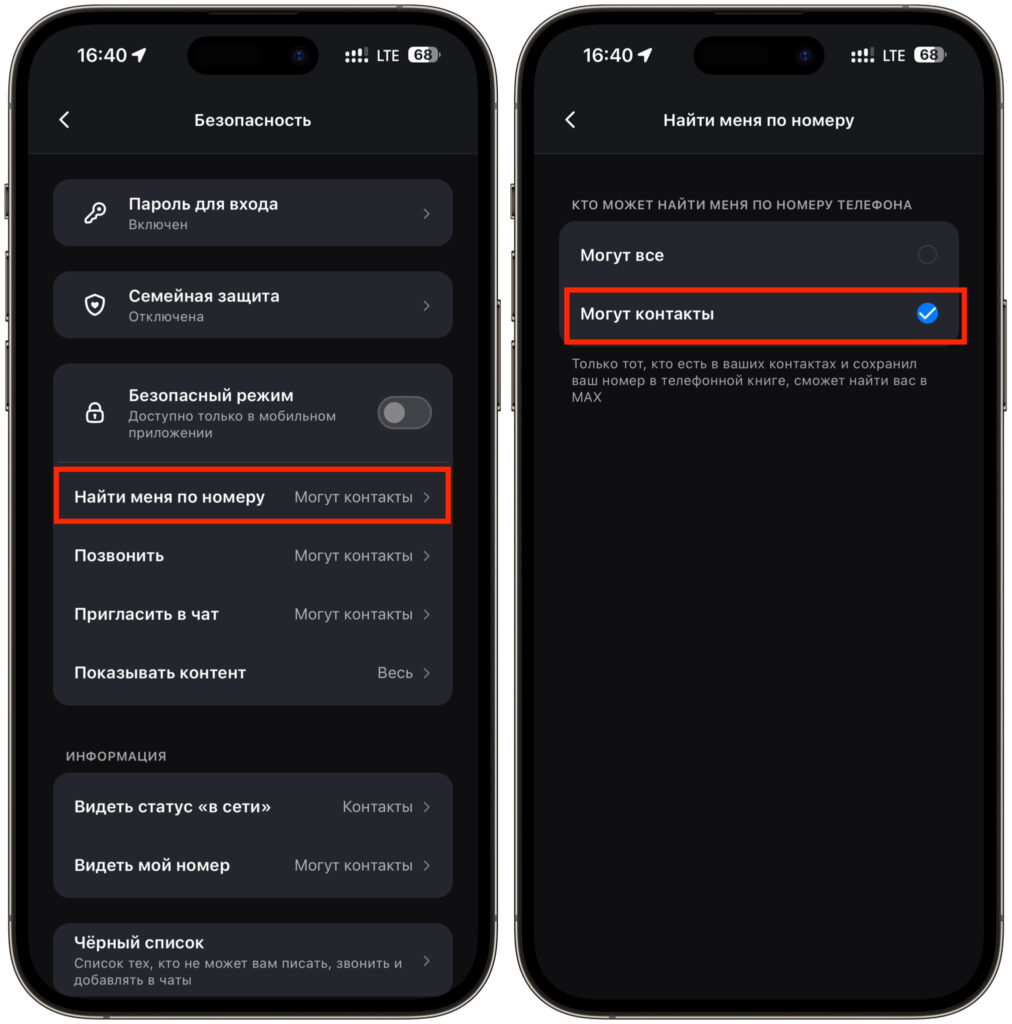
The web version follows the same steps as the app
- Open the MAKS web version in your browser and log in to your account.
- Go to Settings via the profile icon or the side menu.
- Select the Security section.
- Open “Find me by number.”
- Choose “Contacts only” and close the settings.
According to the source, MAKS settings sync between devices. Enabling the restriction in the web version automatically applies it in the mobile app as well, so there is no need to repeat the process.
Why this matters especially for children’s accounts
The source author highlights children’s accounts as a particular concern. As school and class group chats move to MAKS, children’s phone numbers end up in the contact lists of classmates, their parents, teachers, and extracurricular groups. From there, the number can spread through group chats in ways that are impossible to track.
With phone-number search left open to everyone, any stranger who happens to have a child’s number can message them directly. With the “Contacts only” setting enabled, a person who is not in the child’s contact list cannot find them through search and cannot initiate a conversation. Only people the child or parent has deliberately added as contacts will be able to reach them.
The source author recommends enabling this restriction on children’s devices before handing the phone over, noting that it takes the same half-minute as on an adult account but provides significantly more peace of mind.


