Google is rolling out a new layer of protection for sideloading Android apps from unverified developers. The change introduces a mandatory 24-hour waiting period before users can install APK files from sources outside Google Play. This is separate from the existing “install from unknown sources” permission and the Play Protect post-install scanning that Android already uses. The new mechanism is tied to a broader mandatory developer verification program launching on September 30 in Brazil, Indonesia, Singapore, and Thailand, with a global rollout planned for the following year.
What you need to know
- Google is adding a new “advanced” sideloading mode that requires enabling Developer Options and waiting 24 hours before APK installation from unverified developers is allowed.
- Developer verification launches September 30 in Brazil, Indonesia, Singapore, and Thailand, with worldwide expansion planned for the following year.
- The permission can be granted temporarily (seven days) or indefinitely, and installing apps via ADB (Android Debug Bridge) is not affected by the new restriction.
- The feature is delivered through a separate app called “Android Developer Verifier” and is rolling out gradually — not all devices have it yet.
Google is introducing new restrictions on APK installation
How the new restriction differs from existing protections
Android has long required users to grant per-app permission to “install from unknown sources” — for example, allowing a specific browser or file manager to initiate APK installations. That mechanism remains in place and is unchanged.
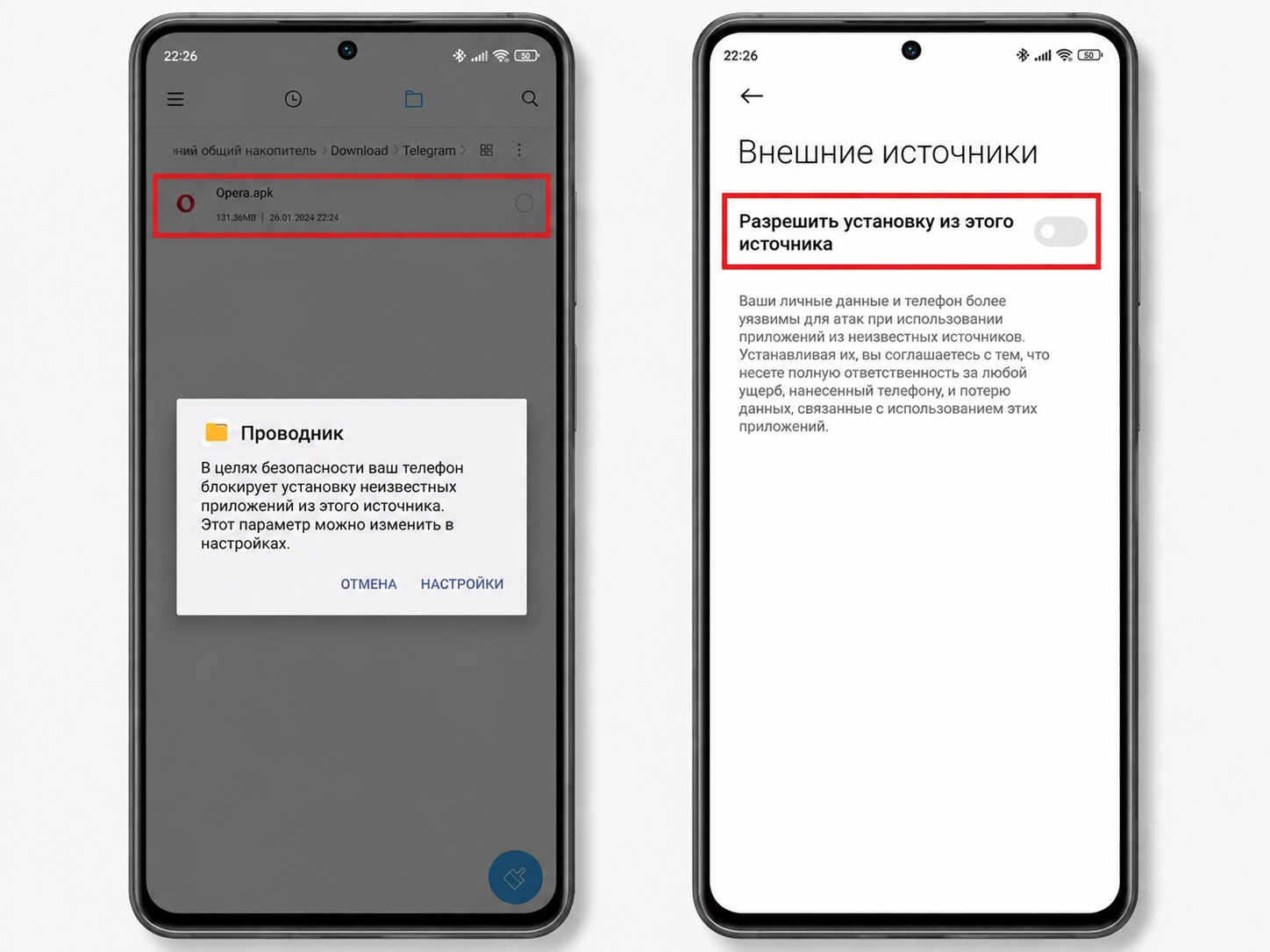
Before the new restrictions take effect, only a one-time confirmation is needed to install from unknown sources after opening an APK
Google also previously began blocking certain apps after installation through its Play Protect system. The new “advanced” installation mode is an additional layer on top of both of these, and it is specifically tied to developer verification status.
Rollout timeline
Two separate processes are at play. Google has already started rolling out the “advanced” installation mechanism itself, which the company describes as a “first version.” It is arriving gradually and is not yet available on all devices.

The developer verification requirement that underpins the system launches on September 30 in four initial markets: Brazil, Indonesia, Singapore, and Thailand. A global expansion is planned for the following year, meaning most countries are not in the first wave but should expect the change eventually.
How to enable APK installation from unverified developers
According to the source, the new toggle is located not in the standard security settings but in Developer Options. The steps are as follows:
- Open your phone’s Settings and enable Developer Mode (typically by tapping the build number several times in the “About phone” section).
- Navigate to Developer Options and find the setting labeled “Allow apps from unverified developers.”
- Enable it — the system will display warnings before starting a one-time 24-hour waiting period.
- After 24 hours, return to the same page to complete the process and gain the ability to install such apps.
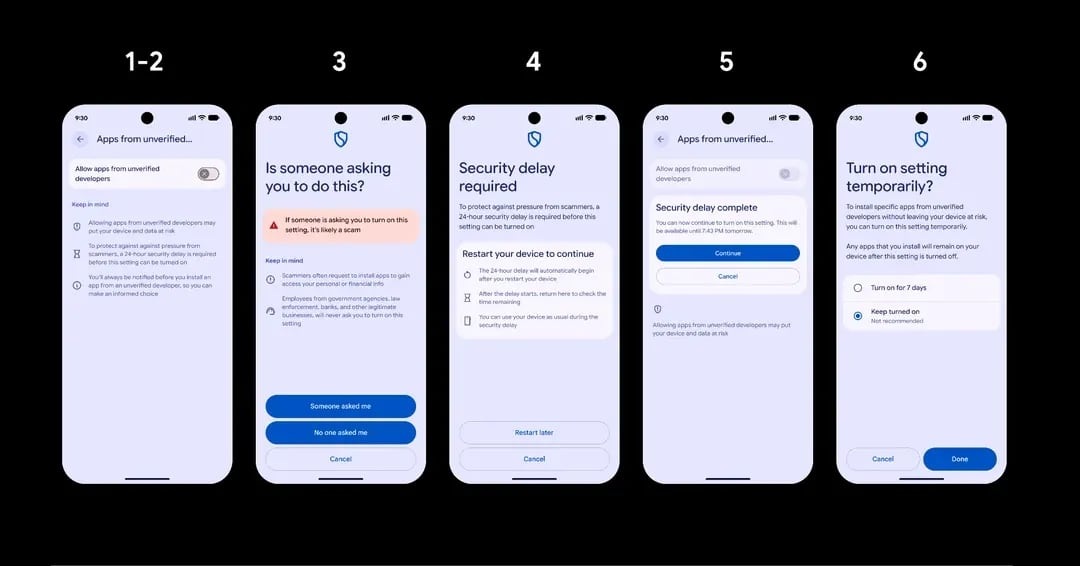
After the new rules take effect, installation must be permitted through Developer Options
The permission can be set to temporary (seven days) or left enabled indefinitely. The temporary option may suit users who sideload apps infrequently and prefer not to leave the protection disabled permanently.
Important details to keep in mind
- Once the “advanced” sideloading permission has been granted, Developer Mode can be turned off again — the permission remains active.
- Installation via ADB (Android Debug Bridge, used when connecting a phone to a computer) is not affected by the new restriction.
- The functionality is delivered by a separate app called “Android Developer Verifier,” which is rolling out gradually. If the option does not yet appear in your Developer Options menu, it has not reached your device yet.
What this means for users
Google is not outright banning APK sideloading, but it is adding significant friction: a 24-hour delay, multiple warnings, and a toggle buried in Developer Options. For users who install apps exclusively from Google Play, nothing changes. Those who regularly sideload APK files should familiarize themselves with the new Developer Options toggle in advance and factor in the 24-hour waiting period when planning to install apps from unverified sources.


