Russian Android users install apps such as SberBank Online, VK, the MAX messenger and Ozon Bank from RuStore or as APK files from developers’ websites rather than from Google Play. On 24 September, Digital Development Minister Maksut Shadaev acknowledged that the ministry is preparing for a scenario in which even that route could one day be closed off. The cause is not sanctions but Google’s new developer verification rules for Android, which begin switching on 30 September. A closer look at those rules shows that, for now, Russia is one of the few places where they will not apply at all.
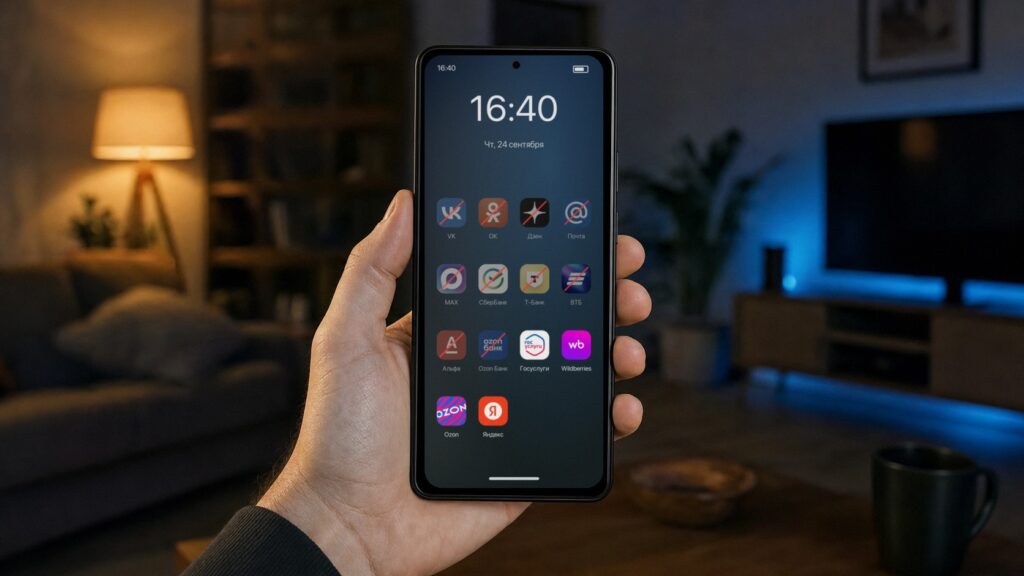
A smartphone with crossed-out VK, Sber and MAX icons
What you need to know
- Google’s developer verification switches on 30 September in only four countries: Brazil, Indonesia, Singapore and Thailand, and only in seven app stores; APK files from websites are not yet checked even there.
- Google plans a worldwide rollout in 2027, but its developer documentation says verification will not operate in sanctioned countries; according to CNews, that means Russia, Iran, Cuba and North Korea.
- Unverified apps will not be banned outright but will require an “advanced mode” involving developer settings, a reboot, a 24-hour wait and identity confirmation by fingerprint, face or PIN.
- Russia’s Digital Ministry says access to apps inside the country will be preserved, but treats a possible change to Google’s exemption as a risk on its internal “risk map.”
What Shadaev said and why the ministry is uneasy
A smartphone with an icon grid and empty slots
Shadaev was careful to say that Google is not plotting anything against Russia. He explained that the ministry keeps a “risk map” of everything that could go wrong; some entries were once considered far-fetched, but the ministry now says it prepares for any scenario. One entry concerns Android directly:
“Google is carrying out developer verification. Right now, if we install apps on Android, there are no problems. But if tomorrow Google suddenly changes something in this program, it is unclear how it will work. We view this as a risk that, hypothetically, tomorrow it will be impossible to install apps,” Shadaev said.
The concern follows a summer of removals. On 25 June, Russian apps began disappearing from Apple’s App Store, including VK Music, VK Video, Dzen, Odnoklassniki and Mail.ru. On 16 July the same happened on Google Play, where 17 VK apps were pulled at once, among them VKontakte itself, Mail email, Yula and Marusya. The MAX messenger was removed at the same time. In August, Ozon Bank and almost all apps tied to the Ozon marketplace vanished as well.
In practice the impact was limited. Ozon complained to Google and the marketplace app was reinstated on 21 August. The VK apps did not return to Google Play, but they remained available in RuStore, Huawei AppGallery, Galaxy Store and Xiaomi GetApps, and existing installations kept working and updating.
The takeaway was that being removed from Google Play was unpleasant but not fatal: an app could always be installed from RuStore or as a file from the developer’s site. It is precisely that fallback that Google is now beginning to restrict, which is what worries the ministry.
What the verification is and why Google wants it
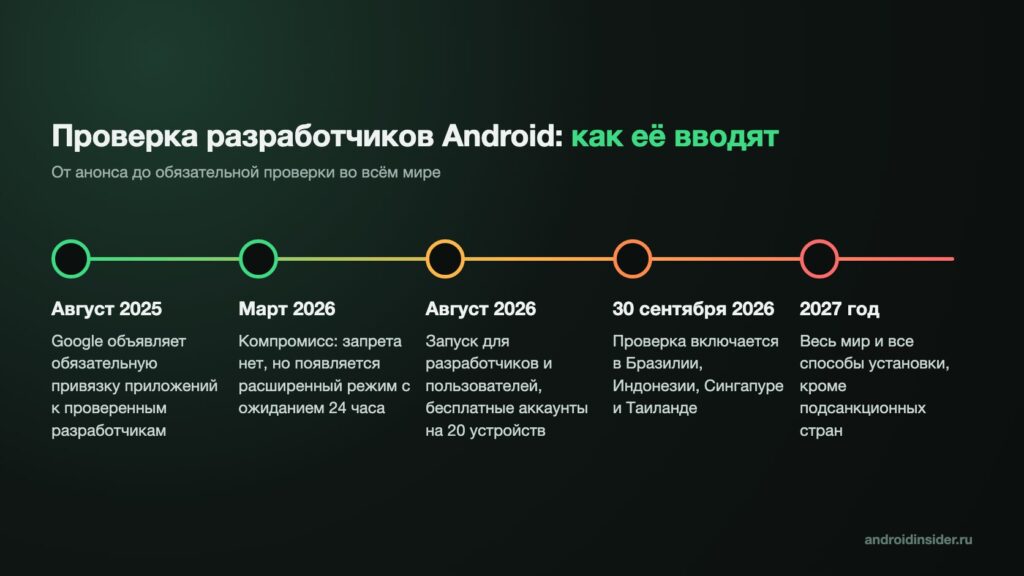
Infographic of the stages for introducing developer verification
In August of last year, Google introduced a rule that every app on an Android phone must be tied to a real, identifiable person or company. Developers publishing on Google Play have long been verified; the new requirement extends to all apps, including those downloaded as files from websites. Google frames this as an anti-fraud measure: today, when a malicious app is blocked, its author can simply republish it under a new name, which becomes far harder when each app is linked to a verified identity.
According to the source, verification requires a developer to provide Google with identity documents, an address and a phone number, while companies must also submit registration documents, and pay a 25-dollar fee. A free tier without documents exists for students and hobbyists, but apps published that way can be installed on at most 20 devices, which is of no use to a bank with millions of customers.
Google initially planned to block installation of apps from unverified developers entirely. That drew opposition from dozens of organisations, from the F-Droid store to the Brave browser, and the company partly backed down. There is no outright ban, but installing such an app now takes deliberate effort. The source notes that Google’s tougher installation flow was reported in January and that the new rules took effect in August.
How installing an app from an unverified developer will work
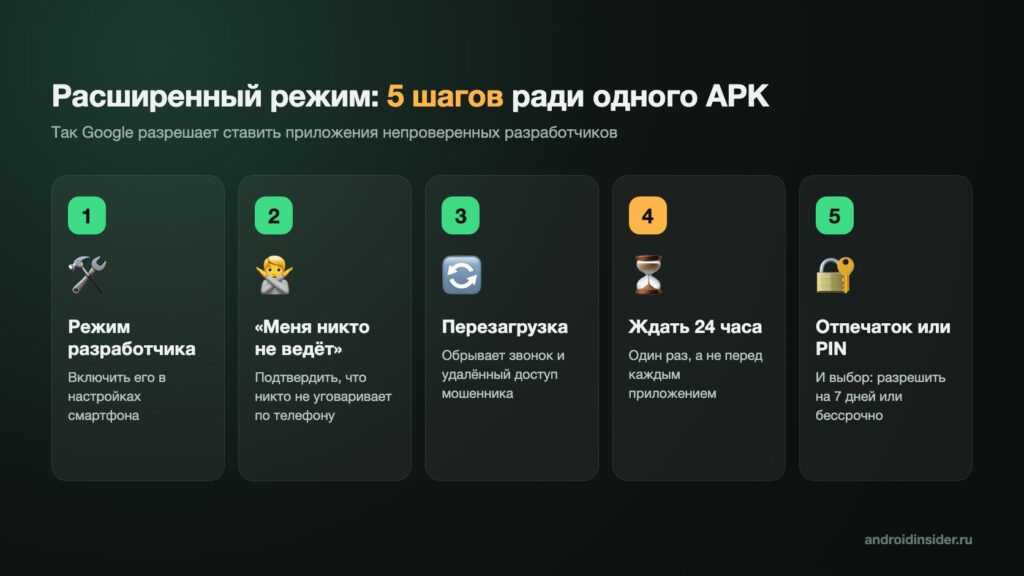
Infographic of the five steps of advanced mode
Google calls the fallback “advanced mode,” and it is deliberately designed so that it cannot be switched on in a hurry. According to the source, it involves five steps:

- Enable developer mode in the settings.
- Confirm that nobody is talking you through this over the phone; the device asks this explicitly.
- Reboot the phone. If a scammer is on a call or watching the screen at that moment, the connection drops.
- Wait 24 hours.
- Confirm your identity with a fingerprint, face or PIN, and choose how long the mode stays on: 7 days or indefinitely.
The 24-hour wait applies once, not before every installation; once the mode is enabled, apps can be installed as before. The catch, which the source says is buried in Google’s documentation, is that updates for such apps arrive only while the mode is active. Choose the 7-day option, and after a week the app simply stops updating.
Developers retain a workaround: apps can be installed from a computer over a cable without checks or waiting, though this is not realistic for most ordinary users. The verification itself is delivered to all phones running Android 7 or newer through Google’s services, with no system update required. Newer Huawei devices without Google services will not receive it at all.
Why nothing changes in Russia for now
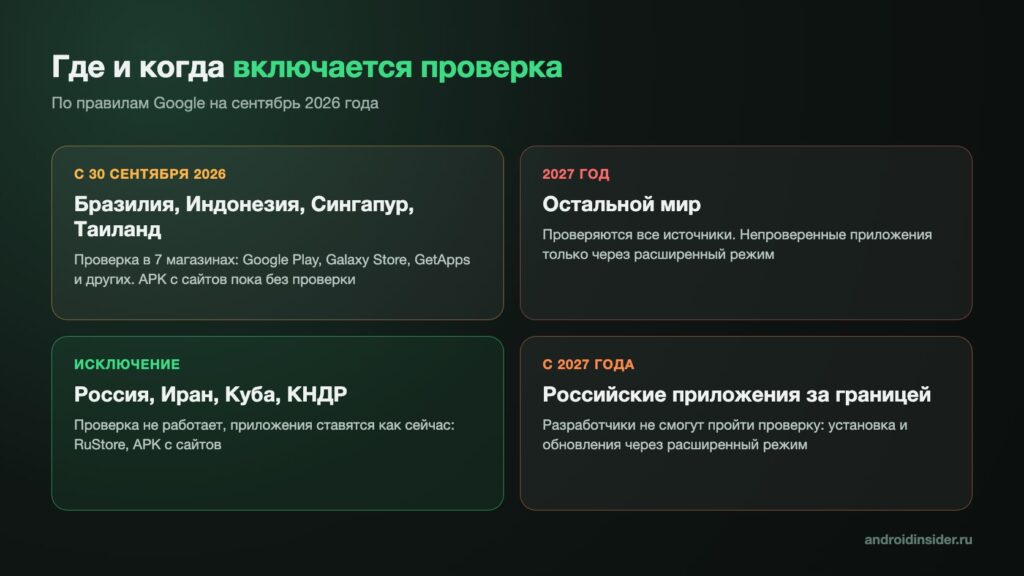
Infographic: countries and timelines for developer verification
This is the detail that has received little coverage. On 30 September, verification switches on in just four countries: Brazil, Indonesia, Singapore and Thailand, and only in seven app stores, including Google Play, Galaxy Store and the stores of HONOR, OPPO and Xiaomi. Files downloaded from websites are not yet checked even there. Google says it plans to extend the rules worldwide in 2027.
Russia, however, is not part of that “worldwide” rollout, at least for now. Google’s own documentation states that verification will not operate in sanctioned countries and that apps there can be installed as before. A company representative added that residents of those countries will not be able to pass verification. According to CNews, the affected countries are Russia, Iran, Cuba and North Korea. The result is paradoxical: users in Brazil cannot escape the new protection, while in Russia it is simply switched off.
RuStore, APK files from banks’ websites and other channels therefore continue to work as they do today. RuStore has become the primary store for many users: it had 68.4 million monthly users in July, and by law it is preinstalled on every smartphone sold in Russia. According to TASS, the Digital Ministry also says access to apps inside the country will be preserved. The source summarised the situation in a table.
| Where | When | What happens |
|---|---|---|
| Brazil, Indonesia, Singapore, Thailand | From 30 September 2026 | Verification in seven app stores; files from websites not yet checked |
| Rest of the world | 2027, per Google’s plan | Verification everywhere; unverified apps only via advanced mode |
| Russia, Iran, Cuba, North Korea | Under current rules | No verification; everything installs as today |
| Russian apps used abroad | 2027, per Google’s plan | Only via advanced mode |
Where the real problem lies
A smartphone with a timer, held at an airport
Difficulties will arise for people who live abroad or spend long periods outside Russia. Sber, T-Bank, VTB, Alfa-Bank and many others have long distributed their apps through RuStore and as website downloads, and Russian developers, by Google’s own account, will not be able to pass verification. If Google proceeds as planned, then from 2027 someone living in Kazakhstan, Serbia or Turkey and using a Russian bank card would need to install and update such apps through advanced mode, with its 24-hour wait. According to TASS, Shadaev said the impact would be greatest on apps that have already been removed from the stores.
There is also an open question Google has not answered: how a phone determines which country it is in — by SIM card, by network or by account. That determines what happens to a device during a holiday in Turkey or Egypt. The source notes that Google’s documentation says nothing on this point and declines to speculate.
The second scenario is the one the ministry fears. Everything currently shielding Russia from verification is a single paragraph in Google’s developer help pages. It was last changed on 25 March, and nothing obliges Google to keep it there indefinitely. If the company removes it, Russian apps would fall into advanced mode: developer settings, a day’s wait, and the risk that a banking app one day stops updating. The ministry says it is preparing proposals with IT companies to avoid this outcome, but has not said what they are.
What the source author recommends now
An incoming call on a smartphone next to a cup of tea
The source author argues that panic is premature but suggests a few precautions, depending on where a person lives and how they use their phone:
- Living in Russia. Change nothing, but do not uninstall RuStore even if it seems unnecessary; it is the simplest way to install and update apps that are absent from Google Play.
- Living abroad or planning to move. Once verification reaches your country, enable advanced mode once, in advance, rather than on the day you urgently need to transfer money. Choose the indefinite option; otherwise banking apps will stop updating after a week.
- Helping parents with their phone. Tell them that no bank, “security service” or government portal ever asks users to enable developer mode and reboot the phone. Google’s advanced-mode prompt about whether someone is coaching you exists for a reason: phone scammers work precisely by persuading victims to install a “protective app” from a file.
The source author’s reading is that Shadaev’s remarks should not be taken as “Google will soon cut off our apps.” Rather, they are an admission that everything Russian users rely on in Android rests on Google’s continued permission to install apps outside its store. For now Russia has an exemption that makes life easier there than in Brazil. But an exemption is not a guarantee, and the ministry knows it.


