A familiar situation: your smartphone is lying on the table, the screen doesn’t light up, there’s no sound, but as soon as you pick it up, there’s an unread notification. You open Telegram and see a new post in a channel or a message from a friend. The notification arrived, but as if sneaking in on tiptoes. Next to it is a small bell with a crossed-out line. What is this new nuisance in Telegram? Or is it not new at all?

You’ve probably seen such notifications many times
Why Telegram Messages Arrive Without Sound
In such moments, many people blame the iPhone: something broke, need to restart. They restart, and it’s useless. Let me reassure you: your phone is perfectly fine. What you’re seeing is called a silent notification.
This is a standard Telegram feature, and it works exactly as intended. The message reaches you instantly, pops up on the lock screen, appears in the notification shade, but is not accompanied by sound or vibration. The phone doesn’t disturb you — it simply quietly places the letter in your mailbox.
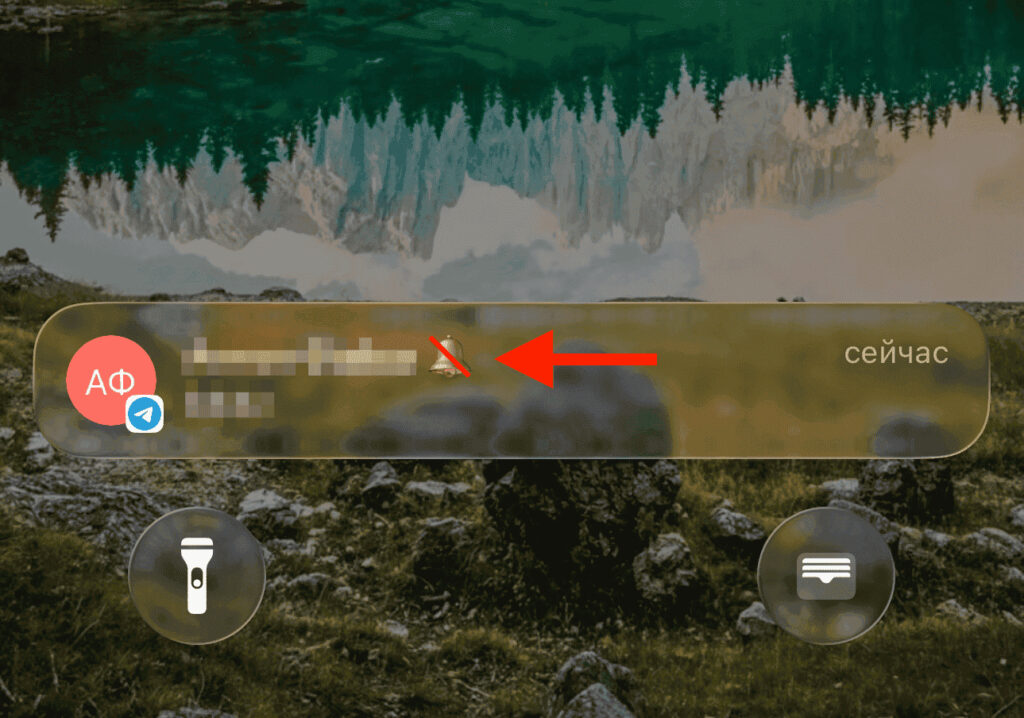
It turns out this is not a bug, but a feature
Identifying such a notification is easy. That very crossed-out bell is the silent marker. If you see it next to a message, it means the sender specifically chose silent mode. It’s not a firmware glitch, not a settings error, and not a carrier conspiracy. Restarting is useless here because there’s nothing broken.
Why is this even needed? Imagine someone texting you at 1 AM. The question isn’t urgent, they expect an answer in the morning, but their conscience won’t let them wake you with a notification chime. Silent mode solves this task elegantly. The message is delivered, and your sleep is undisturbed. The same logic applies to channels: not every post is worth pulling subscribers away from their activities.
Why Some Telegram Notifications Come With Sound and Others Don’t
There’s an important distinction here, because in channels and in personal messages the mechanics are different. In channels, the decision is made by the administrator. When an author publishes a post, they choose whether to wake subscribers with sound or deliver the news silently. The subscriber has no influence over this: the setting lives on the channel’s side. That’s exactly why notifications from one channel come with sound, while another stubbornly stays silent — even if you never turned off the sound yourself. It’s not your settings malfunctioning; the channel’s editorial team decided it this way.
In personal chats, everything is in the sender’s hands. Anyone who writes to you can send a message in silent mode. They decided not to disturb you, pressed the right button, and the message went out without sound. You didn’t change anything and didn’t press anything. The other person simply showed some tact.
It turns out that a silent notification is always the choice of the one who writes, not the one who reads. So if a silent channel bothers you, there’s no point digging through your own iPhone settings. The source of the silence is on the other side of the screen.
How to Publish a Post in Telegram Without Sound
If you run your own channel and want to publish a post without disturbing subscribers with sound, it’s done in a couple of taps. The bell is hidden right in the send bar.
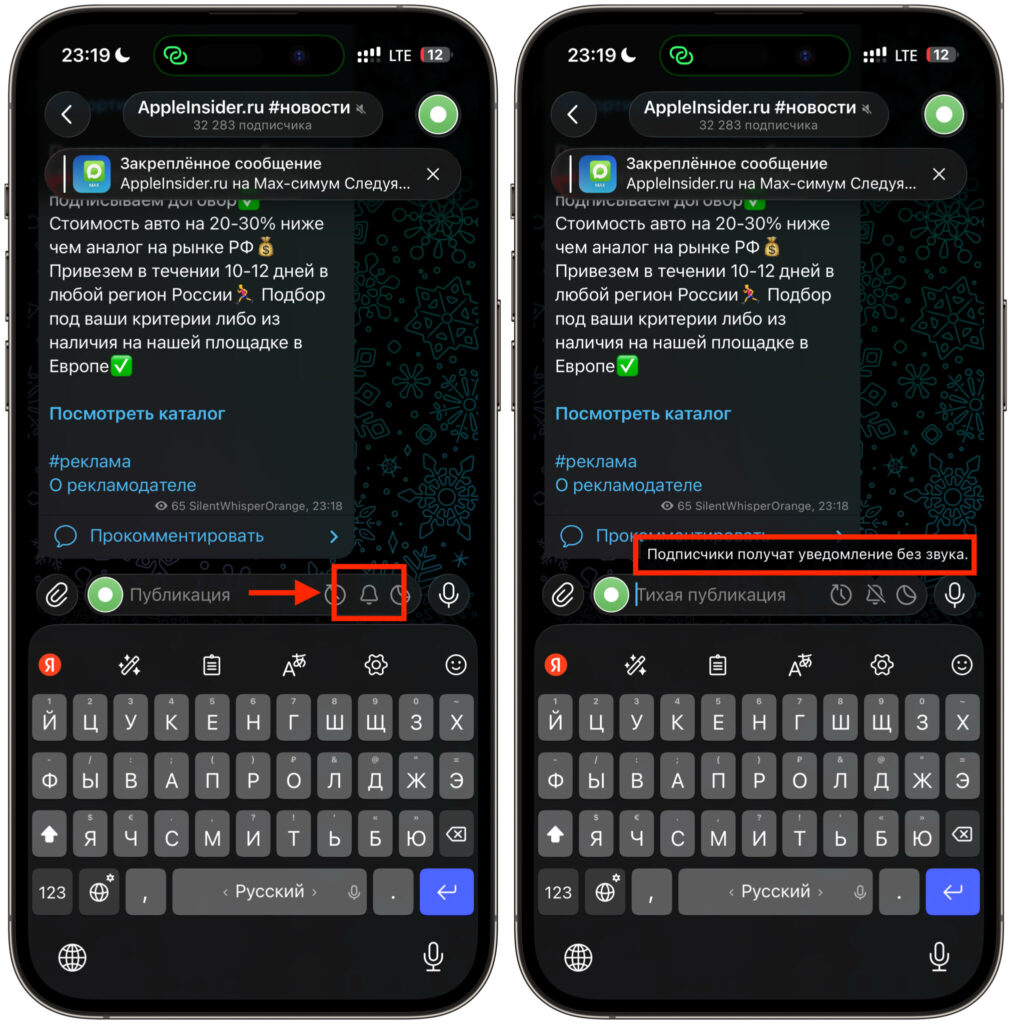
One button, and all messages in the channel will arrive without sound
- Open your channel and start typing a post as usual.
- In the message send bar, find the bell icon.
- Tap it so the bell becomes crossed out.
- Publish the post. Subscribers will receive a notification on their lock screen, but without sound or vibration.
The bell works as a toggle. Tap once, and the mode is activated for that publication. Want to bring back the sound — tap again. It’s convenient when you publish a dozen posts a day and not every one deserves a loud announcement.
How to Send a Message Without Sound in Telegram
With personal messages it’s a bit trickier, because there’s no bell button in a regular chat. Silent mode is hidden behind a long press on the send button.
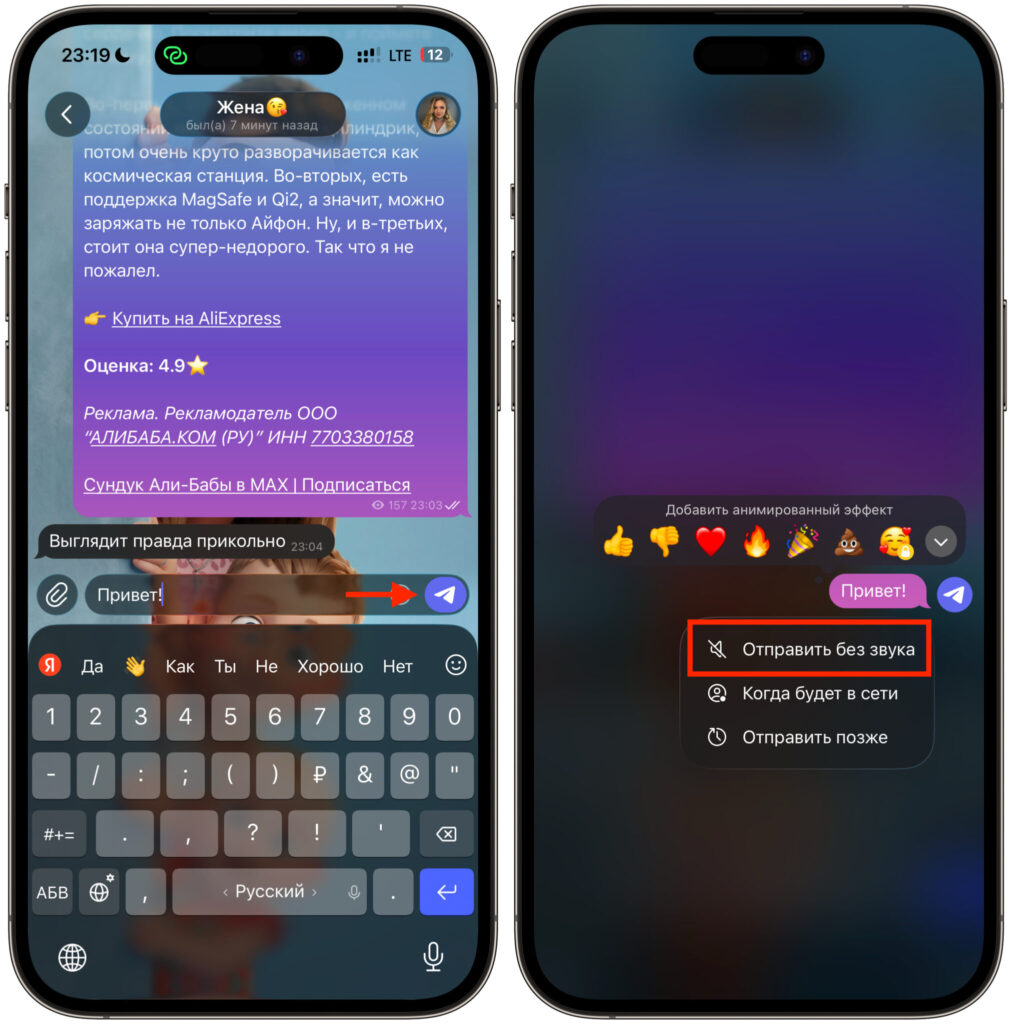
You can send silent messages in personal and group chats too
- Open the desired conversation and type your message.
- Instead of a regular tap, press and hold the send button.
- In the menu that appears, select Send Without Sound.
- The message will be sent to your contact with a silent marker, without waking their phone.
This gesture comes in handy in any delicate situation. Late at night, a work chat on weekends, someone in an important meeting — you write calmly, knowing you won’t barge in with a chime. I personally use this often when sending something to my wife early in the morning. She’s still asleep, and the message is already waiting for her when she wakes up.
The most common misconception is that you can turn off the silence from your side. No, you can’t. Since the setting is chosen by the sender or channel administrator, the reader cannot force other people’s messages to arrive with sound. It’s like asking a mail carrier to ring the doorbell when they’ve decided to quietly slip the letter into the mailbox themselves.
So the crossed-out bell is not a reason to take your iPhone to a service center. It’s simply a sign of courtesy from the person writing to you.