Free neural networks that work without restrictions are becoming more numerous every month. But they all share one common trait: they require internet access, which has been increasingly restricted lately. On top of that, when using such AI, your queries go to a server, get processed there, and come back as a response. All this time, your data passes through someone else’s infrastructure. But Google has released something different, and I spent several days with this offline neural network on my vivo X300.
Google’s new neural network doesn’t even require an internet connection
Drawbacks of Online Neural Networks
Before talking about the new option, it’s worth honestly examining what’s wrong with the usual tools. Online neural networks have systemic problems that aren’t going away:
- All data goes to servers. Every question, every document, every conversation — everything is processed on someone else’s servers. ChatGPT, Gemini, Alisa — each has its own servers, its own data storage policy, and its own history of leaks.
- Internet is required. Provider went down, bad signal, airplane, subway — the neural network is unavailable. In Russia, internet outages are happening more frequently, and that’s not paranoia but statistics.
- Availability in Russia is questionable. Using ChatGPT in Russia is difficult. The service doesn’t officially work without additional tools.
- Paid limits. Free versions of most neural networks are limited in the number of requests, model quality, or context volume. Want proper performance — pay up.
None of this makes online neural networks bad. But it means they only work when it’s convenient for them, not when it’s convenient for you.
Gemma 4 — An Offline Neural Network
On April 2, 2026, Google released Gemma 4 — a family of open language models, two of which were specifically designed to run directly on a smartphone. No servers, no subscriptions, no data going anywhere. The Gemma neural network works as follows: you download the model to your phone once, and then all computations happen locally — on your device’s processor and neural coprocessor. After downloading, you can turn off Wi-Fi, enable airplane mode, and keep working.
What Gemma on Android can do:
- Text chat. Regular questions and answers, explanations, text writing, summarization — a standard AI assistant.
- Image analysis. You can photograph anything and ask what’s in the photo. Works through the camera or gallery.
- Voice transcription. Dictate — get text. All offline, no cloud involved.
- “Thinking” AI mode. The model shows step-by-step reasoning before answering: you can see the logic, not just the result.
- Agent skills. Through tools within the app, the model can use Wikipedia for fact-checking and perform simple actions on the device.
The model is based on the same research foundation as the Gemini neural network on Android, but is significantly more compact. It exists in two variants for smartphones: E2B (faster, lighter) and E4B (smarter, requires more resources). Distributed under the Apache 2.0 license — meaning fully open source, no hidden mechanisms.
System Requirements for the Gemma 4 Neural Network
The Android neural network Gemma 4 doesn’t work on just any device. Here’s what you need:
- Android 10 or higher;
- Minimum 6 GB of RAM for the E2B model, 8 GB for E4B;
- About 2.5 GB of free storage for E2B, about 5 GB for E4B;
- Recommended: Qualcomm Snapdragon 8 Gen 2 or newer, Google Tensor G3+, MediaTek Dimensity 9300 or newer (they have a hardware neural coprocessor that speeds up the model several times over).
On older or weaker processors, the model will technically launch but will run slowly. I tested it on a vivo X300 with the Dimensity 9500. The smartphone heated up noticeably during long queries. This is normal: computations run locally, and the processor works under serious load.
How to Download and Install Gemma 4 on Android
Downloading Gemma is easier than it seems. The Google AI Edge Gallery app is now available directly on Google Play. You can also download the APK file via GitHub.
Google AI Edge Gallery on Google Play
Google AI Edge Gallery on GitHub
- Open Google Play Store and find the “AI Edge Gallery” app by Google. Install it.
- After launching, go to the “Models” tab at the bottom of the screen.
- Choose a model: E2B — if you want faster responses and have 6 GB of RAM; E4B — if quality matters more and you have 8 GB of RAM and a powerful processor.
- Tap “Download.” Download over Wi-Fi: E2B is about 2.5 GB, E4B is around 5 GB.
- After downloading, the model is stored on the device. Internet is no longer needed.
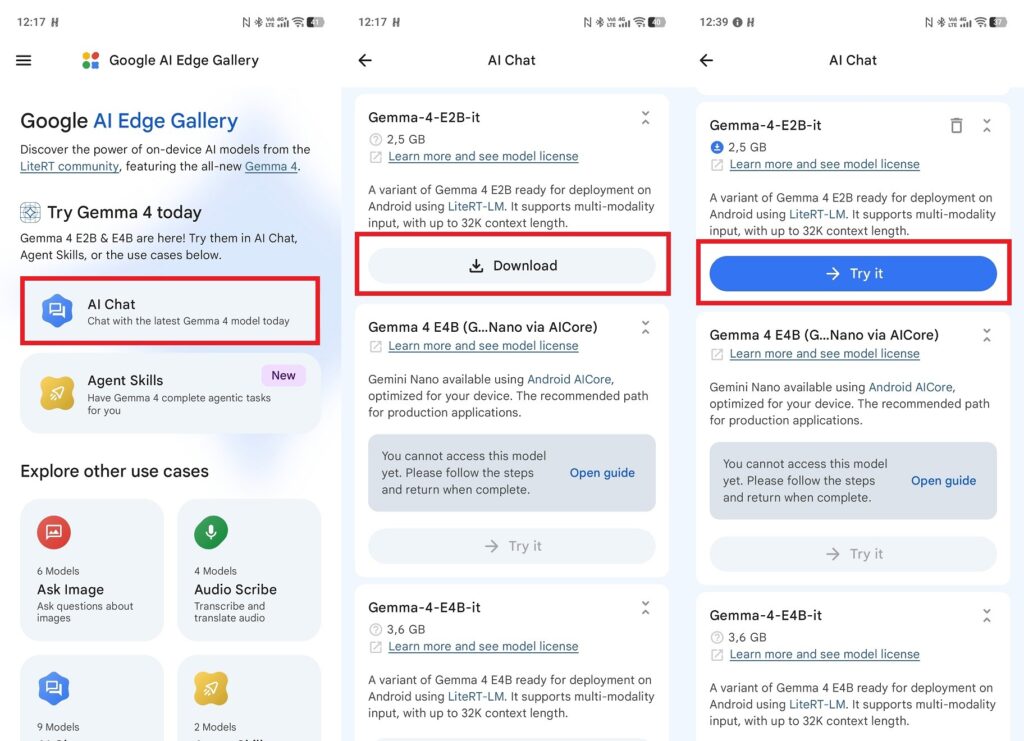
First you need to download the language model
To make sure everything works offline: enable airplane mode after downloading and try typing a question. If the model responds, you’re fully autonomous.
How to Use the Gemma 4 Neural Network on Your Phone
The Google AI Edge Gallery app interface is divided into several workspaces:
- AI Chat: a regular text chat. This is also where you can enable Thinking Mode — a mode where the model shows its reasoning process before the final answer.
- Ask Image: image analysis. Take or upload a photo and ask a question. Works offline.
- Audio Scribe: voice transcription and translation. Speak — get text.
- Prompt Lab: a mode for experimenting with model parameters: temperature, top-k, and other generation settings.
- Agent Skills: advanced tools, including Wikipedia search and simple on-device actions.
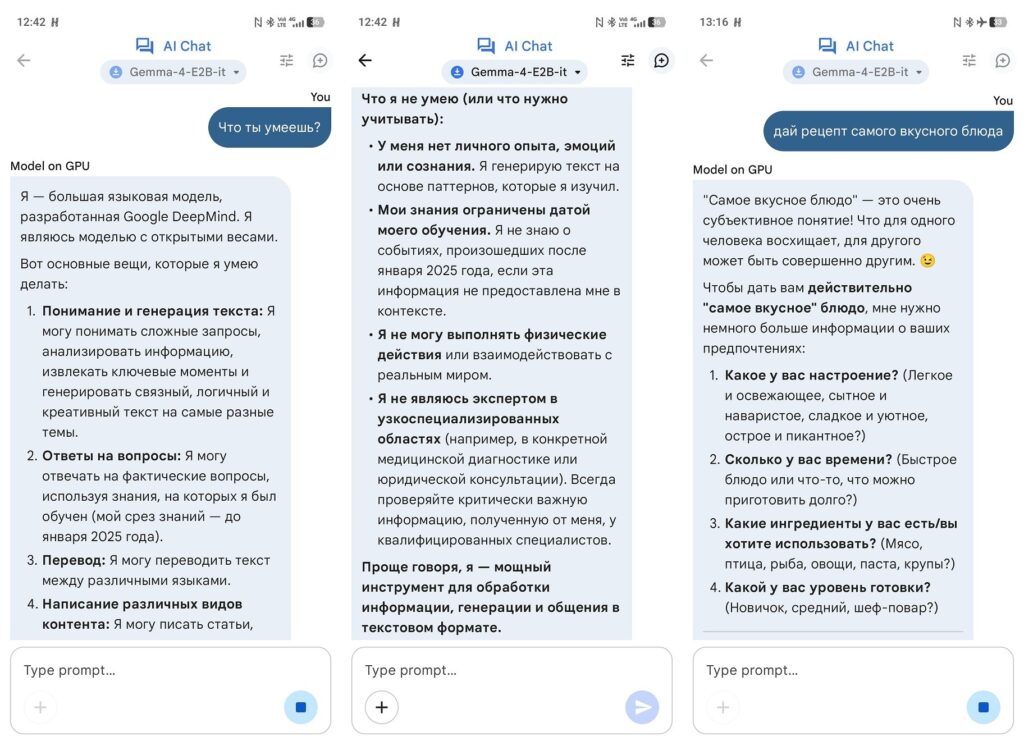
And now you can start using it
An important limitation to know right away: the model’s knowledge base is cut off at January 2025. Gemma 4 doesn’t know what happened after that date and cannot search for current data. You won’t be able to ask about the latest news or recent events — you’ll need online tools for that.
Who Is the Offline Neural Network For
The free neural network Gemma 4 is not a replacement for ChatGPT or Gemini for everyday work. Online models are smarter, more current, and respond faster. But Gemma 4 has its own clear niche.
It’s suitable for those who:
- Live with unstable internet or frequent blockages — Gemma works under any conditions, including complete lack of network;
- Work with confidential documents and don’t want texts going to someone else’s servers;
- Want to have an AI assistant on the road, in nature, or wherever there’s no Wi-Fi;
- Are looking for a free neural network with Russian language support without a subscription — Gemma supports over 140 languages, including Russian.
Phone heating and response speed are noticeably lower than cloud solutions — that’s the honest price for autonomy. But in situations where the internet is shut down or unavailable, offline AI on your phone suddenly becomes a very valuable tool. And such situations in Russia in 2026 are no longer a rarity.