
Sitting still disrupts posture in different ways
Did you know that desk work ruins your posture not because the spine gets tired of doing its job? In reality, posture deteriorates from holding your back in one position for a very long time. Our main enemy is prolonged immobility, not the act of sitting itself. Our body adapts by making some muscles stiff and shutting others down. Joints lose mobility, and the brain starts treating the crooked working posture as normal.
What Is Lordosis and When Does It Become a Problem
You’ve probably heard the word lordosis on TikTok. It’s a natural forward curve of the spine found in the neck and lower back. So the phrase “I have lordosis” isn’t a diagnosis in itself — it’s roughly like saying “I have an elbow.” It’s not a reason to write your will. Lordosis becomes a problem only when it’s excessive, painful, or rigid.
Cleveland Clinic explains that normal lordosis helps maintain posture and absorb load, while an excessive curve can shift the position of the pelvis, abdomen, and buttocks. An overly pronounced lumbar curve is known as hyperlordosis.
It’s important to note that desk work doesn’t always cause hyperlordosis specifically. Often the opposite happens — when a person slouches in a chair, the pelvis tilts backward, the lower back flattens, and the natural curve temporarily decreases.
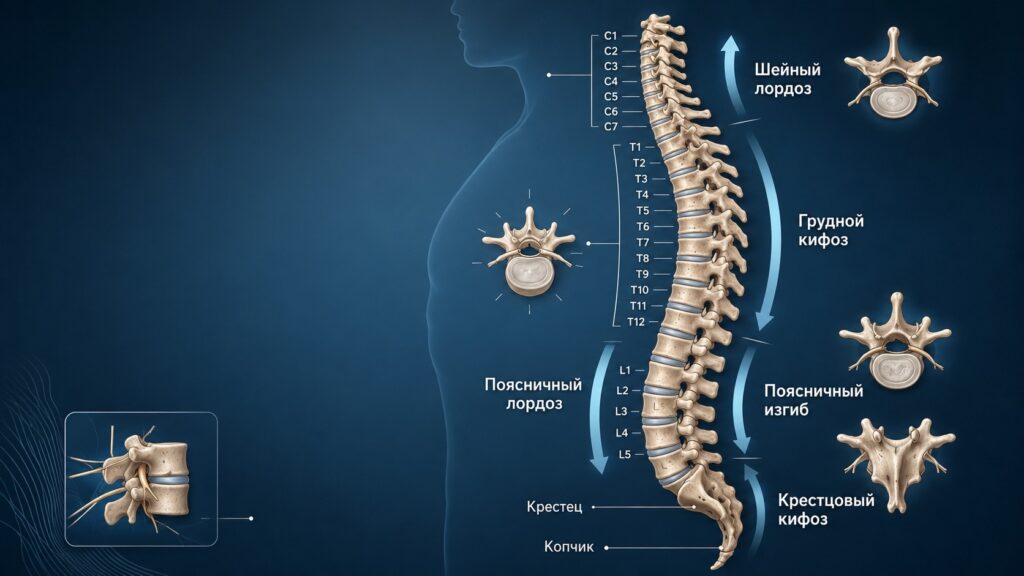
Curves of the human spine
But when standing, the same person’s pelvis may shift forward, the belly protrude, and the lower back over-arch. The body can be “flat” in a chair and “over-arched” when standing.
How Desk Work Changes Your Posture
As I mentioned above, the main danger of desk work is not sitting itself but prolonged immobility. Even if you sit in a perfect posture for 8 hours, that’s still 8 hours with almost no proper muscle engagement.
The WHO directly classifies prolonged sitting as a sedentary lifestyle and notes that in adults it leads to health problems.
Prolonged sitting affects several body zones at once:
- Pelvis and lower back. At a desk, a person either leans back and rounds the spine, or tries to “sit straight” and over-arches the lower back. In the first case, the load goes to ligaments and discs; in the second, the extensor muscles work like a night-shift security guard — technically on duty, but getting nothing out of it.
- Thoracic spine. When reaching toward a laptop, the back rounds, shoulders roll forward, and shoulder blades spread apart. Kyphosis increases, producing the typical office-shrimp posture.
- Neck. The monitor is too low, the phone is in hand — and the head drifts forward. And the skull is no feather, so the neck and trapezius muscles get extra static load.
- Hips. The hip joints are constantly flexed, the hip flexors become stiff, and when the person stands up, they pull the pelvis forward.
- Glutes and abs. They barely work while sitting, and the lower back starts compensating for what other muscles should be doing.
Why Desk Work Causes Lower Back Pain
Lower back pain rarely has one neat cause — there are usually several. The WHO notes that lower back pain in roughly 90% of cases cannot be confidently attributed to a single specific cause. Risk factors include low physical activity, obesity, smoking, and high workload.

Prolonged static posture overloads the lower back
With desk work, the lower back most often hurts due to a combination of factors: static load and weak muscles, plus poor workstation setup, stress, lack of sleep, and overall inactivity.
Stress also plays a role because muscles tense up, pain sensitivity increases, the person moves less, and the cycle continues. But back pain is very common and often resolves within a few weeks, and for relief it’s usually recommended to stay active, continue daily activities, and do exercises and stretching.
How to Tell If Your Posture Has Deteriorated Because of Work
With a pronounced lumbar curve, a person often looks like this: the belly noticeably protrudes forward, the pelvis and buttocks stick out backward, and when lying on the back there’s a large gap under the lower back.
But you can’t diagnose yourself by appearance alone. For one person, a large curve is normal and nothing hurts. For another, the posture looks nearly perfect, yet the lower back aches every day.
How to Properly Set Up Your Workstation for Spinal Health
The chair should support your lower back, not merely exist beneath you. It’s recommended that the backrest match the natural curve of the spine and provide lumbar support. If there’s no support, a rolled-up towel or a small cushion under the lower back works as a temporary solution.
Next, the height and position of everything on the desk matters:
- Feet flat on the floor or on a footrest. Notably, a seat that’s too high forces you to sit without leg support or slide forward, losing back support;
- Monitor at eye level, not somewhere down below that you have to bow to. You should look straight ahead without tilting your head;
- Keyboard and mouse close by so you don’t have to reach;
- If you work on a laptop, it’s better to place it on a stand and connect an external keyboard and mouse separately.
The main enemy when working on a laptop is the laptop itself. Its screen is low, the keyboard is close, and the neck drifts forward. So a stand combined with an external keyboard solves half the neck problems.
How Often Should You Get Up During Desk Work
Any amount of physical activity is better than none, and adults should limit sedentary time and engage in muscle-strengthening activities. The practical guideline is simple: get up every 30–45 minutes for 1–3 minutes.
No need to overcomplicate it. Walking around, doing 10 squats, stretching the hips, extending the thoracic spine, climbing stairs, or getting a glass of water is enough. Your body isn’t asking for a marathon — it’s asking you not to turn it into furniture.
A standing desk can help, but it’s not magical, and if you stand motionless all day, your lower back will start aching too. The right approach is to alternate: sit for a while, stand for a while, walk around.
Which Exercises Help with Lordosis and Lower Back Pain
To feel good, you need to open up the hip flexors, reactivate the glutes, strengthen the core, mobilize the thoracic spine, and relieve the neck. For lordosis, stretching and strengthening the hip, abdominal, and gluteal muscles are recommended to improve posture and reduce symptoms.
Exercise routine for desk workers:
- Hip flexor stretch. Step into a lunge with one knee on the floor, slightly tuck your pelvis under without arching the lower back. Hold for 30–45 seconds per side;
- Glute bridge. Lying on your back, bend your knees, lift your hips, and squeeze your glutes. 2–3 sets of 10–15 reps. The goal is to make the glutes — not the lower back — do the hip extension.
- Dead bug exercise. Lying on your back with a relaxed lower back, slowly lower the opposite arm and leg. 2 sets of 8–10 per side.
- Chin tuck — as if giving yourself a double chin. 8–12 reps. Unflattering for self-esteem, great for the neck;
- Band pull-apart or band row. 2 sets of 12–15 reps to bring the shoulder blades back into place.
What Definitely Won’t Save Your Back with Desk Work
A posture corrector doesn’t solve the desk-work problem. It may temporarily remind the body that it’s not a sack, but it doesn’t make muscles any smarter.
A back massage can provide relief, but if you go right back to sitting crookedly for 9 hours afterward, your back will rightfully wonder if you just burned your money.
An expensive office chair doesn’t fix everything either. Yes, it helps — but only if it’s properly adjusted and you actually move. A chair won’t do glute bridges for you, as I mentioned above.