Since the launch of MacBook Neo, five of my friends have already bought one, and almost all of them are thrilled with Apple’s new laptop. I was curious to compare it with the MacBook Pro. Well, both are MacBooks after all. Especially since, according to reviews, the budget model covers most tasks without any compromises in everyday work. I went head-to-head comparing MacBook Neo and MacBook Pro with the M5 chip in office tasks, multitasking, and video editing to understand where the difference between the devices is truly noticeable and where the premium for Pro isn’t justified.

The difference seems huge, but it’s not
Differences Between MacBook Neo and MacBook Pro with M5 Chip
We’re talking about two laptops with very different positioning. MacBook Neo starts at 51 thousand rubles, runs on the A18 Pro chip — the same one found in iPhone 16 Pro — and is equipped with 8 GB of RAM, storage starting from 256 GB, and a 13-inch Liquid Retina display with 500 nits brightness. MacBook Pro with M5 starts at 145 thousand rubles, and for that money you get 16 GB of RAM, SSD from 512 GB, and a 14.2-inch Liquid Retina XDR display that delivers 1000 nits of brightness.

MacBook Neo can now be picked up really cheap

MacBook Pro — it’s just expensive
There are also less obvious differences. The base version of Neo lacks Touch ID and keyboard backlighting, and instead of a tactile trackpad with Haptic Touch, it has a simpler mechanical one — it physically depresses when pressed. For touch typing this isn’t critical, but if you, like me, often work in the dark, it will be inconvenient.
MacBook Neo Performance in Tests and Everyday Work
In synthetic benchmarks, MacBook Pro significantly outpaces Neo, which is expected. In Geekbench 6, Pro scores 4288 in single-core and 17926 in multi-core versus 3535 and 8920 for Neo. Storage speed differs even more: 6517/6619 MB/s write and read for Pro versus 1440/1585 MB/s for Neo. Transcoding 4K video to 1080p in Handbrake takes 3:31 on Pro and 9:57 on Neo.
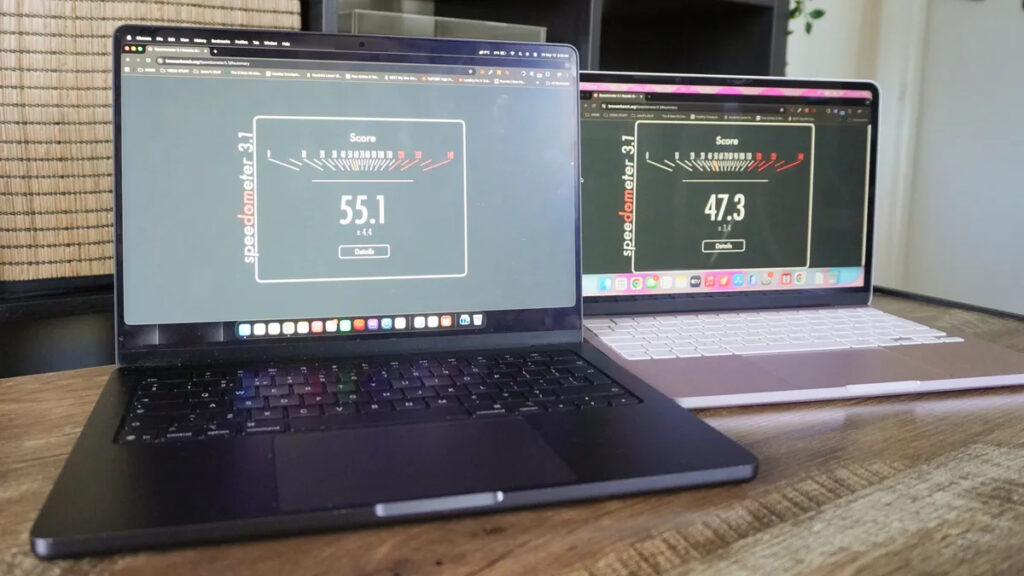
Pro is faster in the browser, but feeling the difference in real life won’t be easy
But in real work, I felt the gap differently. I opened 40 tabs in Chrome and simultaneously launched Pixelmator Pro, Apple Music, and a game — no lag on Neo was noticeable. Delays appeared only during extreme multitasking that a typical user would unlikely encounter.
How Long Does MacBook Neo Hold a Charge and Where It Falls Short of MacBook Pro
In the battery life test, MacBook Pro lasted 18 hours, while MacBook Neo lasted 13 hours and 28 minutes. The difference is noticeable, but don’t forget: Neo has a battery of only 36.5 Wh, while Pro’s is noticeably larger — 72.4 Wh. Against this backdrop, the budget model’s result looks respectable.

Pro holds charge longer, but its battery is twice as large
With a bigger battery, Neo could literally last several days, but even now it was enough for me for a full workday without a power outlet.
MacBook Neo for Video Editing and Photo Processing
The most interesting part — I tried using Neo for tasks it clearly wasn’t designed for. I opened a large 4K project in Final Cut Pro stored on an external SSD and was able to work normally with the timeline without frame drops. Exporting the project on Neo took 9:28 compared to 5:56 on Pro — roughly 50% longer. The same was true when processing RAW files in Pixelmator Pro.

Neo handles video editing
There are nuances: Neo under such loads hits thermal limits and throttles frequencies, and the external SSD runs slower due to USB 3 instead of Thunderbolt. But the mere fact that a computer costing 50 thousand rubles can handle 4K editing — that impressed me. For hobbies and learning, it’s enough, but professionals will find Pro pays for the price difference through speed.
Which MacBook to Choose
Based on my experience, the audience splits roughly like this:

The real downside of MacBook Neo — no keyboard backlighting. Can’t work in the dark
- 75% of users will be perfectly served by MacBook Neo


