Pavel Durov published a response to criticism from WhatsApp*. According to him, WhatsApp’s claim about end-to-end encryption by default is a “giant consumer fraud.” The main argument: the vast majority of conversations end up in cloud backups without any protection.
Pavel Durov gave a harsh response to criticism from WhatsApp. Image: zamin.uz
Are WhatsApp Backups Encrypted?
The founder of Telegram claims that about 95% of WhatsApp* personal messages end up in backups on Apple (iCloud) and Google servers in plain text — that is, without end-to-end encryption. Backup encryption in WhatsApp exists, but it is not enabled by default. According to Durov, only a few users activate this feature on their own, and even fewer set a strong password for it.
Durov separately emphasizes the “weakest link” problem: even if you personally encrypt your backups, your messages can still be stored in plain text — in your contacts’ backups. By his estimate, more than 90% of people do not enable backup encryption, meaning your conversations with them remain unprotected.
Can Someone Read WhatsApp Messages?
Durov claims that Apple and Google hand over stored WhatsApp* messages to third parties thousands of times a year. Additionally, WhatsApp, according to him, stores and discloses metadata — information about exactly who you communicate with.
In contrast, the founder of Telegram asserts that his messenger has “not handed over a single byte” of user messages in over 12 years of operation. It should be noted: this is Durov’s own claim, and there is no independent verification of these figures.
This statement was a response to public criticism from WhatsApp* directed at Durov, in which the company refuted his accusations about the messenger’s lack of security. The confrontation between the two platforms has been ongoing for years, with each side presenting arguments in its favor.
It’s important to understand: Durov is an interested party and the head of a competing product. His statements should be taken as a position in a public dispute, not as the result of an independent audit.
How to Enable WhatsApp Encryption on iPhone
If we accept Durov’s arguments, the problem primarily concerns those who use WhatsApp and back up to iCloud. By default, iPhone regularly creates backups, and WhatsApp* conversations end up there without additional encryption unless you have enabled this option manually.
To check and enable backup encryption in WhatsApp*:
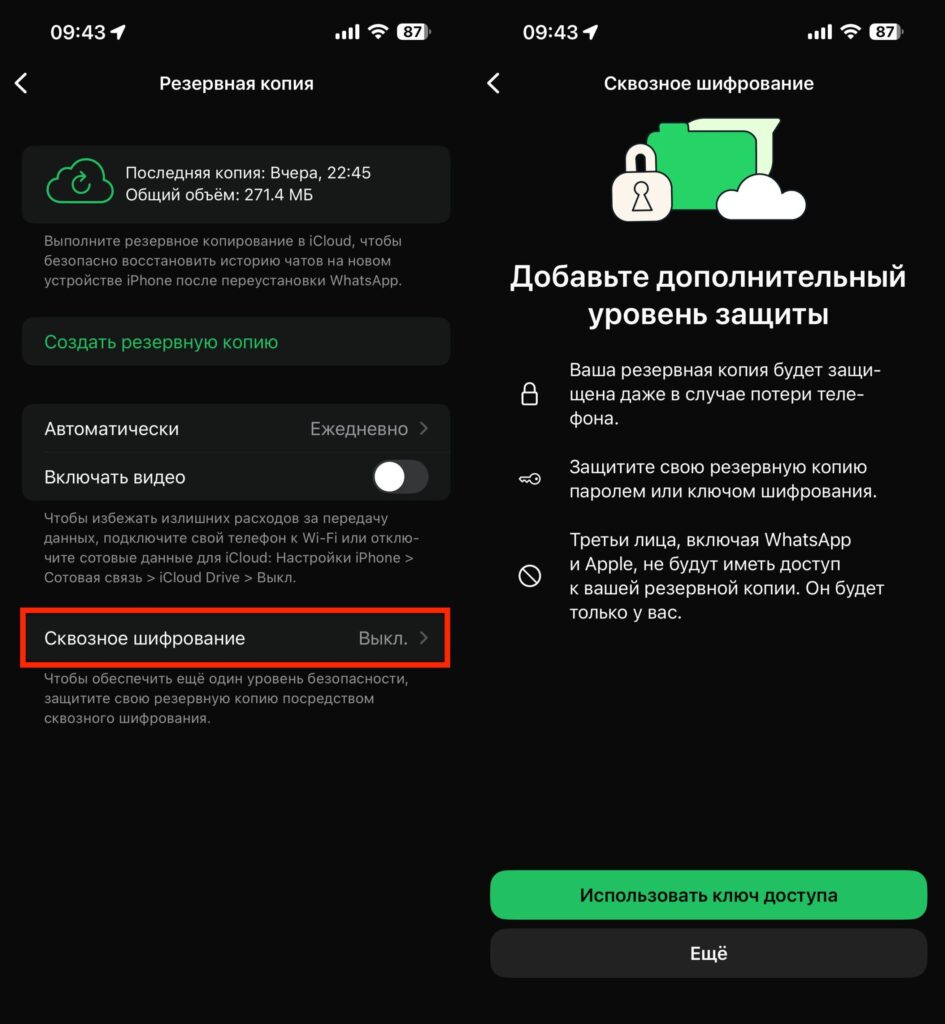
Enable encryption, but it’s important that all your contacts do the same
- Open WhatsApp* — Settings — Chats — Chat Backup
- Tap “End-to-end encryption”
- Set a strong password or use a 64-character encryption key
But even after this, the problem Durov points out remains: your contacts may not do the same, and your messages could end up in their unencrypted backups.
Is It Worth Using WhatsApp in 2026?
Do you still use WhatsApp? Image: absatz.media
If you exchange truly confidential information through WhatsApp* — work documents, financial information, personal data — you should at least enable backup encryption. This doesn’t solve the problem entirely (you can’t control your contacts’ backups), but it closes the most obvious leak channel.
For ordinary everyday conversations — greetings, coordinating meetings, family chats — the risk is low. But knowing exactly how your messages are stored is useful in any case. If privacy is a priority for you, consider Telegram’s secret chats or other messengers with end-to-end encryption that also covers backups.
*owned by Meta, recognized as extremist and banned in Russia