If you try to download VK Music or VK Video to your iPhone right now, you’re in for a surprise. Instead of the “Download” button, the App Store shows nothing — the app can’t be found via search or even a direct link. Apple has once again gone after VK services, and this time the list of casualties looks suspiciously selective. Shortly before this, the MAX messenger was removed from the App Store, so it’s hard to believe this is a standalone coincidence. We’ve seen something similar before when Apple removed VK holding’s apps, but the logic was more straightforward back then. This time, individual services have disappeared from the store while the most prominent app stayed put. Let’s break down what exactly disappeared, why it’s not a catastrophe, and how to get the services you need back on your iPhone’s home screen.
Major VK services have been tossed from the App Store
Which VK Apps Were Removed from the App Store
Six separate VK services have disappeared from Apple’s app store: VK Music, VK Video, VK Messenger, the Dzen app, Mail.ru email, and the Odnoklassniki social network. They can no longer be found via search or direct link. The page shows a placeholder about the app being unavailable instead of the usual download button. However, for those who downloaded these apps earlier, everything continues to work normally. Apple removes the app from the storefront but doesn’t delete it from devices, so there’s no need to panic and start looking for old versions just yet.
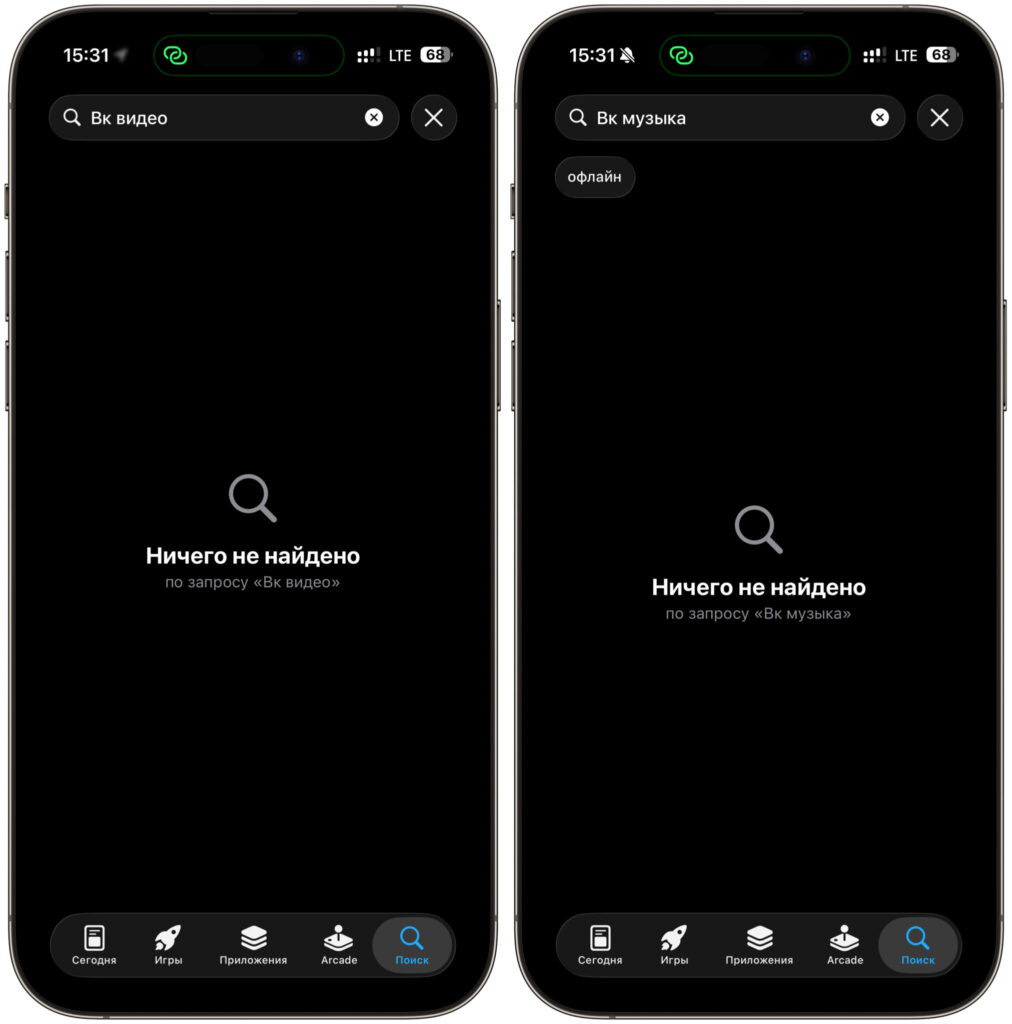
The apps can no longer be found
This story isn’t new. In September 2022, all the holding’s key services were swept out of the App Store in one go: the social network itself, Music, Messenger, Mail.ru email, and cloud storage. At the time, the reason cited was British sanctions targeting VK structures. About two weeks later, the apps quietly returned to the shelves as if nothing had happened. So this company has a habit of removing things first and changing its mind later.
The fresh wave follows another high-profile case. In early June, the MAX messenger disappeared from the App Store — the very national super-app that users had been persistently pushed toward in recent months. Apple didn’t explain its move at the time, and it later turned out that returning the app to the iPhone wouldn’t be possible. Against this backdrop, the purge of five more VK services looks less like a coincidence and more like part of one larger trend. At the same time, authorities are putting pressure on Telegram, and the Russian App Store is gradually turning into a minefield for familiar apps.
Why the VKontakte App Stayed in the App Store
Now here’s where it gets really interesting. If Apple is truly cleaning out the VK ecosystem based on sanctions logic, the first candidate for removal should have been the main VKontakte app. It’s the holding’s flagship, its showcase, its face. But that particular app sits calmly in the App Store, gets updates, and downloads without any problems. The latest version came out on June 17, the developer is listed as VK LLC, and there are no placeholder messages.
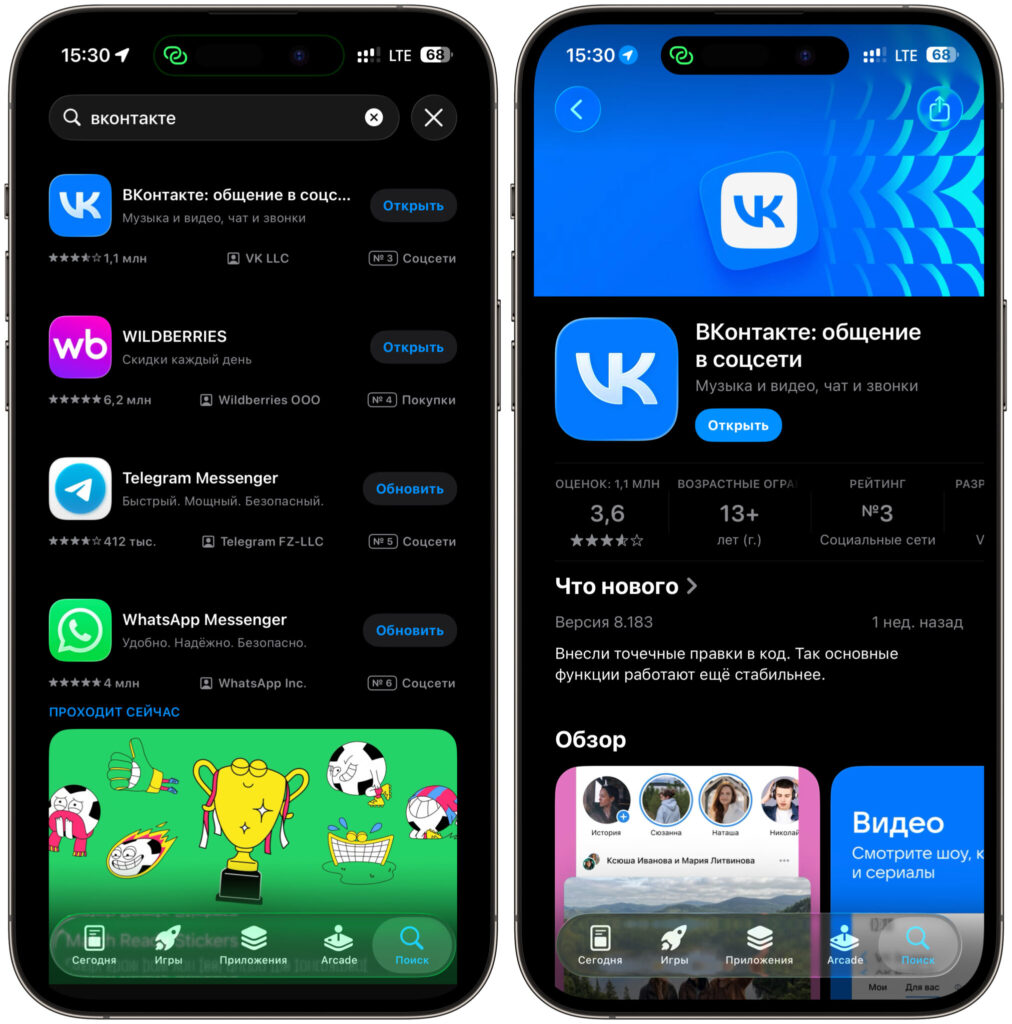
VKontakte is still in place for now
This creates a strange picture. Music — removed. Video — removed. Messenger and Dzen — removed. Even Odnoklassniki got caught up in it. But the social network itself, which contains music, video, and private messages all in one, was left alone. The logic, to put it mildly, is elusive. Especially since Odnoklassniki formally operates under a separate legal entity, and in 2022 that’s exactly what saved it — but now it’s the one that got hit. Amid all this excitement, fake clients disguised as MAX already appeared in the App Store, and they turned out to be pure scam, so be careful with suspicious copies. If the reason is sanctions against the holding, all clients should have been axed at once, not five apps piecemeal while the flagship lives on.
The funniest part is that inside the main VKontakte app, all the same features still exist. Open the social network, go to the music section, and listen to tracks. Switch to video and watch movies. Open messages and chat. So technically, Apple removed the individual doors while leaving the main entrance wide open. It’s like someone carried several stools out of a house but carefully left the couch they were all sitting on in the corner.
Neither side has offered an explanation yet, and we could speculate endlessly. Maybe it’s a technical cleanup of duplicate clients. Maybe it’s targeted pressure on specific services. Or maybe, just like in 2022, everything will come back in a couple of weeks and we’ll look back on this story as yet another tempest in a teapot. I wouldn’t rush to draw dramatic conclusions.
Web Versions of VK Music, VK Video and Dzen Instead of Apps
The main good news is that you’re not left stranded without the removed apps. All five services have full-fledged web versions that open in a browser and work on the iPhone quite decently. Sure, it’s not a native client with perfect animations, but for listening to music, watching a video, replying in a chat, or scrolling through a feed, it’s more than enough.
The addresses are simple. VK Video lives at vkvideo.ru, where movies, series, shows, and live streams are available. VK Music opens right inside vk.com in the music section — the player works and playlists are all there. VK Messenger is accessible through the web version at vk.me, with conversations syncing with those already in your account. Dzen opens at dzen.ru with its full familiar feed of articles, videos, and channels. Odnoklassniki works at ok.ru — feed, messages, and groups are all in place. If you have a subscription, it continues to work — the web version picks it up just fine.
There are downsides to this approach, and it’s only fair to mention them. Push notifications in a browser work worse than in a regular app, so don’t expect instant alerts for new messages. Background music playback is also finicky. But as a temporary solution while the situation is still unclear, web versions cover almost all everyday tasks.
How to Install a Web App on iPhone
To avoid opening the website manually every time, you can turn the web version into an icon right on your iPhone’s home screen. Visually, it’s almost indistinguishable from a regular app — it launches with a single tap and opens without an address bar. This works in both Safari and Chrome; the steps are nearly identical.
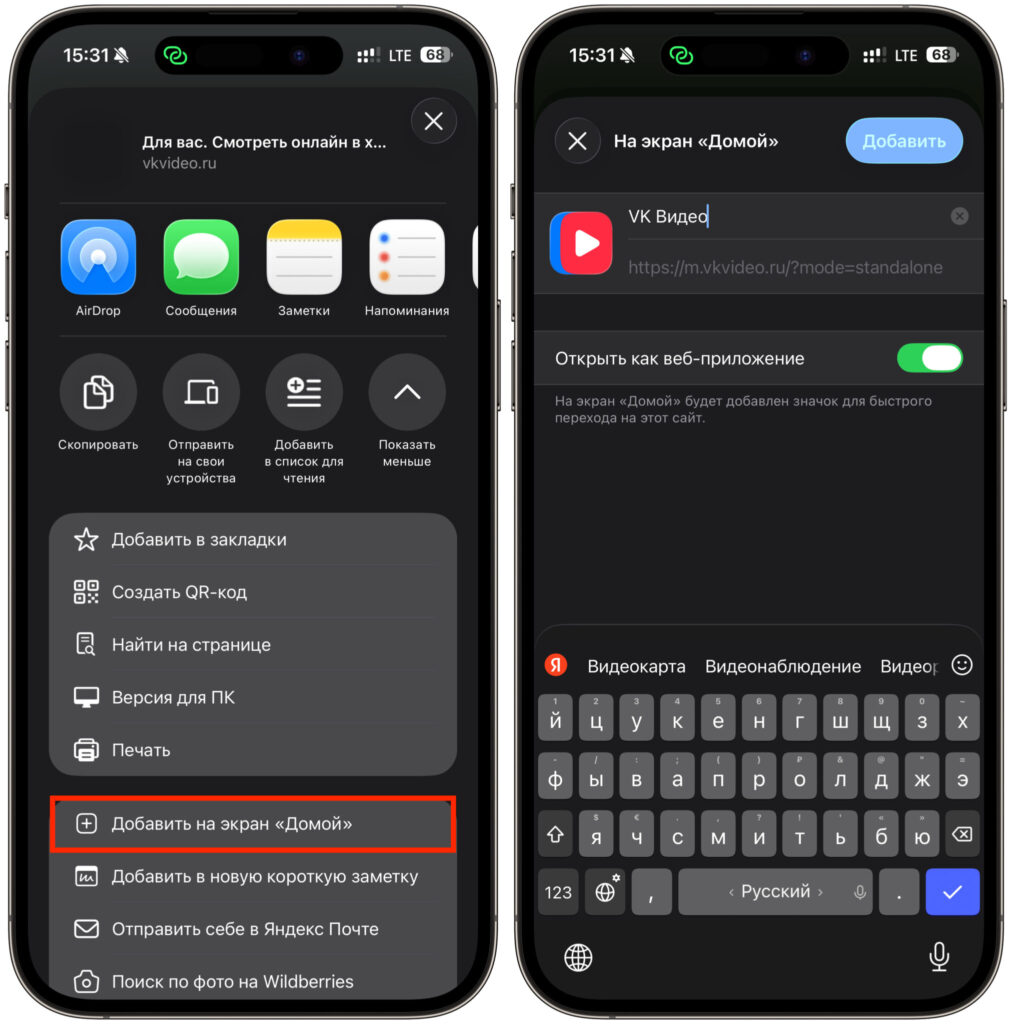
Add the web app and use it
- Open your browser and go to the address of the service you need: vkvideo.ru for video, music.vk.com for music, vk.me for messenger, dzen.ru for Dzen, ok.ru for Odnoklassniki.
- Log in with your account so you don’t have to enter your username and password every time.
- Tap the “Share” button — it’s the square with an upward arrow in the browser’s bottom toolbar.
- Scroll down through the menu and select “Add to Home Screen”.
- Optionally rename the shortcut to something short and clear, then tap “Add” in the upper right corner.
- Done. The icon will appear on your home screen, and the service will open like a full-fledged app.
Repeat these steps for each of the services, and you’ll have the familiar Music, Video, Messenger, Dzen, and Odnoklassniki shortcuts on your screen again. No third-party profiles, certificates, or questionable installation methods — everything is done using standard iOS tools.
And one final piece of advice. If the removed apps are still installed on your iPhone, don’t rush to delete them. Restoring a native app won’t be possible once it’s gone from the App Store.