If you recently tried to open Wildberries, Ozon, or Yandex Market on your iPhone and saw blank screens instead of product cards — you’re not alone. Since April 7, Russian users have been massively complaining that marketplaces have turned into black holes: apps launch, but instead of the usual catalog they show either loading errors or placeholder images. I encountered this myself yesterday evening — and the culprit isn’t the iPhone, Wi-Fi, or even the services themselves. The reason is far more mundane, and fixing it won’t involve iOS settings.
Experiencing problems launching marketplaces? You’re not alone. Image: rbc.ru
Why Product Cards Won’t Load on Wildberries, Ozon, and Yandex Market
In short: Russian marketplaces have started deliberately blocking users with VPN enabled. This is not a glitch or a server failure — it’s a new reality that these platforms have been preparing for over the past couple of weeks.
According to Izvestia, Wildberries, Ozon, and VkusVill have begun restricting access for users who have popular VPN services connected. Technically, the websites and apps still open, but they’re nearly impossible to use: product photos won’t load, descriptions disappear, and the checkout process breaks. This is exactly what you can see in the screenshots below: Ozon shows “Something’s wrong with the internet,” Wildberries displays a catalog with empty tiles instead of images, and Yandex Market refuses to launch altogether.
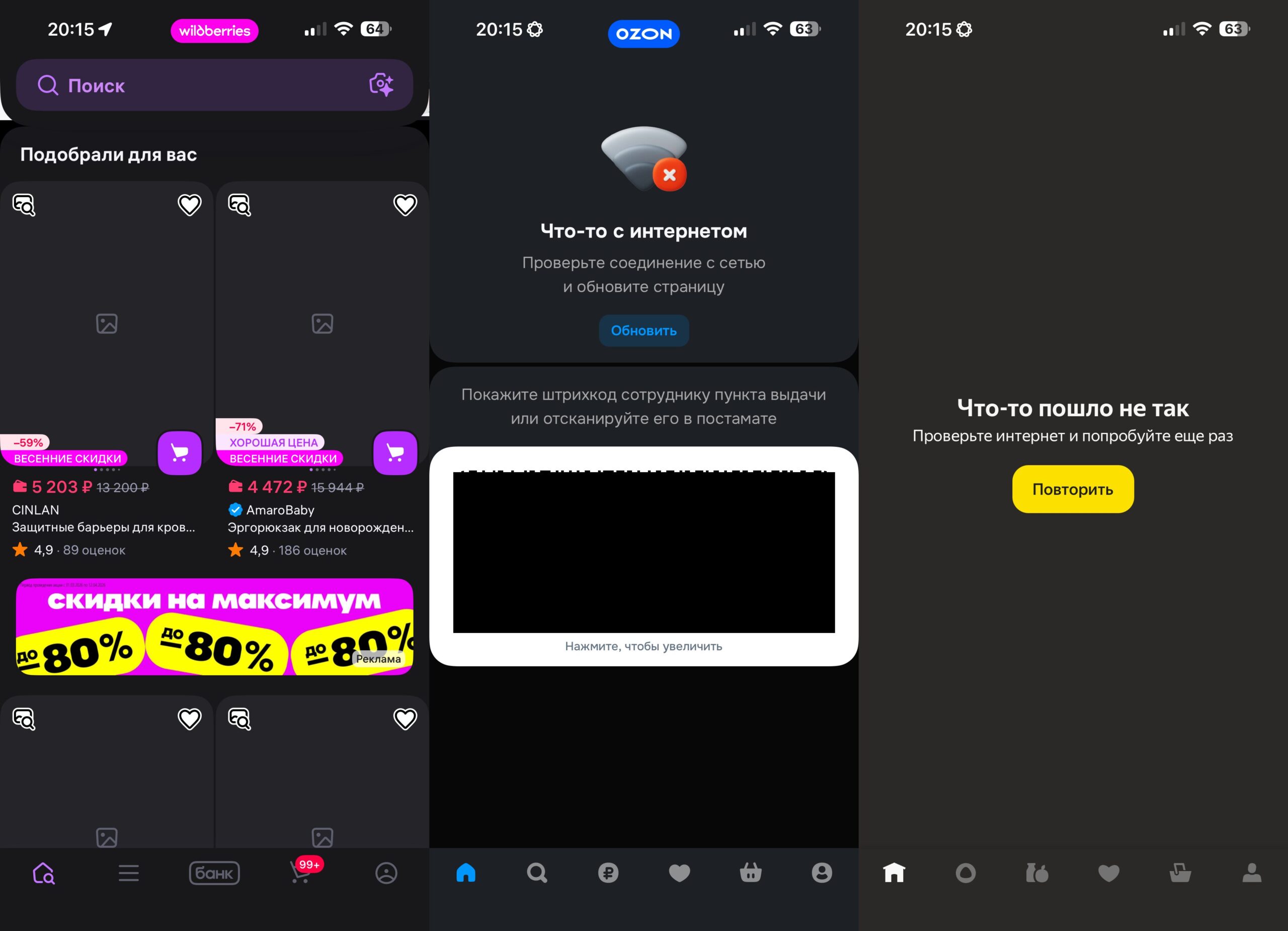
This is what I saw yesterday when launching marketplaces
The story began back in late March. The head of the Ministry of Digital Development, Maksut Shadayev, held a series of closed meetings with the country’s largest IT companies. As a result, the Ministry sent methodological recommendations to more than twenty companies, including Sber, Yandex, VK, Ozon, Wildberries, Avito, X5 Group, and several other major platforms. The task set for businesses: learn to identify VPN users and restrict their access. The deadline is April 15, 2026. But judging by what’s happening right now, some platforms decided not to wait and started testing traffic filtering ahead of schedule.
How to Check If VPN Is Enabled on iPhone
Diagnosis takes less than a minute. Open your iPhone settings and check whether VPN is connected — in the status bar at the top of the screen, there should be a VPN icon in the status bar next to the network indicator. If the icon is there and marketplaces aren’t working, you’ve found the culprit.
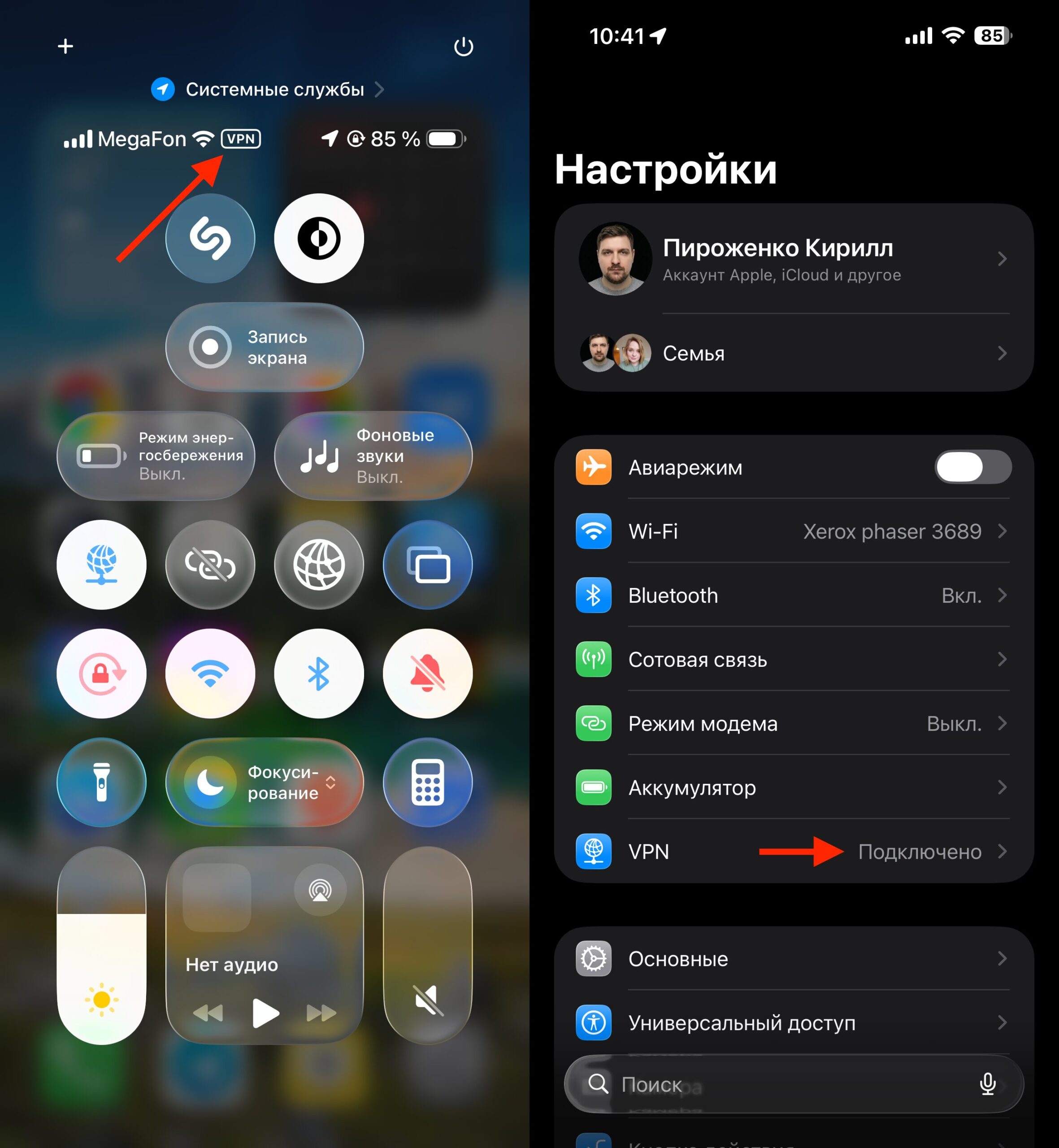
You can see VPN in the Control Center or in Settings
There’s also a second sign: websites open, but product cards remain empty. This is exactly the “filtering mode” that market sources are talking about. Access to the page technically exists, but the content doesn’t load — because the server identified your IP as belonging to a VPN provider and served you a stripped-down version of the platform.
How to Disable VPN on iPhone: Step-by-Step Instructions
There’s exactly one solution to the problem: disable VPN before accessing a marketplace. Russian platforms themselves aren’t blocked in Russia, so VPN isn’t needed to access them. If you use VPN for other tasks — for example, for Instagram* or blocked websites — you’ll have to switch manually.
Here’s how to disable VPN on iPhone:
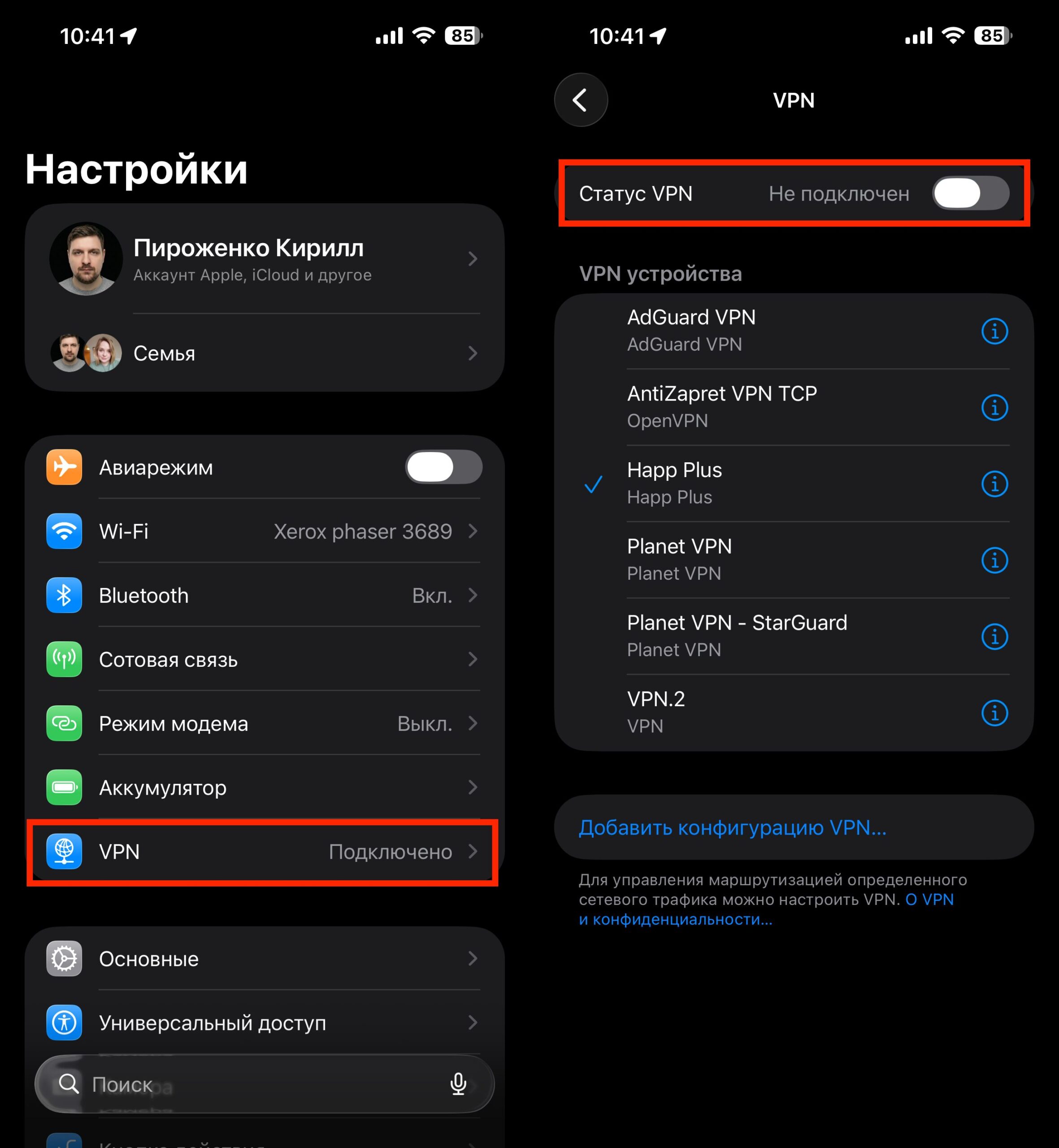
You can disable VPN in just a couple of taps
- Open “Settings” and find the “VPN” option near the top of the menu
- Toggle the switch next to it to “Off”
- Alternative path: “Settings” — “General” — “VPN & Device Management”
- If VPN runs through a separate app, open it and tap “Disconnect” inside the app itself
After that, restart the marketplace app — don’t just minimize it, but actually close it through the app switcher and reopen it. Images should load within a few seconds.
Which Services in Russia Won’t Work with VPN
The platforms don’t disclose an exact list, and this is intentional. First and foremost, they will restrict only the most popular free VPN services. The logic is clear: mass free VPNs are used by thousands of people, and they’re easy to identify by their characteristic IP ranges. Paid and lesser-known services still work more reliably for now, but nobody can guarantee that will last.
For example, on my wife’s iPhone, Wildberries and Ozon worked normally with different VPNs — meaning the filtering is still selective, not comprehensive. Today you might be blocked, tomorrow everything works, the day after it gets cut off again. There’s no universal way around this: each new iteration of filters closes some of the loopholes.
And this is just the beginning. April 15 is the key date, after which filtering will extend beyond just marketplaces. At risk are Yandex, VK, Avito, banking apps, and dozens of other services from the Ministry of Digital Development’s “whitelist.” As of April 2026, the list includes more than 120 services: Gosuslugi (government services), apps from major banks, Russian Railways and airline services, marketplaces, federal media outlets, Rutube, VK Video, and online cinemas. For iPhone users, this means one simple thing: the familiar approach of “keeping VPN always on” stops working. You’ll have to disable it when accessing Russian services.
If Wildberries, Ozon, or Yandex Market won’t open on your iPhone — first thing, disable your VPN. There’s a 99% chance that’s the problem. This isn’t a platform bug or an iOS error — it’s a new policy by Russian marketplaces that they’re testing ahead of April 15. Be prepared for similar issues to start affecting other services from the “whitelist” going forward.
* Owned by Meta Corporation, which has been designated as extremist and banned in Russia.


