Strange things can happen when using an Android smartphone. Sometimes you’re holding it in your hand, and the phone screen goes off by itself. We’ve already covered that issue in a separate article, but there’s another problem too — when the phone turns on the screen by itself. In most cases, the reason isn’t a malfunction but system features that are enabled by default. Let’s figure out why the phone screen turns on by itself, what you can do about it, and when it’s actually a hardware issue.
Random screen activation can even scare some people
Why the Phone Screen Turns On by Itself
Modern Android smartphones have many features that can automatically wake the display. They’re designed for convenience, but sometimes they work too aggressively, especially if several options are enabled at once. As a result, it feels like the phone screen turns on by itself, although it’s actually reacting to sensors or notifications. Most often, it lights up due to the following system features:
- Lift to wake;
- Double tap to turn on;
- Always On Display;
- Screen activation on notifications;
- Gestures and smart features;
- Activation on movement;
- Proximity sensor operation.
For example, the smartphone may think it was picked up, even though it just shifted on the table. Sometimes users think the screen turns on by itself, but the device is simply reacting to movement or a new notification. In most cases, this is normal system behavior, not a malfunction.
What to Do If the Screen Turns On by Itself
If the display lights up on its own, you need to check the features that can automatically wake the smartphone. Usually, it’s enough to disable one or several settings to fix the problem. It’s best to do this one at a time to figure out which specific feature is causing the activation.
Disable Lift to Wake
Many smartphones have a feature that turns on the screen when the device is lifted from a table or picked up. It’s convenient, but sometimes the sensors react too sensitively, creating the feeling that the phone screen works on its own:
- Open your phone settings.
- Go to the “Display” or “Active screen and lock” section.
- Find the “Lift to wake” or “Wake when picked up” option.
- Disable this feature.
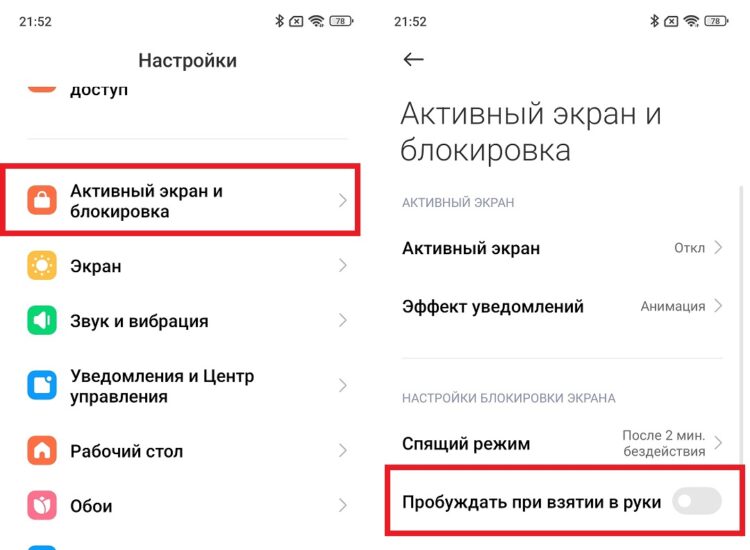
Your hand will rise, but the screen won’t turn on
After disabling this, the screen will stop turning on with movement. If the cause was the sensors, false activations will disappear immediately.
Turn Off Double Tap to Wake
Some smartphones support turning on the display with a double tap. It’s convenient, but sometimes the screen reacts to accidental touches, especially if the phone is in a pocket or on a soft surface:
- Open settings.
- Go to the “Display” or “Active screen and lock” section.
- Find the “Double tap to turn screen on and off” option.
- Disable it.
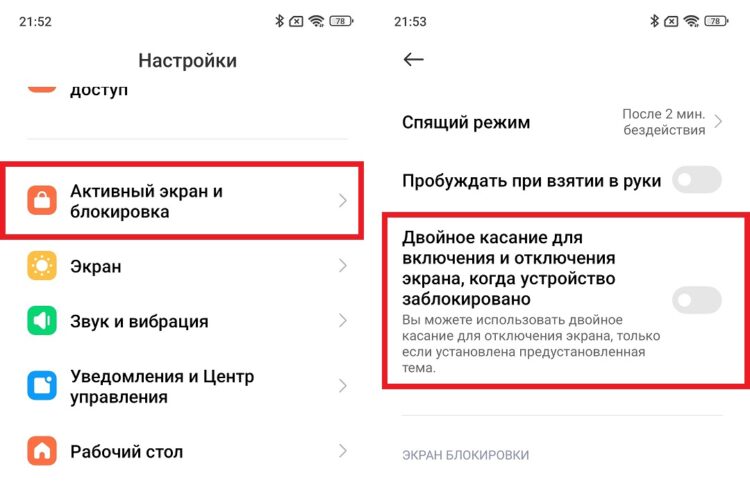
You won’t be able to turn on the screen with a double tap anymore
After this, the screen will only turn on with the power button. In most cases, this completely resolves the situation where it seems like the phone screen lights up by itself.
Disable Always On Display
The Always On Display feature can partially activate the screen when notifications arrive or when there’s movement. This creates the impression that the phone turns on by itself, although the system is simply showing information on the locked display:
- Open settings.
- Go to the “Display” or “Active screen and lock” section.
- Select “Always On Display” or “Active screen.”
- Disable the feature.
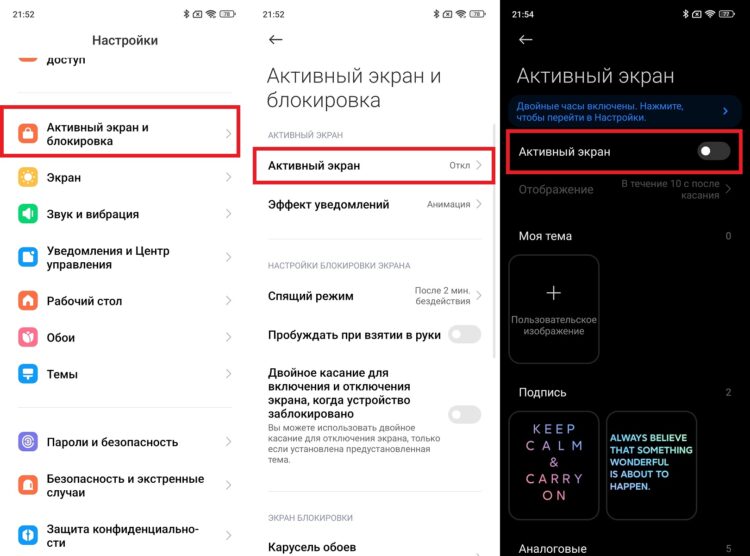
AOD can be completely disabled
If this mode was the cause, the screen will stop lighting up without your involvement after disabling it. Sometimes this also reduces battery drain.
Disable Screen Activation on Notifications
Some Android skins automatically turn on the screen with each new notification. If there are many notifications, it may seem like the phone screen turns on by itself, although this is a normal system reaction:
- Open device settings.
- Go to the “Notifications” or “Notifications and Control Center” section.
- Open the notification effect settings.
- Disable it.
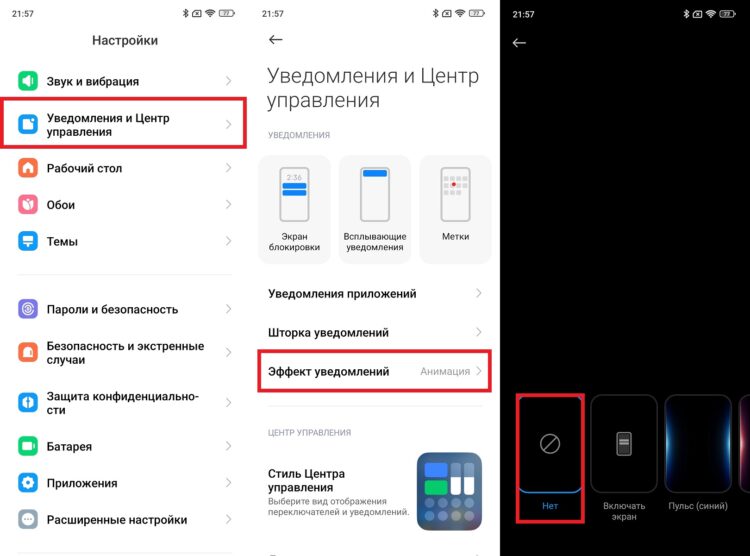
The most common reason why the screen turns on by itself
After this, notifications will arrive without activating the display. The phone will stop lighting up for no reason.
When Random Screen Activation Is a Malfunction
If all features are disabled but the screen still lights up, the cause may be in the sensors or system. Sometimes the device starts behaving strangely after a drop, moisture exposure, or overheating. For example, a faulty proximity sensor or gyroscope can make the smartphone think it’s being moved. In this situation, it feels like the screen turns on by itself, but this is no longer a setting issue — it’s a device malfunction.
Sometimes the problem appears after an Android update. In this case, a restart or factory reset may help. If the screen turns on constantly, phantom touches appear, or the phone works unstably, it’s better to contact a service center, as this could be a hardware malfunction.


