
Paying for ChatGPT has never been this easy. Image: techcrunch.com
It’s 2026, and it’s simply impossible to imagine modern technology without artificial intelligence and neural networks. Unfortunately, the most popular and simultaneously advanced models are foreign ones. Yes, with a few simple tricks you can get access to them, but it will be a free version with a bunch of limitations, and to pay for a subscription, you need a foreign card. It may seem like a dead end, but there is actually a way out.
Foreign Payment Card
Without getting off the couch, you can get yourself a foreign card and gain access to all modern technologies. You don’t need to go anywhere, let alone travel to apply — everything is done from your computer or even smartphone through the Wanttopay service.
Several card options are available for you to choose from:
- Virtual Easy Card with top-up for any amount and a 12-month validity period. Suitable for paying for neural networks, purchases in app stores, online shopping, and even hotel bookings;
- Virtual Prepaid Card with top-up capability and no maintenance fee. A great option if you need a card for a one-time purchase or for rare payments to foreign services;
- Smart Contactless Payment Card. Can be added to Apple Pay or Google Pay and used to pay for purchases even offline. Available for subscribing to foreign services and paying in app stores;
- Pro Contactless Payment Card. Supports Apple Pay, Google Pay, and Samsung Pay plus all the features of the Smart card.
This means that with the last two cards, you can safely travel abroad, and if the services listed above are supported there, you can pay with this card without any hassle. Before applying, be sure to review the full list of rates for issuance, maintenance, and transactions:
| Plan | Prepaid | Easy | Smart | Pro |
|---|---|---|---|---|
| Card Issuance | $14 | $10 | $15 | $35 |
| Card Maintenance (Plus Subscription) | None | $6/month | $6/month | $6/month |
| Minimum Deposit | $14 | $10 | $10 | $10 |
| Monthly Purchase Limit | $1,000 | $4,000 | $50,000 | $50,000 |
| Transaction Fee (US Dollar) | 0.5% of payment amount | $0.25 | $0 | $0.5 |
| Transaction Fee (Multi-currency) | 0.5% of payment amount | $0.25 | $0 | $0.5 |
| Cancellation Transaction | 0.5% of payment amount | $0.25 | $0 | $0.5 |
| Validity Period | 12 months | 12 months | 24 months | 24 months |
| Fiat Balance Top-up | Yes/Rate per current plan | Yes/Internal rate | Yes/Internal rate | Yes/Internal rate |
| Cryptocurrency Payment: USDT, USDC, TON, BTC, ETH, BNB | Yes | Yes/9% | Yes/7% | Yes/9% |
| 3D-Secure | Yes | Yes | Yes | Yes |
| Contactless Payment for Travel | No | No | Apple Pay/Google Pay | Apple Pay/Google Pay/Samsung Pay |
| Additional Card | No | No | No | No |
| Card Withdrawal | No | No | No | No |
| Support Service | Yes | Yes | Yes | Yes |
As you can see, modern neural networks have never been this accessible to you. You finally have the ability to pay for ChatGPT Plus, which truly simplifies many work processes, or Nano Banana Pro for generating realistic images from text. In short, you are now limited only by your imagination.
How to Get a Foreign Card
But let’s see how to actually issue a card through the Wanttopay service. First, you need to pass identity verification, and only after that will you be able to get a foreign card. To do this, you need to follow a few simple steps:
- Open the Wanttopay bot via Telegram;
- Choose a language and open the mini app;
- At the top of the screen, select “Pass Verification”;
- Tap “Start” and enter your email address and phone number;
- Select your country and upload one of the following documents: passport, international passport, or driver’s license;
- Wait for the verification to complete;
- Return to the main page of the Wanttopay bot and tap “Issue Card”;
- Choose one of the four cards that suits you best and tap on it;
- Scroll to the bottom of the screen and tap “Issue Card”;
- Follow the on-screen instructions.
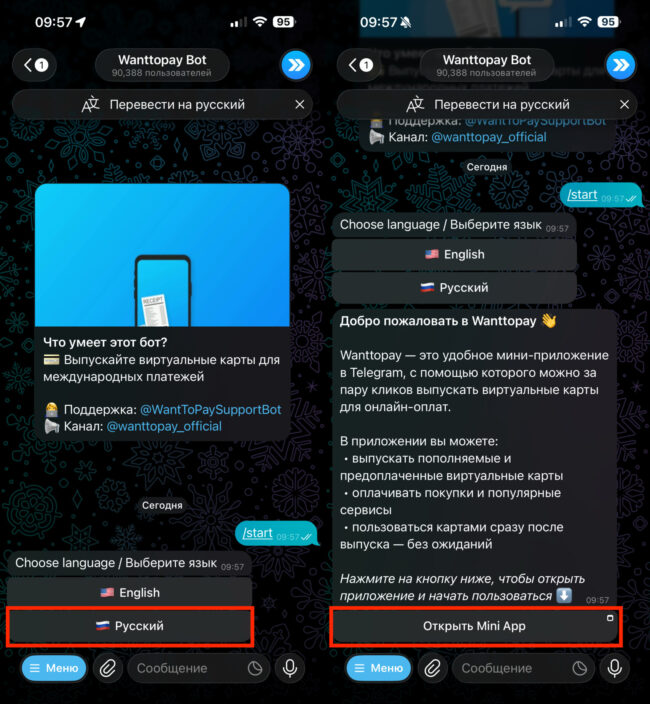
Choose a language and open the mini app
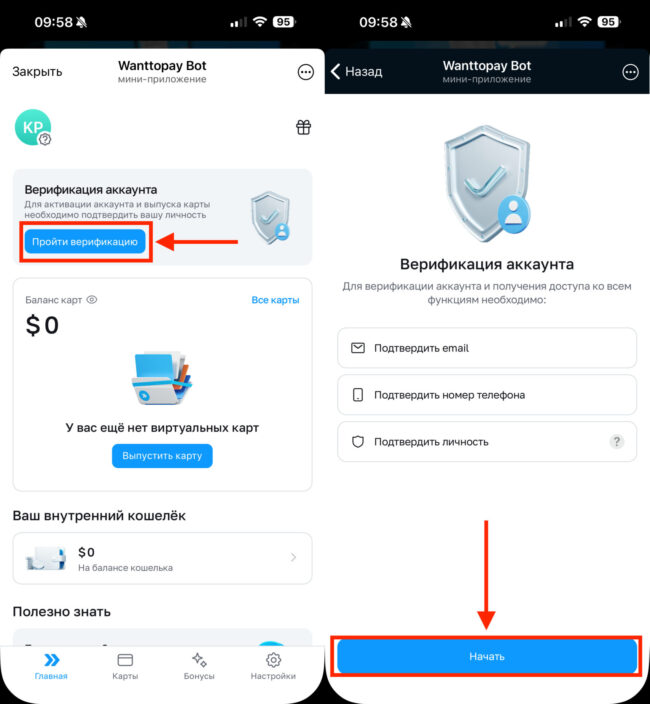
Pass verification and don’t forget to prepare one of the documents
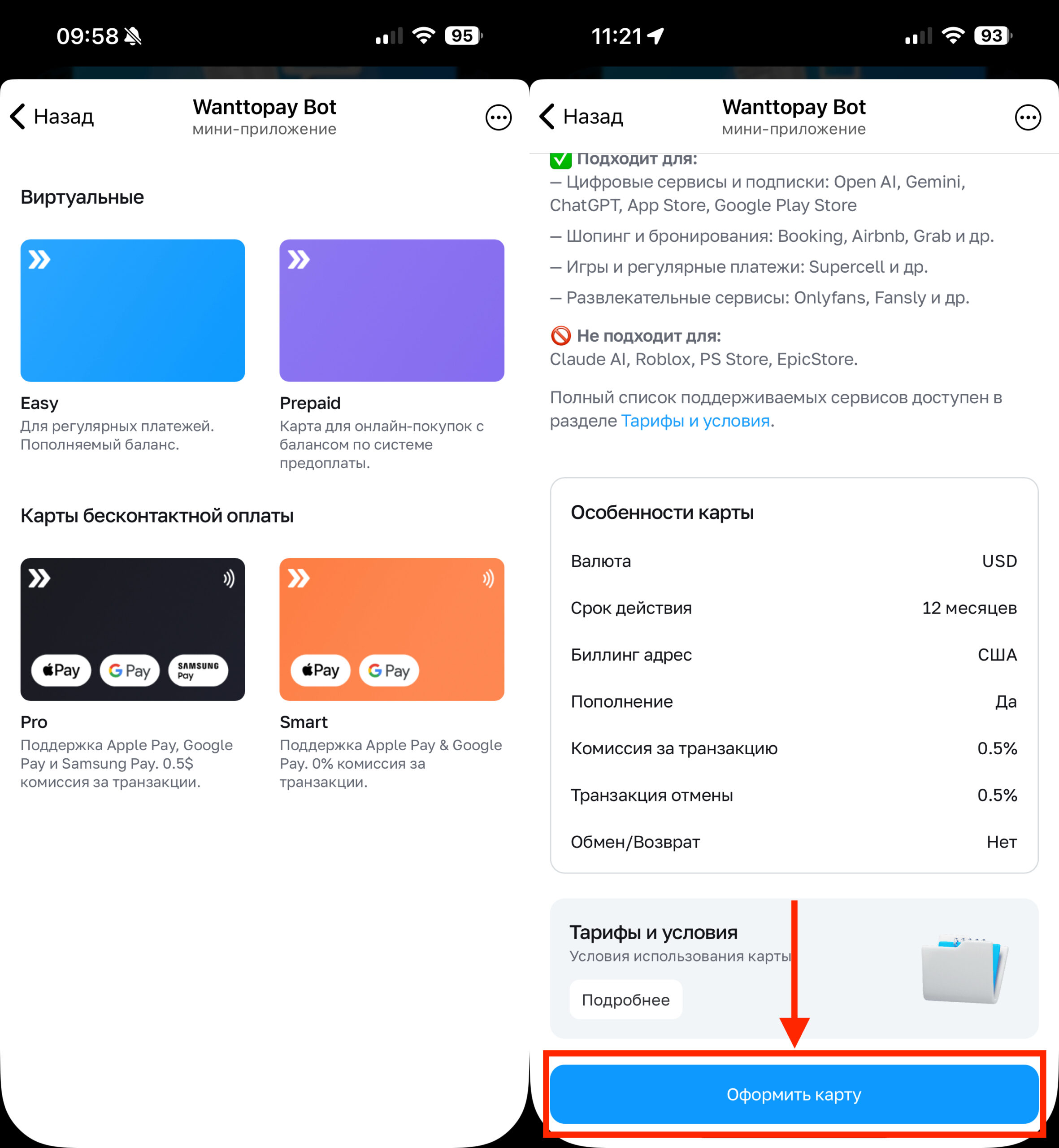
Choose the card you need and issue it
A few simple steps, and a foreign card is in your pocket. However, don’t forget to figure out how to top it up so you have enough funds to pay for subscriptions.
How to Top Up a Foreign Card
You’ve issued a foreign card, now let’s figure out how to top it up. Wanttopay allows you to add money to your card balance using the Fast Payment System (SBP). It takes very little time and doesn’t cause any difficulties:
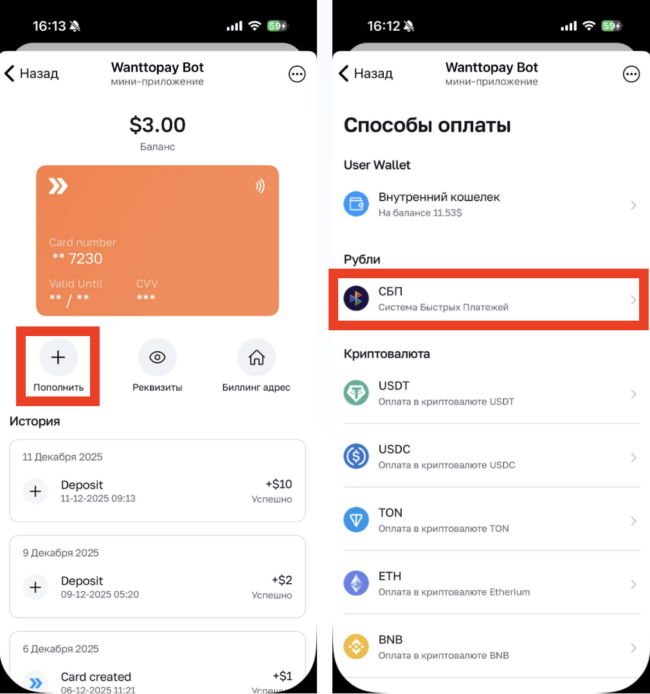
A couple of taps — and the balance is topped up
- Open the Wanttopay bot in Telegram and select the card you want to top up;
- Tap the “Top Up” button below the card;
- In the list that opens, select “Fast Payment System”;
- Enter the amount and follow the on-screen instructions.
As an alternative, there is also the option to top up your foreign card using cryptocurrency. So if you have some USDT lying around, you can transfer it to the card and pay for a subscription. For example, ChatGPT Plus. I use it myself — it’s really great.
By the way, Wanttopay has both a partner and a referral program. Each friend you invite through your link will earn you $4 right away, which you can add to any of your cards and spend as you wish. So the service even lets you earn a little by attracting users.
Wanttopay Bot in Telegram
I want to separately highlight the Wanttopay mini app in Telegram. It might seem like such a service would have to be complex and cluttered, but in reality, the developers did a really good job with the interface and, in my opinion, made it simpler and more user-friendly for regular users.
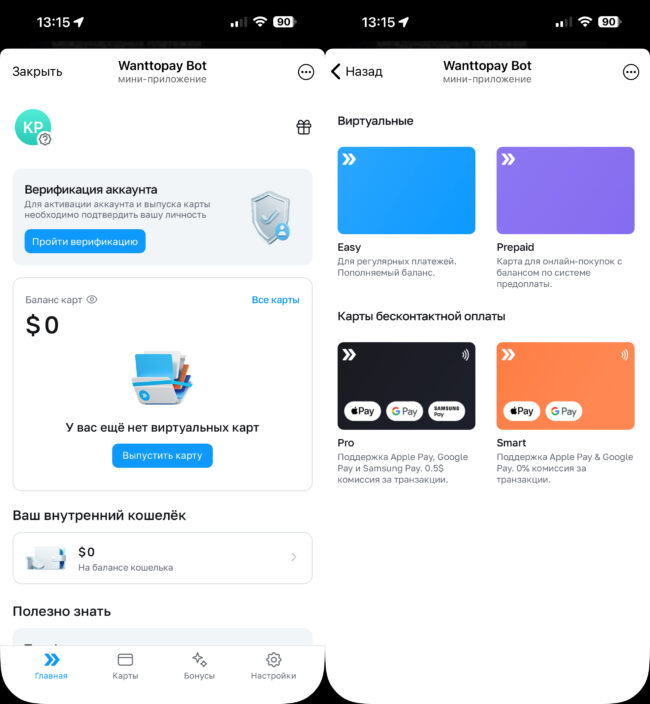
The interface is simple and intuitive
Previously, the start page would dump a list of services on you, among which you still had to find the one you needed. Now it simply shows your cards and the option to open a new one. In my opinion, it’s become much more convenient. And if you need to find out what you can pay for with a Wanttopay foreign card, the support page has a full list of services, and you can check whether everything works as it should and which plan is best to choose.