As Telegram in Russia is actually being seriously blocked, users have started looking for alternatives. One of them is the Korean messenger KakaoTalk, which in March 2026 made it into the top 30 social networks in the Russian App Store. The app is available for download, registration with a Russian number works, but there are serious limitations you should know about in advance.

Another messenger with call support. I wonder if it will be blocked or not. Image: kakaotalk.ru.aptoide.com
Why You Might Need KakaoTalk in Russia
KakaoTalk is the national messenger of South Korea, launched back in 2010. In terms of features, it’s closer to a super app: besides messaging and calls, it has channels, games, news, music, and even payments. However, most of these features are only available to Korean residents.
In the app description, the developers emphasize that KakaoTalk works worldwide, including in Russia. In March 2026, the messenger started being searched for more often on Google and discussed on social media — amid problems with familiar communication tools. You haven’t forgotten that even FaceTime doesn’t work in Russia, right? Well, KakaoTalk can solve that problem.
How to Download KakaoTalk in Russia
The app can be freely downloaded from the Russian App Store
The app is available for free on all major platforms:
- iPhone and iPad — via the App Store (including the Russian one)
- Android — via Google Play
- Computer — desktop version for Windows and macOS on the KakaoTalk website in the Download section
No VPN or third-party app stores are needed for downloading. The app installs the standard way, which is very important for users in Russia.
How to Register on KakaoTalk with a Russian Phone Number
Registration with a Russian phone number works — we tested it ourselves. However, the process is a bit unusual: you enter your number, but instead of receiving a code, you send a special set of characters via SMS to the specified phone number and then press the “Confirm Verification” button in the KakaoTalk app.
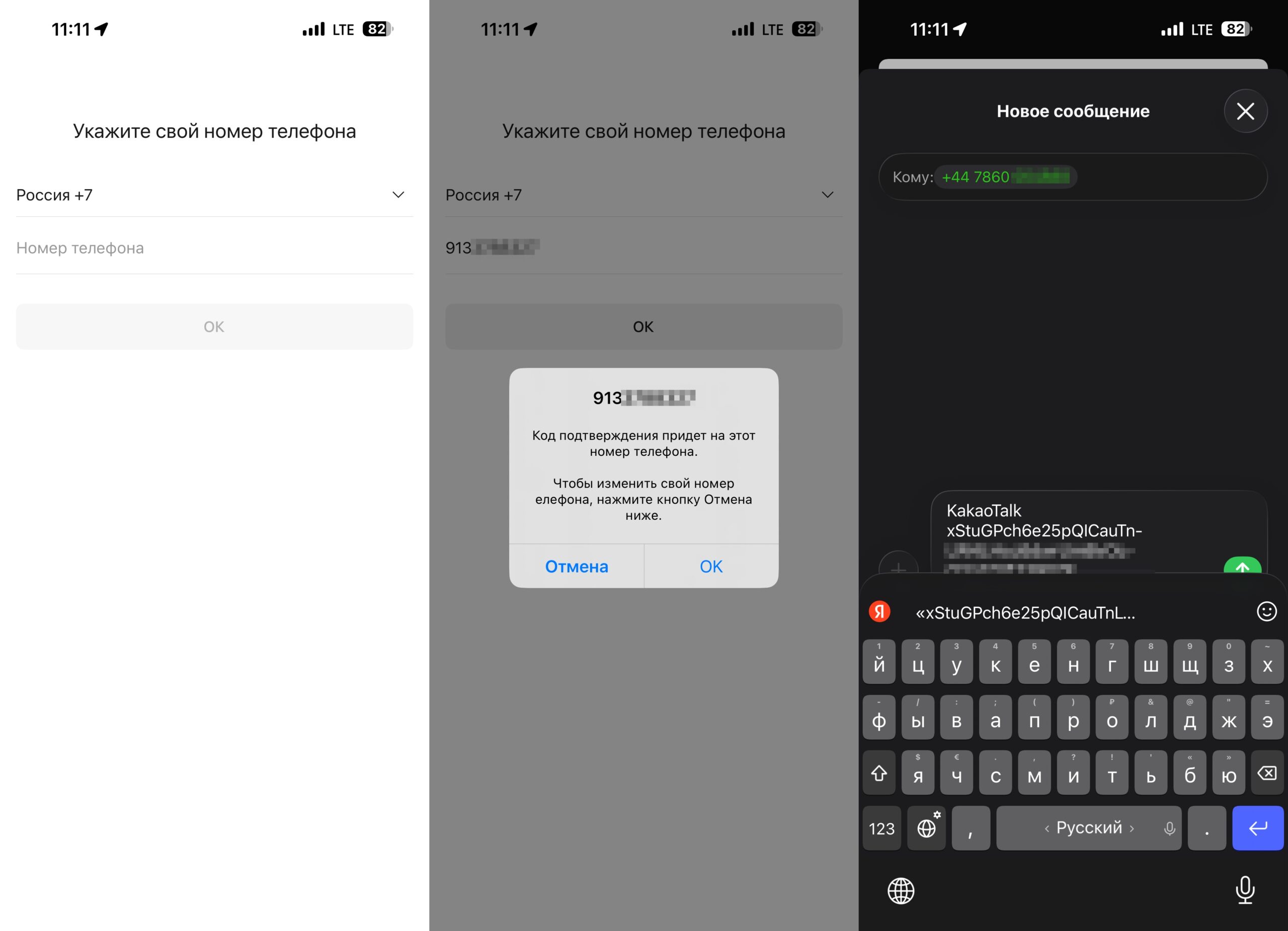
Contrary to the message on screen, you’ll be the one sending the SMS
I stumbled a bit during registration. I’m used to keeping just 1 ruble on my phone balance and only topping up before the subscription fee is charged. The SMS for KakaoTalk needs to be sent abroad, and that balance obviously wasn’t enough — the message wouldn’t go through. I had to urgently top up the balance and the problem was solved. By the way, the international SMS cost me 10 rubles, so keep that in mind.
Some settings and feature names are translated into Russian, but the main interface remains in Korean. Be prepared to figure out many menu items intuitively or with the help of a translator.
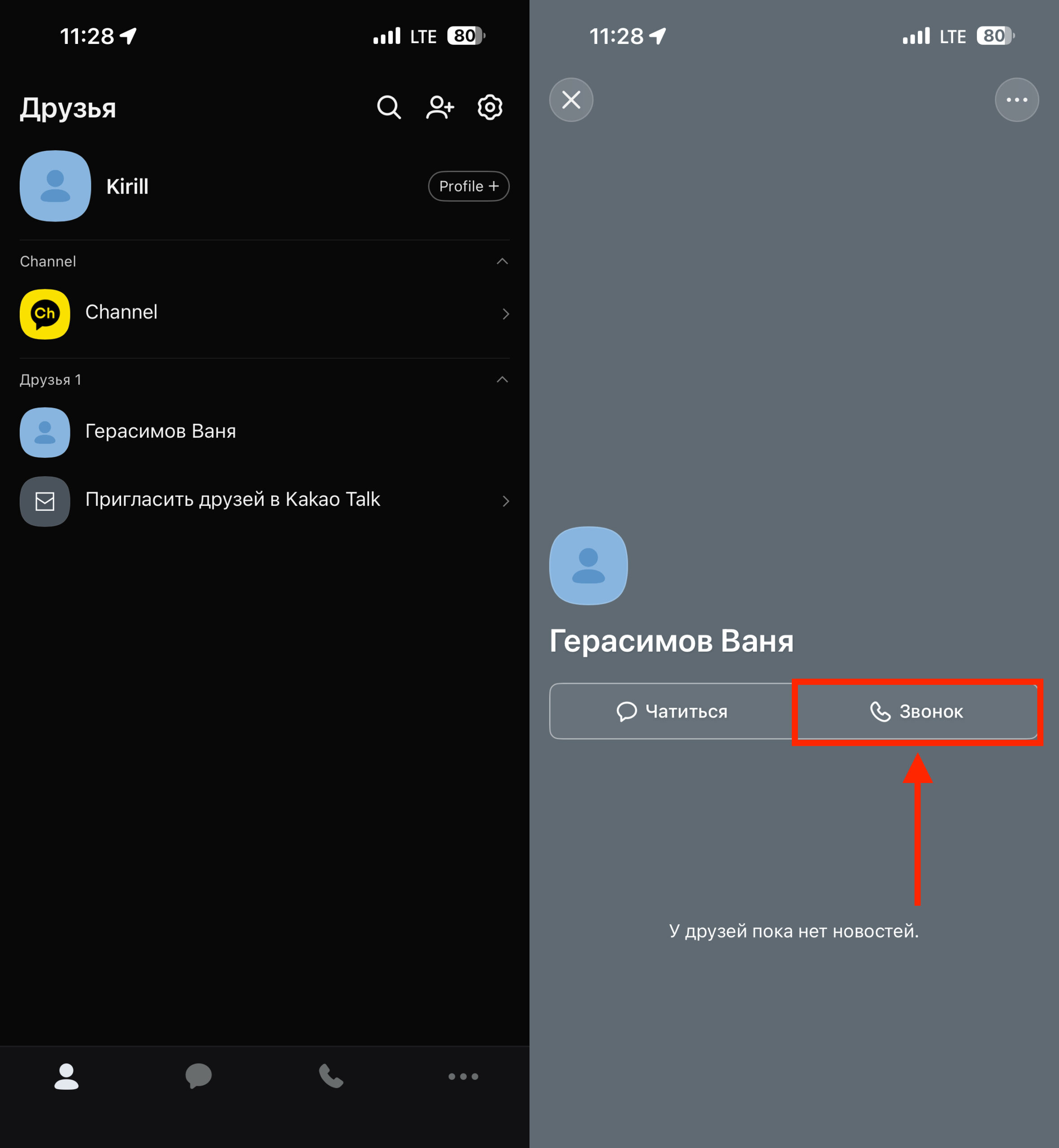
You can make a call in just a couple of taps
KakaoTalk is not just a messenger but also a calling app. Simply go to the contacts tab, select the person you want to call, and press the corresponding button in the window that opens. Call quality is decent — given the absence of Telegram, WhatsApp, and blocked FaceTime, it’s a perfectly viable option.
What Features Does KakaoTalk Have
This is where the main limitations begin. Full verification on KakaoTalk is only possible with a South Korean citizen ID and a Korean phone number. Without verification, functionality is significantly reduced.
What you can do without verification:
- Chat in private conversations
- Make calls
- Join public group chats (up to 2,000 members), search for them by topics and tags
- Create a regular channel (you’ll need a Gmail address)
What’s unavailable without verification:
- Publishing posts, images, videos, and stories on your profile
- Creating your own public group chats
- Purchases, games, maps, news aggregator, and music
- Business channels with monetization (requires a registration address in Korea)
Additionally, moderation may restrict your ability to write in groups and even in private chats if suspicious activity is detected from an unverified account.
Group Chats in KakaoTalk: How to Create and Set Up
KakaoTalk has two types of group chats: closed (by invitation) and public. Public chats support up to 2,000 members and can be found via search by topics and tags — somewhat like Telegram channels.
But there’s an important caveat: foreign users cannot create their own public chats. You can only join existing ones. And considering that most chats are in Korean, the practical benefit for Russian-speaking users is currently limited. Creating a closed group chat is very easy:
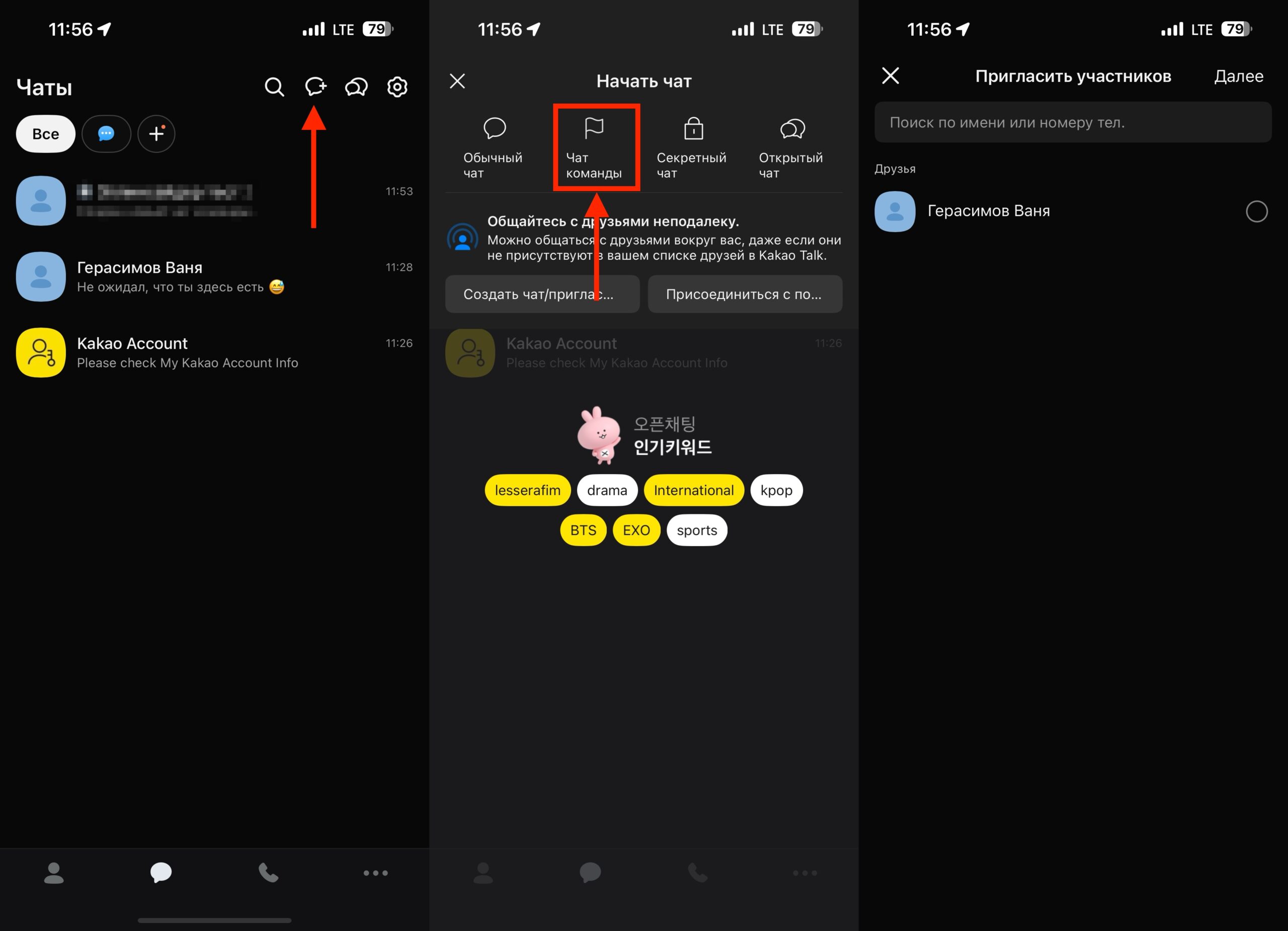
You can create closed group chats
- Open the KakaoTalk app on your iPhone;
- Go to the chats tab;
- At the top of the screen, tap the speech bubble icon with a plus sign;
- In the dropdown menu, select “Team Chat”;
- Check all the users you want to add and finish creating the chat.
Now you can chat with friends and family in one KakaoTalk group chat. By the way, the messenger works without VPN or any other workarounds, which is also quite important.
Is It Worth Switching to KakaoTalk from WhatsApp and Telegram in Russia
KakaoTalk is a full-fledged messenger with solid infrastructure, but it was designed for the Korean market. For basic communication — messaging and calls — it works with a Russian number. However, without verification, you get a significantly stripped-down version. On the other hand, do you really need all that? Given the number of blocks, if there’s at least something covering even basic functions, that might be enough.
If you need a backup messenger for personal conversations with specific people, KakaoTalk will do. But as a full-fledged replacement for Telegram with channels, groups, and Russian-language content — not yet. The main limitation is not


