On the morning of March 30, 2026, the MAX messenger stopped working for a significant portion of Russian users. The first complaints started coming in around 9:28 AM Moscow time — that’s exactly when the monitoring service Detector404 recorded a sharp spike in reports. Today’s MAX outage affected users in several regions simultaneously, which points to infrastructure-level problems rather than individual device issues. What to do if MAX messenger isn’t working — we break it down in this article.
MAX stopped working across all of Russia
What Exactly Isn’t Working in MAX on March 30
The MAX app outage manifests differently depending on the device and region. According to Detector404, users are complaining about the following:
- inability to load the main app interface;
- complete service failure — the app freezes or won’t open;
- problems sending and receiving messages;
- inability to send media files and load media content.
Android users were hit hardest by the MAX outage — they account for 42.4% of all reports. Windows is in second place with 29.3%, followed by iOS with 23.9%. Judging by the statistics, Android device owners experienced the most severe problems — many report being completely unable to launch the app.
Where MAX Isn’t Working Today
MAX isn’t working on March 30 across several regions at once. The Samara Oblast leads in the number of complaints — it accounts for 10% of all reports. The Ulyanovsk Oblast takes second place with 7%. Moscow and Saint Petersburg each contribute 5% of complaints, and the Republic of Tatarstan — the same. Fontanka also recorded the first complaints in Moscow and Krasnodar. Thus, MAX isn’t working today across virtually the entire country, although the intensity of problems varies between regions.
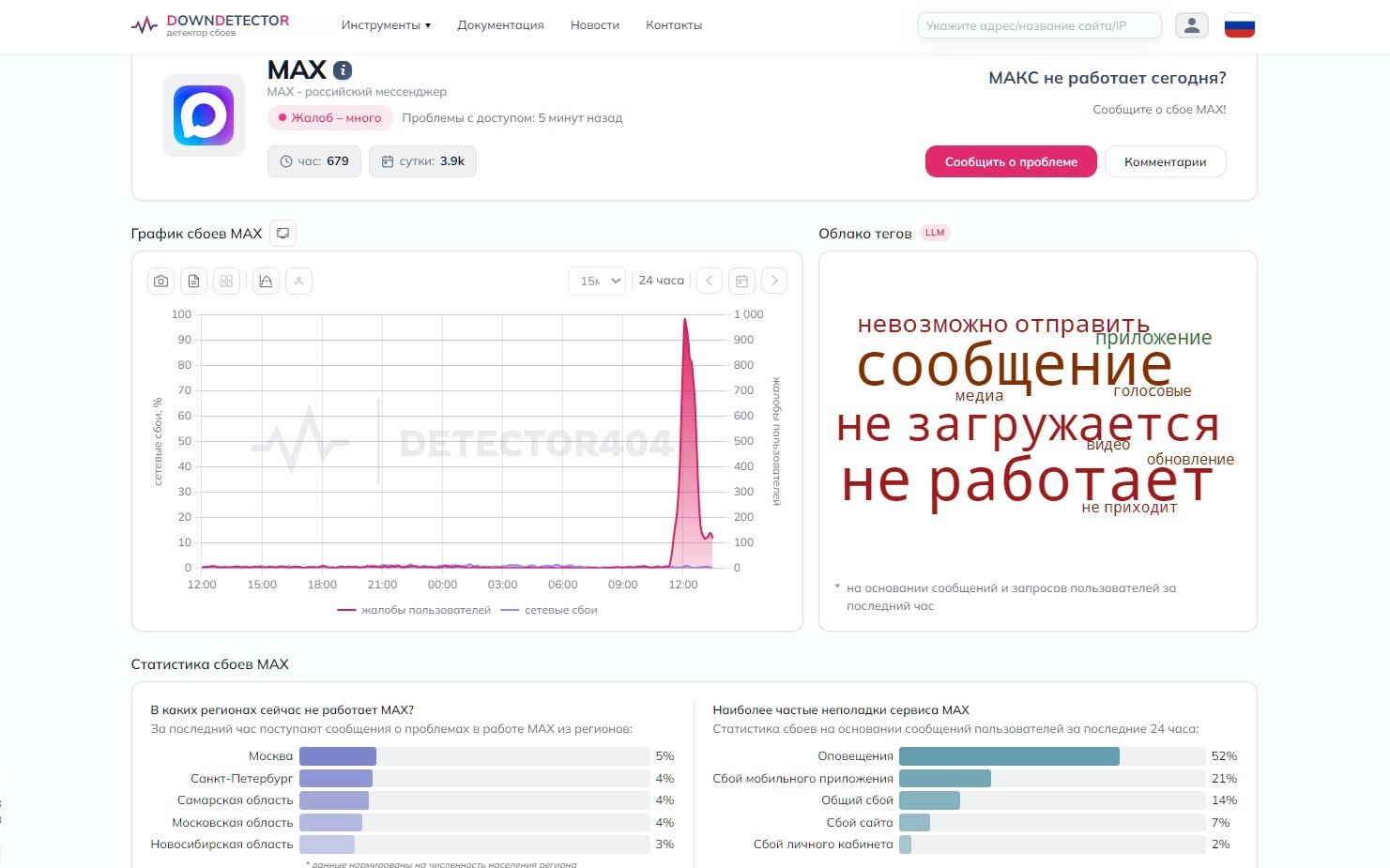
MAX is more or less down for everyone. Source: detector404.ru
What makes it particularly frustrating is that the MAX app outage hit during the morning hours at the start of the workday — exactly when the messenger is used most actively for business communication. For many users, MAX became their primary communication channel after restrictions on Telegram and WhatsApp, which we covered in detail previously. That’s precisely why any outage of the national messenger is felt especially acutely.
What to Do If MAX Isn’t Working
So far, there have been no official comments from the developers. If the MAX app isn’t working right now, here’s what you can try:
- Force close the app and relaunch it.
- Check your internet connection — switch between Wi-Fi and mobile data.
- Try opening the web version of MAX at web.max.ru.
- Clear the app cache via “Settings” — “Apps” — MAX — “Clear cache.”
- If nothing helps — just wait. Mass outages of this kind are typically resolved within a few hours.
It’s worth saying directly: incidents like this aren’t the best advertisement for a messenger that the government is actively promoting as a replacement for foreign services. Questions about MAX’s security already come up regularly among users, and technical outages add more reasons for doubt. We’re monitoring the situation and will update this article as soon as official comments appear.


