Starting April 1, 2026, mobile carriers disabled direct Apple ID top-ups from phone balances — a method used by millions of iPhone owners in Russia. Linking a number and paying for iCloud or Apple Music through mobile balance is no longer possible. But foreign virtual cards have become noticeably more accessible over the past two years: commissions dropped from 25–30% to 7–12%, and issuing takes 5 to 15 minutes right in Telegram. Let’s break down four services that are working right now.
Different services offer cards in different currencies and with different issuers
Which Foreign Services Can Be Paid with a Virtual Card from Russia
The main reason people look for foreign cards is paying for subscriptions and services that don’t accept Russian cards. Here’s what, according to sources, people pay for most often:

With a foreign card, paying for international services won’t cause problems. Image: habr.com
- Apple services: iCloud, Apple Music, Apple TV+, App Store purchases
- AI services: ChatGPT Plus and other OpenAI subscriptions
- Streaming: Spotify, Netflix
- Work tools: Adobe Creative Cloud
- Travel: Booking.com, Airbnb
- Marketplaces: Amazon
For services with US geolocation (ChatGPT, Amazon, Apple with a US account), dollar cards with an American issuer work best. For European subscriptions — cards in euros. This affects whether the payment goes through: some services check the card’s country of issue.
Paying for iCloud, Apple Music, and App Store from Russia in 2026

Apple subscriptions, including iCloud, can also be paid for. Image: igeeksblog.com
After mobile payments were disabled, iPhone owners are left with two working options: Apple Gift Card codes and linking a foreign card to Apple ID.
The virtual card option is more convenient if you have multiple subscriptions: you link the card once and forget about it — charges go through automatically. With gift codes, you need to monitor the balance each time and top it up on time.
If you use a card with a European issuer, you may need to change your Apple ID region. For cards with US GEO — switch to the US region. Keep in mind that changing regions may cause some apps and subscriptions from the previous region to disappear. It’s worth checking this in advance.
Comparison of Services for Issuing Foreign Virtual Cards in 2026
Below are four services that are mentioned in sources as working in 2026. There’s no ranking with “first places” here: each service is tailored for its own tasks.
Plati po Miru (Pay Around the World)
The simplest option for most tasks. Everything works in a mini-app in Telegram, top-up via SBP (Fast Payment System), no verification needed.
- Subscription card (EUR, issuer — Spain): issue 2,990 ₽, then 3,990 ₽/year
- Travel card (USD, issuer — Hong Kong): issue 3,990 ₽, then 3,990 ₽/year
- Balance after issue: 5 USD or 5 EUR
- Suitable for: Spotify, Netflix, Booking, Apple subscriptions (with region change)
You can issue a Plati po Miru card as follows:
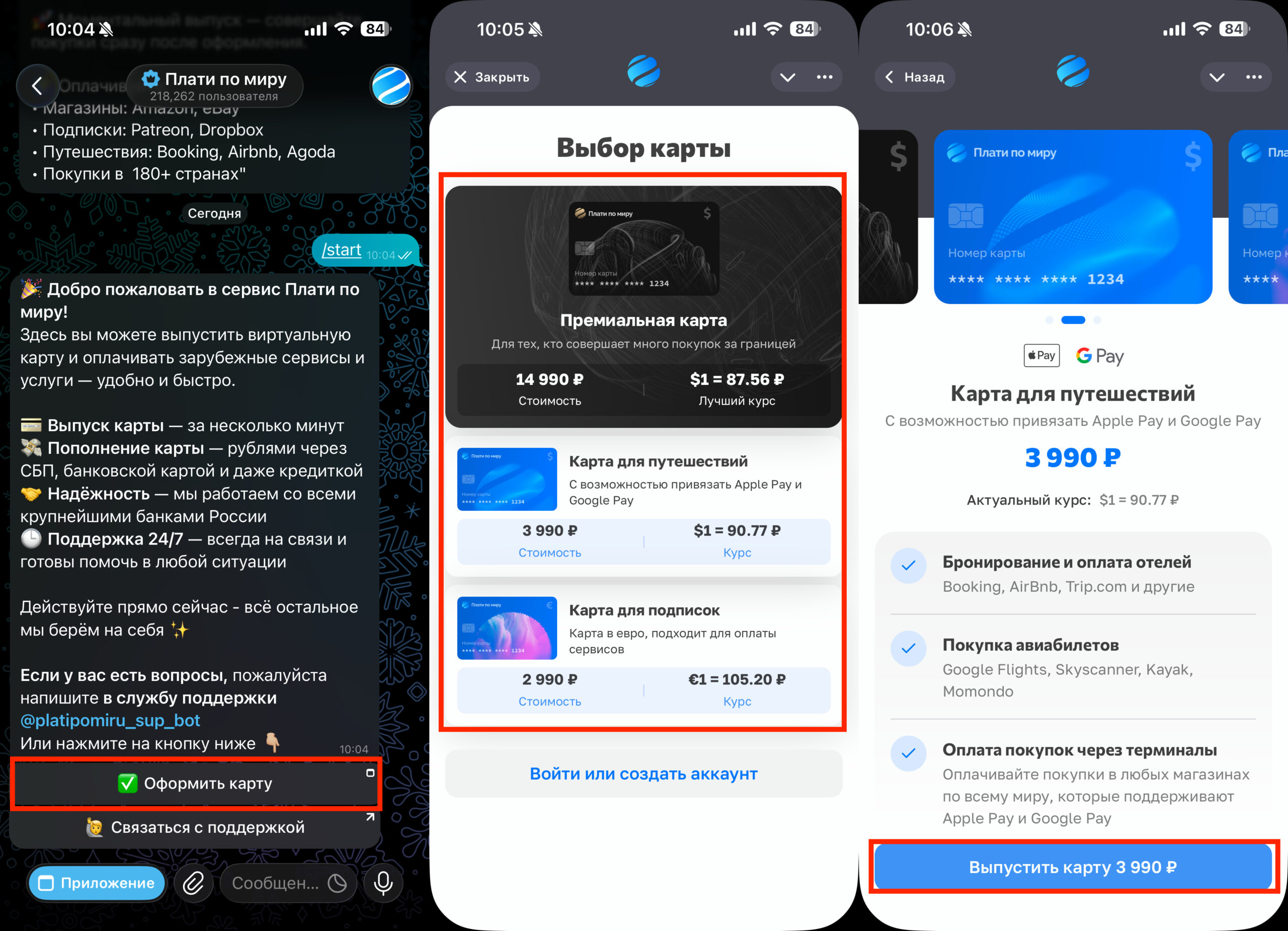
There are several card options to choose from
- In Telegram, go to the “Plati po Miru” bot and launch it.
- Press “Issue a card”;
- In the mini-app that opens, select the card you need and press “Issue card”;
- Follow the on-screen instructions.
Everything works as simply and quickly as possible, and you can pay for card issuance and top-up via SBP.
Card.Club
A dollar card with US GEO — works better with US services.
- Issuance from $35 (approximately from 4,000 ₽)
- Top-up: SBP and USDT
- Suitable for: ChatGPT, Amazon, Apple with US account
A Card.Club card is issued like this:
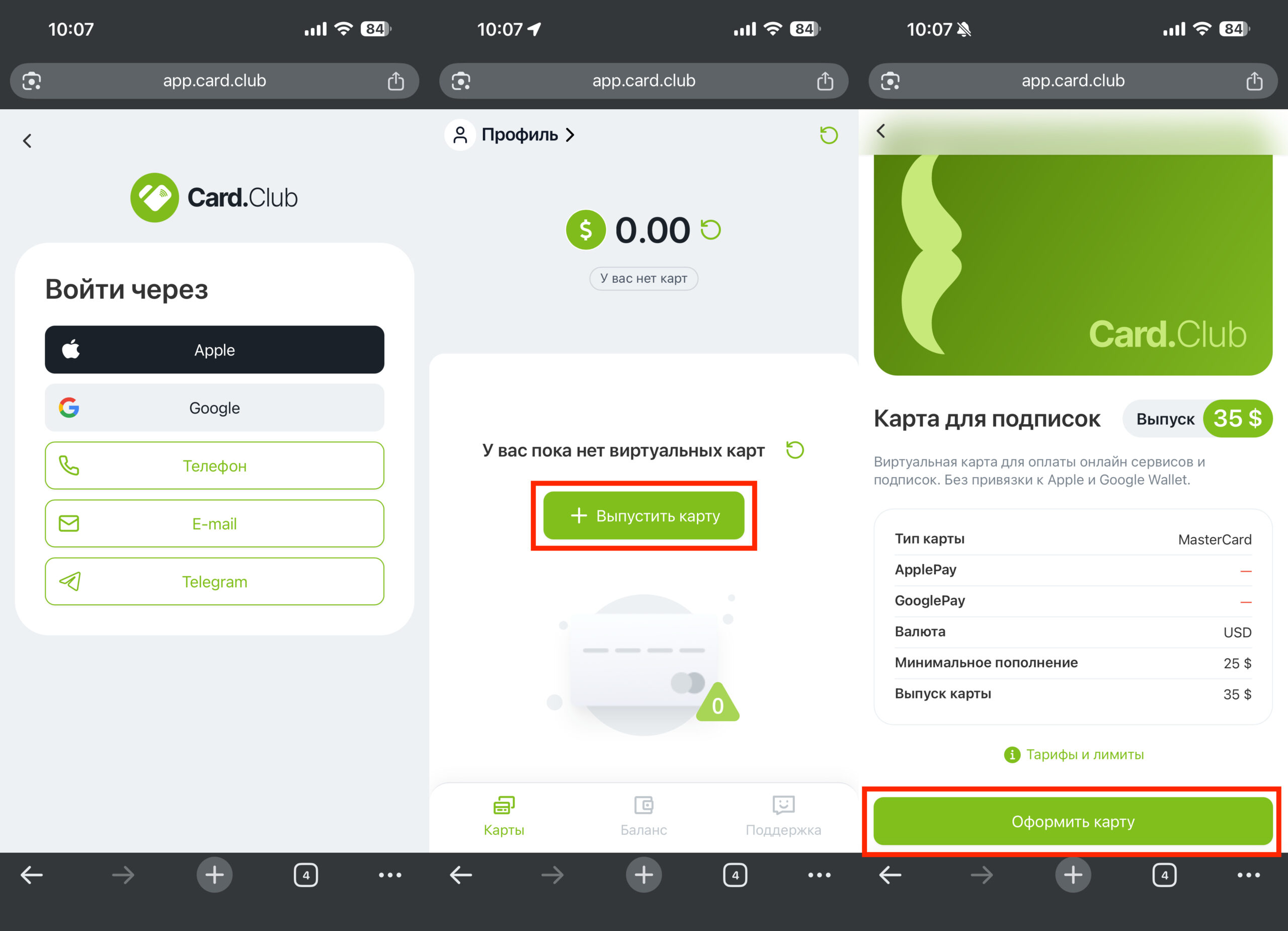
Everything is done through the website
- Go to the Card.Club website from any device;
- Press the “Issue a card” button and register or sign in via Google or Apple;
- Press “Issue a card” and choose the best option for you;
- Press “Issue a card” again and follow the on-screen instructions.
WantToPay
A fintech service with access through a Telegram mini-app. Positioned as a convenient tool for paying for foreign services, subscriptions, and bookings.
- Works through a Telegram bot
- Suitable for: subscriptions, travel, foreign services
Issuing a WantToPay card is just as easy as all the previous ones. Especially since interaction happens through a Telegram bot:
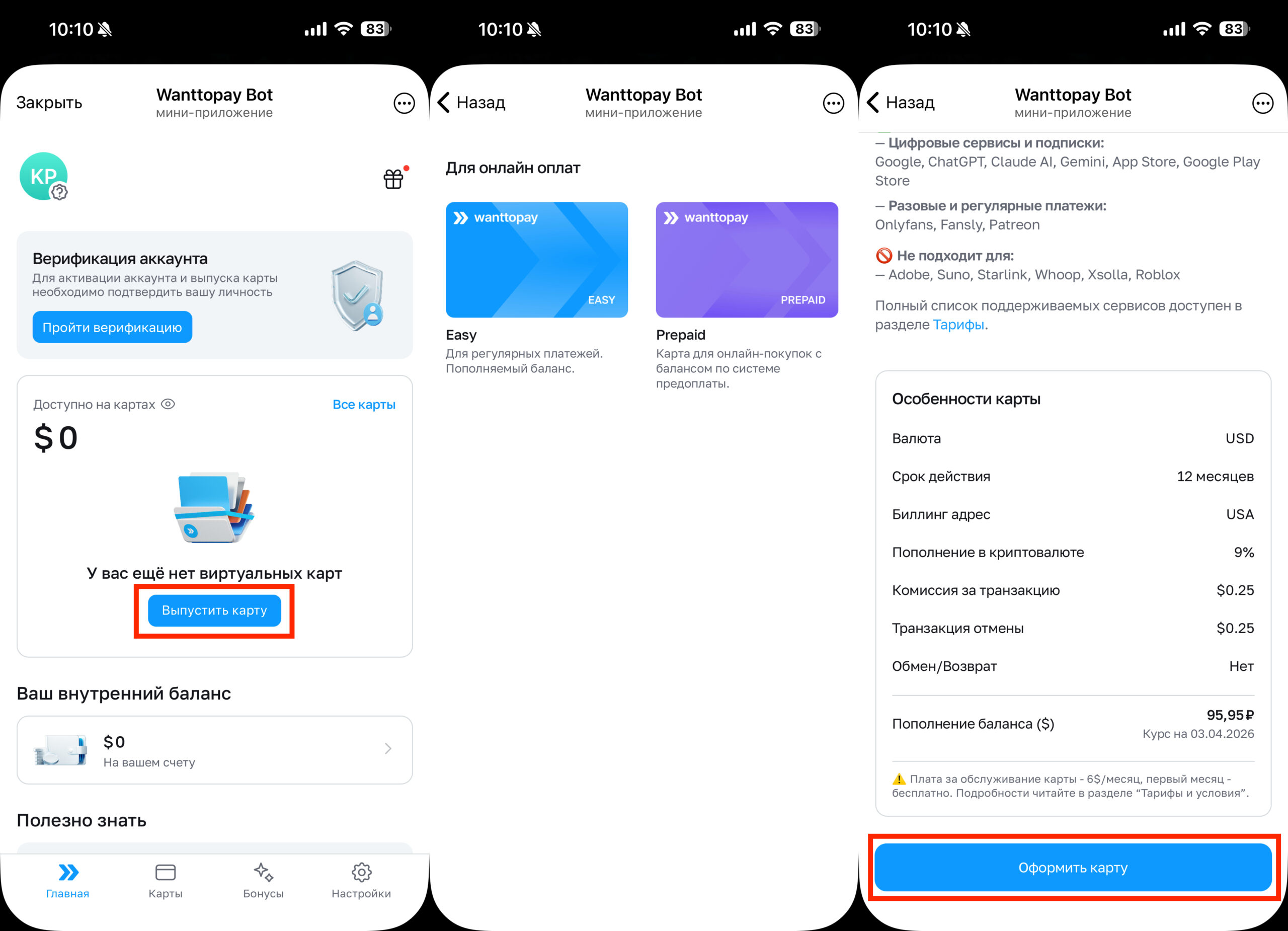
The service works in Telegram, and that’s convenient
- In Telegram, go to the WantToPay bot and launch it;
- Press the “Issue a card” button;
- Choose the best option for you and press “Issue card”;
- Follow the on-screen instructions.
It’s that simple. A few taps and you already have a foreign card.
EasyPayments
The only option on the list where you can get an actual physical foreign card.


