A couple of weeks ago, a friend of mine came to me with an unpleasant story: he opened Telegram, saw messages sent from his account that he didn’t write, and lost access to his account within minutes. The situation is unpleasant but solvable if you act quickly and methodically. Fortunately, we managed to fix the problem, and I reminded him about important Telegram security features he had neglected. Now let’s walk through all the steps together in case you’ve also encountered a Telegram account hack. This happens just as often here as in the recently popular MAX messenger.
Dealing with a Telegram account hack
Can Telegram Be Hacked
Telegram is widely considered one of the most secure messengers. End-to-end encryption in secret chats, open source code, the MTProto protocol — it all sounds reliable. But Telegram hacks happen constantly, and the number of complaints isn’t decreasing.
A telling parallel: MAX is considered an insecure messenger, and indeed — MAX account hacks happen regularly. But Telegram is no better in this regard. Technically, the messenger is well-protected, but it’s the user who gets attacked, not the protocol. And here, Durov’s app is no different from any other. If scammers hacked your Telegram account, it’s always about the human factor, not holes in the code. You gave away access yourself without even noticing.
How Telegram Gets Hacked on Android
Hacking Telegram on Android almost always happens in one of the following ways:
- Phishing links. A message with an attractive link, supposedly from a friend or official channel. You follow it, enter your phone number and the SMS code. That’s it — the account is no longer yours.
- Fake tech support. A bot or account with a Telegram avatar writes that your profile will be blocked and asks for a verification code. Real Telegram never does this.
- SMS code interception. Technically more difficult, but possible through SIM card swapping or carrier vulnerabilities.
- Unofficial Telegram clients. Telegram mods are dangerous — there are concrete examples of how forks steal sessions and transmit data to third-party servers.
- Malicious apps. You downloaded something from a suspicious site, and it intercepts SMS or reads data from the clipboard.
- Access to an unlocked phone. Someone gained physical access to your smartphone and logged into Telegram on their device.
Most of these methods have one thing in common: the user themselves hands over the verification code, thinking they’re doing something useful and important.
How to Tell If Your Telegram Has Been Hacked
Check these signs for yourself
Sometimes a Telegram account hack is immediately noticeable, sometimes attackers stay quiet for several days. Here are the signs to watch for:
- you received a verification code on your phone that you didn’t request;
- you can’t log into your account (the password doesn’t work or has been changed);
- an unfamiliar device appeared in the list of active sessions;
- friends report receiving strange messages or money requests from you;
- channel subscriptions have disappeared or new ones have appeared;
- your username, avatar, or profile information has changed;
- posts you didn’t publish have appeared in your channels.
If even one of these signs is present, act immediately. Every minute of delay gives the attacker more opportunities.
What to Do If Your Telegram Is Hacked
The course of action depends on whether you still have access to your account. If you do — act right now:
- Open Telegram and go to “Settings.”
- Go to “Privacy and Security.”
- Select “Devices.”
- Tap “Terminate All Other Sessions” (this will kick the attacker out of the account).
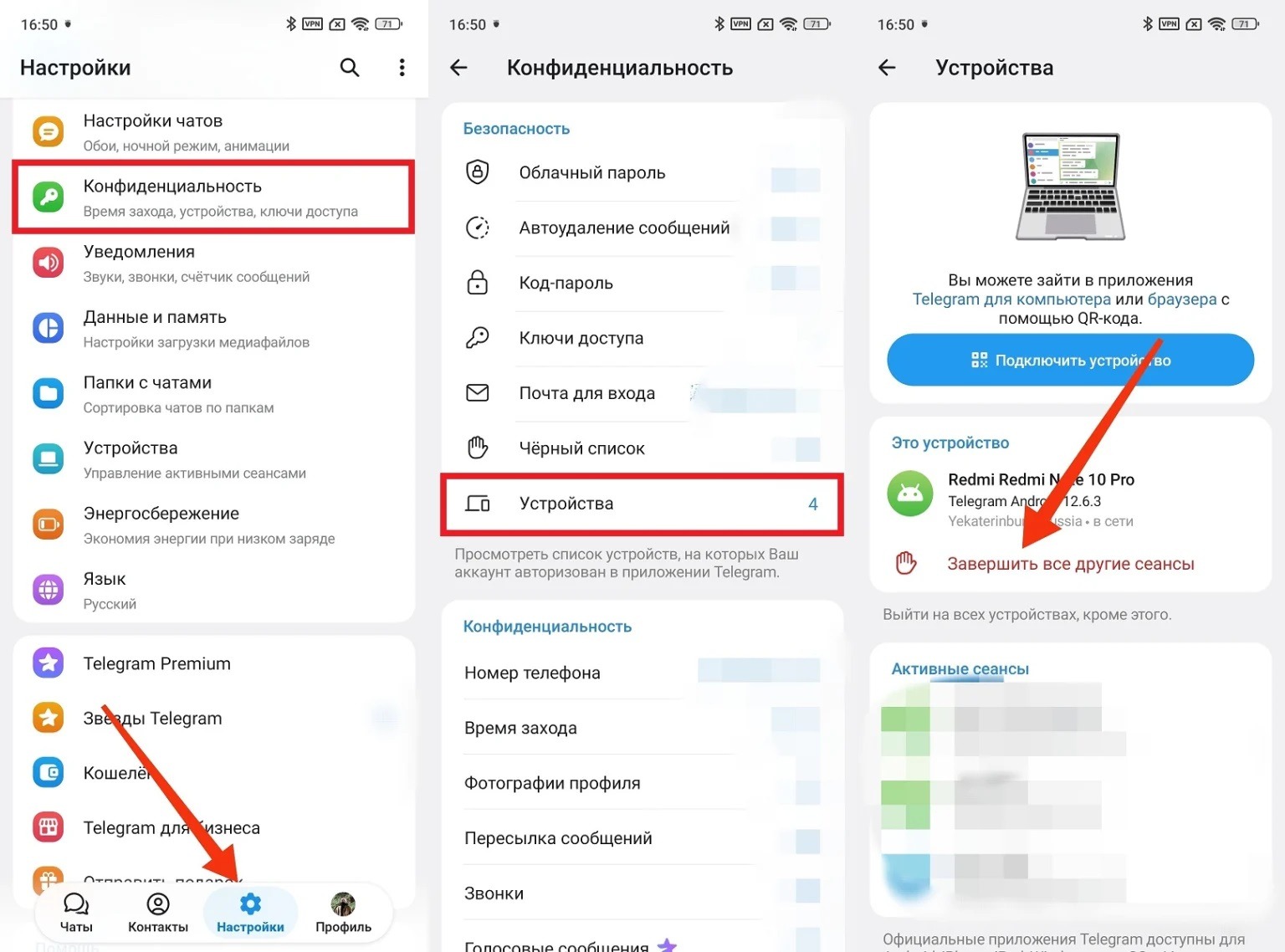
Make sure to terminate active sessions if you have access to your profile
If you don’t have access, try to reset your Telegram password, which recently started being sent to email:
- On the login screen, enter your number.
- Then tap “No access to email?”
- Confirm the email reset.
- Telegram will send a code to the linked email address.
- Enter the code and set a new password.
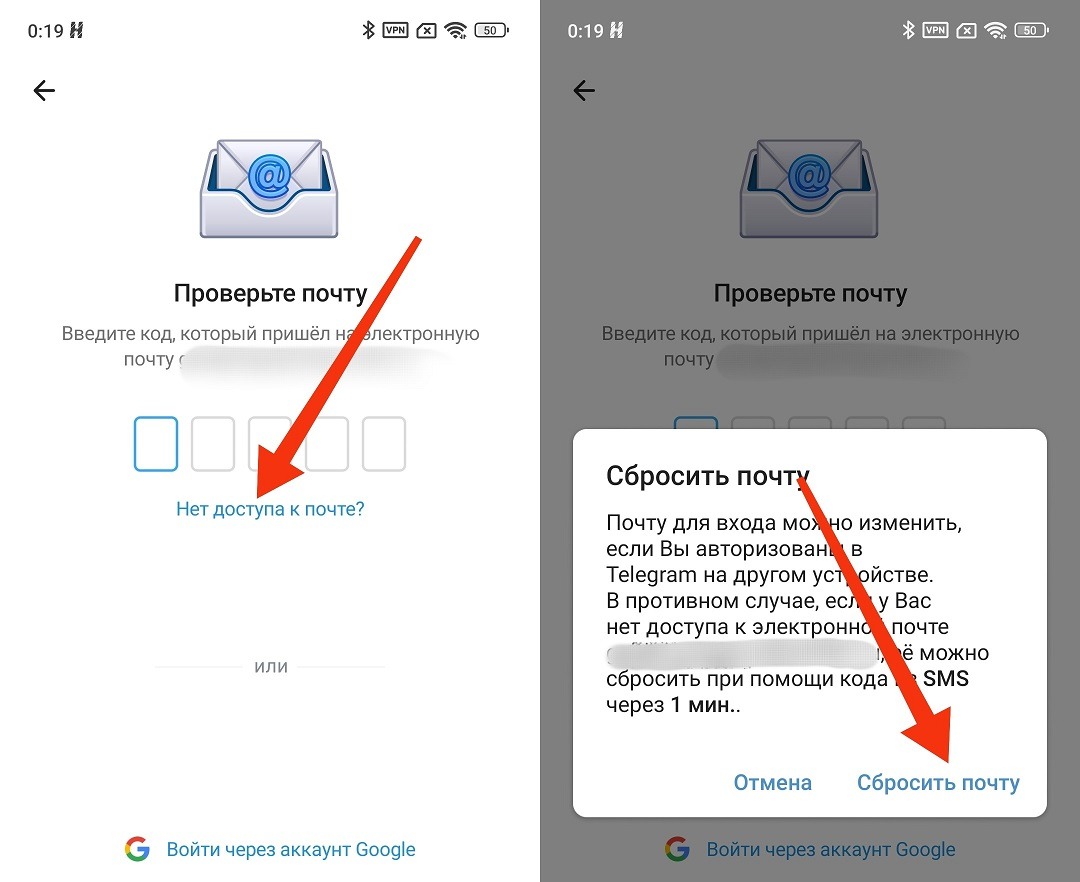
You’ll need to link a new email
If you don’t have access to the email either, there’s a password reset button in the settings that works without email, but you’ll have to wait seven days. Telegram did this intentionally: to prevent an attacker from instantly locking you out of your own account.
How to Recover Telegram If It Was Hacked
If you can’t recover your Telegram account on your own — it means the scammers changed both the password and the email. The remaining option is to contact support.
Telegram support service in case of a hack is available at telegram.org/support. There’s a feedback form there. Describe the situation, provide your phone number, and explain what happened.
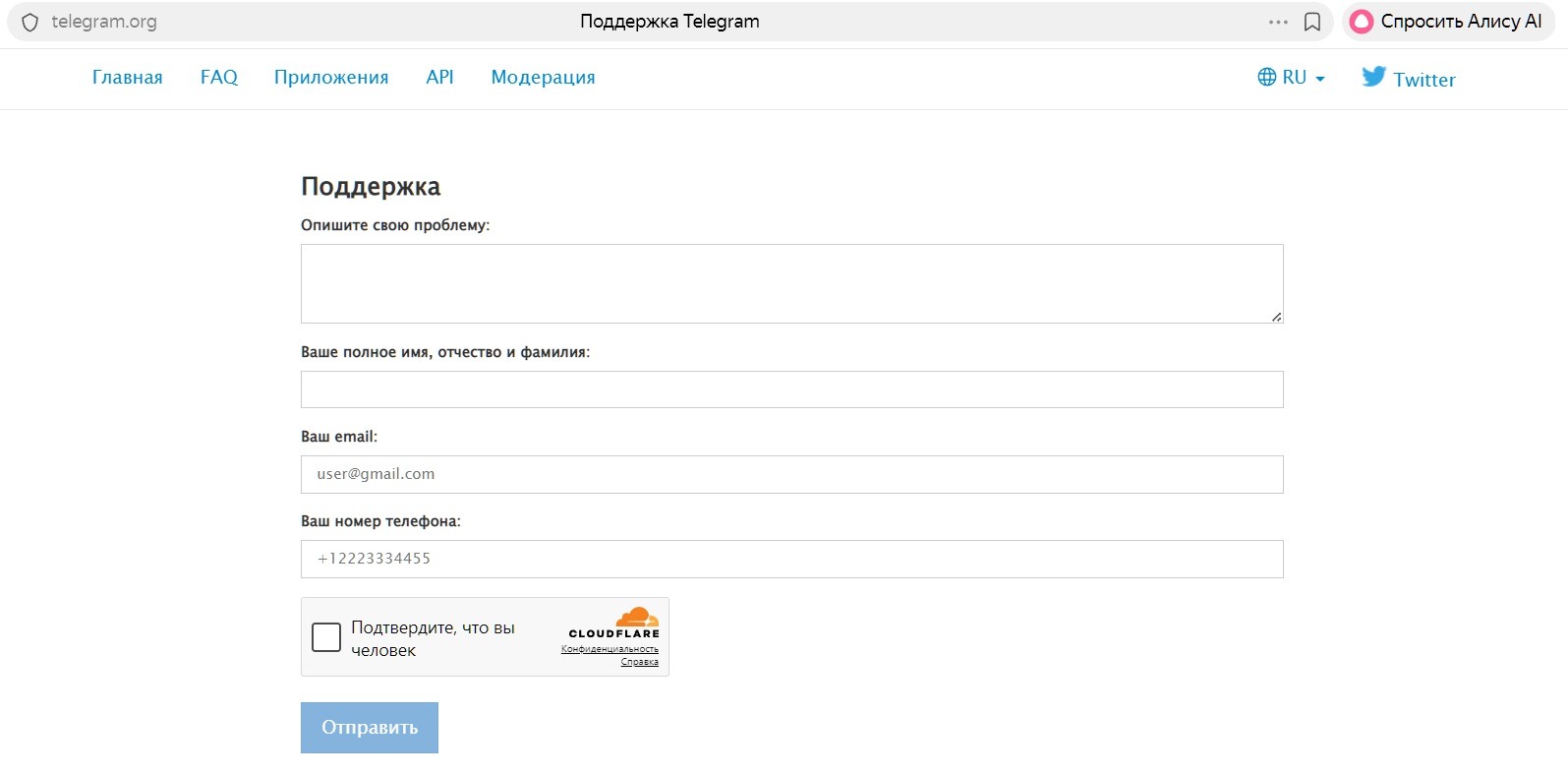
Telegram support contact form
You can also email recover@telegram.org simultaneously. This is the address for Telegram account recovery requests after a hack or deletion.
What’s important to include in your request:
- your phone number