With the release of iOS 26.4, 8 new emoji have arrived on iPhone — the first and only keyboard addition this year. The set turned out quite diverse: there’s a mythical creature, a musical instrument, an orca, and a face that’s already being called the most recognizable meme of 2026. Here’s what was added, what each symbol means, how to quickly find it, and who might actually need it.
iOS 26.4 brought new emoji. They don’t display on older OS versions. Image: macworld.com
What New Emoji Were Added in iOS 26.4: Full List
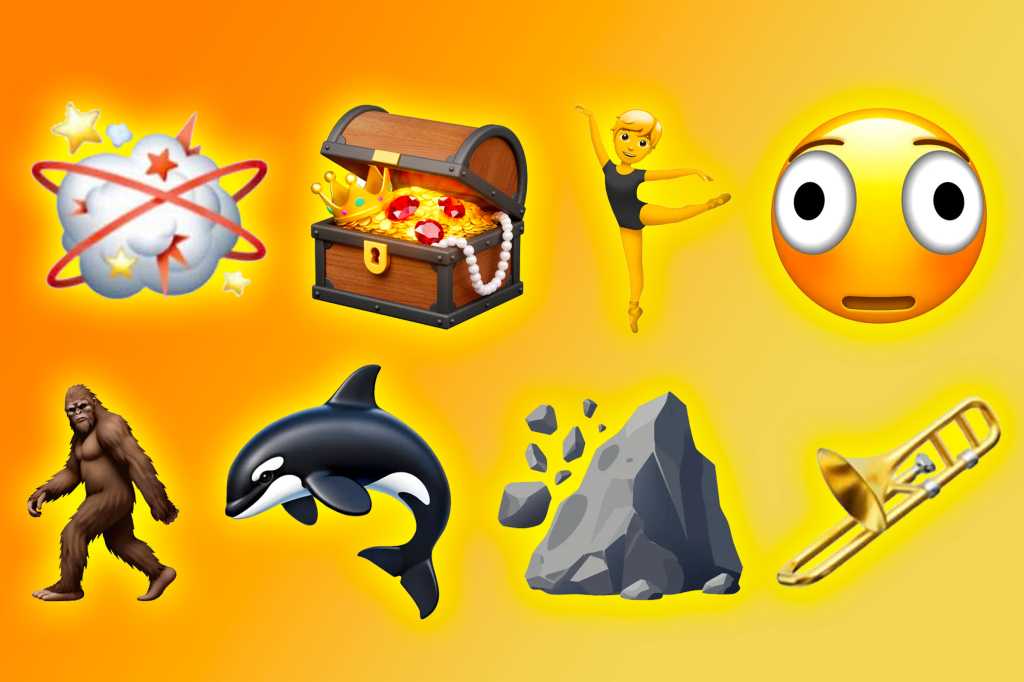
Here are all the new emoji from iOS 26.4. Image: macworld.com
Here are all 8 new emoji that appeared in the update:
- Ballet Dancer — a gender-neutral character symbolizing dance and grace
- Distorted Face — a smiley with bulging eyes and a “bloated” face, as if seen through a fisheye lens
- Fight Cloud — the classic cartoon dust cloud from comics, a sign of a scuffle or chaos
- Hairy Creature — also known as Bigfoot, Yeti, or the Abominable Snowman
- Landslide — an image of a mountain landslide
- Orca — a marine mammal that was missing from the keyboard until now
- Treasure Chest — a pirate chest, a symbol of reward or discovery
- Trombone — a brass instrument, a nod to musicians and ska enthusiasts
In addition to entirely new symbols, the update adds skin tone variations for the existing “People Wrestling” and “People with Bunny Ears” emoji. Including variations, the total number of new designs reaches 163.
What Each Emoji from iOS 26.4 Means
The new symbols are part of the Unicode 17.0 standard, which was approved in September 2025. The Unicode Consortium is a non-profit organization that sets unified rules for all platforms, while Apple designs its own versions for iPhone, iPad, and Mac.
Distorted Face is the star of the set. It’s a smiley with a “fisheye” effect: disproportionately large eyes and a surprised expression. It has long been popular on Discord servers — essentially, it’s a distorted version of the flushed face emoji. Perfect for when the words “I’m shocked” don’t convey the full depth of your feelings.
Fight Cloud — the familiar comic book and cartoon cloud indicating a brawl between at least two characters. A great way to represent chaos, disorder, or a heated argument — without pointing fingers at anyone.
Hairy Creature (Bigfoot) — can represent mystery, adventure, or something unproven but intriguing. Useful for stories in the “you won’t believe what happened” genre.
Orca — a widely recognized marine mammal that was previously missing from the emoji keyboard. Useful for ocean lovers, environmentalists, and anyone who simply loves orcas.
Treasure Chest — a symbol of reward or a hidden surprise. Gamers, marketers, and anyone who wants to say “I found something valuable” will appreciate it.
Trombone — a key addition to the music category. It can represent not only the instrument itself but also the comical “wah-wah-wah” sound of disappointment from cartoons. This emoji has an unusual backstory: it was proposed for approval back in 2019 by schoolchildren from Maryland.
Landslide — an image of a landslide or mountain collapse. Can be used literally — for discussing natural disasters — or metaphorically, when everything is falling apart.
Ballet Dancer — a gender-neutral character symbolizing the art of dance, grace, and self-expression.
Attentive readers may have noticed that back in 2025, an Apple Core emoji was among the announced emoji. However, it didn’t make it into the final set. According to sources, the symbol was included in the Unicode 17 standard but didn’t appear in iOS 26.4 beta versions. According to Macworld, the Apple Core emoji was withdrawn from consideration. So don’t expect it on the keyboard for now.
How to Find the New Emoji on iPhone
After installing iOS 26.4, the new emoji automatically appear on the keyboard. You don’t need to enable anything — just update. Here’s how to quickly find them:
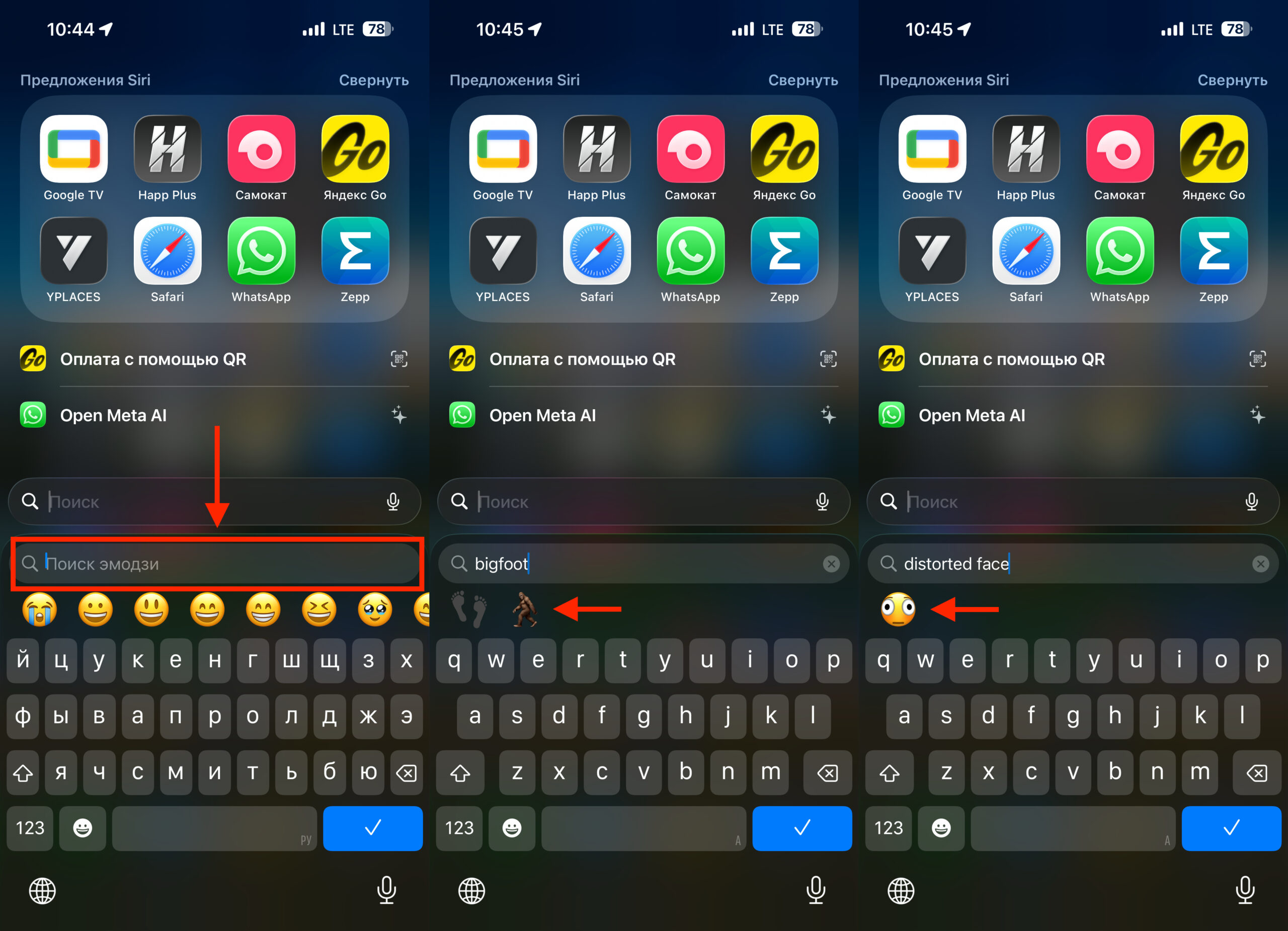
Emoji search works in English
- Open any app with a text field — Messages, Notes, or any messenger
- Tap on the text field, then on the emoji button (smiley face) or the globe icon on the keyboard
- Use the “Search Emoji” bar at the top of the keyboard
- Type the emoji name in English — for example, bigfoot, orca, trombone, treasure chest, or fight cloud
- Tap on the desired emoji, and it will be inserted into the text
If the search bar doesn’t appear, check that the Emoji keyboard is enabled: Settings → General → Keyboard → Keyboards → Add New Keyboard → select “Emoji.”
How Standard Emoji in iOS Differ from Genmoji
On iPhone 15 Pro and newer, the Genmoji feature is available — AI-powered generation of custom emoji. You might wonder: why do we need standard new emoji if you can create any one you want?
The difference is fundamental. New standard emoji are part of a cross-platform standard, so after the release of iOS 26.4 and similar updates on other platforms, they can be sent and received in any messenger — whether Android, Windows, or web versions. Genmoji, on the other hand, only work on Apple devices and don’t display as regular emoji on Android.
iOS 26.4 Release Date and What Else Changed in This Update
According to Apple, the iOS 26.4 update adds the Playlist Playground feature and a “Concerts” section in Apple Music, as well as 8 new emoji, bug fixes, and security updates. The expected public release date is March 25, 2026. The update is released simultaneously for iPhone, iPad, Mac, Apple Watch, and Apple TV.
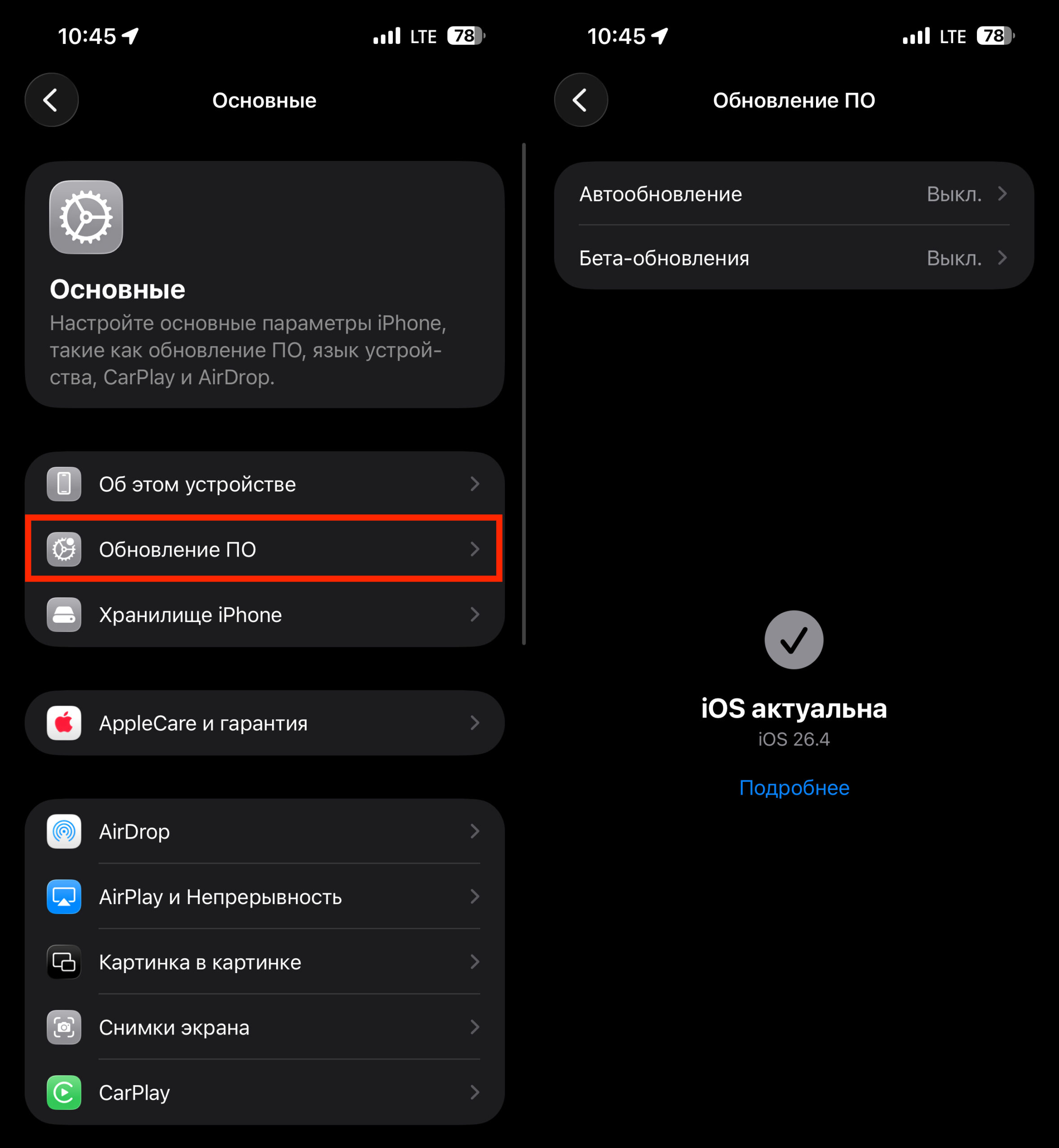
The new firmware is already available for installation
New emoji appear on iPhone only once a year — usually in spring, in an update numbered x.4. The next batch shouldn’t be expected before spring 2027 with iOS 27. To install, go to Settings → General → Software Update and tap “Download and Install.” The update is free and available on all iPhones that support iOS 26.
Eight new emoji isn’t a revolution, but if you actively use emoji in your chats, you’ll find some useful ones among them. Distorted Face will surely become a chat hit, Fight Cloud will come in handy for playful arguments, and Orca and Trombone fill long-standing gaps in the nature and music categories. You don’t have to update just for the emoji alone, but iOS 26.4 brings other improvements too — so there’s a reason to install it.


