MTS and Beeline are already sending SMS warnings: payment for Apple services from a mobile account may be disabled starting April 1, 2026. The carriers recommend topping up your Apple ID balance in advance while it’s still possible. For millions of iPhone owners in Russia, this means that the simplest way to pay for iCloud, Apple Music, and apps will soon stop working.
Apple’s App Store held out with payment the longest. Image: rbc.ru
App Store Payment from Mobile Account — What’s Being Disabled on April 1, 2026
According to several sources in the telecom market, starting April 1, 2026, Russian carriers will disable the ability to top up Apple ID from a mobile account. The “Big Four” carriers received corresponding instructions at a meeting with the Ministry of Digital Development on March 28.
This applies to all four major carriers. Currently, paying for purchases and subscriptions in Apple from a mobile phone account is available to MTS and Beeline subscribers. MegaFon and T2 offer this capability through partners. After April 1, all these mechanisms should stop working.
Apple ID is used to pay for subscriptions and company services, including iCloud+, Apple Music, Apple TV+, and other digital services. If your subscription was charged directly from your MTS or Beeline balance, after the disconnection it simply won’t renew — and the service will stop working.
Why Apple Removes Russian Apps from the App Store
The official reason, communicated through government sources, is pressure on Apple. The Ministry of Digital Development discussed at the meeting with the “Big Four” on March 28 the possibility of temporarily suspending payment for Apple services from mobile phone accounts to force the tech giant to restore Russian services to the App Store.
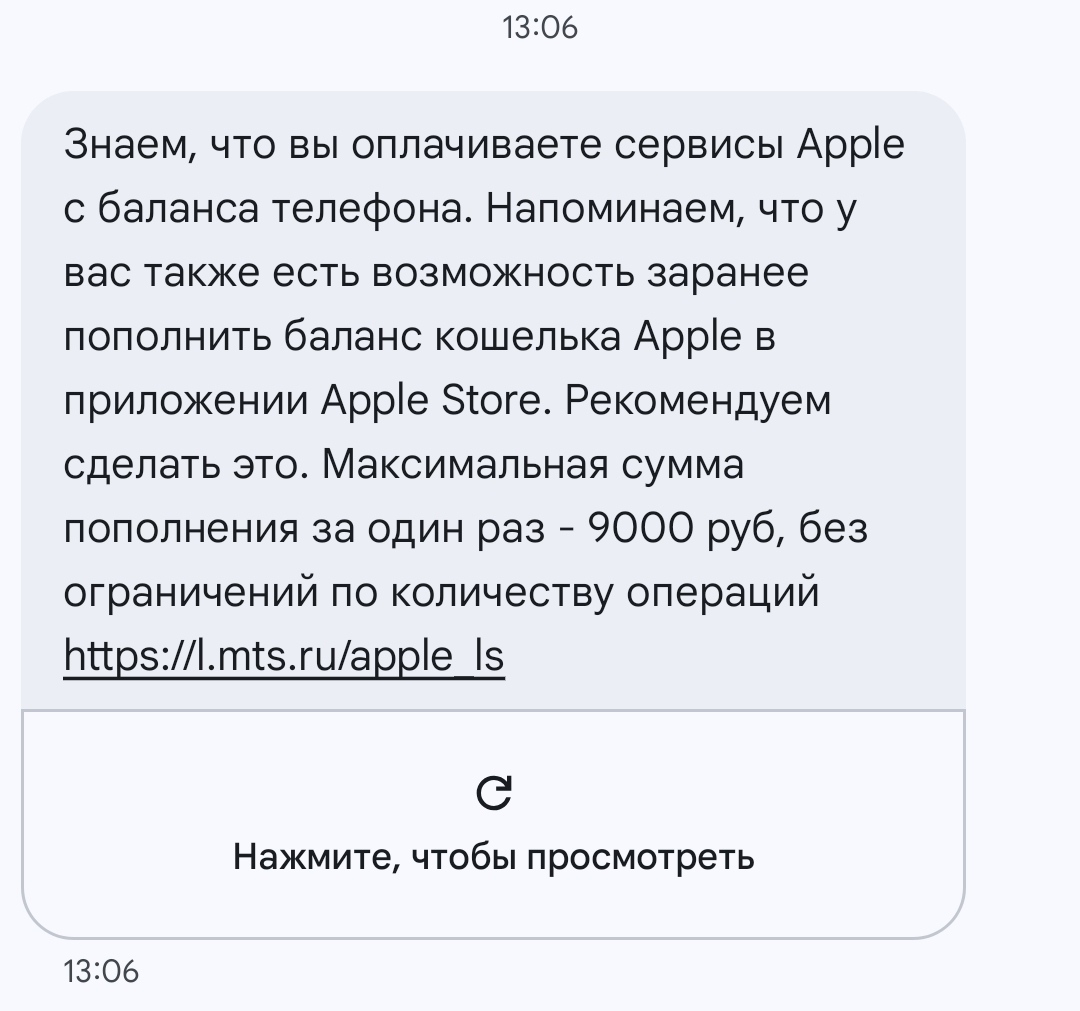
These are the SMS messages MTS and Beeline subscribers are receiving today
There have been many complaints against Apple. Starting in 2022, the company removed dozens of popular Russian apps from the App Store — banking, mapping, aggregator apps and others, citing sanctions as the reason. Additionally, Apple has not complied with the FAS ruling on a default search engine selection window on iOS devices in Russia, and also ignores the legal requirement to install the Russian app store RuStore.
There is also another version. Among the reasons cited for this step was the need to make it harder to pay for VPN services. According to sources, VPN apps account for more than 80% of all purchases in the Russian App Store. This means the motivation could be twofold: both putting pressure on Apple and restricting access to VPNs.
How to Top Up Your Apple ID Balance from Your Phone Account Before It’s Disabled
While payment from a mobile account still works, it makes sense to top up your Apple ID balance with a reserve. The maximum single top-up amount is 9,000 rubles, and the number of transactions is unlimited. This means you can add as much as you need — just in several payments.
Here’s how to do it:
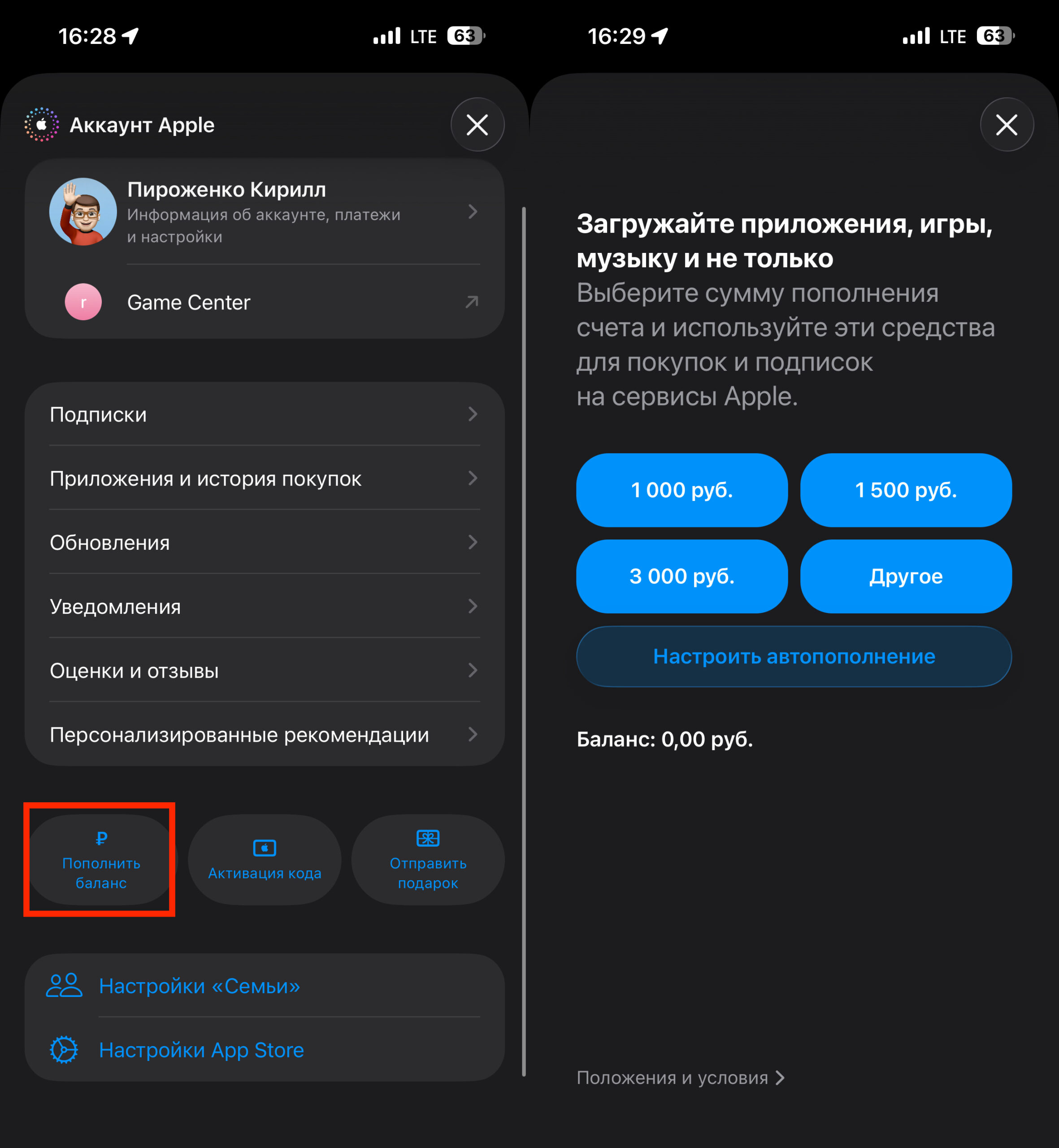
Top up your balance before it’s too late
- Open the App Store on your iPhone
- Tap on your avatar in the upper right corner
- Select “Add Funds”
- Enter the amount — from 100 to 9,000 ₽
- Confirm payment from your mobile account
The money in your Apple ID account doesn’t expire. You can add 5,000 or 10,000 rubles, and they’ll sit there until you spend them. Calculate the cost of your subscriptions for several months ahead and top up your balance for that amount. For example, iCloud with 2 TB costs 599 rubles per month, meaning you’ll need to add nearly 7,200 rubles for a year.
How to Pay for Apple After Mobile Account Payments Are Disabled
After April 1, there will be fewer payment methods, and all of them are less convenient. After mobile payments are disabled, users will be left with limited top-up options — primarily digital gift codes sold through intermediaries with a commission and requiring the account region to match.
Here’s what actually works:
- Apple gift cards through Sberbank Online. Sber charges a 25% commission for purchasing a gift card. Not cheap, but the method works right from the banking app: go to the “Payments” section — “Entertainment” — Apple Card Russia. The code is sent to your email and needs to be activated in the App Store.
- Gift cards on marketplaces. Cards can be purchased on marketplaces and specialized digital goods platforms. Due to seller markups, the final cost of a card often exceeds its face value by 15–50%. Just look at the greed of sellers on Yandex Market.
- Foreign bank card. If you have a bank card from Kazakhstan, Turkey, or another country — you can link it to your Apple ID. But for this you’ll need to change your Apple ID region, which is a separate issue with risks — you may lose access to previously purchased apps that aren’t available in another regional store.
Apple gift cards for the Russian App Store may run out at any time, and then you'll have to change your account region
Will Apple Return Russian Apps to the App Store After the Restrictions
The Ministry of Digital Development expects that the disconnection will hit Apple’s revenue in Russia and force the company to comply with Russian laws. But experts doubt this. Such government actions are unlikely to encourage Apple to return sanctioned companies’ apps to the Russian segment of the App Store.
Apple complies with US sanctions legislation, and pressure from one national market is unlikely to make the company violate those rules. Apple doesn’t disclose separate financial figures for Russia, but the Russian market accounts for a very small share of the company’s global services revenue.
App Store payment restrictions will affect millions of Russian users
In reality, the disconnection will primarily hurt ordinary users. Those who were used to paying for iCloud, music, and apps with just two taps will now have to buy gift cards with a 15–30% markup or look for other workarounds.
Which Apple Users Need to Top Up Before Payment Is Disabled
If you’re an MTS or Beeline subscriber and pay for any Apple services from your mobile account — top up your Apple ID balance today while it still works. Estimate how much you spend on subscriptions per month, multiply by 6–12 months, and add that amount to your Apple ID balance. It will take a couple of minutes and save you headaches later.
If you’re a MegaFon or T2 subscriber, you didn’t have direct payment anyway — not much changes for you, except that partner schemes will also be disabled.
If you don’t have paid Apple subscriptions and don’t purchase apps — you can safely ignore this news. Free apps, iOS updates, and iPhone functionality are not affected by this in any way.


