The MAX messenger is gradually becoming an essential service for authorization in government services and identity verification. It can now be used to receive notifications, log into accounts, and even use documents, which is why Gosuslugi (Russia’s government services portal) requires you to create a Digital ID. Because of this, situations where MAX verification codes don’t arrive are becoming more frequent, preventing us from accessing an account or confirming an action. This problem can occur both when logging into the messenger itself and when authorizing in government services. It’s important to understand that verification codes in MAX are used for different tasks, so the causes of errors can also differ.
Understanding codes from the MAX messenger
The first type is codes for logging into the messenger itself. They are sent to the phone number provided during registration. Such a code arrives during the first login, when switching devices, or during re-authorization. If the SMS with the MAX verification code doesn’t arrive, the problem is most often related to your carrier or phone settings. In this case, you need to check your signal and make sure the number is correct.
The second type is codes for logging into Gosuslugi through MAX. In this case, the message arrives directly in the app, not via SMS. The user receives a notification from a system account, sometimes called the MAX verification code bot. These messages are used for identity verification. If you don’t know how to find the verification code in MAX, you might simply miss the incoming message.
Why Verification Codes Don’t Arrive in MAX
The reasons can differ depending on which specific code isn’t arriving. Sometimes the problem is related to the phone number, and sometimes to account settings. There can also be temporary service outages. That’s why it’s important to first understand why verification codes aren’t arriving in MAX, and only then look for a solution. Below, the reasons are listed separately for different situations.
The reasons for missing codes vary
Reasons why the login code for MAX doesn’t arrive:
- no network signal;
- airplane mode is enabled;
- the number was entered incorrectly;
- messages are blocked by the carrier;
- too many login attempts;
- SMS filtering is enabled;
- verification codes in MAX aren’t working due to a server outage.
Reasons why the Gosuslugi code doesn’t arrive:
- the number isn’t linked to the account;
- notifications are disabled;
- login is being attempted from a different device;
- the account isn’t verified;
- message receiving isn’t configured;
- the Gosuslugi verification code doesn’t arrive in MAX due to a service error;
- Gosuslugi verification codes don’t arrive in MAX during maintenance.
After you’ve checked the main causes, it’s important to understand that the login verification problem doesn’t only occur due to user errors. Sometimes the code doesn’t arrive because of temporary outages on the service or carrier side, and in such a situation, you can only wait and try again later. If the verification message consistently doesn’t arrive, you should proceed to checking your phone settings and account parameters. That’s where the cause is most often hidden — the reason why the Gosuslugi verification code doesn’t arrive, even when the number is entered correctly.
What to Do If the MAX Verification Code Doesn’t Arrive
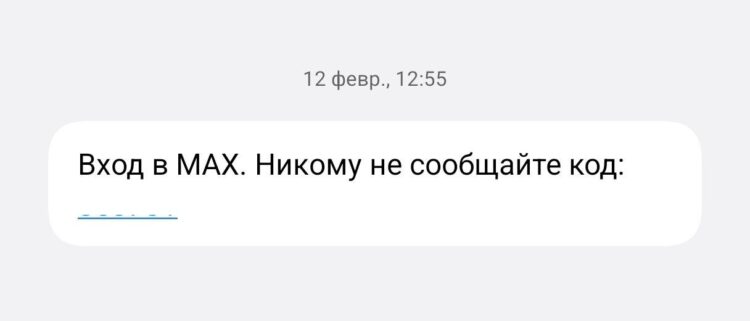
Login codes for MAX arrive via SMS
Sometimes the message doesn’t arrive even when the number is entered correctly. In such a situation, you need to check your phone settings and connection. Most often, the problem is related to the network or message blocking. If the MAX verification code doesn’t arrive, don’t immediately request a new code multiple times in a row. It’s better to perform standard checks first. If the message doesn’t arrive, try the following steps:
- Check that the phone number is correct.
- Make sure you have a network signal.
- Disable airplane mode.
- Restart your phone.
- Wait a few minutes before trying again.
- Check SMS blocking settings.
- Contact your mobile carrier.
After performing these steps, the message usually arrives. Sometimes the delay is related to server load. In rare cases, verification codes in MAX don’t work due to maintenance. In that case, you just need to wait and try again later.
What to Do If the Gosuslugi Verification Code Doesn’t Arrive in MAX
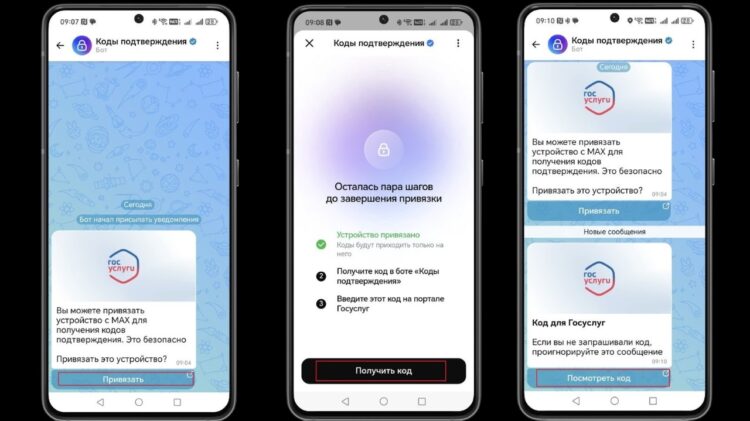
To log into Gosuslugi through MAX, you first need to link accounts via the bot
Sometimes logging into the messenger works, but the message from Gosuslugi doesn’t arrive. In this case, the problem is related to account settings or the login method. Sometimes the code is sent to the app, but the user doesn’t see the notification. If the Gosuslugi verification code doesn’t arrive in MAX, you need to check the authorization settings. You should also make sure you’re using the correct phone number.
If the message doesn’t arrive, perform the following steps:
- Check the phone number in your Gosuslugi account.
- Make sure that login is being done through MAX.
- Open the app and check incoming messages.
- Check notification settings.
- Log out of your account and log back in.
- Request the code again.
- Try a different login method.
If the problem persists, you can disable receiving codes through the messenger. In that case, messages will once again arrive via SMS. After that, the verification code via MAX will no longer be used, and authorization will work as before.


