MAX registration takes just a few minutes, but users still have many questions. Some don’t understand whether registration in the national messenger is even necessary, others can’t log in on the first try, and still others complain about forced app installation. If you’ve also encountered a similar situation, you should first figure out what to do if you’re being forced to download MAX, and only then proceed to creating a profile. Below, we’ll cover how registration works, what you need to create an account, and why sometimes you can’t log into the app.
Creating a MAX account and starting to use the mandatory messenger
What You Need to Register in MAX
Before starting your MAX account registration, it’s important to note that creating a profile requires a phone number. Email or login won’t work. Your MAX messenger account is tied specifically to a SIM card. Currently, you can register with phone numbers from the following countries:
- Russia;
- Belarus;
- Azerbaijan;
- Armenia;
- Kazakhstan;
- Kyrgyzstan;
- Moldova;
- Tajikistan;
- Uzbekistan;
- Georgia;
- Turkey;
- UAE;
- India;
- Vietnam;
- Thailand;
- Malaysia;
- Indonesia;
- Egypt;
- Qatar;
- Saudi Arabia.
Since the messenger is a national one and even includes a citizen’s Digital ID, you may reasonably ask: is registration in MAX through Gosuslugi (Government Services) required? In fact, the service does not require mandatory authorization through government services, so you can safely register without additional accounts. However, it’s important to remember that MAX cannot be used without registration — without creating a profile, you won’t be able to send messages or make calls.
How to Register in MAX on a Phone
Before registering in the MAX messenger, you need to install the app on your smartphone. Read our guide on installing MAX on Android, and then proceed to creating your profile.
Here are the instructions on how to create an account in MAX:
- Open the MAX app.
- Enter your phone number.
- Tap “Continue.”
- Wait for the SMS with the code.
- Enter the confirmation code.
- Specify a profile name and, if desired, choose an avatar.
- Allow access to contacts.
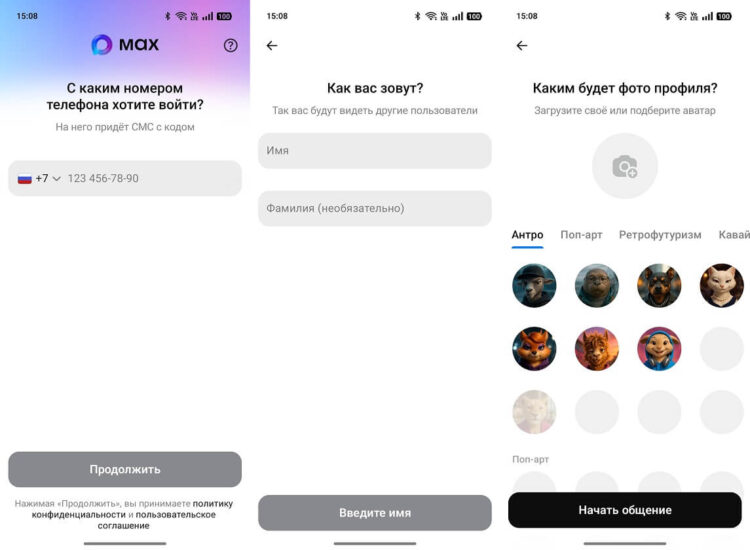
Registration will take you a couple of minutes
After that, your MAX account will be created, and you can use chats, calls, and channels. You can use the same method to log into MAX on a new phone or after reinstalling the app.
Can You Register in MAX Without a Phone Number
Sometimes users try to find a way to complete MAX registration without a phone, but currently there is no such option. A phone number is required for login because it is used as the primary identifier.
You also won’t be able to complete MAX web registration through a browser. The web version exists only for logging into an already created profile — you cannot create a new account through the website. Even if you open the service from a computer, you’ll first need to register in MAX with a phone number in the desktop app. This is done for security and protection against fake accounts.
Why You Can’t Register in MAX
If you can’t register in MAX, the problem is most often related to the following reasons:
- the number was entered incorrectly;
- the SMS isn’t arriving;
- an unsupported country is being used;
- there’s no internet access;
- an outdated version of the app is installed;
- the number is already in use;
- the phone isn’t receiving messages.
You might think that you can’t register in MAX without Gosuslugi, and that’s why registration isn’t going through. But we remind you: this is not a mandatory requirement, and a profile can be created without linking to government services. If you can’t register in MAX even after checking your number, try reinstalling the app or using a different SIM card. In most cases, account creation goes through without errors after that.


