MAX positions itself as a secure Russian messenger. According to the developers’ promises, it should become almost the most protected app on Android. However, the number of complaints about MAX account hacking is growing every month. And this despite the fact that the messenger hasn’t been around for long. Today we’ll talk about what to do if the worst has already happened and your profile has ended up in someone else’s hands.
Many thousands of people have already been affected by hacking
Can MAX Be Hacked
Yes, and it happens quite often. Scammers have hacked MAX for thousands of users already. Among the victims, there are some quite unexpected figures. For instance, recently Galina Maslikova, a deputy of the Nizhny Tagil city council and principal of school No. 32, publicly announced that she was hacked in the MAX messenger and phishing links were being sent to her contacts:
I was hacked in MAX. Be vigilant! Do not respond to my messages!
She managed to restore access to MAX, but not everyone is so lucky. Although the hacking mechanics are usually standard. Attackers use several methods to gain access to someone else’s account:
- phishing sites that imitate the MAX login page and intercept the username and password;
- SMS interception: technically complex but a real way to obtain the confirmation code;
- social engineering: a scammer calls the victim, poses as a bank employee or tech support representative, and tricks them into revealing the SMS code;
- malicious applications that intercept data directly on the device.
A separate issue involves cases when MAX and Gosuslugi (government services) were hacked simultaneously. What else would you expect when creating a Digital ID in the national messenger and linking all government services to it? After one account is compromised, the attacker gains access to everything else. This is exactly why scammers are actively moving to MAX — a new messenger with a large audience and users who are not yet accustomed to being cautious.
How to Tell if MAX Has Been Hacked
Sometimes the hacking of the MAX messenger is immediately obvious, sometimes the first signs are easy to miss. Here’s what to watch for:
- you can’t log into your account;
- you receive SMS codes without requesting them;
- acquaintances report receiving strange messages or links from you;
- your profile name, photo, or other data have been changed;
- unfamiliar sessions appear in the “Devices” section;
- your profile is unexpectedly blocked, or you were logged out of your MAX account for no apparent reason.
If even one of these signs matches — you need to act immediately. Every minute of delay gives the scammer more time to use your profile.
What to Do if MAX Has Been Hacked
If you still have access to your MAX account on at least one device, act in the following order:
- Open “Profile.”
- Go to the “Devices” section.
- End all active sessions except the current one. This will kick the attacker out of the account.
- Immediately create a login password for MAX.
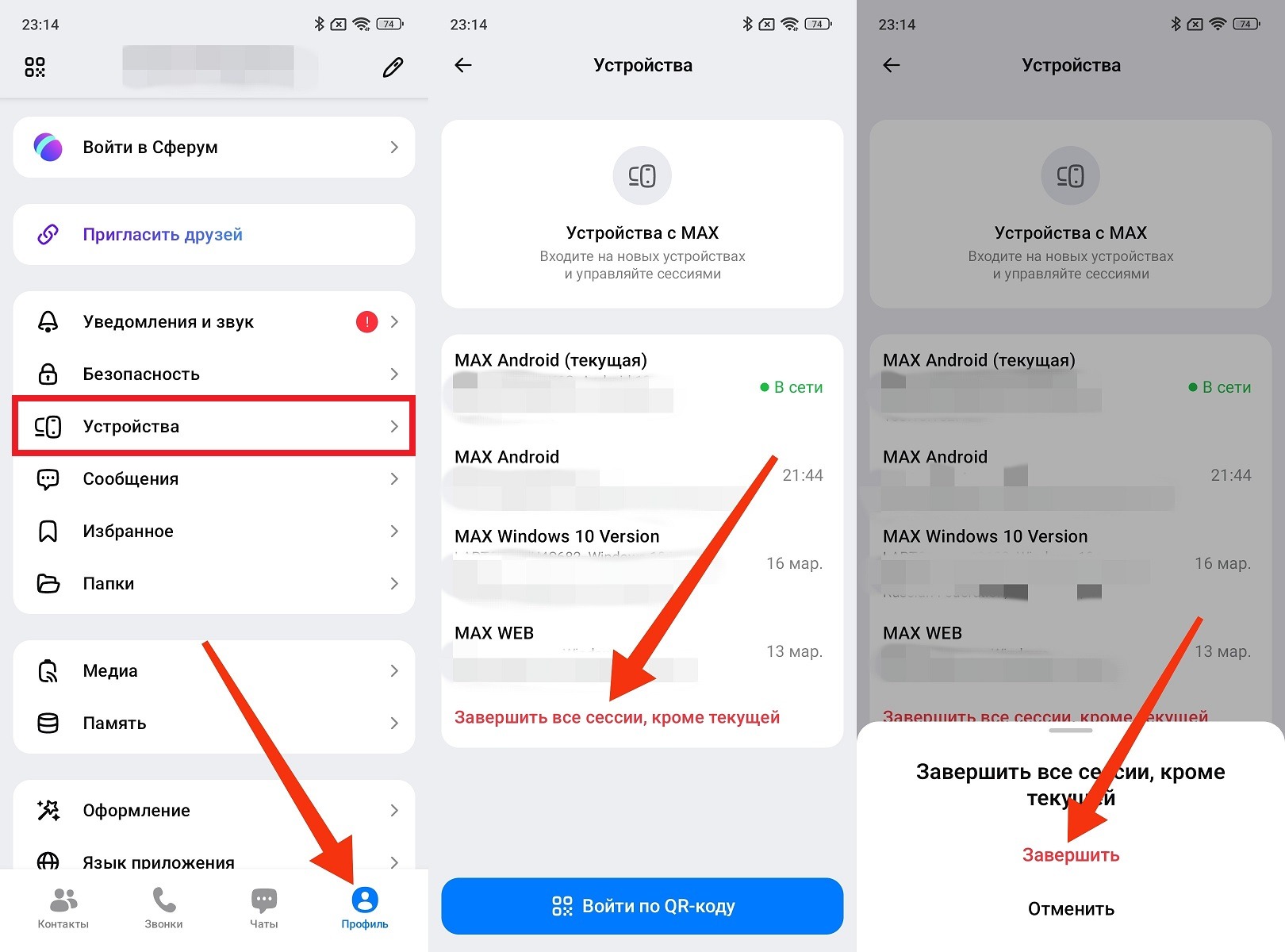
The main thing is to log out of MAX on all extra devices
You can’t waste a single minute. While the attacker remains in the account, they control your conversations, see all your contacts, and continue sending fraudulent messages on your behalf. Scammers act fast after hacking MAX: the first thing they do is change the password to lock you out. Beat them to it.
How to Recover a MAX Account After Hacking
If MAX was hacked and a password was set, you won’t be able to log in on your own. In this case, the only option is tech support.
- Go to the website help.max.ru and create a support request.
- In the request, specify the linked phone number, the approximate time you noticed the problem, and what you did shortly before it: for example, clicked a link or installed a new app.
- Attach screenshots of errors if you have any. This will speed up the review.
- Don’t send repeated requests frequently, as this will slow down the response rather than speed it up.
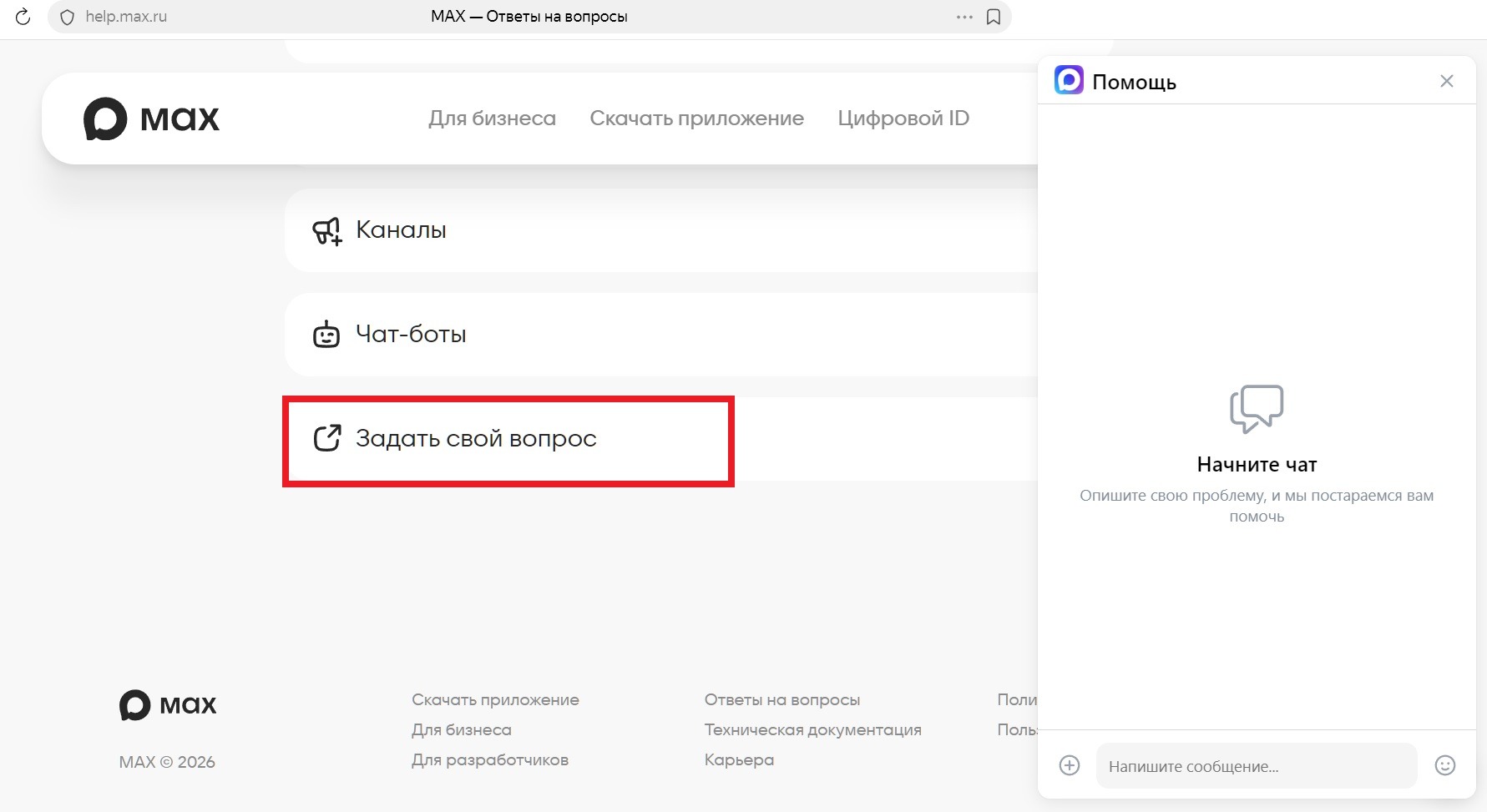
If you lose access, contact support
While waiting for a response from tech support, check your device with an antivirus and save a screenshot of the scan results. If you find malicious programs — remove them before restoring access to your account. Otherwise, the situation will repeat itself.
How to Protect Your MAX Account from Hacking
After access to your MAX account has been restored, it’s important to immediately close the vulnerabilities through which the hack occurred. MAX does have security features — most users just don’t know about them or don’t enable them. First, do the following:
- Enable two-factor authentication in the security settings.
- Link and confirm an email address (this is a backup way to restore access).
- End all active sessions on unfamiliar devices.
- Set a unique password that is not used in any other service.
This is the minimum set that covers most attack vectors. Beyond that — simple rules that work everywhere and always: don’t click on suspicious links, don’t share SMS codes with anyone, even those who claim to be tech support staff. Scammers are messaging on MAX more actively precisely because the messenger’s audience is growing, while many users haven’t yet developed security habits.
If you encounter fraud — report it directly in the app. MAX has a “Report” button with a “Fraud” option for this purpose. By the way, many attackers specifically ask their victims to install MAX. This is a separate story about how the new messenger has become a tool for schemes that most users don’t even suspect.


