A new laptop for just $599, and from Apple no less. It sounds almost like a dream, but MacBook Neo is a very real device, with reviews already appearing in major publications. An aluminum body, vibrant colors, a chip from the iPhone 16 Pro — it’s all impressive. But there’s one detail that concerns literally everyone: just 8 GB of RAM with no option to upgrade.

MacBook Neo with 8 GB of RAM: Is It Actually Enough?
What Is MacBook Neo
MacBook Neo is the most affordable MacBook in Apple’s entire history. The starting price in the US is $599, and for students and education staff, it’s reduced to just $499. For comparison, that’s cheaper than many mid-range Windows laptops.
The laptop is available in four colors: Blush, Citrus, Indigo, and Silver. Inside is a version of the A18 Pro chip — the same one found in the iPhone 16 Pro. The display is 13 inches, storage goes up to 512 GB. And then there are those 8 GB of RAM that can’t be upgraded at the time of order.

A laptop that has every chance of becoming a bestseller. Image: 9to5mac.com
As the Bloomberg reviewer noted, the aluminum body, sharp display, and balanced speakers on both sides of the laptop make it a purchase that’s hard to pass up. In hand, it feels like a real Mac, not a budget knockoff.
Four colors — and none of them look boring. Apple was clearly aiming at a younger audience.
How Much RAM Do You Need for Everyday Tasks
This is the main question every reviewer asked. And the answer, based on initial reviews, is mixed but leans positive.
The Verge called the notorious 8 GB of RAM “perfectly adequate” for the tasks MacBook Neo was designed for. We’re talking about web browsing, working in Google Docs, and similar everyday scenarios. According to the journalists, the laptop literally flies through light workloads.

For browsing and office apps, 8 GB is more than enough. Just don’t open 150 tabs at once
Moreover, the A18 Pro chip outperforms the Apple M1 MacBook Air and most Windows laptops in single-core performance benchmarks. And it’s single-core performance that matters most for everyday work. Simply put, if you’re opening a browser, writing documents, and chatting in messengers, the MacBook Neo handles it brilliantly.
But there’s a catch. The same reviewer noticed that at the edges of its capabilities, the laptop does stumble. For example, when clicking on the Applications folder in the dock, icons sometimes appear with a noticeable delay — about a second. A small thing, but telling.
What Else Was Cut in the MacBook Neo
For more demanding tasks, the limitations become noticeable. As The Verge author directly stated, the small amount of RAM and the slow 256 GB drive don’t allow the MacBook Neo to compete with the MacBook Air and MacBook Pro in resource-intensive creative applications.
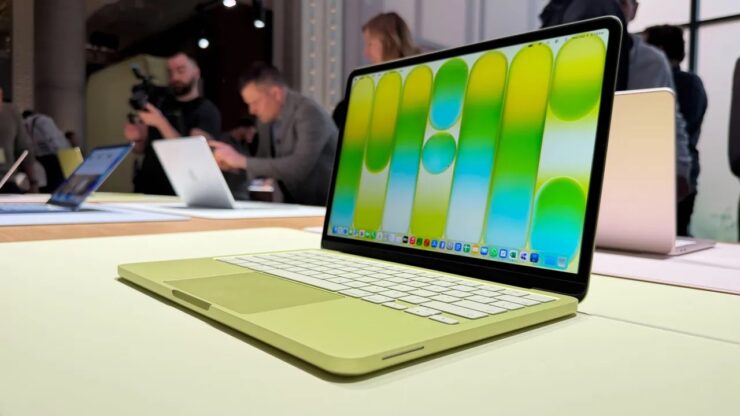
A youth-oriented laptop in cool color options. Image: zdnet.com
In other words, if you plan to edit video, work in Photoshop with heavy files, or run demanding software — this laptop isn’t for you. But as reviewers fairly note, that’s perfectly fine too. After all, the MacBook Neo was never intended for those scenarios.
The thing is, Apple deliberately chose 8 GB of memory with no configuration option. It’s not a mistake or greed — it’s positioning. The laptop was made for students, for those who need their first Mac, for people who need a computer for studying and basic productivity. And within those boundaries, it works brilliantly. So the ideal scenario for the MacBook Neo is lectures, note-taking, and a cup of coffee at the nearest café.
MacBook Neo Battery Life
Beyond the RAM question, reviewers also tested battery life — another critically important parameter for a budget laptop.
Tom’s Guide ran a standard test with continuous web browsing at 150 nits of screen brightness. The result — 13 hours and 28 minutes. For a laptop in this price category, that’s an excellent result. For comparison, the Microsoft Surface Laptop Go 3 lasted only 8 hours and 39 minutes in the same test — nearly five hours less.
However, the new Neo doesn’t quite reach the MacBook Air: the bigger sibling achieved 15 hours and 28 minutes. The two-hour difference is noticeable, but considering the price gap, the MacBook Neo still looks very respectable.
| MacBook Neo | MacBook Air 13 | MacBook Pro 14 | |
|---|---|---|---|
| Video playback | 16 hours | 18 hours | 24 hours |
| Web browsing | 11 hours | 15 hours | 16 hours |
| Battery capacity | 36.5 Wh | 53.8 Wh | 72.4 Wh |
Essentially, 13.5 hours of battery life means a full work or school day without recharging. For a student who takes their laptop to lectures, that’s more than enough. And really, almost 13 and a half hours without an outlet is a dream for anyone who’s always forgetting their charger at home.
Is It Worth Buying MacBook Neo in 2026
If you combine all the reviews, the picture looks like this: MacBook Neo is not a replacement for the MacBook Air and certainly not a competitor to the MacBook Pro. It’s a separate category — the first truly affordable Mac that you won’t be embarrassed to hold in your hands.
Reviewers are unanimous: for light everyday tasks, 8 GB of RAM is enough. The A18 Pro chip compensates for RAM limitations through high single-core performance and efficient resource management. The laptop is fast, beautiful, lasts all day, and costs half the price of a MacBook Air.
But if you know for sure that you need more — more memory, more power, a faster drive — then you should look at higher-end models. For example, the MacBook Air with M5 is a completely different level in terms of memory and drive speed, though it costs noticeably more. 8 GB of RAM isn’t a compromise — it’s a deliberate choice for a specific audience. And for that audience, the MacBook Neo could be the best purchase of the year.