Ever since MAX became mandatory for pre-installation on smartphones, the same story has been circulating online: the national messenger monitors everything you do. Whether this is actually true remains an open question. But then it suddenly turned out that Max allows itself a bit more than everyone thought, and this raises questions. For example, visiting various websites and checking for blocks. Interesting — why?
They say the Max messenger now monitors VPN too. Interesting — why? Photo: RIA
How Exactly MAX Checks for VPN
A Habr user analyzed the messenger’s network traffic and found a built-in VPN monitoring module.
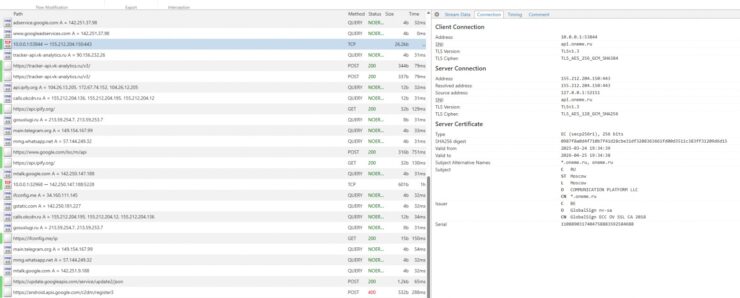
You probably won’t understand any of this. But you can ask an AI what’s happening here. Photo: Habr
He took MAX version 26.4.3, launched it in an Android emulator, and connected mitmproxy — a tool that intercepts all network traffic and shows exactly who the app is communicating with. Plus the JADX decompiler — to read the code directly.
The first oddity he discovered was in the protocol. It turned out that MAX communicates with its server api.oneme.ru not through regular HTTP or WebSocket, but through its own binary TCP stream. Each message is packed into a 10-byte header with a command code and compression flag, the data is in MessagePack format, additionally compressed with the LZ4 algorithm. Non-standard, but not alarming.
The alarming part comes next. Among the intercepted requests were calls to Telegram and WhatsApp servers. Even though there’s no technical reason for it to contact them. There’s only one explanation: this is that very VPN-checking module — built right into the messenger.
How to Check MAX’s Network Activity on iPhone
iPhone has a built-in tool — the “App Privacy Report.” It records which domains each application contacts over the past seven days. To enable it, you need to do the following:
- Open “Settings”
- Go to “Privacy & Security”
- Tap “App Privacy Report” — “Turn On App Privacy Report”
Here are the main services MAX was contacting:
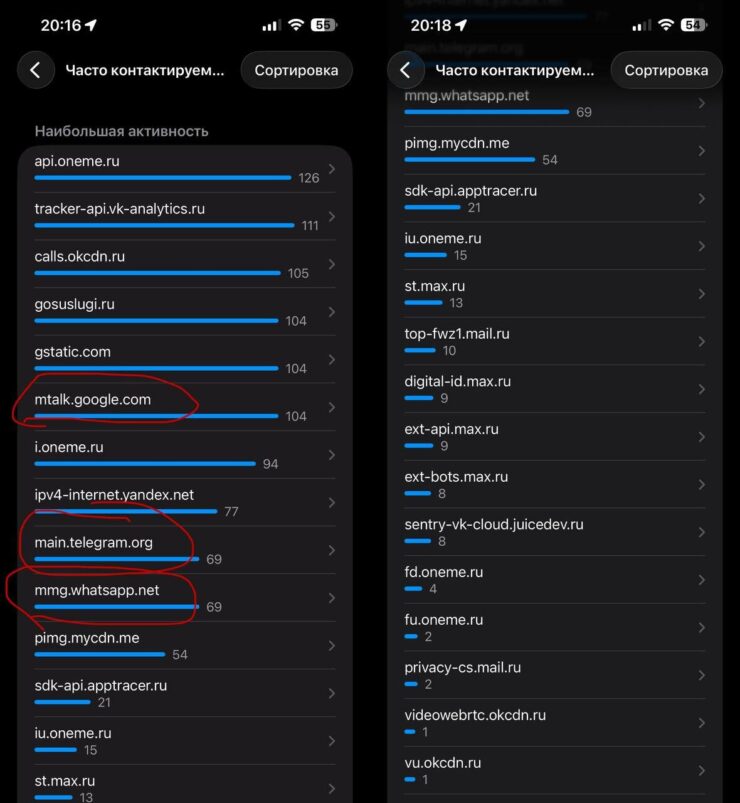
Here are the services MAX was pinging on our device
Gosuslugi — 104 requests
The most frequent in the list was gosuslugi.ru: 104 requests per week. The explanation is simple: MAX is officially integrated with Gosuslugi (Russia’s government services portal), and digital ID and electronic signatures work through it. For this purpose, the messenger maintains a constant background connection to the portal’s servers — even when you haven’t opened it. This is the price of integration, not surveillance.
Telegram and WhatsApp — 69 requests each
This one can’t be explained by integration. main.telegram.org — 69 requests, mmg.whatsapp.net — also 69. MAX doesn’t support Telegram or WhatsApp. There’s no technical reason to contact their servers — except one: this is that very availability check. The app constantly checks whether blocked services are accessible from your IP — even if you’ve never opened them.
VK analytics tracker — 111 requests
The most active address in the report was tracker-api.vk-analytics.ru: 111 requests over several hours of background mode. VK behavioral analytics: how much time you spend in the app, what you tap on, which features you use. Technically, every major app does this — from banks to marketplaces, and MAX is no exception here.
How to Prevent MAX from Tracking
Blocking MAX’s background requests won’t work. But you can cut the messenger’s access to things it definitely doesn’t need:
- Open “Settings”
- Scroll down to MAX
- Remove permissions you don’t need: contacts, camera, microphone
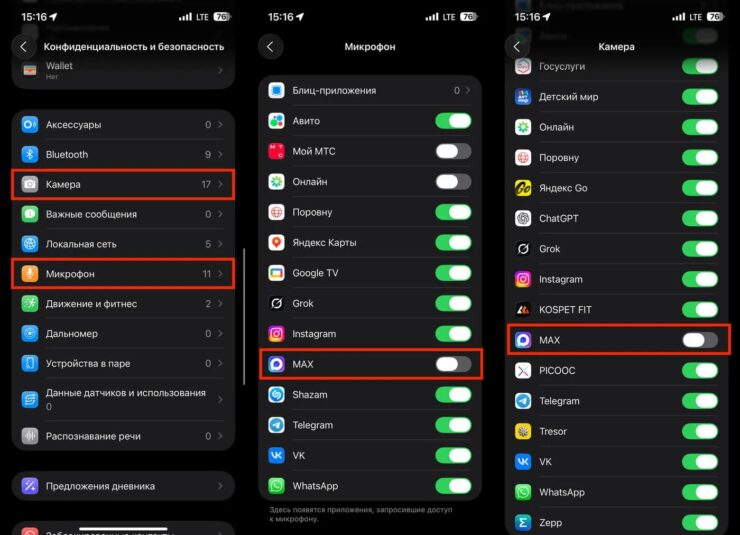
Although iPhone won’t let Max spy on you in the background through the camera or microphone anyway
We’ve written separately about how to configure privacy on iPhone overall. Check it out if you’re interested.
Although MAX says all of this is nonsense.
Max does not track VPN usage. IP address information is used exclusively to ensure proper call functionality. To establish a P2P connection (calls), WebRTC technology requires an external IP to build a direct “phone-to-phone” route. This is standard for all services that make calls using this technology, — the messenger’s press service stated.
FAQ: MAX and VPN on the Same iPhone
Can MAX see what I do through VPN?
No. On iPhone, all apps run in an isolated environment — MAX physically cannot read the traffic of Safari, Telegram, or any other app. In 2025, Apple patched a vulnerability through which apps could theoretically see each other’s network connections. After the patch, each app can only see its own requests.
Does MAX know that I have VPN enabled?
The developers say no, but traffic interception suggests otherwise. In Russia, Telegram is blocked — if it responds to a request from your device, it means your internet is going through a VPN. And MAX knows this.
Does MAX traffic go through VPN?
Yes. When VPN is enabled on iPhone, it covers all device traffic — including MAX’s background requests. The messenger’s servers see a connection from the VPN server’s IP, not from your real address.
Does VPN protect against MAX tracking?
Only partially. VPN hides your real IP from VK’s servers. But you log into MAX with your account, from a device with persistent identifiers. VPN hides you from your ISP, but not from a service you’re authenticated in. The tool works against the provider, not against VK.