Opened a browser, found a crypto exchange website, followed a link from search results. The page loaded quickly, everything looked normal — logo, exchange rates, a form for entering amounts. Nothing suspicious at all. Studied the charts a bit, compared prices, and closed the tab without buying anything. Three days later, all the money disappeared from the crypto wallet. That’s the story. Yes, this can happen, but this time the cause was something else entirely.

What to do to prevent your iPhone from being hacked via Coruna
Recently, a friend of mine shared a sad story with me. Fortunately, everyone is alive and well, but it left quite an unpleasant aftertaste. So, he told me that he lost a certain amount from his cryptocurrency wallet and was initially baffled because he hadn’t shared his data with anyone, nor had he entered anything anywhere for authorization.
He hadn’t even downloaded any apps, nor had he followed links from spam or messengers. Because that’s usually how our accounts get hacked. But here, he simply opened a website — and that was enough. At the time we were surprised, but later it became known that this was not a coincidence or a one-time hijacking: it turns out this is how a well-known iPhone hacking tool works.
How Hackers Hack iPhones Through a Website
What happened to my friend is not fiction and not phishing in the usual sense. It’s a straightforward browser-based hack, and this is exactly how the Coruna tool works, details about which were published last week by Google and the company iVerify.
The scheme works like this. Hackers create a website — one that looks completely normal on the outside. A crypto exchange, an online casino, a financial service, anything really, even a dog food store. Then they promote it in search results or ads and wait.
When you visit such a page, invisible code running in the background identifies your iPhone model and iOS version in a fraction of a second. Then — like something out of a spy movie: the system selects the right combination of vulnerabilities, breaks through the defenses layer by layer, and silently installs malicious software. In total, Coruna’s arsenal currently includes 23 vulnerabilities combined into five complete exploit chains. And while the malicious page loads, you don’t even notice anything.
Who Created Coruna
And this is where the story gets really uncomfortable. According to iVerify specialists, the tool was presumably built on the basis of government hacking developments — and apparently American ones. At the very least, the code was written by native English speakers, and the level of execution is professional. The development cost has already been estimated at millions of dollars.
Who told you that an iPhone can’t be hacked? Image: appleinsider.com
The tool later leaked, but Google tracked its “journey”: first it was used by a client of a commercial spyware company, then by hackers from China through fake crypto platforms. All in all, it resembles the story of another tool, EternalBlue, which similarly leaked in 2017 and became the foundation for the WannaCry and NotPetya viruses. Except those attacks paralyzed hospitals, factories, and banks around the world, while Coruna hasn’t reached that scale yet — but it’s already moving in the same direction.
How to Tell if Your iPhone Has Been Hacked
After Coruna infiltrates an iPhone, the virus doesn’t do anything noticeable. The screen doesn’t go dark, apps don’t crash, the battery doesn’t drain faster than usual. The phone works as before, while the malware operates silently. Its main target is cryptocurrency wallets: it searches for apps, extracts seed phrases for recovery, and transmits them to hackers.
A seed phrase is 12 or 24 words that give full access to a wallet from any device. If it’s gone — the money is gone with it, and reversing the transaction is impossible. This is apparently exactly what happened to our “hero” from the beginning of the article.
Which iPhones Can Coruna Hack
The malware doesn’t attack all iPhones, only those running iOS versions from 13.0 to iOS 17.2.1. That means all devices that haven’t been updated since December 2023. The current iOS version closes all vulnerabilities that this tool exploits, so there’s no need to worry. Checking your iOS version is easy:
- Open “Settings” and go to “General”
- Tap on “About”
- Look at the “iOS Version” entry
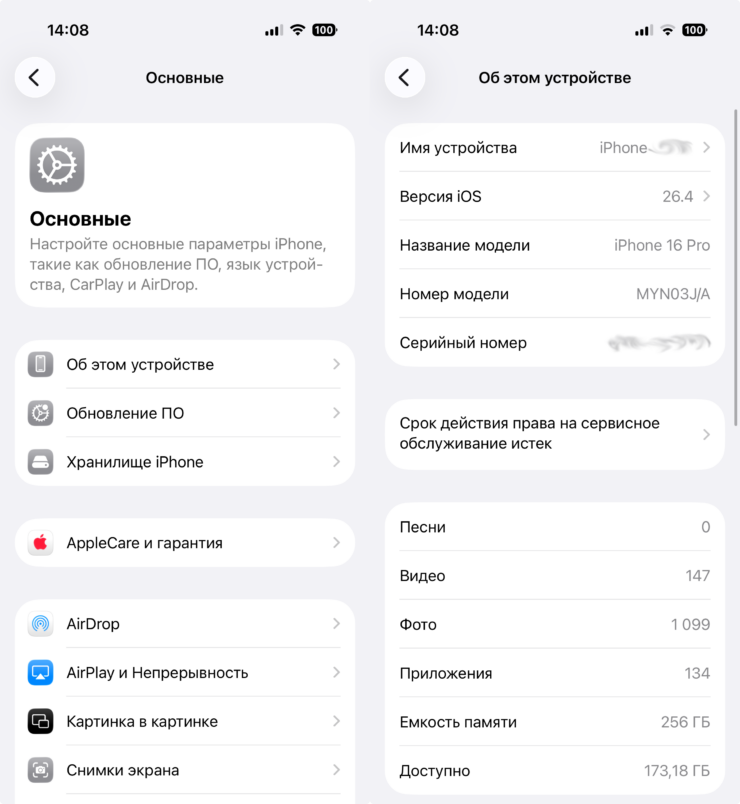
All useful information about your iPhone is here
If you see iOS 17.3 or higher, you’re safe. If it’s lower — update right now. And if you have an older iPhone that can’t handle the latest iOS, simply enable Lockdown Mode or use a third-party private browser instead of Safari: Coruna specifically checks for these settings and aborts the attack when it detects them.
And one last thing. This story isn’t about the iPhone being unreliable. It’s still one of the most secure smartphones out there. But protection only works when you keep it updated.


