Apple unexpectedly released iOS 26.4.1 for all compatible iPhones — just two weeks after the release of iOS 26.4. In the official update description, Apple stuck with the standard phrase about “bug fixes,” but in reality, the update fixes a serious iCloud sync bug and also changes security settings. There are no major features like those expected in iOS 27 here, but it’s still worth installing the update.

iOS 26.4.1 is available for everyone
What’s New in iOS 26.4.1
The main reason for the update is a critical bug in CloudKit, the framework through which apps exchange data with iCloud. On iOS 26.4, iPhones simply stopped receiving notifications about changes in the cloud. This affected even those who still had an active iCloud subscription. In practice, this meant that data you changed on one device wouldn’t automatically sync to your iPhone and iPad.
Apple fixed an important iCloud issue
The problem affected not only third-party apps but also Apple’s own services. The Passwords app was hit the hardest — in particular, the shared password access feature simply stopped working correctly. Developers noticed the bug several weeks ago, submitted reports to Apple, and could only wait for a system-level fix. The wait is over.
If you’ve recently noticed oddities with data syncing between devices — the cause was almost certainly this. iPadOS 26.4 suffered from the same problem, while macOS Tahoe 26.4 was unaffected by the bug.
Stolen Device Protection on iPhone
The second important detail that Apple didn’t mention in the update description is changes to Stolen Device Protection. After updating from iOS 26.4 to iOS 26.4.1, the feature will automatically turn on for all corporate iPhones and iPads. Previously, in iOS 26.4, Apple had already enabled it by default for regular users — now it’s the turn of devices managed through MDM.
Stolen Device Protection on corporate devices now turns on automatically
Here’s a reminder of how this feature works. When an iPhone is away from familiar locations — home or work — additional requirements kick in for critical actions:
- Biometrics with no fallback. Access to saved passwords and bank cards requires Face ID or Touch ID — entering a passcode instead is no longer an option.
- One-hour delay. For changing the Apple ID password and other sensitive operations, you’ll need to wait an hour and then confirm the action again via biometrics.
The idea is simple: even if an attacker knows your passcode, they won’t be able to take over your account and empty your keychain in just a few minutes.
Security Update in iOS 26.4.1
Interestingly, Apple’s security page for iOS 26.4.1 contains no CVE entries — formally, the update doesn’t patch any publicly known vulnerabilities. This is a rare case: usually even minor updates include security patches.
It’s also worth noting that Apple released the update only for iPhone and iPad. Mac, Apple Watch, Apple TV, and Apple Vision Pro didn’t receive new builds today — which further confirms that 26.4.1 plugs specific holes in iOS and iPadOS rather than being a routine update for the entire ecosystem. Meanwhile, iOS 26.5 testing continues — the CloudKit bug has already been fixed in the beta version.
How to Install iOS 26.4.1
The update is available for all iPhones that support iOS 26. The build number is 23E254. To install:
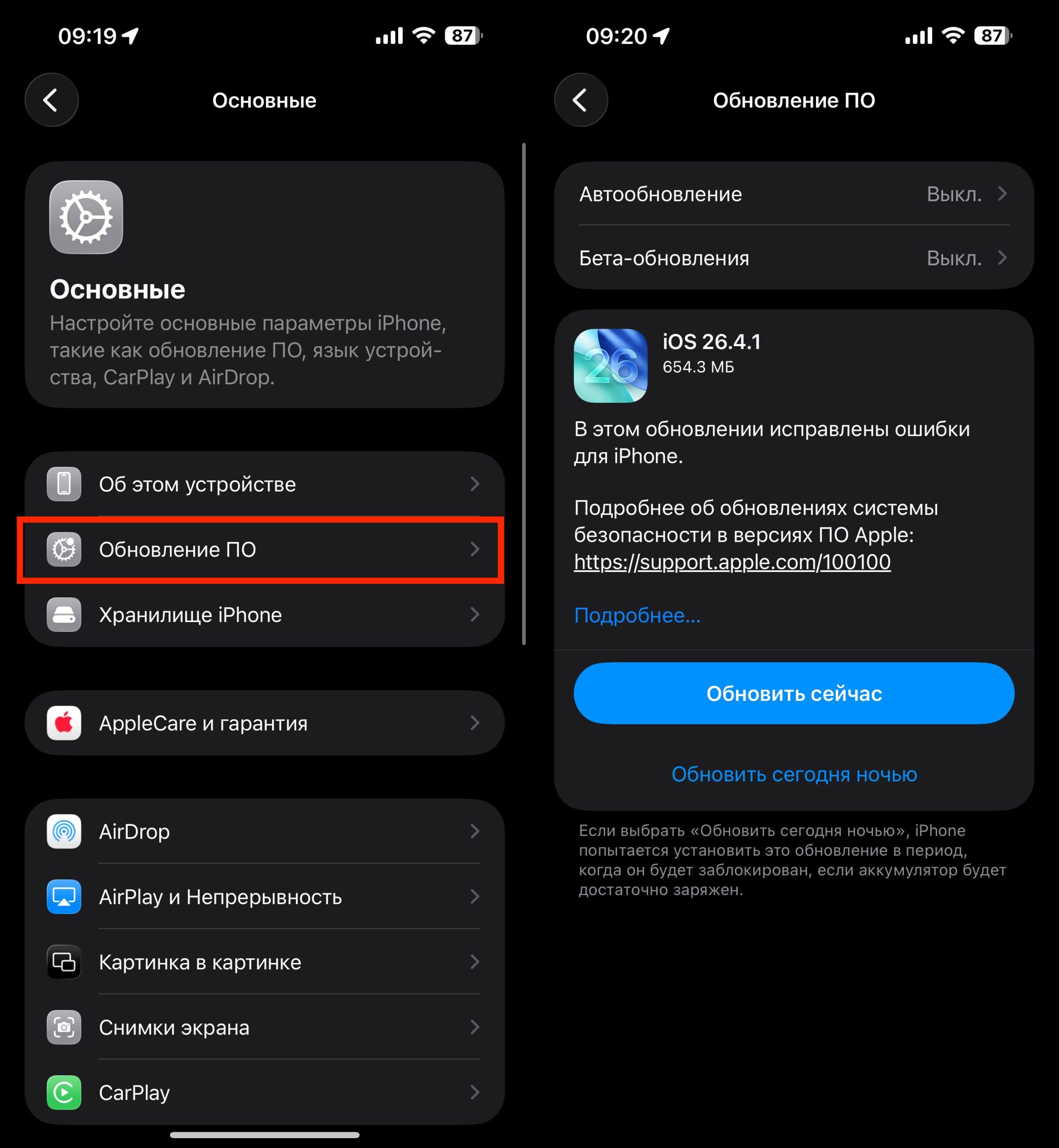
You can install iOS 26.4.1 using the standard method
- Open Settings.
- Go to General.
- Select Software Update.
- Wait for iOS 26.4.1 to appear and tap Download and Install.
Before installing, make sure your iPhone is charged to at least 50% or connected to a charger, and that it’s connected to Wi-Fi. The process itself takes 10–15 minutes depending on the model. If you’re on iOS 26.4 and use iCloud apps — don’t delay: the sync fix is worth it.


