Realme phones regularly receive new system versions, but many users either don’t install them or don’t even know how to do it. Yet realme smartphone updates can noticeably affect the device’s speed, battery life, and security. If you recently bought a new device or are just planning to, it’s worth understanding in advance how system support works and which models receive new versions. Especially if you’ve purchased a device from the list of the best realme smartphones, which receive updates longer than others.
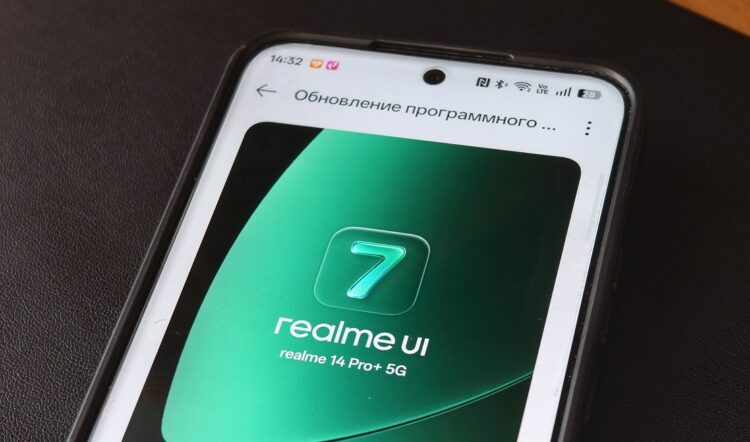
Every realme smartphone can be updated over the air
What Does a Realme Update Give You
Any realme update is not just a new interface design. Along with a new system version, the manufacturer fixes bugs, improves performance, and enhances device security. Sometimes after installing a new version, the phone starts working faster than before, even though almost nothing changes visually.
It’s also important to understand that there are realme UI updates as well as security patch updates. They are released independently of each other. For example, a new shell version may come out once a year, while security fixes arrive separately and are installed as a separate system update. This is especially noticeable after the release of realme UI 7, when many models received new features, but security patches continued to arrive separately.

The realme UI 7 update significantly changed the system. Image: TechVishal VSB
After installing a new version, users often notice that realme after updating works more stably, holds a charge better, and heats up less. This is because firmware updates include optimizations for the processor, memory, and power-saving system. Major system versions can change the interface and add new features, so realme software updates are important not only for security but also for the convenience of using the phone.
How to Update a Realme Phone
The simplest way to install a realme system update is through the phone’s settings. The system has a built-in tool that automatically checks for a new version and allows you to install it without a computer. To update realme firmware, follow these steps:
- Open “Settings.”
- Go to the “System and Updates” section.
- Open “Software Update.”
- Tap “Download and Install.”
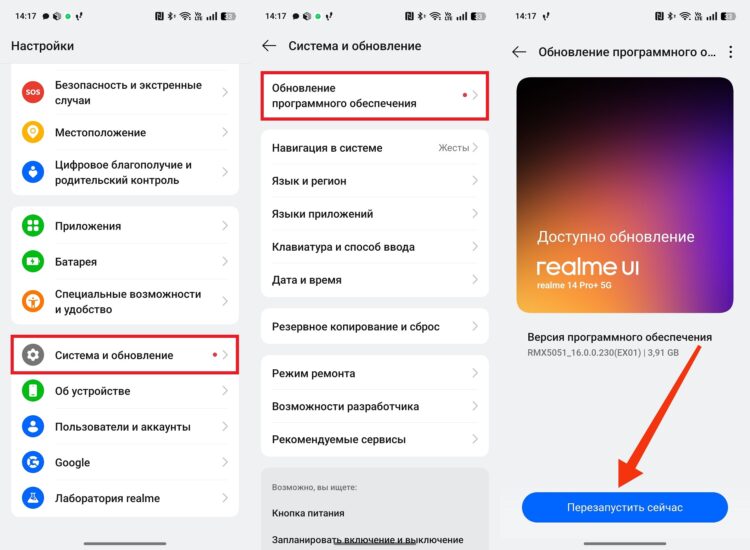
Updates are installed through the smartphone settings
After downloading, the system will prompt you to restart the device. It’s best not to touch the phone during installation. If a new version is available, the system will offer to update the realme version automatically. If there are no updates, it means they haven’t arrived for your device yet, or the support period has already ended.
How to Set Up Auto-Update on Realme
Realme smartphones have an automatic system update feature. It allows you to receive realme phone updates without manual checking, so the phone will update itself when a new version becomes available. Auto-update is convenient because the user doesn’t miss important fixes and always gets the latest system versions.
To enable auto-update, follow these instructions:
- Open “Settings.”
- Go to the “System and Updates” section, then — “Software Update.”
- Tap the “three dots.”
- Open “Auto-Update.”
- Enable “Automatically update overnight.”
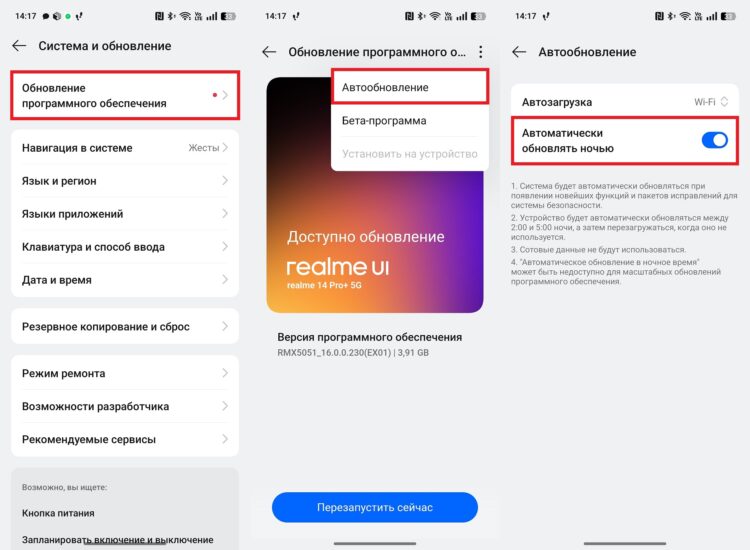
With automatic updates, you don’t have to do anything yourself
After that, the system will check for new versions on its own and install them when connected to Wi-Fi. Many users ask whether it’s worth updating realme automatically, and in most cases the answer is yes, because updates fix bugs and improve security.
Realme Security Updates
In addition to new shell versions, smartphones receive realme security updates. These are small packages that are installed separately and don’t change the system’s appearance. Such updates are needed to protect against viruses, bugs, and vulnerabilities. Even if a new shell version isn’t released, security patches may continue to arrive for a long time.
To install a security patch update, do the following:
- Open “Settings.”
- Go to the “Privacy and Security” section, then — “System and Updates.”
- Select “Security System Update.”
- Install the available update.
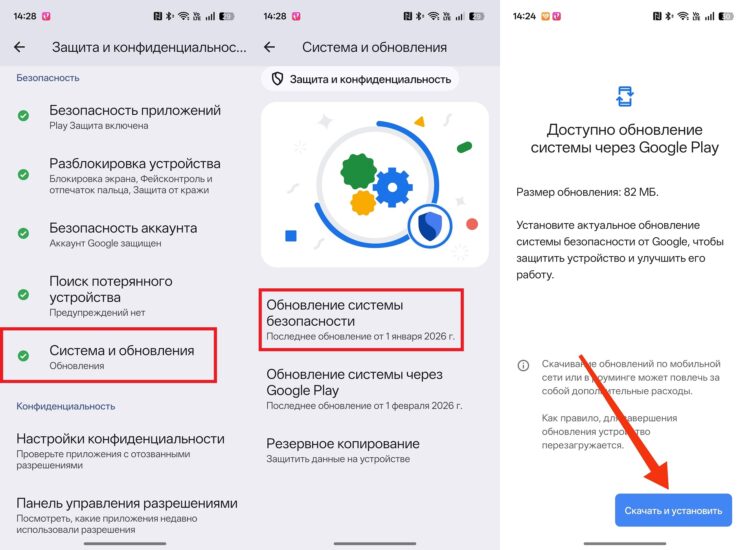
Security updates are installed separately
Sometimes these packages arrive more frequently than major updates, so it’s important to periodically check the system manually. Even a small update can fix serious bugs and improve device stability.
Why There Are No Realme Firmware Updates
Some users don’t receive realme smartphone updates even though other owners have already installed a new version. This is normal because firmware is distributed gradually and doesn’t arrive for everyone at the same time. It’s also worth considering that device support is limited in time. A few years after a model’s release, the manufacturer stops releasing new system versions.
Here are the key reasons why there’s no realme update:
- the update is rolling out gradually by region;
- the firmware isn’t ready for your model yet;
- the smartphone is no longer supported;
- the update has been temporarily paused due to bugs.
If a new version hasn’t arrived for a long time, it’s not always a phone problem. Sometimes you just need to wait until the realme firmware update becomes available for all devices.