If you use an iPhone in Russia, you probably know that since 2022, the usual payment methods in the App Store have stopped working. Visa and Mastercard bank cards are disconnected from international systems, Apple Pay is unavailable, and the store simply doesn’t accept Russian MIR cards. For a long time, the only lifeline was paying from your mobile phone balance — through MTS or Beeline. Well, this method may also disappear as early as April 1, 2026. And here’s why you should act right now.
Ready for the App Store payment shutdown? Image: techcrunch.com
App Store Payment via MTS and Beeline — Why It May Be Shut Down
Paying for purchases in the App Store from your phone balance is essentially a mobile commerce service. It only works with two carriers: MTS and Beeline. Megafon, Tele2, and others are out of the picture. Even now, this isn’t the most reliable method: many subscribers experience failed payments due to legacy plans, restrictions on content services, or simply technical glitches.
But the main problem is something else. The Ministry of Digital Development has asked mobile carriers to temporarily restrict such payments. The stated reason: to pressure Apple into returning Russian apps to the App Store. Whether you believe this explanation or not is up to you, but it appears that we’ll soon be left without a convenient tool for paying for Apple subscriptions and apps.
What Will Happen to iCloud and Apple Music Subscriptions Without a Payment Method
Imagine this situation. You have an iCloud+ subscription that auto-renews from your phone balance. Or you’re used to buying apps and games without thinking — money is charged from your MTS balance, and everything just works. Then one day the carrier disables mobile commerce for the App Store. Here’s what will happen:
- Subscriptions to iCloud+, Apple Music, and other services won’t renew and will simply be deactivated
- You won’t be able to purchase any paid apps
- In-app purchases will become unavailable
- Updates for paid apps may be blocked
And all of this — without warning. Apple won’t send a notification a month in advance. One day the payment simply won’t go through, and the service will be cut off.
How to Top Up Your Apple ID Balance from Your Phone in Russia
The simplest and most reliable option is to top up your Apple ID balance in advance. Money in your Apple ID account doesn’t expire. You can add 5,000 or 10,000 rubles, and it will sit there until you spend it. Subscriptions will be charged from this balance automatically, and apps can be purchased without issues. Here’s how to top up:
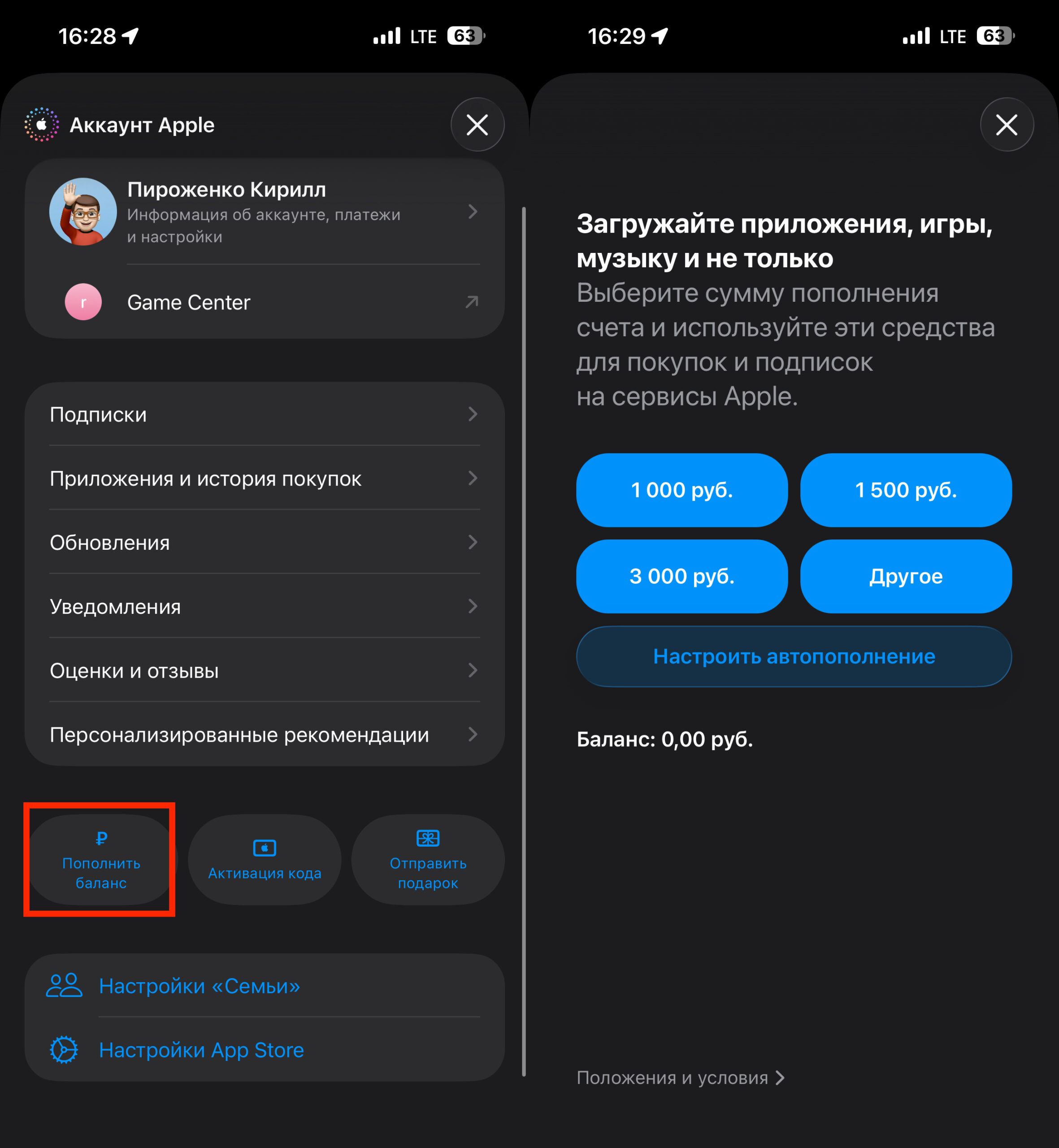
A few taps — and the funds are in your account
- Open the App Store, tap your profile icon in the top right corner;
- Select “Add Funds” and enter the amount;
- Confirm the top-up, and the money will be deducted from your mobile balance and credited to your Apple ID.
Right now — while phone payment still works — it makes sense to add enough to your App Store balance to last several months. Calculate your subscriptions for a few months ahead. Add a reserve for apps and games.
App Store Gift Cards in Russia — How to Activate
If mobile payment is indeed shut down, essentially one option will remain — App Store gift cards. You can buy them from specialized stores for rubles. But it’s less convenient: you need to find a seller and pay a commission. Fortunately, activating them is very simple:
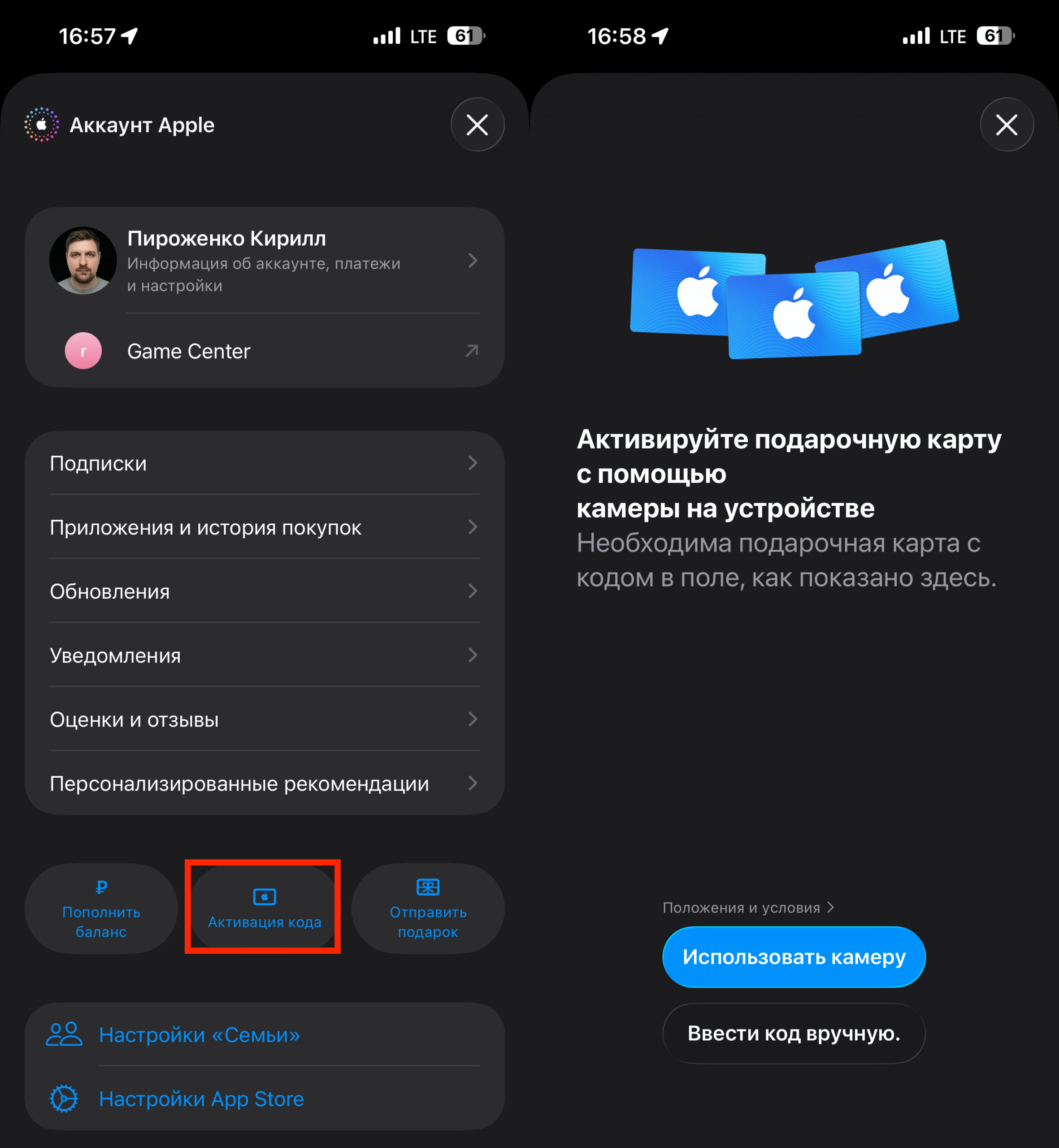
Finding a gift card at a reasonable price is a challenge in itself
- Purchase an App Store gift card from any convenient source. For example, on Yandex Market;
- Open the App Store and tap your profile in the top right corner;
- Tap “Redeem Gift Card or Code” and enter the code you received.
There’s also the option of a foreign bank card — from Kazakhstan, Turkey, or Europe. But that requires changing your Apple ID region, which is a whole separate story with its own risks. So my advice is don’t wait. While you still have the ability to top up your Apple ID balance from your phone in just two taps — take advantage of it. Later it may be too late.


