Millions of people are voluntarily or involuntarily switching to MAX, trying to stay connected after the inevitable blocking of Telegram in Russia and other messengers. However, being a relatively new product, this domestic app needs to be configured by the user. In particular, you need to know how to set up notifications in MAX so you don’t miss incoming calls and messages from your contacts.
Everything about setting up notifications in MAX
How to Enable Notifications in MAX
The national messenger offers many notification settings, but first you simply need to turn on notifications in MAX:
- Launch MAX.
- Open the “Profile” tab.
- Go to the “Notifications and Sound” section.
- In the pop-up window, tap “Enable.”
- Grant the app permission to send notifications.
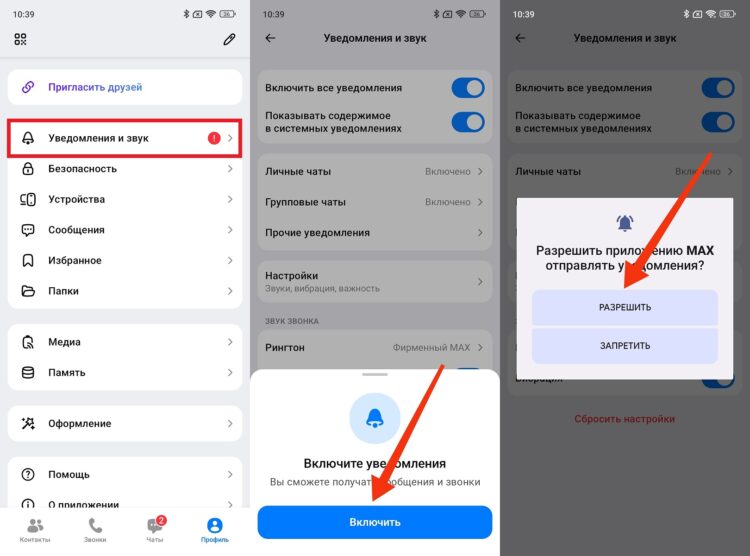
Notifications are enabled directly through MAX
You can also enable notifications in the MAX messenger through your smartphone’s settings:
- Open Settings.
- Go to the “Apps” section and find MAX.
- Open the “Notifications” tab.
- Activate the notifications toggle.
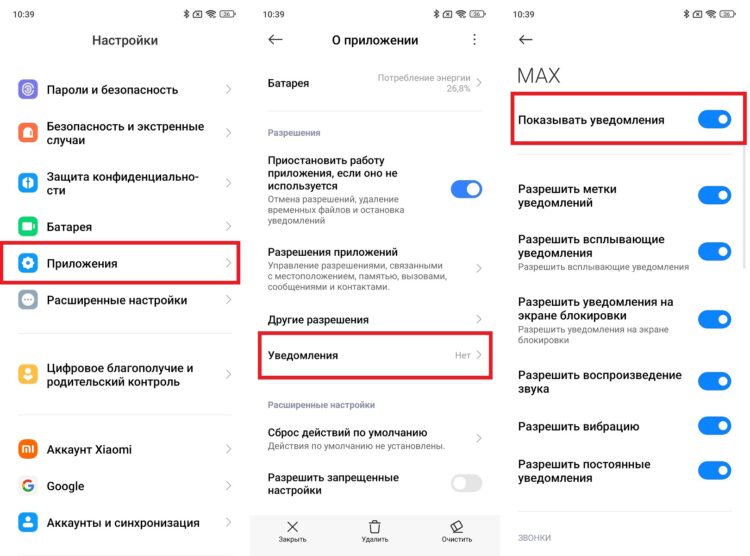
Notifications can also be enabled through phone settings
In general, this should be sufficient for the messenger to work correctly. And if you still aren’t receiving notifications in MAX, check out our separate guide where we offered several solutions to the problem.
How to Configure Notifications in MAX
Enabling notifications is only half the battle. It’s important to make sure they work properly. That’s why the national messenger includes a “Notifications and Sound” section with additional settings.
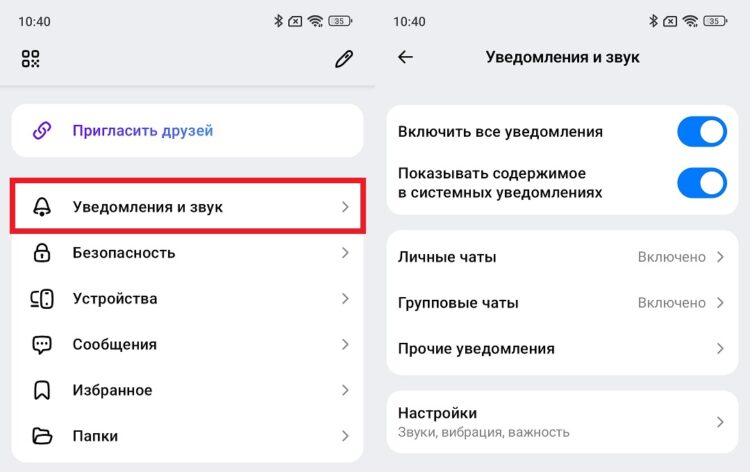
MAX has many additional notification settings
Here you can disable notifications in MAX from groups and channels to receive alerts only from personal chats, and customize other parameters to your liking.
How to Change the Notification Sound in MAX
An important aspect is the notification sound in MAX. By default, the national messenger uses its own ringtone and takes the system signal for incoming message alerts. But you can change the notification sound in MAX by following these instructions:
- Open your phone’s settings.
- Find MAX in the “Apps” section.
- Open the “Notifications” tab, then select “Chats” (for messages) or “Incoming” (for calls).
- Go to the “Sound” section.
- Choose the desired melody.
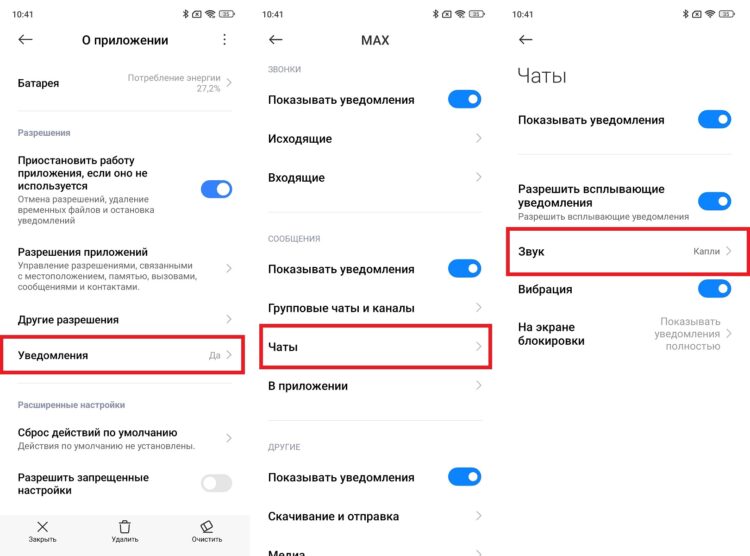
Notification sounds are easily changed
This way, you can configure notifications in MAX however you like. You can change virtually every parameter so you feel comfortable after the blocking of other messengers.


