The MAX messenger continues its advance into the Russian market, and many iPhone users have already accepted that they’ll need to install it — at least for work chats or staying in touch with relatives who have migrated there en masse. But there’s one trick that not all Apple device owners know about. It turns out you can easily keep MAX on your iPad without installing it on your main iPhone at all, sparing yourself from the VPN tracking that MAX conducts.

Installing the MAX messenger on iPad is sometimes not so simple. Image: brandanalytics.ru
I’ve been using this trick myself for several weeks now and can say: the setup works, it’s convenient, and it solves several problems at once. Here’s how to install MAX on iPad and why it’s a great idea if you don’t want to let the national messenger onto your main smartphone.
Is There a MAX Messenger for iPad?
Short answer: there is no separate MAX app for iPad in the App Store. The messenger’s listing indicates compatibility only with iPhone, and if you open the app store on your tablet and start searching for MAX through the standard search, there’s a good chance you simply won’t see it. The App Store by default only shows apps that developers have adapted for iPadOS.
Why this happens. The messenger’s developers focused on smartphones and desktop. MAX has versions for iPhone, Android, Windows, macOS, and Linux, as well as a web client. Running MAX on iPhone requires at least iOS 15, which means you won’t be able to install MAX on iPhone 6S, iPhone 6S Plus, first-generation iPhone SE, or older models. But a dedicated build for the large tablet screen doesn’t exist yet. It may appear later, but as of 2026 it still doesn’t exist.
This isn’t a unique situation. Many popular apps have gone years without a native iPad version: it’s easier for developers to maintain a single universal iPhone build than to deal with a separate tablet interface. By the way, if you do install MAX on iPad, be smart about granting permissions. Everything works the same as on iPhone.
Installing MAX on iPad via the App Store: Step-by-Step Guide
Despite the absence of a tablet version, you can still install MAX on iPad. Apple has allowed running iPhone apps on iPad for many years, and this mechanism has only one catch: you need to switch the filter in the App Store. Here’s a step-by-step guide.
- Open the App Store on your iPad.
- In the search bar, type MAX or MAX messenger.
- If nothing appears in the results or MAX is missing, tap the Supported filter at the top of the screen and select iPhone Only.
- In the updated results, find the official MAX app by VK.
- Tap the download button with the cloud icon and wait for the installation.
- Confirm the download via Face ID, Touch ID, or your Apple ID password.
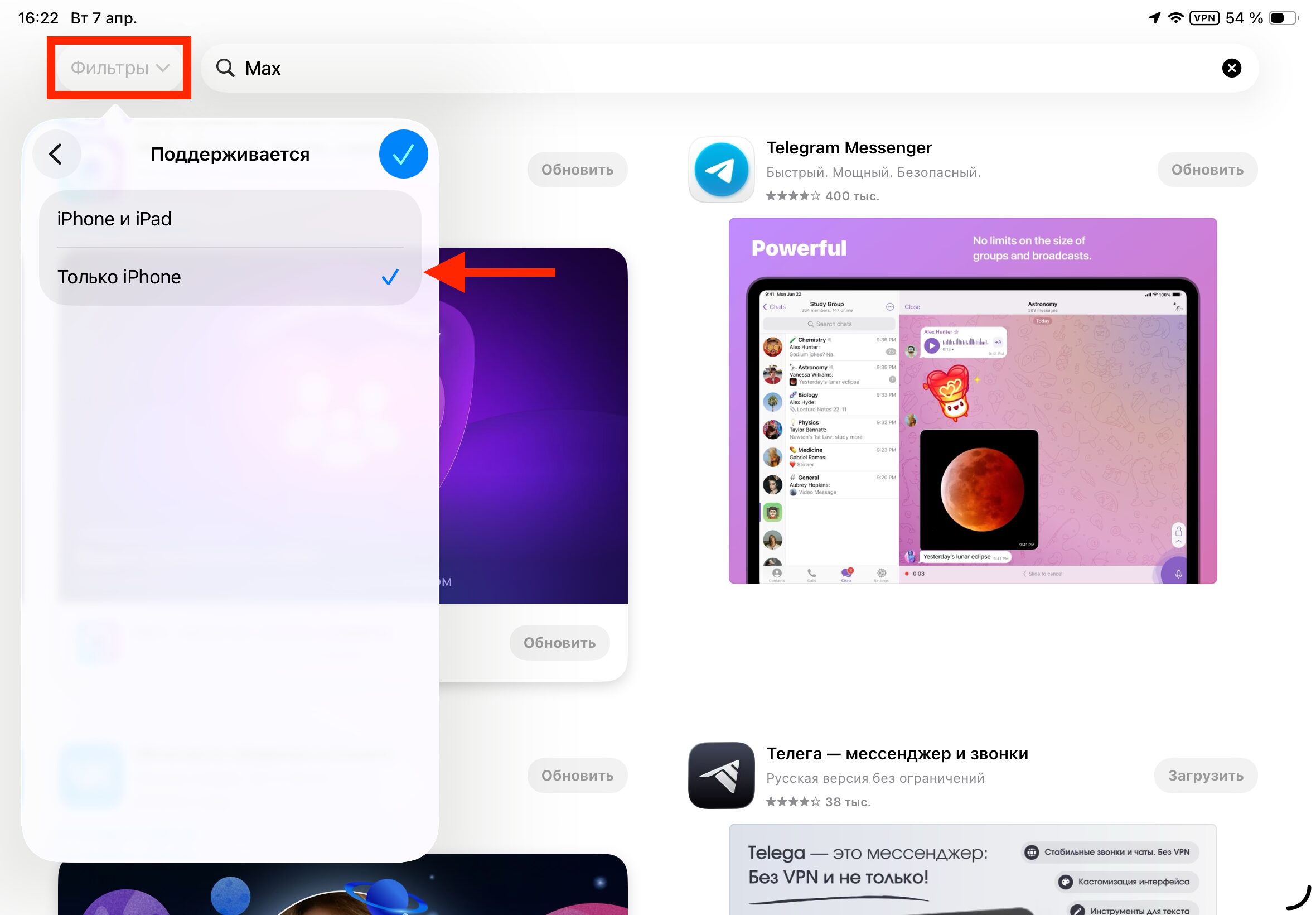
Without this filter, MAX often simply doesn’t show up in search. Keep in mind that some people may not need it
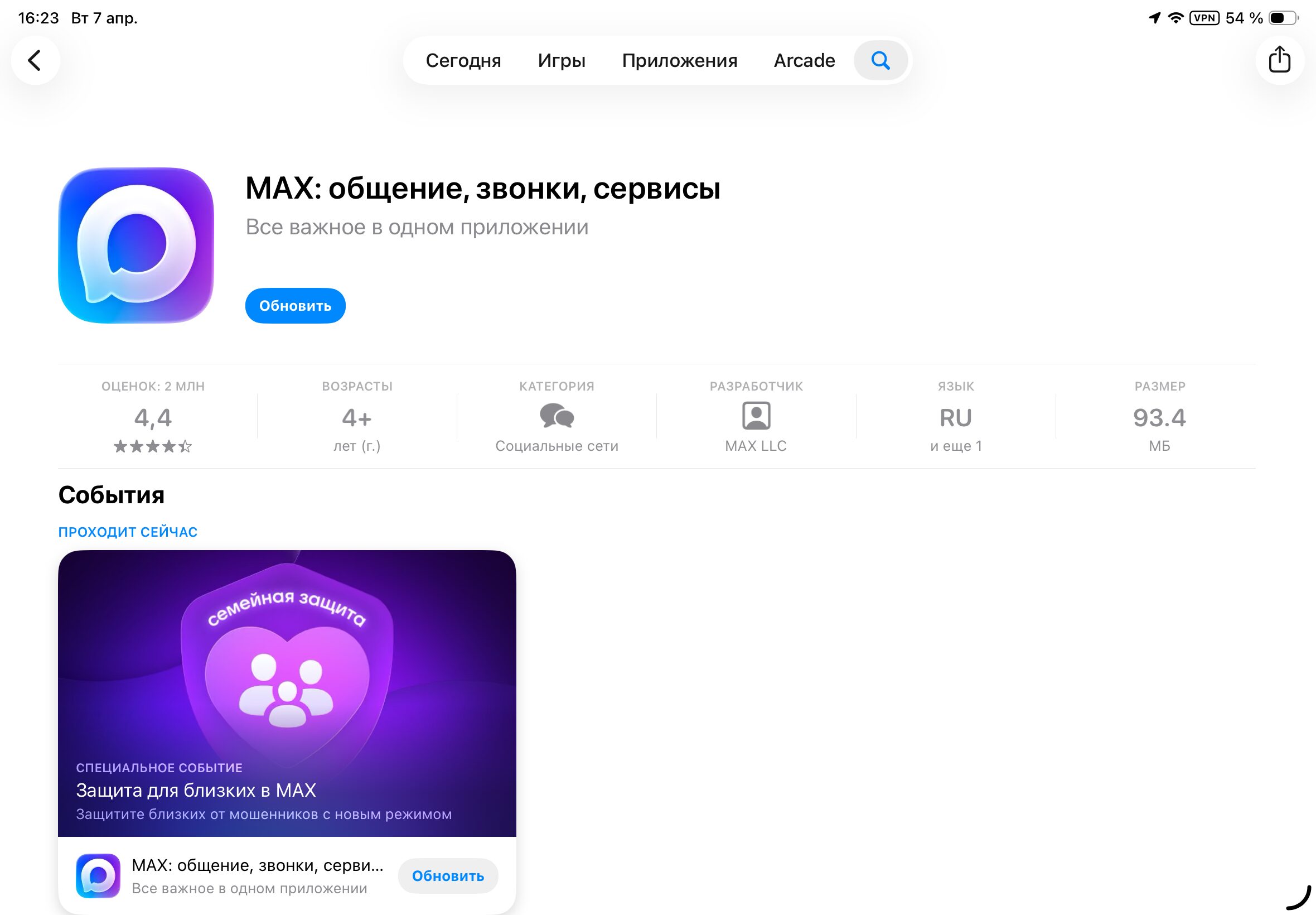
After this, Max will be found without any problems
After installation, the icon will appear on the iPad home screen just like any other app. MAX launches with a regular tap on the icon, and registration is done via phone number — everything works just like on iPhone.
How to Make MAX Full Screen on iPad
This is where things get interesting. Since MAX is an iPhone app, by default it will open in a small window in the center of the tablet screen, mimicking the dimensions of a smartphone display. It looks mediocre: a huge iPad, and in the middle of it — a tiny messenger window with black bars on the sides.
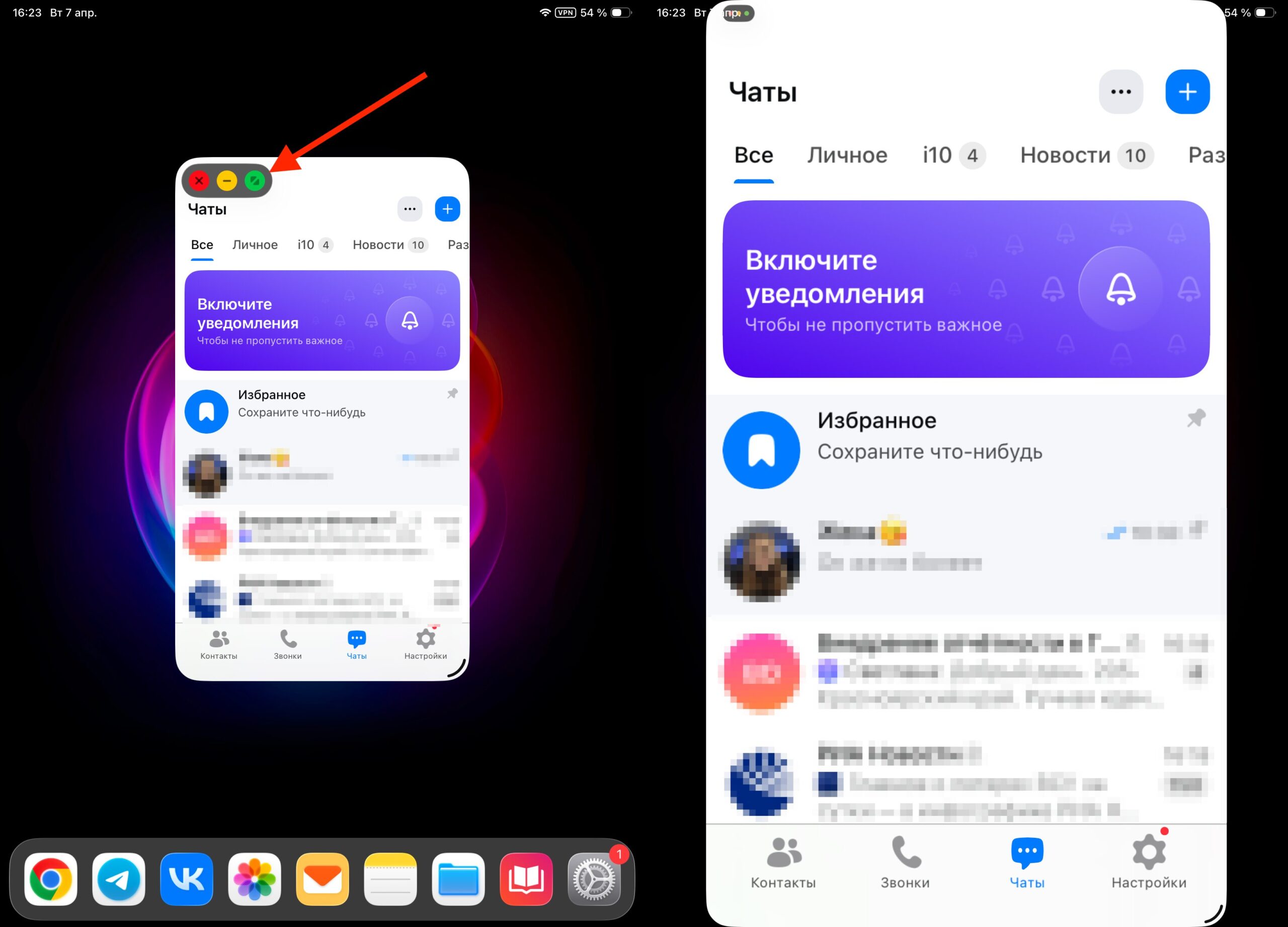
You can expand MAX to full screen with one button
Fortunately, iPadOS can stretch iPhone apps to fill the entire screen. This is done right at launch or through a scaling gesture. In the top-left corner of the app, tap the traffic light with three circles that toggles the display mode. Tap the green button, and MAX will expand to fill the entire tablet display.
Important note: the interface won’t become adaptive. You’ll simply get an enlarged copy of the iPhone version with stretched elements. Buttons will be larger, text will be too, but the proportions will remain smartphone-like. For a messenger, this isn’t critical: chats, calls, and channels work exactly the same as on iPhone.
Why Install MAX on iPad Instead of iPhone
Now for the main question: why bother with installing an iPhone app on a tablet when you already have a primary smartphone? Well, there are actually several scenarios where this setup turns out to be very convenient.
You don’t want to install MAX on your main iPhone. The most common reason. Many users have a, shall we say, cautious attitude toward the national messenger. Some don’t want to give it access to contacts, others — to the microphone and camera, and some simply don’t want to expose their primary phone number in the MAX app. In this sense, iPad becomes the ideal compromise: the messenger is there, you can use it, but it lives in the tablet’s “sandbox” and doesn’t interfere with your working iPhone.
Some prefer to dedicate MAX to the iPad rather than the main iPhone. Image: vedomosti.ru
Keep work chats separate from personal ones. If management insists on switching to MAX and you don’t want to mix work correspondence with personal messages, iPad becomes an excellent solution. Work stays on the tablet, while iPhone remains for Telegram and everything else.
Using a second number. If you have a spare SIM card or a virtual number, you can link MAX on iPad to that number specifically. This gives you a completely independent account that doesn’t overlap with your main iPhone.
Convenience when working at a desk. A tablet with a large screen and keyboard is almost a laptop. If you spend a lot of time with an iPad Pro or iPad Air with Magic Keyboard, messaging from the tablet is simply more convenient than constantly switching to your iPhone.
MAX Not Showing Up in the App Store on iPad: What to Do
If you’ve switched the filter to “iPhone Only” but the app still doesn’t appear, check a few things. Your Apple ID region should be set to Russia.