The question of privacy in MAX is more pressing than in most other messengers. The reason is simple: MAX is tied to a phone number — it’s impossible to register without one. Logging into MAX on a phone or computer always requires confirmation via a phone number, and this fundamentally distinguishes it from messengers where you can create an anonymous account using a username. Let’s figure out what you can actually hide and what you can’t.

Showing how to hide your number from prying eyes
Can You Hide Your Number in MAX
An honest answer right away: it’s completely impossible to hide your phone number in the national messenger. This is not a flaw but an architectural decision — the account number in MAX is the primary user identifier, and the system is built around it. That’s exactly why the concept of MAX without a phone number doesn’t exist in principle: without it, you can neither register nor use the messenger.
At the same time, the developers have provided two tools that allow you to limit the visibility of your number to other users. The first is a search setting: you can make it so that only those who have your number saved in their phone book can find you by number. The second is safe mode, which goes further and restricts any incoming contacts from strangers. Both tools are covered below with step-by-step instructions.
Who Can See My Number in MAX
By default, is your phone number visible in MAX — yes, and to quite a wide circle of people. Any messenger user can find you by number through search if they know it. Once a conversation has started between you, the other person sees your number in your profile — and this behavior cannot be changed by any settings.
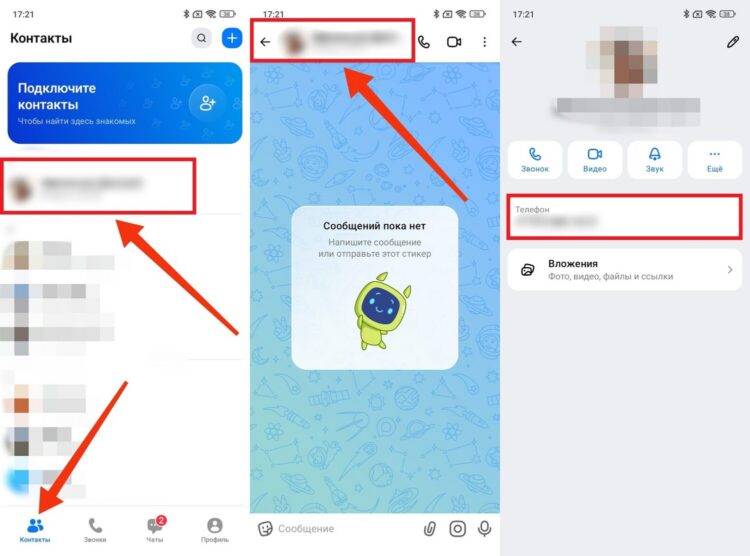
Your number in MAX is definitely visible to contacts
The situation where a number is not visible in MAX for another user is explained by privacy settings on their side. If a person has closed search by number or enabled safe mode, their profile either won’t be found in search at all, or it will be found but without the number displayed. It works the same way in reverse: if you want your profile’s contact number to not be visible in MAX to strangers — you need to change the settings yourself. At the same time, users with whom you’ve already had conversations have seen the number and will continue to see it regardless of any future settings changes.
How to Hide Your Phone Number in MAX
The main method is to restrict search by phone number in MAX so that only people from your phone book can find you. By default, search is open to all messenger users, and this is the main reason strangers can find your account. To fix this:
- Open the MAX app and go to the “Profile” tab in the bottom menu.
- Tap on “Security.”
- Select “Search by phone number.”
- Switch the value from “Everyone” to “Contacts.”
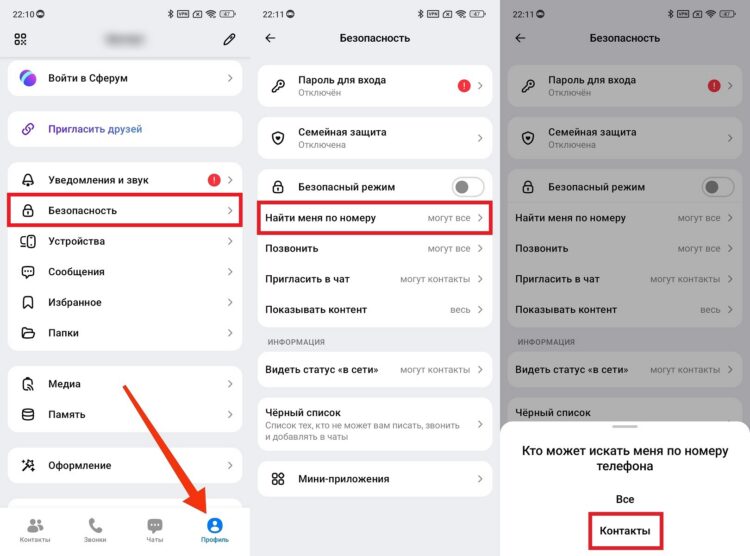
This way at least they won’t find you by number
After this, only users who have your number saved in their smartphone’s phone book — and you are also saved in theirs — will be able to find you in MAX by phone number. This is a two-way condition: simply knowing your number is not enough — it must be saved specifically as a contact. The setting takes effect instantly and doesn’t require restarting the app.
When You Should Enable MAX Safe Mode
Restricting search by number closes one channel of unwanted contacts, but not all of them. Strangers can still message you directly, call you, or add you to a group chat — if they somehow found your account not through phone number search. MAX safe mode is designed for such cases.
When it’s enabled, only those you’ve added to your contacts yourself or manually approved can reach you. Everyone else will be denied when trying to message, call, or add you to a group. This is the maximum level of privacy available in MAX. Enabling safe mode is simple:
- Open the “Profile” tab in the bottom menu.
- Go to the “Security” section.
- Find the “Safe mode” toggle and activate it.
- If needed, configure additional parameters — who can add you to groups and what content to filter.
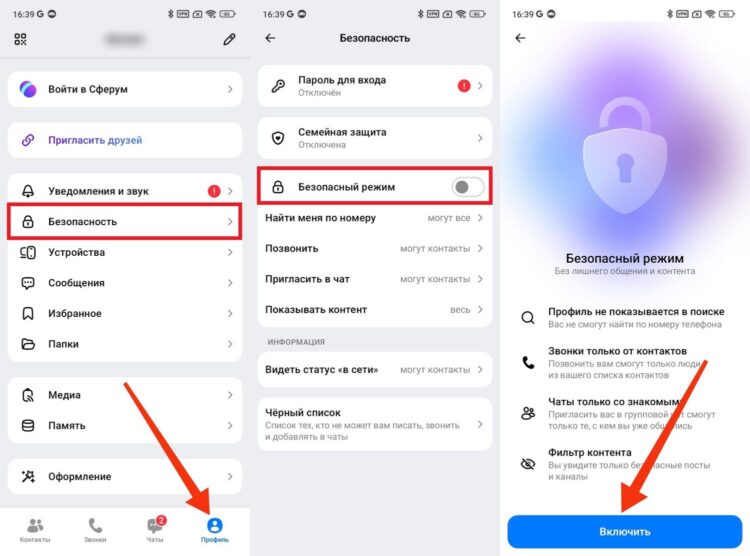
A radical mode that hides everything
Safe mode is especially relevant if you’re just starting to use the messenger and don’t want to receive messages from strangers. Contact numbers in MAX don’t disappear — those you’ve already communicated with can still message you without restrictions. The mode only applies to new incoming contacts.


