Neural networks in phones are gradually becoming a standard feature, and Alice AI is one of the most convenient tools that can already modify images, add details, and even bring old photos to life. Many of you have probably used photo editors on Android, but it turns out you no longer need to do things manually: artificial intelligence handles everything. Let’s explore how Alice AI works, how to edit photos using a neural network, and which features are already available right now.

Alice can do amazing photo editing. Image: Yandex
How to Use Alice AI
Alice AI is a built-in assistant from Yandex with neural network capabilities. Its latest versions include tools for working with images that allow you to edit photos, create new pictures, and modify existing images. Everything works through the Alice AI app, available on Google Play.
You can also use the neural network for photo editing in a browser by going to alice.yandex.ru/chat. All the features available in the app are also accessible there. So choose whichever option you prefer.
How to Edit Photos Using a Neural Network
With Alice AI, you can change backgrounds, add objects, improve quality, and even completely remake an image. Essentially, it’s the same generative neural network, just built right into the assistant. To edit a photo using a neural network, you need to upload a picture and write what exactly needs to be done. For example, like this:
- Open a chat with Alice.
- Click “Add file.”
- Select a photo.
- Write a command, for example “Add a smile.”
- Wait for the result.
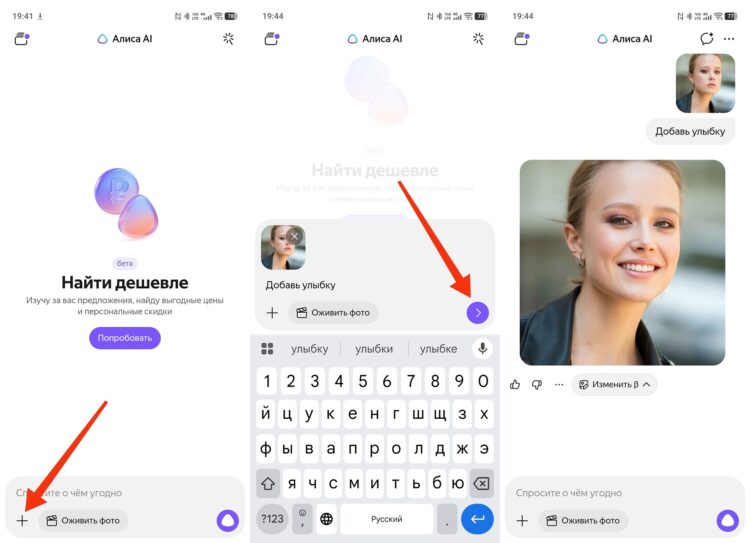
You can, for example, add a smile
Also in beta testing, Yandex’s neural network allows you to apply various effects. For instance, turning your portrait into an anime-style picture. Why not, right?

You can apply an effect to a photo
The neural network analyzes the image on its own and suggests a processing option. If you don’t like the result, you can send a new command and edit the photo again.
Neural Network That Removes Watermarks
One of the most popular features is removing unwanted objects. Many people use Alice as a neural network that removes watermarks, text, or logos from photos. It works the same way as regular editing:
Instructions:
- Open a chat with Alice.
- Upload a photo with a watermark.
- Write “remove the text” or “delete the logo.”
- Wait for processing.
- Save the result.
Sometimes the result isn’t perfect, especially if the watermark covers an important part of the image, but in most cases the neural network does a pretty good job.
Bringing Photos to Life with Alice
Another interesting feature is bringing photos to life. Alice can make a face in a photo move, blink, or smile. This works thanks to neural networks that can create animation based on a single image:
- Open a chat with Alice.
- Add a photo.
- Press the “bring photo to life” button.
- Wait for the processing to finish.

You can even bring a photo to life
This feature is often used for old family photos or profile pictures. The neural network adds movements on its own, making the image look like a short video.